yasin-playwright-slack-report
Version:
Send Slack notifications with Playwright test results using a custom reporter.
133 lines (86 loc) • 3.41 kB
Markdown
# 🎭 Yasin Playwright Slack Reporter
A custom Slack reporter for [Playwright](https://playwright.dev/) that sends visually rich, informative test results to your Slack channel — including emojis, test stats, build info, links, and even pie charts! 📊
## 🚀 Features
- ✅ **Summary of passed/failed/skipped tests**
- ⏱️ **Total test duration**
- 🔗 **Build info**, branch, and custom HTML report links
- 📊 **Pass/fail donut chart** via [QuickChart](https://quickchart.io/)
- 📡 **Works with any Slack Incoming Webhook**
## 📦 Installation
To install the package, run the following command:
```bash
npm install --save-dev yasin-playwright-slack-report
yarn add --dev yasin-playwright-slack-report
```
## 🛠️ Configuration
### 1. Create Slack Webhook
Go to Slack Incoming Webhooks and generate a Webhook URL for your channel.
### 2. Add Reporter to `playwright.config.ts`
```ts
// playwright.config.ts
import { defineConfig } from "@playwright/test";
export default defineConfig({
reporter: [
["list"],
[
"yasin-playwright-slack-report",
{
webhookUrl: "https://hooks.slack.com/services/XXXX/XXXX/XXXX",
buildId: "https://your.ci/build/123",
branchName: "main",
htmlReportUrl: "https://your.html.report/index.html",
},
],
],
});
```
## Slack Message Format
Here’s what the Slack message will look like:
🎭 **Playwright Results**
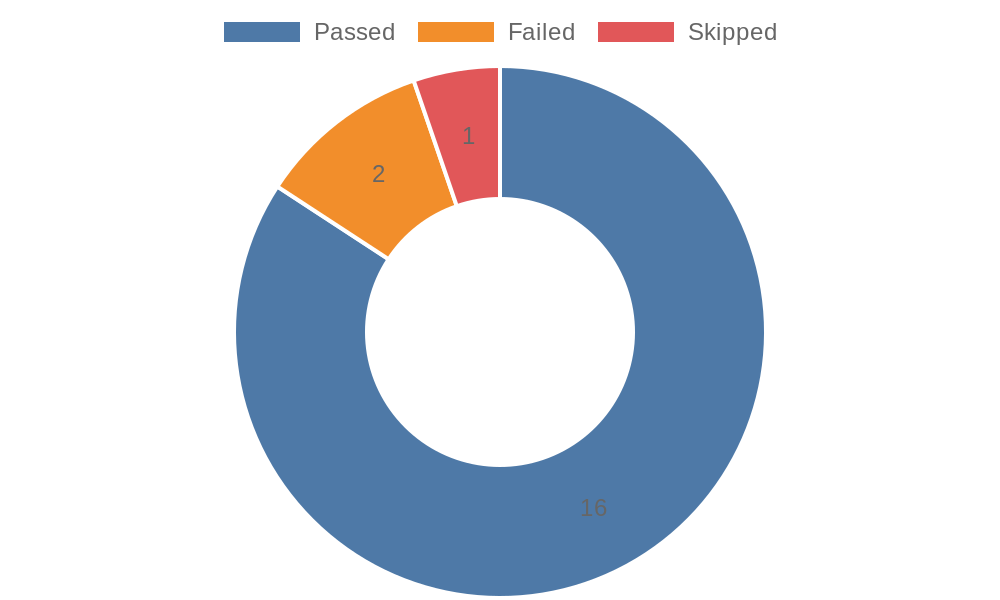
- ✅ **Passed**: 16 | ❌ **Failed**: 2 | ⏭️ **Skipped**: 1
- 🧪 **Total Tests**: 19
- 🕒 **Duration**: 00:00:25
- 🔗 **Build**: [View Build](https://your.ci/build/123)
- 🌿 **Branch**: main
- 📊 **HTML Report**: [View Report](https://your.html.report/index.html)
And includes a **donut chart**:
## 🔧 Advanced Options
| Option | Type | Required | Description |
| ---------------- | ------ | -------- | ------------------------------------ |
| `webhookUrl` | string | ✅ | Slack webhook URL |
| `buildUrl` | string | ❌ | CI build link to show in the message |
| `branchName` | string | ❌ | Branch name shown in report |
| `htmlReportLink` | string | ❌ | Link to the HTML report |
## 🧪 Development
If you're developing or contributing to this package:
```bash
git clone https://github.com/your-user/playwright-slack-report.git
cd playwright-slack-report
npm install
npm run build
```
## 💬 Feedback & Issues
If you have any suggestions or run into issues, feel free to open an issue or submit a PR!
## 📄 License
MIT © 2025 [Yasin Ramazan Oguz]
Then just commit the change if your project is in version control:
```bash
git add README.md
git commit -m "Update README with usage instructions and chart support"
```
### Key Changes:
- **Yarn Installation**: Added the `yarn add --dev playwright-slack-report` command under the **Installation** section.
- **No lint step**: As per your request, the `lint` step has been removed from the `npm version patch` script.
This should provide clear instructions for users who prefer Yarn over npm for installing the package. Let me know if you need any further adjustments!