yamlresume
Version:
The CLI interface for YAMLResume's engine
96 lines (65 loc) • 3.38 kB
Markdown
# YAMLResume CLI
[](https://www.npmjs.com/package/yamlresume)
[](https://www.npmjs.com/package/yamlresume)
[](https://nodejs.org/)
[](https://hub.docker.com/r/yamlresume/yamlresume)
[](https://discord.gg/9SyT7mVV4K)
[YAMLResume](https://yamlresume.dev) is a command-line tool that lets you
manage your resume as code. Write your resume in YAML and compile it into a
beautifully typeset, professional PDF.
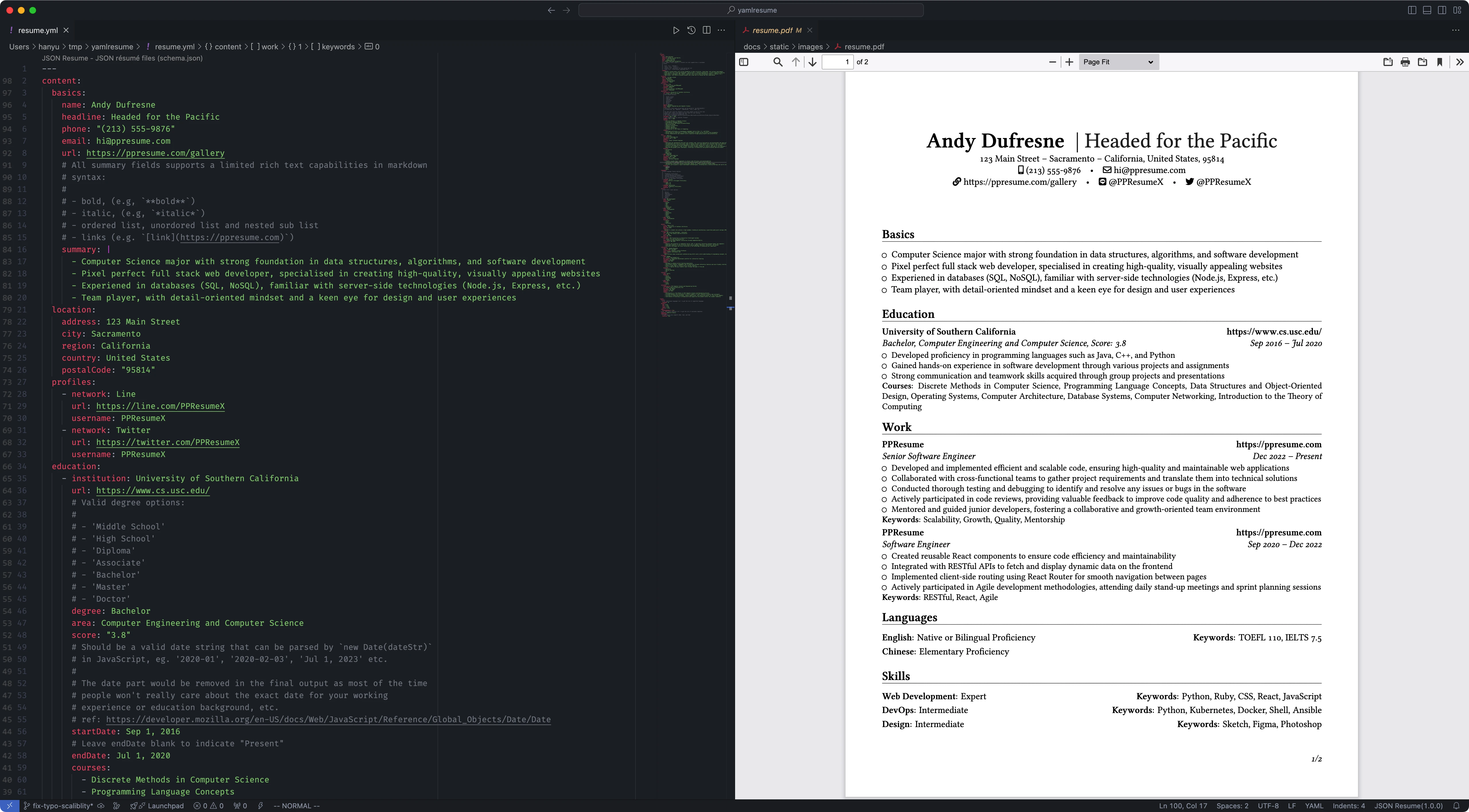
**Important:** PDF generation requires a LaTeX installation. For detailed
instructions, please see the
[Installation Guide](https://yamlresume.dev/docs/installation).
If you don't have LaTeX installed, you can use Docker to run YAMLResume:
[](https://asciinema.org/a/722057)
YAMLResume is a full fledged resume
[compiler](https://yamlresume.dev/docs/compiler), which provides a builtin
[schema](https://yamlresume.dev/docs/compiler/schema) to validate resumes and
help avoid lots of low level mistakes.
[](https://asciinema.org/a/728098)
## Quick Start
First, install the CLI using your favorite package manager:
```sh
# using npm
$ npm install -g yamlresume
# using yarn
$ yarn global add yamlresume
# using pnpm
$ pnpm add -g yamlresume
# using bun
$ bun add -g yamlresume
```
Then, verify the installation:
```sh
yamlresume help
```
## Usage
### 1. Create a New Resume
Use the `new` command to bootstrap a resume from a template. For more details,
see the [`new` command docs](https://yamlresume.dev/docs/cli/new).
```sh
yamlresume new my-resume.yml
```
### 2. Build the Resume
Compile your YAML file into a PDF. For all available options, see the [`build`
command docs](https://yamlresume.dev/docs/cli/build).
```sh
yamlresume build my-resume.yml
```
This generates `my-resume.tex` and `my-resume.pdf` in the same directory.
## Documentation
For more detailed information, please visit our official documentation:
- **[Quick Start](https://yamlresume.dev/docs/)**: A comprehensive guide to get
you started.
- **[CLI Reference](https://yamlresume.dev/docs/cli/)**: Full
reference for all commands.
- **[Schema Validation](https://yamlresume.dev/docs/compiler/schema)**: The complete
resume schema reference.
- **[Multi Language Support](https://yamlresume.dev/docs/locale)**:
Learn how to write resumes in multiple languages.
- **[Templates](https://yamlresume.dev/docs/layouts/latex/templates)**: Learn how to
use and create templates.
## Support the Project
If you find YAMLResume helpful, consider supporting the project:
[](https://buymeacoffee.com/xiaohanyu)