yamlify-object
Version:
Stringify object/array with yaml syntax
157 lines (116 loc) • 3.11 kB
Markdown
# yamlify-object
Stringify object/array with yaml syntax
## Install
```
npm install yamlify-object
```
## Usage
```ts
import yamlifyObject from 'yamlify-object';
const obj = {
array: [
2,
'two',
{
emptyArray: [],
},
],
error: new Error('message'),
date: new Date(0),
object: {
number: 200,
bool: false,
null: null,
undefined: undefined,
emptyObject: {},
},
};
obj.circular = obj;
const formattedString = yamlifyObject(obj, {
indent: ' ',
prefix: '\n',
postfix: '\n',
});
console.log(formattedString);
/*
array:
- 2
- two
- emptyArray: []
error: Error: message
date: new Date(1970-01-01T00:00:00.000Z)
object:
number: 200
bool: false
null: null
undefined: undefined
emptyObject: {}
circular: [Circular]
*/
```
## API
### yamlifyObject(input, [options])
#### input
Type: `Object` `Array`
#### options
##### indent
Type: `string`<br>
Default: `' '` - single space
##### prefix
Type: `string`<br>
Default: `'\n'`
##### postfix
Type: `string`<br>
Default: `''`
##### dateToString(date: Date)
Type: `Function`
Expected to return a `string` that stringified version of Date instance.
##### errorToString(error: Error)
Type: `Function`
Expected to return a `string` that stringified version of Error instance.
##### colors
Type: `object`<br>
Default:
``` ts
{
date: function (s: string): string,
error: function (s: string): string,
symbol: function (s: string): string,
string: function (s: string): string,
number: function (s: string): string,
boolean: function (s: string): string,
null: function (s: string): string,
undefined: function (s: string): string,
}
```
Each property of colors object expected to be a `function` that
expected to return somehow colorified version of passed `string` argument.
You can specify colors only for types you need and, if have the need, the base text color.
The rest will stay colorless strings:
``` js
const obj = {
number: 1
string: 'str',
bool: true,
};
const formattedString = yamlifyObject(obj, {
colors: {
base: (text) => `COLOR_CODE${text}COLOR_CODE`,
number: (value) => `COLOR_CODE${value}COLOR_CODE`,
boolean: (value) => `COLOR_CODE${value}COLOR_CODE`,
},
});
console.log(formattedString);
/*
number: COLOR_CODE1COLOR_CODE
string: str
bool: COLOR_CODEtrueCOLOR_CODE
*/
```
`base` color is the text that is not related to the values (names of the properties, dashes, brackets, etc)
For terminal can be used [yamlify-object-colors](https://github.com/eugeny-dementev/yamlify-object-colors) preset:
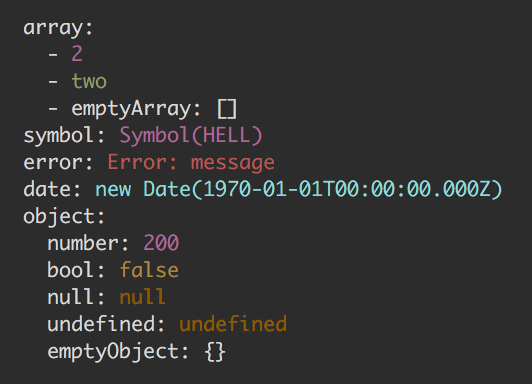
[travis-img]: https://travis-ci.org/eugeny-dementev/yamlify-object.svg?branch=master
[travis-url]: https://travis-ci.org/eugeny-dementev/yamlify-object
[codecov-img]: https://codecov.io/github/eugeny-dementev/yamlify-object/coverage.svg?branch=master
[codecov-url]: https://codecov.io/github/eugeny-dementev/yamlify-object?branch=master