xml-disassembler
Version:
Disassemble XML files into smaller, more manageable files and reassemble the XML when needed.
209 lines (148 loc) • 10.6 kB
Markdown
# `xml-disassembler`
[](https://www.npmjs.com/package/xml-disassembler) [](https://npmjs.org/package/xml-disassembler)
Disassemble XML files into smaller, more manageable files (XML/INI/JSON/JSON5/TOML/YAML) and reassemble the XML when needed.
This tool simplifies version control, improves diff readability, and streamlines collaboration when dealing with large XML files.
---
## 🚀 Features
- **Disassemble XML Files** – Break down XML files into structured directories.
- **Reassemble XML Files** – Recreate the original XML structure from disassembled parts.
> **NOTE**: The `xml-disassembler` aims to reassemble the original XML 100% element-wise, however, the element sorting will vary. The reassembler will sort elements based on how they are sorted in the disassembled directories. "toml" format sorting varies compared to the other formats.
- **Unique Identifiers** – Use specific XML elements as file names or fallback to SHA-256 hashes.
- **Ignore Files** – Specify XML files to exclude from disassembly.
- **Logging** – Enable detailed debugging logs.
- **Integrations** – Works with tools like Salesforce CLI
- **Multiple Formats** - The disassembled file format can be XML, INI, JSON, JSON5, TOML, or YAML based on preference. The reassembler will reassemble the original XML structure from these formats.
<!-- TABLE OF CONTENTS -->
<details>
<summary>Table of Contents</summary>
- [Background](#background)
- [Install](#install)
- [Disassembling Files](#disassembling-files)
- [Disassembly Strategies](#disassembly-strategies)
- [Reassembling Files](#reassembling-files)
- [Use Case](#use-case)
- [Ignore File](#ignore-file)
- [XML Parser](#xml-parser)
- [Logging](#logging)
- [Contributing](#contributing)
- [Template](#template)
</details>
## Background
Large XML files, especially those generated by external tools, can be challenging to review and manage.
`xml-disassembler` helps by breaking down these files into smaller, more digestible chunks, making it easier to track changes and collaborate.
Instead of relying on complex XML diff algorithms, `xml-disassembler` provides a simple and accessible solution by splitting XML files into structured directories.
## Install
Install the package using NPM:
```
npm install xml-disassembler
```
## Disassembling Files
Disassemble a single XML file or multiple XML files within a directory into smaller files (XML/INI/JSON/JSON5/TOML/YAML).
```typescript
/*
FLAGS
- filePath: Relative path to the XML file or directory to disassemble.
- uniqueIdElements: Comma-separated list of UID elements for naming disassembled files (nested elements).
Defaults to SHA-256 hash if UID is undefined or not found.
- prePurge: Delete pre-existing disassembled files prior to disassembling the file.
- postPurge: Delete the XML file after disassembling it.
- ignorePath: Path to an XML disassembly ignore file.
- format: File format for the disassembled files ("xml", "ini", "json", "json5", "toml", "yaml")
Defaults to "xml" if the format isn't supported or provided.
- strategy: Disassemble strategy ("unique-id" or "grouped-by-tag")
Defaults to "unique-id" if strategy isn't supported or provided.
*/
import { DisassembleXMLFileHandler } from "xml-disassembler";
const handler = new DisassembleXMLFileHandler();
await handler.disassemble({
filePath: "test/baselines/general",
uniqueIdElements:
"application,apexClass,name,externalDataSource,flow,object,apexPage,recordType,tab,field",
prePurge: true,
postPurge: true,
ignorePath: ".xmldisassemblerignore",
format: "json",
strategy: "unique-id",
});
```
## Disassembly Strategies
`xml-disassembler` supports two disassembly strategies to suit different use cases for nested elements. You can choose a strategy by setting the strategy option when calling disassemble().
🔹 unique-id (default)
> This is the strategy all previous versions of the `xml-disassembler` follow.
Disassembles each nested element into its own file under sub-directories.
File names are generated using one or more unique identifier elements (uniqueIdElements) or fallback to a SHA-256 hash.
Leaf elements remain grouped in a file named after the original XML.
Best for maximum diff granularity and precision in version control.
**Disassembled Directory Samples for Unique IDs**
| Format | Unique ID Elements | SHA-256 Hashes |
| --------- | ------------------------------------------------------------------------------------------------------------------------ | -------------------------------------------------------------------------------------------------------------------------------- |
| **XML** | 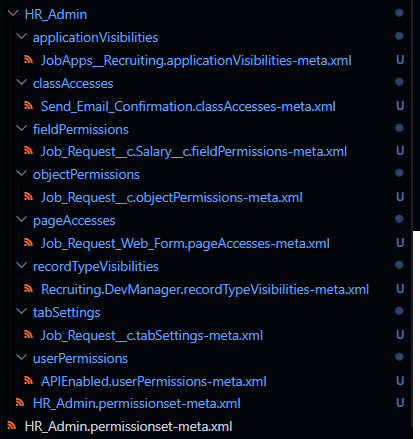<br> | 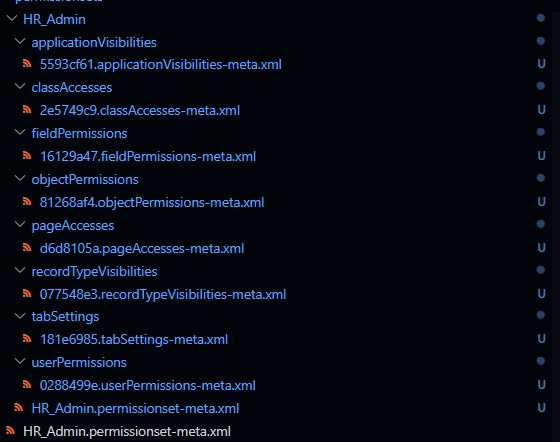<br> |
| **YAML** | 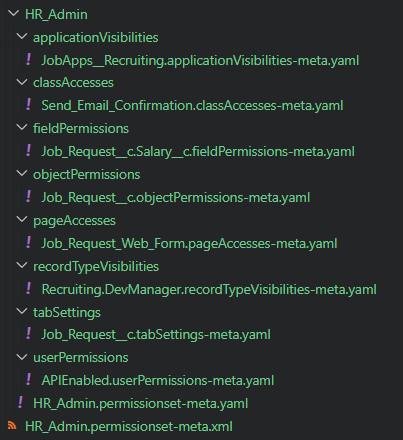<br> | 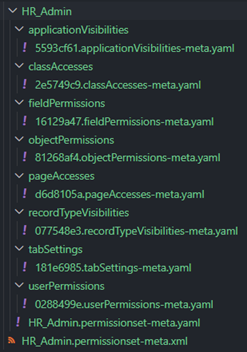<br> |
| **JSON** | 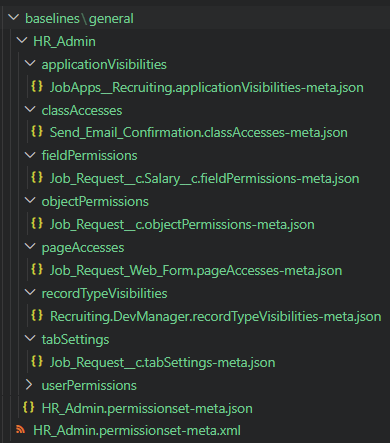<br> | 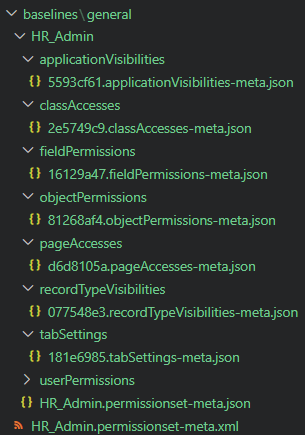<br> |
| **JSON5** | 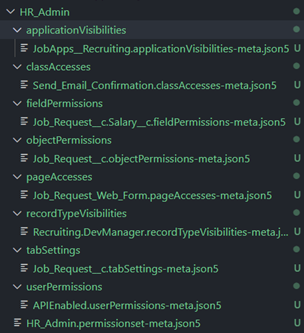<br> | 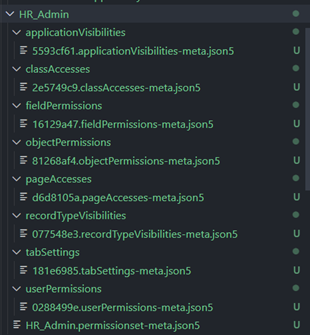<br> |
| **TOML** | 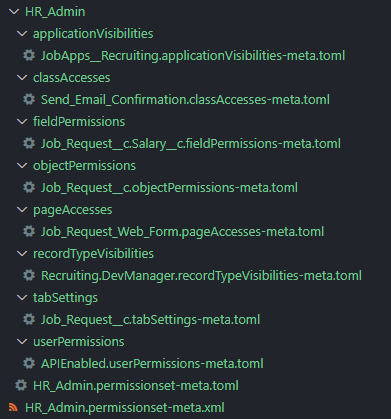<br> | 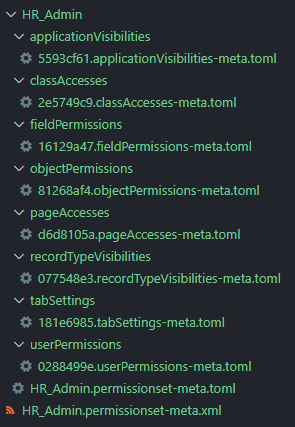<br> |
| **INI** | 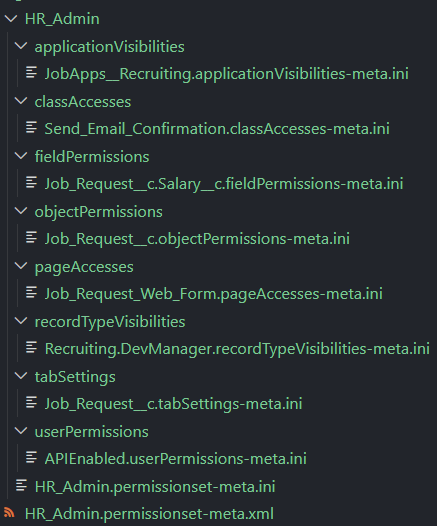<br> | 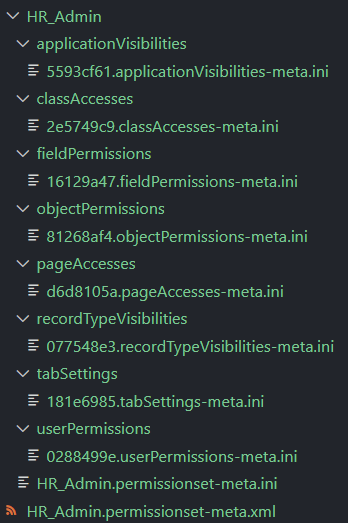<br> |
🔸 grouped-by-tag
Groups all nested elements by tag name into a single file (e.g., all `<fieldPermissions>` into `fieldPermissions.xml`).
Leaf elements remain grouped in a file named after the original XML.
Useful for simplifying diff views and reducing file count in large projects.
**Disassembled Directory Samples for Grouped by Tag**
| Format | Unique ID Elements |
| --------- | ----------------------------------------------------------------------------------------------------------------------------- |
| **XML** | 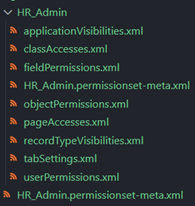<br> |
| **YAML** | 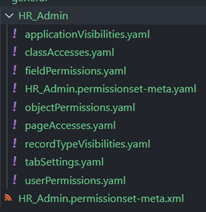<br> |
| **JSON** | 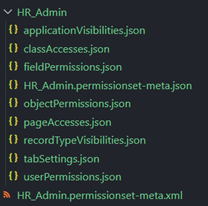<br> |
| **JSON5** | 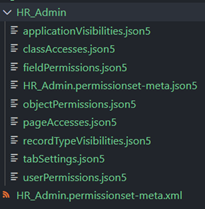<br> |
| **TOML** | 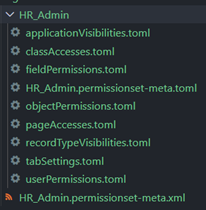<br> |
| **INI** | 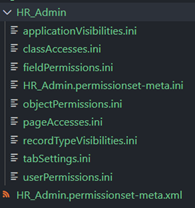<br> |
## Reassembling Files
Reassemble a directory of disassembled files (XML/INI/JSON/JSON5/TOML/YAML) into a single XML file.
```typescript
/*
FLAGS
- filePath: Relative path to the disassembled directory to reassemble.
- fileExtension: File extension for the reassembled XML.
[default: `.xml`]
- postPurge: Delete the disassembled files after reassembly.
*/
import { ReassembleXMLFileHandler } from "xml-disassembler";
const handler = new ReassembleXMLFileHandler();
await handler.reassemble({
filePath: "test/baselines/general/HR_Admin",
fileExtension: "permissionset-meta.xml",
postPurge: true,
});
```
## Use Case
See [`sf-decomposer`](https://github.com/mcarvin8/sf-decomposer) for a Salesforce CLI use case:
- [Disassemble Use Case](https://github.com/mcarvin8/sf-decomposer/blob/main/src/service/decomposeFileHandler.ts)
- [Reassemble Use Case](https://github.com/mcarvin8/sf-decomposer/blob/main/src/service/recomposeFileHandler.ts)
## Ignore File
Create an ignore file (`.xmldisassemblerignore` by default) to exclude XMLs from disassembly.
- uses [`node-ignore`](https://github.com/kaelzhang/node-ignore) (follows [.gitignore spec 2.22.1](https://git-scm.com/docs/gitignore))
## XML Parser
Uses [`fast-xml-parser`](https://github.com/NaturalIntelligence/fast-xml-parser) with support for:
- Character Data (CDATA): `" to create a logging file. Logs are stored in `disassemble.log`.
By default, only errors are logged.
```
[2024-03-30T14:28:37.950] [ERROR] default - The XML file HR_Admin.no-nested-elements.xml only has leaf elements. This file will not be disassembled.
```
Enable debug logs using the `setLogLevel` function:
```typescript
import {
DisassembleXMLFileHandler,
ReassembleXMLFileHandler,
setLogLevel,
} from "xml-disassembler";
setLogLevel("debug");
```
## Contributing
Contributions are welcome! See [Contributing](https://github.com/mcarvin8/xml-disassembler/blob/main/CONTRIBUTING.md).
## Template
This project was created from a template by [Allan Oricil](https://github.com/AllanOricil).
His original [license](https://github.com/AllanOricil/js-template/blob/main/LICENSE) remains in this project.