wxt
Version:
⚡ Next-gen Web Extension Framework
105 lines (104 loc) • 4.16 kB
TypeScript
/** @module wxt/utils/content-script-ui/types */
export interface ContentScriptUi<TMounted> extends MountFunctions {
mounted: TMounted | undefined;
}
export type ContentScriptUiOptions<TMounted> = ContentScriptPositioningOptions & ContentScriptAnchoredOptions & {
/**
* Callback called before the UI is removed from the webpage. Use to cleanup your UI, like
* unmounting your Vue or React apps.
*
* Note that this callback is called only when `ui.remove` is called - that means it is
* not called automatically when the anchor is removed, unless you use `autoMount`.
*/
onRemove?: (mounted: TMounted | undefined) => void;
};
export type ContentScriptOverlayAlignment = 'top-left' | 'top-right' | 'bottom-left' | 'bottom-right';
/**
* 
*/
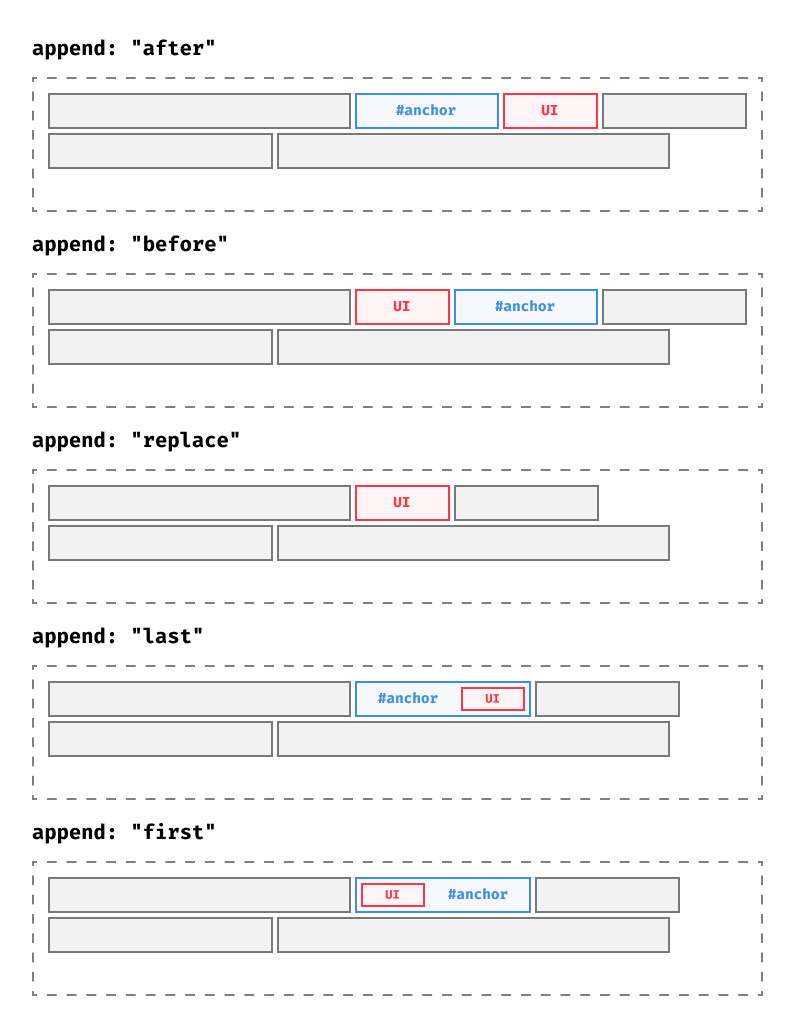
export type ContentScriptAppendMode = 'last' | 'first' | 'replace' | 'before' | 'after' | ((anchor: Element, ui: Element) => void);
export interface ContentScriptInlinePositioningOptions {
position: 'inline';
}
export interface ContentScriptOverlayPositioningOptions {
position: 'overlay';
/**
* The `z-index` used on the `wrapper` element. Set to a positive number to show your UI over website
* content.
*/
zIndex?: number;
/**
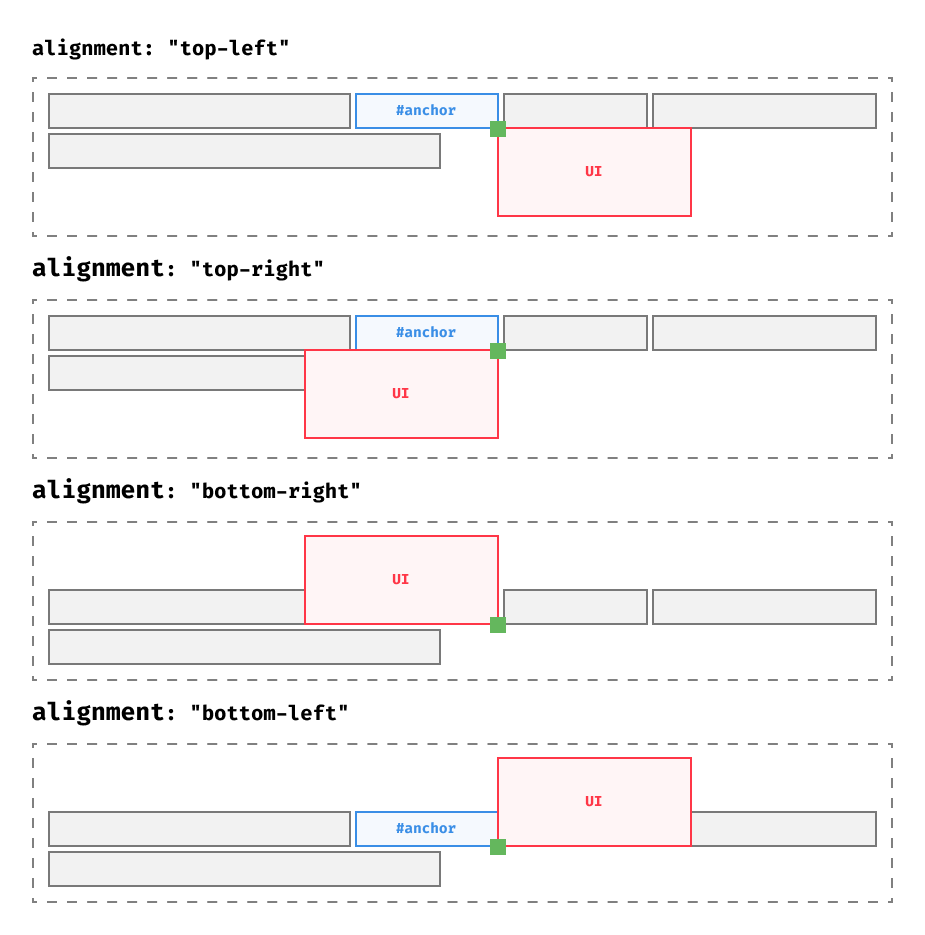
* When using `type: "overlay"`, the mounted element is 0px by 0px in size. Alignment specifies
* which corner is aligned with that 0x0 pixel space.
*
* 
*
* @default "top-left"
*/
alignment?: ContentScriptOverlayAlignment;
}
export interface ContentScriptModalPositioningOptions {
position: 'modal';
/**
* The `z-index` used on the `shadowHost`. Set to a positive number to show your UI over website
* content.
*/
zIndex?: number;
}
/**
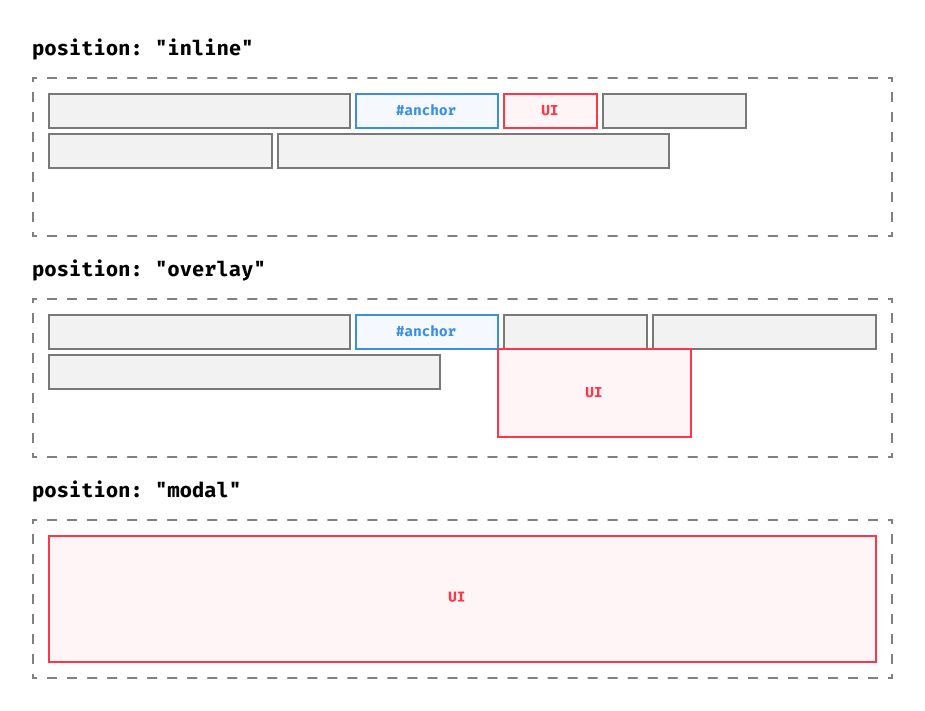
* Choose between `"inline"`, `"overlay"`, or `"modal"` positions.
*
* 
*/
export type ContentScriptPositioningOptions = ContentScriptInlinePositioningOptions | ContentScriptOverlayPositioningOptions | ContentScriptModalPositioningOptions;
export interface ContentScriptAnchoredOptions {
/**
* A CSS selector, XPath expression, element, or function that returns one of the three. Along with `append`, the
* `anchor` dictates where in the page the UI will be added.
*/
anchor?: string | Element | null | undefined | (() => string | Element | null | undefined);
/**
* In combination with `anchor`, decide how to add the UI to the DOM.
*
* - `"last"` (default) - Add the UI as the last child of the `anchor` element
* - `"first"` - Add the UI as the first child of the `anchor` element
* - `"replace"` - Replace the `anchor` element with the UI.
* - `"before"` - Add the UI as the sibling before the `anchor` element
* - `"after"` - Add the UI as the sibling after the `anchor` element
* - `(anchor, ui) => void` - Customizable function that let's you add the UI to the DOM
*/
append?: ContentScriptAppendMode | ((anchor: Element, ui: Element) => void);
}
export interface BaseMountFunctions {
/**
* Function that mounts or remounts the UI on the page.
*/
mount: () => void;
/**
* Function that removes the UI from the webpage.
*/
remove: () => void;
}
export interface MountFunctions extends BaseMountFunctions {
/**
* Call `ui.autoMount()` to automatically mount and remove the UI as the anchor is dynamically added/removed by the webpage.
*/
autoMount: (options?: AutoMountOptions) => void;
}
export type AutoMountOptions = {
/**
* When true, only mount and unmount a UI once.
*/
once?: boolean;
/**
* The callback triggered when `StopAutoMount` is called.
*/
onStop?: () => void;
};
export type StopAutoMount = () => void;
export interface AutoMount {
/**
* Stop watching the anchor element for changes, but keep the UI mounted.
*/
stopAutoMount: StopAutoMount;
}