wordpress-webpack-workflow
Version:
Modern WebPack workflow for WordPress front-end development and testing (plugins & themes) with handy tools included.
558 lines (493 loc) • 18.9 kB
Markdown
# WordPress Webpack v5 Workflow





<table width='100%' align="center">
<tr>
<td align='left' width='100%' colspan='2'>
<strong>WebPack workflow to kickstart your WordPress projects</strong><br />
This includes common and modern tools to facilitate front-end development and testing and kick-start a front-end build-workflow for your WordPress plugins and themes.
</td>
</tr>
</table>
Includes WebPack v5, BabelJS v7, BrowserSync v2, PostCSS v8, PurgeCSS v3, Autoprefixer, Eslint, Stylelint, SCSS
processor, WPPot, an organized config & file structure and more.
## Quickstart
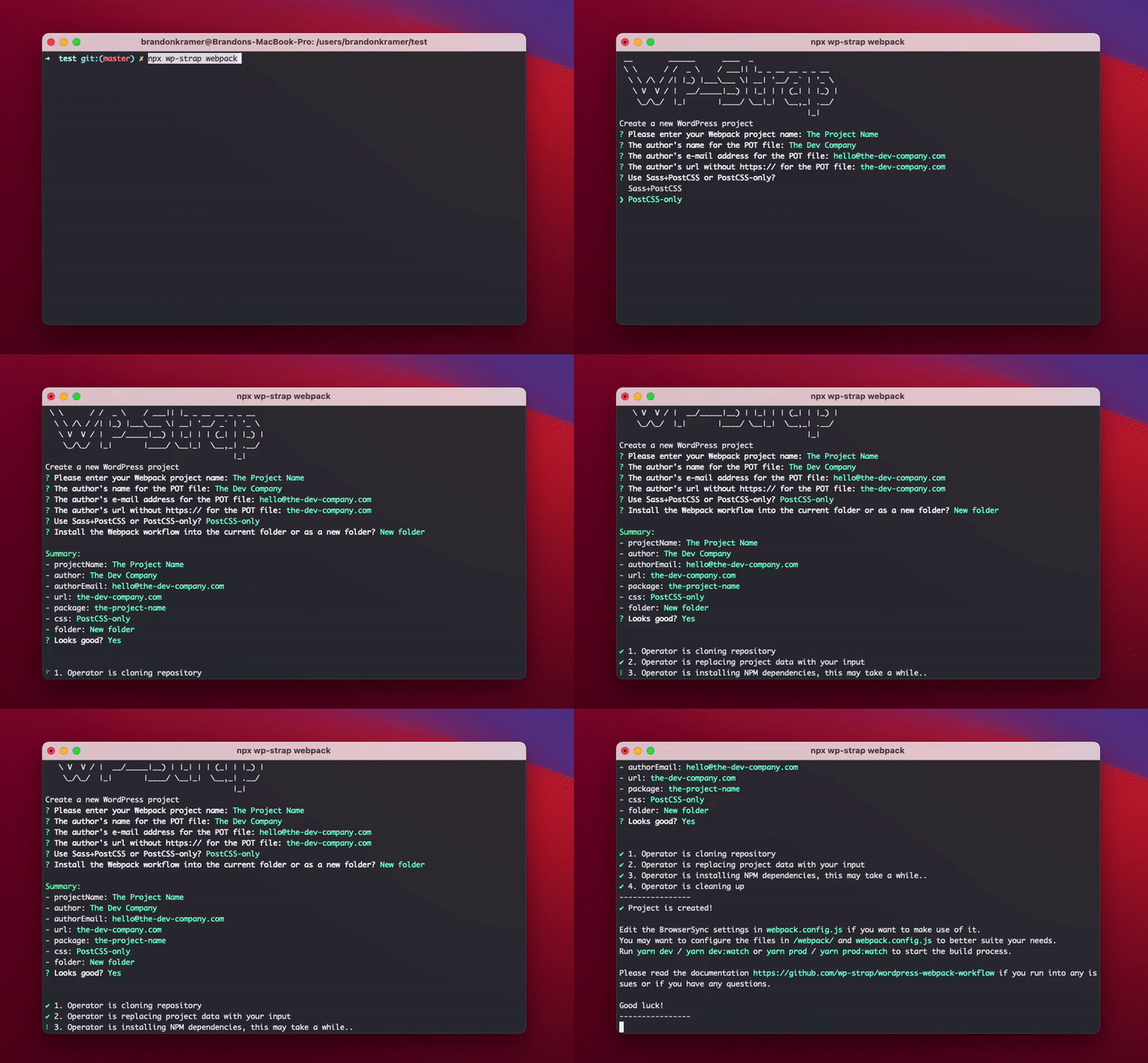
```bash
# 1-- Run the npx script to get the files
npx wp-strap webpack
# 2-- Fill in the details for your POT file in the terminal
# 3-- Edit the BrowserSync settings in `webpack.config.js` if you want to make use of it
# 4-- Start your npm build workflow with one of these commands:
yarn dev
yarn dev:watch
yarn prod
yarn prod:watch
```
You can also use the npx script with predefined answers to get a quicker start
```bash
npx wp-strap webpack "projectName:Your plugin name" "author:The Dev Company" authorEmail:hello@the-dev-company.com url:the-dev-company.com css:Sass+PostCSS "folder:Current folder"
```
<a href="#what-to-configure">Read more about the configuration & build scripts</a>
____
## Features & benefits
**Styling (CSS)**
>- **Minification** in production mode handled by Webpack
>- [**PostCSS**](http://postcss.org/) for handy tools during post CSS transformation using Webpack's [**PostCSS-loader**](https://webpack.js.org/loaders/postcss-loader/)
>- **Auto-prefixing** using PostCSS's [**autoprefixer**](https://github.com/postcss/autoprefixer) to parse CSS and add vendor prefixes to CSS rules using values from [Can I Use](https://caniuse.com/). It is [recommended](https://developers.google.com/web/tools/setup/setup-buildtools#dont_trip_up_with_vendor_prefixes) by Google and used in Twitter and Alibaba.
>- [**PurgeCSS**](https://github.com/FullHuman/purgecss) which scans your php (template) files to remove unused selectors from your css when in production mode, resulting in smaller css files.
>- **Sourcemaps** generation for debugging purposes with [various styles of source mapping](https://webpack.js.org/configuration/devtool/) handled by WebPack
>- [**Stylelint**](https://stylelint.io/) that helps you avoid errors and enforce conventions in your styles. It includes a [linting tool for Sass](https://github.com/kristerkari/stylelint-scss).
**Styling when using PostCSS-only**
>- Includes [**postcss-import**](https://github.com/postcss/postcss-import) to consume local files, node modules or web_modules with the @import statement
>- Includes [**postcss-import-ext-glob**](https://github.com/dimitrinicolas/postcss-import-ext-glob) that extends postcss-import path resolver to allow glob usage as a path
>- Includes [**postcss-nested**](https://github.com/postcss/postcss-nested) to unwrap nested rules like how Sass does it.
>- Includes [**postcss-nested-ancestors**](https://github.com/toomuchdesign/postcss-nested-ancestors) that introduces ^& selector which let you reference any parent ancestor selector with an easy and customizable interface
>- Includes [**postcss-advanced-variables**](https://github.com/jonathantneal/postcss-advanced-variables) that lets you use Sass-like variables, conditionals, and iterators in CSS.
**Styling when using Sass+PostCSS**
> - **Sass to CSS conversion** using Webpack's [**sass-loader**](https://webpack.js.org/loaders/sass-loader/)
>- Includes [**Sass magic importer**](https://github.com/maoberlehner/node-sass-magic-importer) to do lot of fancy things with Sass @import statements
**JavaScript**
> - [**BabelJS**](https://babeljs.io/) Webpack loader to use next generation Javascript with a **BabelJS Configuration file**
>- **Minification** in production mode
>- [**Code Splitting**](https://webpack.js.org/guides/code-splitting/), being able to structure JavaScript code into modules & bundles
>- **Sourcemaps** generation for debugging purposes with [various styles of source mapping](https://webpack.js.org/configuration/devtool/) handled by WebPack
>- [**ESLint**](https://eslint.org/) find and fix problems in your JavaScript code with a **linting configuration** including configurations and custom rules for WordPress development.
>- [**Prettier**](https://prettier.io/) for automatic JavaScript / TypeScript code **formatting**
**Images**
> - [**ImageMinimizerWebpackPlugin**](https://webpack.js.org/plugins/image-minimizer-webpack-plugin/) + [**CopyWebpackPlugin**](https://webpack.js.org/plugins/copy-webpack-plugin/)
to optimize (compress) all images using
>- _File types: `.png`, `.jpg`, `.jpeg`, `.gif`, `.svg`_
**Translation**
> - [**WP-Pot**](https://github.com/wp-pot/wp-pot-cli) scans all the files and generates `.pot` file automatically for i18n and l10n
**BrowserSync, Watcher & WebpackBar**
> - [**Watch Mode**](https://webpack.js.org/guides/development/#using-watch-mode), watches for changes in files to recompile
>- _File types: `.css`, `.html`, `.php`, `.js`_
>- [**BrowserSync**](https://browsersync.io/), synchronising browsers, URLs, interactions and code changes across devices and automatically refreshes all the browsers on all devices on changes
>- [**WebPackBar**](https://github.com/nuxt/webpackbar) so you can get a real progress bar while development which also includes a **profiler**
**Configuration**
> - All configuration files `.prettierrc.js`, `.eslintrc.js`, `.stylelintrc.js`, `babel.config.js`, `postcss.config.js` are organised in a single folder
>- The Webpack configuration is divided into 2 environmental config files for the development and production build/environment
## Requirements
- [Node.js](https://docs.npmjs.com/downloading-and-installing-node-js-and-npm)
- [NPM](https://docs.npmjs.com/downloading-and-installing-node-js-and-npm)
- [Yarn](https://classic.yarnpkg.com/en/docs/install/#mac-stable)
## File structure
```bash
├──package.json # Node.js dependencies & scripts (NPM functions)
├──webpack.config.js # Holds all the base Webpack configurations
├──webpack # Folder that holds all the sub-config files
│ ├── .prettierrc.js # Configuration for Prettier
│ ├── .eslintrc.js # Configuration for Eslint
│ ├── .stylelintrc.js # Configuration for Stylelint
│ ├── babel.config.js # Configuration for BabelJS
│ ├── postcss.config.js # Configuration for PostCSS
│ ├── config.base.js # Base config for Webpack's development & production mode
│ ├── config.development.js # Configuration for Webpack in development mode
│ └── config.production.js # Configuration for Webpack in production mode
├──languages # WordPress default language map in Plugins & Themes
│ ├── wordpress-webpack.pot # Boilerplate POT File that gets overwritten by WP-Pot
└──assets
├── src # Holds all the source files
│ ├── images # Uncompressed images
│ ├── scss # Holds the SCSS files
│ │ ├─ frontend.scss # For front-end styling
│ │ └─ backend.scss # For back-end / wp-admin styling
│ └── js # Holds the JS files
│ ├─ frontend.js # For front-end scripting
│ └─ backend.js # For back-end / wp-admin scripting
│
└── public
├── images # Optimized (compressed) images
├── css # Compiled CSS files with be generated here
└── js # Compiled JS files with be generated here
```
## What to configure
1. Edit the translate script in package.json with your project data
- If you use `npx wp-strap webpack` to get the files then this will be done automatically with you terminal input
2. Edit the BrowserSync settings in `webpack.config.js` which applies to your local/server environment
- You can also disable BrowserSync, Eslint & Stylelint in `webpack.config.js`
3. The workflow is ready to start, you may want to configure the files in `/webpack/` and `webpack.config.js` to better
suite your needs
### Work with Sass+PostCSS or PostCSS-only
In `webpack.config.js` you can choose to work with Sass, and use PostCSS only for the autoprefixer function or go full PostCSS (without sass); In that case `sass` needs to be configured to `postcss`.
```js
projectCss: {
use: 'sass' // sass || postcss
}
```
It get will get automatically configured when using the initial setup with `npx wp-strap webpack`.
Working with PostCSS-only is beneficial when you work with TailwindCSS for example. You can read more about that here: https://tailwindcss.com/docs/using-with-preprocessors#using-post-css-as-your-preprocessor. Using TailwindCSS as a utility-first css framework is great for tons of reasons, but I do believe there are projects where you're better off using Sass(+Bootstrap), though it's a personal preference; therefore I left the ability to change between `Sass+PostCSS` or `PostCSS-only`.
When changing this configuration after the `npx wp-strap webpack` setup, then you also need to change the import rule in `assets/src/js/frontend.js` & `assets/src/js/backend.js` to import a `.css` or `.pcss` file instead of a `.scss` file.
```js
// Change
import '../sass/frontend.scss';
// To
import '../postcss/frontend.pcss';
```
## Developing Locally
To work on the project locally (with Eslint, Stylelint & Prettier active), run:
```bash
yarn dev
```
Or run with watcher & browserSync
```bash
yarn dev:watch
```
This will open a browser, watch all files (php, scss, js, etc) and reload the browser when you press save.
## Building for Production
To create an optimized production build (purged with PurgeCSS & fully minified CSS & JS files), run:
```bash
yarn prod
```
Or run with watcher & browserSync
```bash
yarn prod:watch
```
## More Scripts/Tasks
```bash
# To scan for text-domain functions and generate WP POT translation file
yarn translate
# To find problems in your JavaScript code
yarn eslint
# To find fix problems in your JavaScript code
yarn eslint:fix
# To find problems in your sass/css code
yarn stylelint
# To find fix problems in your sass/css code
yarn stylelint:fix
# To make sure files in assets/src/js are formatted
yarn prettier
# To fix and format the js files in assets/src/js
yarn prettier:fix
```
## Package.json dependencies
<table>
<thead>
<tr>
<th>Depedency</th>
<th>Description</th>
<th>Version</th>
</tr>
</thead>
</tbody>
<thead>
<tr>
<th></th>
<th>BabelJS</th>
<th></th>
</tr>
</thead>
<tbody>
<tbody>
<tr>
<td>babel-loader</td>
<td>This package allows transpiling JavaScript files using Babel and webpack.</td>
<td>8.2.2</td>
</tr>
<tr>
<td>@babel/core</td>
<td>Babel compiler core for the Webpack babel loader</td>
<td>7.12.10</td>
</tr>
<tr>
<td>@babel/preset-env</td>
<td>A smart preset that allows you to use the latest JavaScript without needing to micromanage which syntax transforms are needed by your target environment(s).</td>
<td>7.12.11</td>
</tr>
</tbody>
<thead>
<tr>
<th></th>
<th>Eslint & prettier</th>
<th></th>
</tr>
</thead>
<tbody>
<tr>
<td>eslint</td>
<td>Find and fix problems in your JavaScript code with a linting configuration</td>
<td>7.17.0</td>
</tr>
<tr>
<td>eslint-webpack-plugin</td>
<td>Make eslint work with Webpack during compiling</td>
<td>2.4.1</td>
</tr>
<tr>
<td>@babel/eslint-parser</td>
<td>Allows you to lint ALL valid Babel code with Eslint</td>
<td>7.12.1</td>
</tr>
<tr>
<td>@wordpress/eslint-plugin</td>
<td>ESLint plugin including configurations and custom rules for WordPress development.</td>
<td>7.4.0</td>
</tr>
<tr>
<td>prettier</td>
<td>For automatic JavaScript / TypeScript code formatting</td>
<td>2.2.1</td>
</tr>
<tr>
<td>eslint-plugin-prettier</td>
<td>Runs Prettier as an ESLint rule and reports differences as individual ESLint issues.</td>
<td>3.3.1</td>
</tr>
</tbody>
<thead>
<tr>
<th></th>
<th>CSS & PurgeCSS</th>
<th></th>
</tr>
</thead>
<tbody>
<tr>
<td>css-loader</td>
<td>Needed in Webpack to load and process CSS</td>
<td>5.0.1</td>
</tr>
<tr>
<td>mini-css-extract-plugin</td>
<td>Webpack normally loads CSS from out JavaScript. Since we're working with WordPress we need the CSS files separately. This will make that happen.</td>
<td>1.3.3</td>
</tr>
<tr>
<td>purgecss-webpack-plugin</td>
<td>Scans your php (template) files to remove unused selectors from your css when in production mode, resulting in smaller css files.</td>
<td>3.1.3</td>
</tr>
</tbody>
<thead>
<tr>
<th></th>
<th>PostCSS & Autoprefixer</th>
<th></th>
</tr>
</thead>
<tbody>
<tr>
<td>postcss</td>
<td>To make use of great tools during post CSS transformation</td>
<td>8.2.4</td>
</tr>
<tr>
<td>postcss-loader</td>
<td>Loader to process CSS with PostCSS.for Webpack</td>
<td>4.1.0</td>
</tr>
<tr>
<td>autoprefixer</td>
<td>To parse CSS and add vendor prefixes to CSS rules using values from Can I Use.</td>
<td>10.2.1</td>
</tr>
</tbody>
<thead>
<tr>
<th></th>
<th>If we use Sass+PostCSS</th>
<th></th>
</tr>
</thead>
<tbody>
<tr>
<td>sass</td>
<td>To make Sass work with node</td>
<td>1.32.2</td>
</tr>
<tr>
<td>sass-loader</td>
<td>Sass loader for Webpack to compile to CSS</td>
<td>10.1.0</td>
</tr>
<tr>
<td>node-sass-magic-importer</td>
<td>To do lot of fancy things with Sass @import statements</td>
<td>5.3.2</td>
</tr>
</tbody>
<thead>
<tr>
<th></th>
<th>If we use PostCSS-only</th>
<th></th>
</tr>
</thead>
<tbody>
<tr>
<td>postcss-import</td>
<td>To add an import feature like Sass, this can consume local files, node modules or web_modules</td>
<td>14.0.0</td>
</tr>
<tr>
<td>postcss-import-ext-glob</td>
<td>Extends postcss-import path resolver to allow glob usage as a path</td>
<td>2.0.0</td>
</tr>
<tr>
<td>postcss-nested</td>
<td>To unwrap nested rules like how Sass does it</td>
<td>5.0.3</td>
</tr>
<tr>
<td>postcss-nested-ancestors</td>
<td>introduces ^& selector which let you reference any parent ancestor selector with an easy and customizable interface</td>
<td>2.0.0</td>
</tr>
<tr>
<td>postcss-advanced-variables</td>
<td>Lets you use Sass-like variables, conditionals, and iterators in CSS</td>
<td>3.0.1</td>
</tr>
</tbody>
<thead>
<tr>
<th></th>
<th>Stylelint</th>
<th></th>
</tr>
</thead>
<tbody>
<tr>
<td>stylelint</td>
<td>Helps you avoid errors and enforce conventions in your styles</td>
<td>1.32.2</td>
</tr>
<tr>
<td>stylelint-scss</td>
<td>Extra stylelint rules for Sass</td>
<td>3.18.0</td>
</tr>
<tr>
<td>stylelint-webpack-plugin</td>
<td>Make stylelint work with webpack during compiling</td>
<td>2.1.1</td>
</tr>
</tbody>
<thead>
<tr>
<th></th>
<th>BrowserSync</th>
<th></th>
</tr>
</thead>
<tbody>
<tr>
<td>browser-sync</td>
<td>Synchronising URLs, interactions and code changes across devices and automatically refreshes all the browsers on al devices</td>
<td>2.26.13</td>
</tr>
<tr>
<td>browser-sync-webpack-plugin</td>
<td>Makes it possible to use BrowserSync in Webpack</td>
<td>2.3.0</td>
</tr>
</tbody>
<thead>
<tr>
<th></th>
<th>Optimize images</th>
<th></th>
</tr>
</thead>
<tbody>
<tr>
<td>image-minimizer-webpack-plugin</td>
<td>Uses imagemin to optimize your images.</td>
<td>2.2.0</td>
</tr>
<tr>
<td>imagemin-gifsicle</td>
<td>Needed for the image optimizer to work with GIF</td>
<td>7.0.0</td>
</tr>
<tr>
<td>imagemin-jpegtran</td>
<td>Needed for the image optimizer to work with JPEG</td>
<td>7.0.0</td>
</tr>
<tr>
<td>imagemin-optipng</td>
<td>Needed for the image optimizer to work with PNG</td>
<td>8.0.0</td>
</tr>
<tr>
<td>imagemin-svgo</td>
<td>Needed for the image optimizer to work with SVG</td>
<td>8.0.0</td>
</tr>
</tbody>
<thead>
<tr>
<th></th>
<th>Webpack </th>
<th></th>
</tr>
</thead>
<tbody>
<tr>
<td>webpack</td>
<td>The Webpack bundler</td>
<td>5.12.3</td>
</tr>
<tr>
<td>webpack-cli</td>
<td>Webpack CLI provides a flexible set of commands for developers</td>
<td>4.3.1</td>
</tr>
<tr>
<td>webpackbar</td>
<td>Get a real progress bar while development which also includes a profiler</td>
<td>5.0.0-3</td>
</tr>
</tbody>
<thead>
<tr>
<th></th>
<th>Translation</th>
<th></th>
</tr>
</thead>
<tbody>
<tr>
<td>wp-pot-cli</td>
<td>Scans all the files and generates .pot file automatically for i18n and l10n</td>
<td>1.5.0</td>
</tr>
</tbody>
<thead>
<tr>
<th></th>
<th>Misc</th>
<th></th>
</tr>
</thead>
<tbody>
<tr>
<td>glob-all</td>
<td>Provides a similar API to glob, however instead of a single pattern, you may also use arrays of patterns. Used to glob multiple files in one of the configuration files</td>
<td>3.2.1</td>
</tr>
</tbody>
</table>
## Workflow's Changelog
Documenting this project's progress...
#### January 15, 2021
* refactor: Migrated from NPM to Yarn for speed, `install` went from 183.281s to 65.76s-90.02s.
* fix: Added `eslint-plugin-prettier` to make yarn work with eslint
* refactor: DRY - added `config.base.js` file to facilitate configurations for both dev/prod
#### January 14, 2021
* feat: Be able to choose to work with `Sass+PostCss` or `PostCSS` only
* feat: Added npx CLI build script + docs
* fix: Make sure eslint & stylelint ignores vendor and testing folders
* refactor: Move BrowserSync settings to "projectFiles" constant
#### January 13, 2021
* refactor: Make sourcemap customizable from `webpack.config.js`
#### January 12, 2021
* feat: [Prettier](https://prettier.io/) & [ImageMinimizerWebpackPlugin](https://webpack.js.org/plugins/image-minimizer-webpack-plugin/)
* feat: [BrowserSync](https://browsersync.io/), [WP-Pot](https://github.com/wp-pot/wp-pot-cli) & [WebpackBar](https://github.com/nuxt-contrib/webpackbar)
* feat: `README.md` file