wintersmith
Version:
A flexible static site generator.
268 lines (178 loc) • 11 kB
Markdown
#
Wintersmith is a simple yet flexible static site generator. It takes contents (markdown, less, scripts, etc), transforms them using plugins and outputs a static website (html, css, images, etc) that you can host anywhere.
It ships with plugins for [markdown](http://daringfireball.net/projects/markdown/) and [pug templates](https://github.com/pugjs/pug), if you need something else check the [plugin listing][plugin-listing] or [write your own][plugin-guide]!
## Resources
* [Project site][website]
* [API Documentation][docs]
* [Wiki][wiki]
* [stackoverflow tag](http://stackoverflow.com/questions/tagged/wintersmith)
* IRC - **#wintersmith** on freenode
[website]: http://wintersmith.io "Wintersmith project website"
[docs]: http://wintersmith.io/docs "Wintersmith API Documentation"
[wiki]: https://github.com/jnordberg/wintersmith/wiki "Wintersmith wiki"
[plugin-listing]: https://github.com/jnordberg/wintersmith/wiki/Plugins "Wintersmith plugin listing"
[plugin-guide]: https://github.com/jnordberg/wintersmith/wiki/Writing-plugins "Wintersmith plugin guide"
## Quick-start
First install wintersmith using [npm](http://npmjs.org/):
```bash
$ npm install wintersmith -g
```
This will install wintersmith globally on your system so that you can access the `wintersmith` command from anywhere. Once that is complete run:
```bash
$ wintersmith new <path>
```
Where `<path>` is the location you want the site to be generated. This creates a skeleton site with a basic set of templates and some articles, while not strictly needed it's a good starting point.
Now enter the directory and start the preview server:
```bash
$ cd <path>
$ wintersmith preview
```
At this point you are ready to start customizing your site. Point your browser to `http://localhost:8080` and start editing templates and articles.
When done run:
```bash
$ wintersmith build
```
This generates your site and places it in the `build/` directory - all ready to be copied to your web server!
And remember to give the old `--help` a look :-)
## Overview
A wintersmith site is built up of three main components: contents, views and templates.
Contents is a directory where all the sites raw material goes (markdown files, images, javascript etc). This directory is then scanned to produce what's internally called a ContentTree.
The ContentTree is a nested object built up of ContentPlugins and looks something like this:
```javascript
{
"myfile.md": {MarkdownPlugin} // plugin instance, subclass of ContentPlugin
"some-dir/": { // another ContentTree instance
"image.jpg": {StaticPlugin}
"random.file": {StaticPlugin}
}
}
```
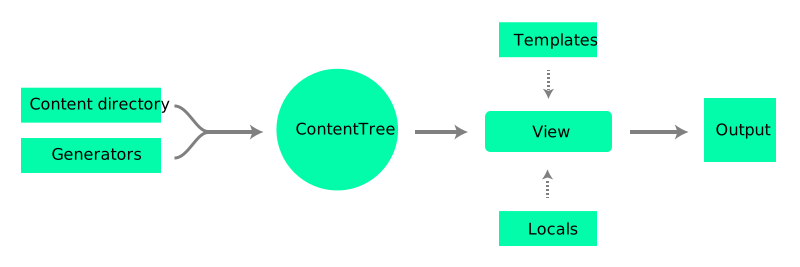
This content tree is provided in full to the views when rendering. This gives you a lot of flexibility when writing plugins, you could for example write a plugin that generates a mosaic using images located in a specific directory.
Wintersmith comes with a default Page plugin that renders markdown content using templates. This plugin takes markdown (combined with some metadata, more on this later) compiles it and provides it to a template along with the content tree and some utility functions.
This brings us to the second component, the template directory. All templates found in this directory are loaded and are also passed to the content plugins when rendering.
By default only `.pug` templates are loaded, but you can easily add template plugins to use a template engine of your choosing.
Check the `examples/` directory for some inspiration on how you can use wintersmith or the [showcase](https://github.com/jnordberg/wintersmith/wiki/Showcase) to see what others are doing.
## Configuration
Configuration can be done with command-line options, a config file or both. The config file will be looked for as `config.json` in the root of your site (you can set a custom path using `--config`).
### Options
Name | Default | Description
-------------|-----------------|-----------------------------------------------
contents | `./contents` | contents directory location
templates | `./templates` | templates directory location
views | `null` | views directory location, optional
locals | `{}` | global site variables, can also be a path to a json file
require | `{}` | modules to load and add to locals. e.g. if you want underscore as `_` you would say `{"_": "underscore"}`
plugins | `[]` | list of plugins to load
ignore | `[]` | list of files or pattern to ignore
output | `./build` | output directory, this is where the generated site is output when building
filenameTemplate | `:file.html`| outputs filenames and paths according to a template. ([documentation](https://github.com/jnordberg/wintersmith/wiki/Page-Plugin#filename-templating))
introCutoffs | `['<span class="more', '<h2', '<hr']` | list of strings to search for when determining if a page has an intro
baseUrl | `/` | base url that site lives on, e.g. `/blog/`.
hostname | `null` | hostname to bind preview server to, null = INADDR_ANY
port | `8080` | port preview server listens on
All paths can either be relative or absolute. Relative paths will be resolved from the working directory or `--chdir` if set.
## Content Plugins
ContentPlugins transform content, each item in the content tree is represented by a ContentPlugin instance. Content plugins can be created from files matching a glob pattern or by generators.
The ContentPlugin class is that all content plugins inherit from. Subclasses have to implement the `getFilename` and `getView` instance methods and the `fromFile` class method - more info in the [plugin guide][plugin-guide].
All content plugins have the following properties (a property in wintersmith is simply a shortcut to a getter. i.e. `item.filename` is the same as calling `item.getFilename()`)
Property | Getter signature | Description
-------------|------------------|---------------------
filename | `getFilename()` | filename content will be rendered to
view | `getView()` | function used to render the plugin, e.g. the page plugin uses a view that passes the plugin and locals to a template
url | `getUrl(base)` | url for the content. *base* is from where this url will be resolved and defaults to `config.baseUrl`. for example you can call `content.getUrl('http://myiste.com')` to get a permalink to that content
## The Page plugin
Wintersmith ships with a page plugin. This plugin is what the markdown page and many other content plugins build upon.
### Model
The Page model (inherits from ContentPlugin)
Properties:
Name | Description
-------------|------------
metadata | object containing the pages metadata
title | `metadata.title` or `Untitled`
date | Date object created from `metadata.date` if set, unix epoch time if not
rfc822date | a rfc-822 formatted string made from `date`
body | markdown source
html | parsed markdown as html
A MarkdownPage is either a markdown file with metadata on top or a json file located in the contents directory.
```markdown
---
title: My first post
date: 2012-12-12 12:12
author: John Hjort <foo@bar.com>
template: article.pug
----
# Hello friends!
Life is wonderful, isn't it?
```
or use json to simply pass metadata to a template:
```json
{
"template": "template.pug",
"stuff": {
"things": 123,
"moar": [1, 2, 3]
}
}
```
Pages are by default rendered using the `template` view. This view passes the page to the template provided in the metadata. Omitting the template key or setting it to `none` will cause the page not to be rendered.
### Links
All relative links in the markdown will be resolved correctly when rendering. This means you can just place *image.png* in the same directory and simply include it in your markdown as ``
This is especially convenient when using a markdown editor (read [Mou](http://mouapp.com/) if you're on a mac).
### Metadata
Metadata is parsed using [js-yaml](https://github.com/nodeca/js-yaml) and will be accessible in the template as `page.metadata`.
There are two special metadata keys, The first one is `template` which specifies what template to render the page with. If the key is omitted or set to `none` the page will not be rendered (but still available in the content tree).
The second one is `filename` which can be used to override the output filename of the page. See [filename templating](https://github.com/jnordberg/wintersmith/wiki/Page-Plugin#filename-templating) for advanced usage.
### Templates
When a page is rendered to a template the page instance is available as `page` in the template context. The content tree is also available as `contents` and `config.locals` is the root object.
## Plugins
A plugin is a function that's called with the wintersmith environment and a callback.
Plugins are loaded by adding a "require id" to `config.plugins`. This can be a path, local- or global module.
It works just like you would expect a `require()` call to.
Plugin example:
```coffeescript
fs = require 'fs'
module.exports = (env, callback) ->
class SimonSays extends env.ContentPlugin
constructor: (@filepath, text) ->
@text = "Simon says: #{ text }"
getFilename: -> @filepath.relative # relative to content directory
getView: -> (env, locals, contents, templates, callback) ->
callback null, new Buffer @text
SimonSays.fromFile = (filepath, callback) ->
fs.readFile filepath.full, (error, buffer) ->
if error
callback error
else
callback null, new SimonSays filepath, buffer.toString()
env.registerContentPlugin 'text', '**/*.txt', SimonSays
callback() # tell the plugin manager we are done
```
See the [plugin guide][plugin-guide] for more info.
## Using wintersmith programmatically
example:
```javascript
var wintersmith = require('wintersmith');
// create the sites environment, can also be called with a config object. e.g.
// {contents: '/some/contents', locals: {powerLevel: 10}}, ..}
var env = wintersmith('/path/to/my/config.json');
// build site
env.build(function(error) {
if (error) throw error;
console.log('Done!');
});
// preview
env.preview(function(error, server) {
if (error) throw error;
console.log('Server running!');
});
// do something with the content tree
env.load(function(error, result) {
if (error) throw error;
console.log('Contents loaded!');
});
```
Check the source or [api docs][docs] for a full list of methods.
## About
Wintersmith is written by [Johan Nordberg](http://johan-nordberg.com) using [CoffeeScript](http://coffeescript.org/) and licensed under the [MIT-license](http://en.wikipedia.org/wiki/MIT_License).
The name is a nod to [blacksmith](https://github.com/flatiron/blacksmith) which inspired this project.