webrtc-scalable-broadcast
Version:
Scalable WebRTC peer-to-peer broadcasting demo.
176 lines (118 loc) • 6.9 kB
Markdown
# [WebRTC Scalable Broadcast](https://github.com/muaz-khan/WebRTC-Scalable-Broadcast)
Scalable WebRTC peer-to-peer broadcasting demo.
[](https://npmjs.org/package/webrtc-scalable-broadcast) [](https://npmjs.org/package/webrtc-scalable-broadcast)
This module simply initializes socket.io and configures it in a way that single broadcast can be relayed over unlimited users without any bandwidth/CPU usage issues. Everything happens peer-to-peer!
## Demos
1. [`index.html`](https://github.com/muaz-khan/WebRTC-Scalable-Broadcast/blob/master/index.html) - share video or screen or audio over unlimited users using p2p methods.
2. [`share-files.html`](https://github.com/muaz-khan/WebRTC-Scalable-Broadcast/blob/master/share-files.html) - share files with unlimited users using p2p methods!
## Browsers Support:
| Browser | Support |
| ------------- |-------------|
| Firefox | [Stable](http://www.mozilla.org/en-US/firefox/new/) / [Aurora](http://www.mozilla.org/en-US/firefox/aurora/) / [Nightly](http://nightly.mozilla.org/) |
| Google Chrome | [Stable](https://www.google.com/intl/en_uk/chrome/browser/) / [Canary](https://www.google.com/intl/en/chrome/browser/canary.html) / [Beta](https://www.google.com/intl/en/chrome/browser/beta.html) / [Dev](https://www.google.com/intl/en/chrome/browser/index.html?extra=devchannel#eula) |
## Browsers Comparison
`host` means the browser that is used to forward remote-stream.
| Host | Streams | Receivers | Issues |
| ------------- |------------- |------------- |------------- |
| Chrome | Audio+Video | Chrome,Firefox | Remote audio tracks are skipped. |
| Chrome | Audio | None | Chrome can NOT forward remote-audio |
| Chrome | Video | Chrome,Firefox | No issues |
| Chrome | Screen | Chrome,Firefox | No issues |
| Firefox | Audio+Video | Chrome,Firefox | No issues |
| Firefox | Audio+Screen | Chrome,Firefox | No issues |
| Firefox | Audio | Chrome,Firefox | No issues |
| Firefox | Video | Chrome,Firefox | No issues |
| Firefox | Screen | Chrome,Firefox | No issues |
1. First column shows browser name
2. Second column shows type of remote-stream forwarded
3. Third column shows browsers that can receive the remote forwarded stream
4. Fourth column shows sender's i.e. host's issues
Chrome-to-Firefox interoperability also works!
> Android devices are NOT tested yet. Opera is also NOT tested yet (though Opera uses same chromium code-base).
Currently you can't share audio in Chrome out of [this big](https://www.webrtc-experiment.com/demos/remote-stream-recording.html). In case of audio+video stream, chrome will skip remote-audio tracks forwarding. However chrome will keep receiving remote-audio from Firefox!
## Firefox
Firefox additionally allows remote-stream-forwarding for:
1. Streams captured from `<canvas>`
2. Streams captured from `<video>`
3. Streams captured or generated by `AudioContext` i.e. WebAudio API
## Is stream keeps quality?
Obviously "nope". It will have minor side-effects (e.g. latency in milliseconds/etc.).
If you'll be testing across tabs on the same system, then you'll obviously notice quality lost; however it will NOT happen if you test across different systems.
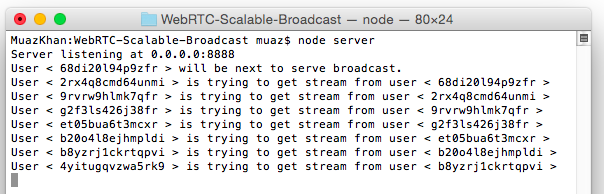
In the image, you can see that each NEW-peer is getting stream from most-recent peer instead of getting stream directly from the moderator.
```
npm install webrtc-scalable-broadcast
# goto node_modules>webrtc-scalable-broadcast
cd node_modules
cd webrtc-scalable-broadcast
# and run the server.js file
node server.js
```
Or install using WGet:
```
mkdir webrtc-scalable-broadcast && cd webrtc-scalable-broadcast
wget http://dl.webrtc-experiment.com/webrtc-scalable-broadcast.tar.gz
tar -zxvf webrtc-scalable-broadcast.tar.gz
ls -a
node server.js
```
Or directly download the TAR/archive on windows:
* http://dl.webrtc-experiment.com/webrtc-scalable-broadcast.tar.gz
And now open: `http://localhost:8888` or `127.0.0.1:8888`.
If `server.js` fails to run:
```
# if fails,
lsof -n -i4TCP:8888 | grep LISTEN
kill process-ID
# and try again
node server.js
```
## How it works?
Above image showing terminal logs explains it better.
For more details, to understand how this broadcasting technique works:
* https://github.com/muaz-khan/WebRTC-Experiment/issues/2

Assuming peers 1-to-10:
### First Peer:
Peer1 is the only peer that invokes `getUserMedia`. Rest of the peers will simply [forward/relay remote stream](https://www.webrtc-experiment.com/RTCMultiConnection/remote-stream-forwarding.html).
```
peer1 captures user-media
peer1 starts the room
```
### Second Peer:
```
peer2 joins the room
peer2 gets remote stream from peer1
peer2 opens a "parallel" broadcasting peer named as "peer2-broadcaster"
```
### Third Peer:
```
peer3 joins the room
peer3 gets remote stream from peer2
peer3 opens a "parallel" broadcasting peer named as "peer3-broadcaster"
```
### Fourth Peer:
```
peer4 joins the room
peer4 gets remote stream from peer3
peer4 opens a "parallel" broadcasting peer named as "peer4-broadcaster"
```
### Fifth Peer:
```
peer5 joins the room
peer5 gets remote stream from peer4
peer5 opens a "parallel" broadcasting peer named as "peer5-broadcaster"
```
and 10th peer:
```
peer10 joins the room
peer10 gets remote stream from peer9
peer10 opens a "parallel" broadcasting peer named as "peer10-broadcaster"
```
## Conclusion
1. Peer9 gets remote stream from peer8
2. Peer15 gets remote stream from peer14
3. Peer50 gets remote stream from peer49
and so on.
## License
[Scalable WebRTC Broadcasting Demo](https://github.com/muaz-khan/WebRTC-Scalable-Broadcast) is released under [MIT licence](https://www.webrtc-experiment.com/licence/) . Copyright (c) [Muaz Khan](http://www.MuazKhan.com/).