web-vitals-reporter
Version:
Report Web Vitals to your API with one POST request per session
297 lines (229 loc) • 9.29 kB
Markdown
# web-vitals-reporter
> Report [Web Vitals](https://web.dev/vitals/) to your API with one POST request per session.
The [web-vitals](https://github.com/GoogleChrome/web-vitals) is a small and powerful library that accurately measures [Web Vitals](https://web.dev/vitals/). It has no opinion on how to report data from a browser to your analytics. It results in multiple API calls, session tracking, and lost metrics. The `web-vitals-reporter` makes [Web Vitals](https://github.com/GoogleChrome/web-vitals) reporting as simple as sending one `POST` request.
**Features**:
- Report [Web Vitals](https://web.dev/vitals/) with one request per session;
- Associate useful device information like the number of `cpus`, `memory` size, and `connection` type;
- Report custom front end metrics;
- Handle edge-cases like multiple CLS calls, round values, and `sendBeacon` fallback;
- It's a tiny (800 bytes) library without external dependencies.
## Usage
① Report [Core Web Vitals](https://web.dev/vitals/) and device information to an API endpoint:
```js
import { getCLS, getFID, getLCP } from 'web-vitals'
import { createApiReporter, getDeviceInfo } from 'web-vitals-reporter'
// Init report callback with information about the browser.
const sendToAnalytics = createApiReporter('/analytics', { initial: getDeviceInfo() })
// Setup web-vitals
getLCP(sendToAnalytics)
getFID(sendToAnalytics)
getCLS(sendToAnalytics)
// Receive `POST /analytics` at the end of the session:
{
id: '1591874402350-8969370227936',
cpus: 8,
memory: 8,
connection: {rtt: 100, downlink: 5, effectiveType: '4g'},
LCP: 1487,
FID: 6,
CLS: 1.5602,
duration: 4560 // session duration
}
```
② Measure performance with [Next.js](https://nextjs.org/docs/advanced-features/measuring-performance):
```js
import { createApiReporter } from 'web-vitals-reporter'
// init reporter
const report = createApiReporter('/analytics')
// export `reportWebVitals` custom function
export function reportWebVitals(metric) {
if (metric.label === 'web-vitals') {
report(metric)
} else {
report({ name: metric.name, value: metric.value })
}
}
// or just, `report` supports custom metrics:
export { report as reportWebVitals }
```
③ Load and report Web Vitals using a `<script>` tag:
```html
<script defer src="https://unpkg.com/web-vitals"></script>
<script defer src="https://unpkg.com/web-vitals-reporter"></script>
<script>
addEventListener('DOMContentLoaded', function () {
var sendToAnalytics = webVitalsReporter.createApiReporter('/analytics')
webVitals.getCLS(sendToAnalytics)
webVitals.getFID(sendToAnalytics)
webVitals.getLCP(sendToAnalytics)
})
</script>
```
## API
### createApiReporter(url, [options])
Create a report function that accepts [Web Vitals' Metric](https://github.com/GoogleChrome/web-vitals#metric) object.
At the end of the session, it sends collected data to the `url` using a POST request.
It accepts any `{ name: string, value: number }` object, making it a useful tool for reporting any metric to the API using the one-request-per-session pattern.
#### options.initial
Use `initial` to add extra context to the result object.
By default `web-vitals-reporter` only adds `id` and session `duration`. It's possible to rewrite `id` with the `initial` object.
```js
import { getFID } from 'web-vitals'
import { createApiReporter, getDeviceInfo } from 'web-vitals-reporter'
const report = createApiReporter('/analytics', {
initial: { id: 'custom-id', cpus: getDeviceInfo().cpus },
})
getFID(report)
// reported body:
{
id: 'custom-id',
cpus: 8,
FID: 24,
duration: 4560 // session duration
}
```
#### options.onSend(url, result)
By default `web-vitals-reporter` uses [`sendBeacon`](https://developer.mozilla.org/en-US/docs/Web/API/Navigator/sendBeacon) and fallbacks to `XMLHttpRequest`.
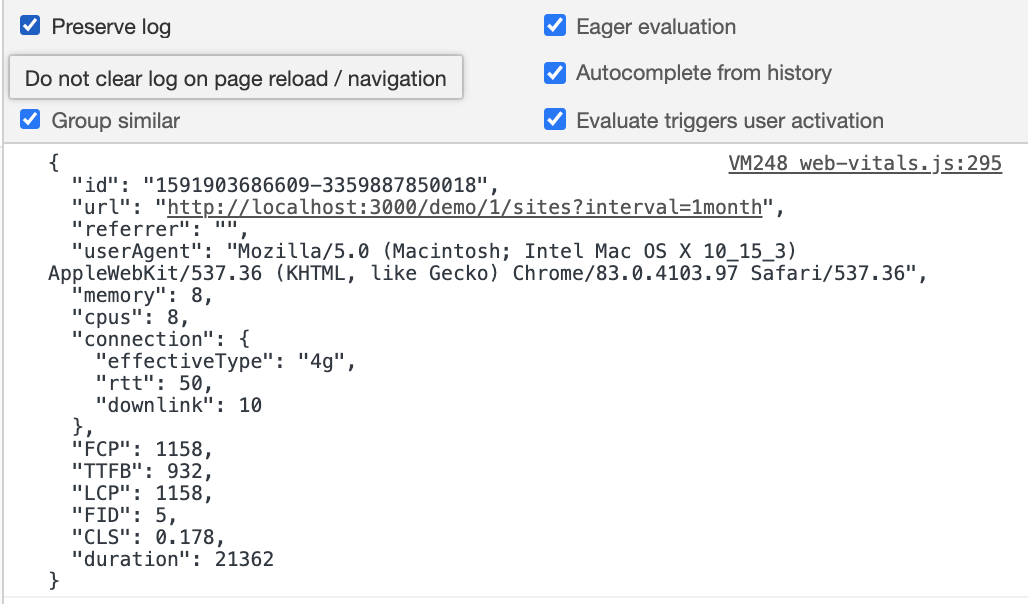
Use `onSend` to implement a custom request logic, like logging data in development, or adding extra headers with `window.fetch`.
```js
import { createApiReporter } from 'web-vitals-reporter'
// detect Lighthouse using an `userAgent`
const isLighthouse = Boolean(navigator.userAgent.match('Chrome-Lighthouse'))
// exclude `localhost`
const isLocalhost = location.origin.includes('localhost')
// don't send results to API when a page tested with Lighthouse
const report = createApiReporter('/analytics', {
onSend:
isLighthouse || isLocalhost
? (url, result) => {
console.log(JSON.stringify(result, null, ' '))
}
: null,
})
```
To see output in the console, set `Preserve log` option and refresh the page.
#### options.mapMetric(metric, result)
By default `web-vitals-reporter` only rounds `metric.value` for known Web Vitals ([code](https://github.com/treosh/web-vitals-reporter/blob/master/src/index.js#L43)).
Use `mapMetric` to implement a custom metric mapping. For example:
```js
import { getCLS, getFID, getLCP } from 'web-vitals'
import { createApiReporter } from 'web-vitals-reporter'
const report = createApiReporter('/analytics', {
mapMetric: (metric) => {
switch (metric.name) {
// capture LCP element and its size
case 'LCP': {
const entry = metric.entries[metric.entries.length - 1] // use the last
return {
largestContentfulPaint: metric.value,
largestContentfulElement: getCssSelector(entry.element), // custom helper
largestContentfulElementSize: entry.size,
}
}
// capture cumulative/largest/total layout shift
case 'CLS': {
return {
cumulativeLayoutShift: metric.value,
largestLayoutShift: Math.max(...metric.entries.map((e) => e.value)),
totalLayoutShifts: metric.entries.length,
}
}
// report more information about first input
case 'FID': {
const entry = metric.entries[0]
return {
firstInputDelay: metric.value,
firstInputName: entry.name,
firstInputTime: entry.startTime,
}
}
// default name –> value mapping
default:
return { [metric.name]: metric.value }
}
},
})
getLCP(report)
getFID(report)
getCLS(report)
```
#### options.beforeSend(result)
Use `beforeSend` to modify the final result before it's sent to the server. _Note_: The method should be **synchronous** because it's fired at the end of the session when the tab is closed.
Example, compute metric score to pass [Core Web Vitals thresholds](https://web.dev/vitals/#core-web-vitals):
```js
import { getCLS, getFID, getLCP } from 'web-vitals'
import { createApiReporter } from 'web-vitals-reporter'
const report = createApiReporter('/analytics', {
beforeSend: (result) => {
const { LCP, FID, CLS } = result
if (!LCP || !FID || !CLS) return // Core Web Vitals are not supported
// return extra attributes to merge into the final result
return {
LCPScore: LCP < 2500 ? 'good' : LCP < 4500 ? 'needs improvement' : 'poor'
FIDScore: FID < 100 ? 'good' : FID < 300 ? 'needs improvement' : 'poor'
CLSScore: CLS < 0.1 ? 'good' : CLS < 0.25 ? 'needs improvement' : 'poor'
}
},
})
getLCP(report)
getFID(report)
getCLS(report)
// Receive `POST /analytics` at the end of the session with:
{
id: '1591874402350-8969370227936',
LCP: 1487,
LCPScore: 'good',
FID: 106,
FIDScore: 'needs improvement'
CLS: 1.5602,
CLSScore: 'poor'
}
```
### getDeviceInfo()
A helper that returns device information (connection type, memory size, or the number of CPU cores).
Use these data to add dimensions to your analytics.
```js
import { getDeviceInfo } from 'web-vitals-reporter'
console.log(getDeviceInfo())
// printed in console:
{
"url": "https://treo.sh/",
"referrer": "https://github.com/",
"userAgent": "Mozilla/5.0 ...",
"cpus": 8,
"memory": 8,
"connection": { "rtt": 100, "downlink": 5, "effectiveType": "4g" }
}
```
Return types:
```ts
{
// The page URL from `location.href`.
url?: string,
// The referrer value from `document.referrer`.
// It's useful to detect unique visits, without cookies or fingerprinting
// https://docs.simpleanalytics.com/uniques
referrer?: string,
// The value of `navigator.userAgent` for browser detection
userAgent?: string,
// An approximate amount of device memory in gigabytes:
// https://developer.mozilla.org/en-US/docs/Web/API/Navigator/deviceMemory
memory?: number,
// The number of CPU cores:
// https://developer.mozilla.org/en-US/docs/Web/API/NavigatorConcurrentHardware/hardwareConcurrency
cpus?: number,
// The network information:
// https://developer.mozilla.org/en-US/docs/Web/API/NetworkInformation
connection?: {
effectiveType: string,
rtt: number,
downlink: number,
},
}
```
## Credits
Sponsored by [Treo.sh - Page speed monitoring made simple](https://treo.sh/).
[](https://github.com/treosh/web-vitals-reporter/actions?workflow=CI)
[](https://npmjs.org/package/web-vitals-reporter)
[](./LICENSE)