vue-rich-editor
Version:
a vue rich text editor,based on quill
238 lines (186 loc) • 6.38 kB
Markdown
# vue-rich-editor
## !!!从 V0.7.x 开始,API 有更新,请注意
[![NPM version][npm-image]][npm-url]
[npm-image]: https://img.shields.io/npm/v/vue-rich-editor.svg?longCache=true&style=for-the-badge
[npm-url]: https://www.npmjs.com/package/vue-rich-editor
> 定制 vue 富文本编辑器,基于 Quill

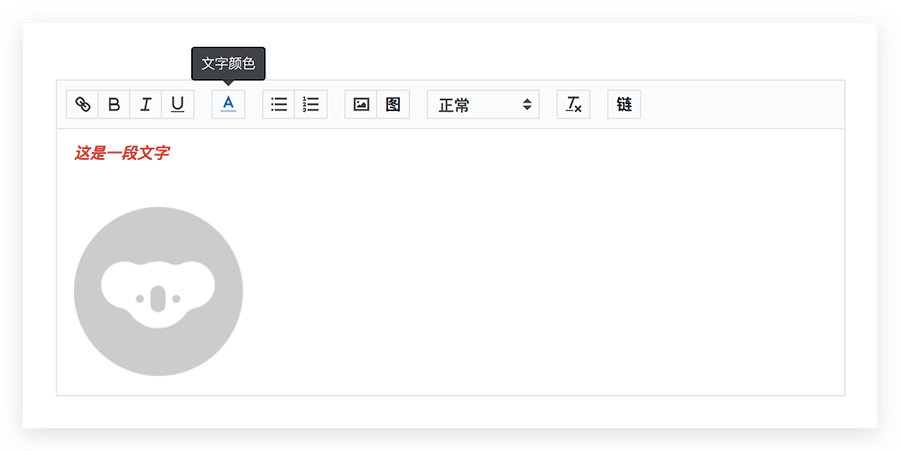
## 介绍
1. 基于 quill 封装
2. 可配置模块
* [x] 行内样式(inline style)
* [x] [图片缩放(image resize)](https://github.com/Fandom-OSS/quill-blot-formatter)
* ~~[拖拽上传(image drop)](https://github.com/kensnyder/quill-image-drop-module)~~
* [x] 链接上传图片(support via the url to upload pictures)
* [x] 剪贴板粘贴图片(support the clipboard to paste pictures)
* [x] 支持 `@(at)` 功能
## 示例
[静态示例](https://realign.github.io/vue-rich-editor/)
[codesandbox 示例](https://codesandbox.io/s/w0m20jjxrl)[不定期更新]
## 使用
[实例](https://github.com/ReAlign/vue-rich-editor/tree/master/example)
## 配置
| 属性值 | 必须 | 默认值 | 类型 | 备注 |
| ----- | --- | ----- | --- | --- |
| value | - | '' | string | 富文本内容 |
| id | 是 | 'quill-container' | string | 唯一标识组件,**单页面多实例情况下必填** |
| keepPasteFormat | - | true | boolean | 粘贴保留文本格式 |
| disabled | - | false | boolean | 禁用 |
| editorContainer | - | [] | array | 自定义操作栏功能,参照[config.js#L16](https://github.com/ReAlign/vue-rich-editor/blob/master/src/vue-rich-editor/config.js#L16) |
| useCustomImageHandler | - | false | boolean | 使用自定义的图片上传【默认是 `insert` `base64`】 |
| quillRegisterKeys | - | null | array | 需要注册的模块,默认参照[config.js#L38](https://github.com/ReAlign/vue-rich-editor/blob/master/src/vue-rich-editor/config.js#L38) |
| placeholder | - | '' | string | 富文本区域默认占位符 |
| linkPlaceholder | - | '请输入链接' | string | 链接输入框占位符 |
| imageLinkTitle | - | '请输入图片地址:' | string | 图片地址输入框标题 |
| imageLinkPlaceholder | - | 'https://' | string | 图片地址输入框占位符 |
| customProtocol | - | null | array | 自定义链接需要额外支持的协议 |
| customLinkHref | - | '' | string | 自定义链接内容;有值:显示按钮,空,表示不显示 |
| toolbarTips | - | false | boolean | 显示操作栏按钮文字提示 |
| toolbarTipsText | - | null | object | 自定义操作栏提示文字内容<br>{ link: 'this is link' }<br>所有支持key参照[config.js#L106](https://github.com/ReAlign/vue-rich-editor/blob/master/src/vue-rich-editor/config.js#L106) |
| atList | - | false | array-object | @呼出选择列表数据,**如开启@功能,此项必须**,具体格式参见下述:**【开启 @-at 功能】** |
| atHooks | - | false | object | @功能的钩子,具体格式参见下述:**【开启 @-at 功能】** |
### customLink 图标样式自定义
* 默认是文字风格,可自由修改,下面的例子是采用图片[按钮内区域大小为:18*18]
```less
.ql-custom-link {
.ql-custom-link-inner {
// 图片
background-image: url(https://dwz.cn/H9EkfLih);
background-size: 100% 100%;
// 重置掉文字
&::before {
content: '';
}
}
}
```
### 开启 @-at 功能
> @ 默认不开启,需要开启的话,请先配置 `quillRegisterKeys`【如果之前使用了默认配置,即没有显式配置,需要将默认 key 显式注册一下】
#### 配置参数
atList
```js
const atList = [
atListItem,
atListItem,
...
];
const atListItem = {
label: '', // 【*】 显式的文字
..., // 其他需要的数据
};
```
atHooks
```js
const atHooks = {
click(opts) {
//
}
};
const opts = {
list, // 当前 list,即 atList,为便利取值
item, // 点击的项,即 list[clickIndex]
index // 点击项的索引
};
```
## 方法
[示例](https://github.com/ReAlign/vue-rich-editor/tree/master/example)
## Emit - 主动抛出
### 编辑器状态相关
```javascript
// focus
reFocus(options)
options = {
Editor,
source,
range,
oldRange,
cursorLocation
}
```
```javascript
// 内容高亮
reHighlighted(options)
options = {
Editor,
source,
range,
oldRange,
cursorLocation,
text
}
```
```javascript
// blur
reBlur(options)
options = {
Editor,
source
}
```
```javascript
// cursor move evt
reCursorMove(options)
options = {
range,
oldRange
}
```
### 图片相关
```javascript
// 文件 上传图片
/**
* 此处注意,更新到 V0.7.0 之后,参数格式变了
*/
reImageAdded(options)
options = {
file, // 文件
Editor, // 当前编辑器
range,
cursorLocation
}
```
```javascript
// 链接上传图片
reImageLink(type, options)
type // string:'ok':点击确定,'cancel':点击取消
options = {
url, // 输入路径
Editor, // 当前编辑器
range,
cursorLocation
}
```
### 自定义链接
```javascript
// 自定义链接回调
reCustomLink(opts)
opts = {
code, // 状态码:0 成功;1 失败
msg, // 状态描述
}
```
## RefCall - 被动调用
### 获取移动端可使用富文本
#### ⚠️🖍只可作为快捷函数使用,此函数输出的值,不能作为下次回填编辑器的文本
```javascript
_$getTagFillHtml()
return = `${transedHtml}` | String
```
### 获取当前富文本有效内容
* 解决填完内容再删除后含有空标签,导致判断错误问题
```javascript
_$getEffectiveValue()
return = `${effectiveValue}` | String
```
### 待完善
1. [x] 行内样式(inline-style)
2. [x] 图片缩放(image-resize)
3. [x] link and style conflict
4. [x] link placeholder
5. [x] use the url to upload image
6. [ ] [image drop](https://github.com/kensnyder/quill-image-drop-module)
## issues
* [clipboard formats about](https://github.com/quilljs/quill/issues/1687)
* [matchvisual](https://quilljs.com/docs/modules/clipboard/#matchvisual)
* [link placeholder](https://github.com/quilljs/quill/issues/1107)