vue-reader
Version:
<div align="center"> <img width=250 src="https://raw.githubusercontent.com/jinhuan138/vue-reader/master/public/logo.png" /> <h1>VueReader</h1> </div>
128 lines (97 loc) • 5.75 kB
Markdown
<div align="center">
<img width=250 src="https://raw.githubusercontent.com/jinhuan138/vue-reader/master/public/logo.png" />
<h1>VueReader</h1>
</div>
<p>
<a href="https://www.npmjs.com/package/vue-reader" target="_blank">
<img src="https://img.shields.io/npm/v/vue-reader?style=flat-square" />
</a>
<a href="https://www.npmjs.com/package/vue-reader" target="_blank" >
<img src="https://img.shields.io/npm/dw/vue-reader?style=flat-square" />
</a>
<a href="./LICENSE">
<img src="https://img.shields.io/npm/l/vue-reader?style=flat-square" />
</a>
</p>
<div align="center">
<h2><a href="https://jinhuan138.github.io/vue-reader/">📖Documentation</a></h2>
</div>
# Introduction
an easy way to embed a ePub into your webapp
## Installation
> From v1.3.x, vue-reader no longer supports Vue 2. Please use v1.2.x for Vue 2 support.
```bash
npm i vue-reader
pnpm add vue-reader
```
## Basic Usage
<details>
<summary>Vue 3</summary>
```vue
<template>
<div style="height: 100vh">
<vue-reader url="/files/啼笑因缘.epub" />
</div>
</template>
<script setup>
import { VueReader } from 'vue-reader'
</script>
```
</details>
<details>
<summary>Vue 2</summary>
```vue
<template>
<div style="height: 100vh">
<vue-reader url="/files/啼笑因缘.epub"> </vue-reader>
</div>
</template>
<script>
import { VueReader } from 'vue-reader'
export default {
components: { VueReader },
}
</script>
```
</details>
## VueReader Attributes
| **Name** | **Description** | **Type** | **Default** |
| -------- | ----------------------- | ---------------------- | ----------- |
| url | book url or arrayBuffer | `string`/`ArrayBuffer` | — |
| title | the title of the book | `string` | — |
| showToc | whether to show the toc | `boolean` | true |
## VueReader Slots
| **Name** | **Description** |
| -------- | ----------------------------------------------------------------------------------- |
| title | You have access to title by [slot](https://v3.vuejs.org/guide/component-slots.html) |
## VueReader props passed to inner EpubView
## EpubView Attributes
| **Name** | **Description** | **Type** | **Default** |
| --------------- | ------------------------------------------------------------------------------------------------------------------------------------ | ---------------------- | ----------- |
| url | the path or arrayBuffer of the book | `string`/`ArrayBuffer` | — |
| location | set / update location of the epub | `string`/`number` | — |
| tocChanged | when the reader has parsed the book you will receive an array of the chapters | `function(toc)` | — |
| epubInitOptions | pass custom properties to the epub init function, see [epub.js](http://epubjs.org/documentation/0.3/#epub) | `object` | — |
| epubOptions | pass custom properties to the epub rendition, see [epub.js's book.renderTo function](http://epubjs.org/documentation/0.3/#rendition) | `object` | — |
| getRendition | when epubjs has rendered the epub-file you can get access to the epubjs-rendition object here | `function(rendition)` | — |
## EpubView Events
| **Name** | **Description** | **type** |
| --------------- | -------------------------------------------------------------------------------------------------------------------------------------------------------- | ----------------------------- |
| update:location | a function that receives the current location while user is reading. This function is called everytime the page changes, and also when it first renders. | `function(location)` |
| select | when select text | `function(cfirange,contents)` |
| keyPress | when press the key | `function(keyboardEvent)` |
## EpubView Slots
| **Name** | **Description** |
| ----------- | --------------------- |
| loadingView | epub view loadingView |
| errorView | epub view errorView |
## EpubView Exposes
| **Name** | **Description** | **Type** |
| ----------- | --------------------- | ---------------- |
| nextPage | display next page | `function` |
| prevPage | display previous page | `function` |
| setLocation | Set the page | `function(href)` |
## Related
- [react-reader](https://github.com/gerhardsletten/react-reader)
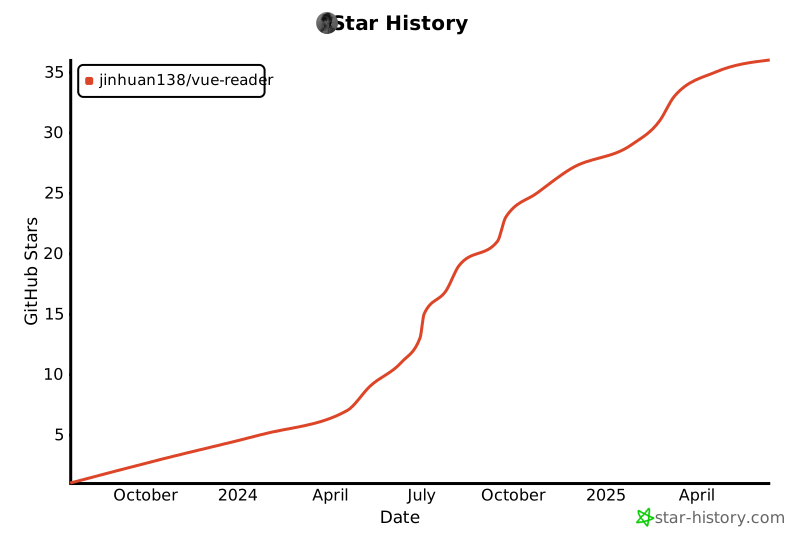
## Star History
[](https://star-history.com/#jinhuan138/vue-reader&Date)