vue-plugin-hiprint
Version:
hiprint for Vue2.x / Vue3.x 支持拖拽(分页(不分页)、表头表脚、样式设置、复制粘贴、缩放、撤销重做)生成打印模板、导出json模板数据、静默打印/获取MAC地址(借助客户端)
667 lines (546 loc) • 26.5 kB
Markdown
<div align="center" style="margin-top: 10px">
<a href="http://hiprint.io/">
<img width="100" height="100" src="http://hiprint.io/Content/assets/hi.png">
</a>
<a href="https://cn.vuejs.org/">
<img width="100" height="100" src="https://v2.cn.vuejs.org/images/logo.svg">
</a>
</div>


<a href="https://gitee.com/CcSimple/vue-plugin-hiprint">
<img src="https://gitee.com/CcSimple/vue-plugin-hiprint/badge/star.svg?theme=dark" alt="Gitee star">
</a>
<a href="https://gitee.com/CcSimple/vue-plugin-hiprint">
<img src="https://gitee.com/CcSimple/vue-plugin-hiprint/badge/fork.svg?theme=dark" alt="Gitee fork">
</a>





## 关于此插件
vue-plugin-hiprint (基于 [hiprint 2.5.4](http://hiprint.io/)) 当时只是为了方便 <span style="color: red">我(并非 hiprint 原作者)</span> 在 vue 项目中引入使用,所以以此命名。
此 <span style="color: red">插件</span> 仅仅是一个 <span style="color: red">JavaScript【工具库】</span> 而非 <span style="color: yellow">Vue【组件库】</span>,所以它默认不包含 demo 中的那些组件页面(demo 代码可复制使用)。
由于 hiprint 官网最后一次更新时间为 2019 年【hiprint 2.5.4 是 [LGPL](#关于lgpl协议) 协议】,后在诸多使用者及反馈下进行了许多优化调整。
## vue-plugin-hiprint
> [✨立即体验](https://ccsimple.github.io/vue-plugin-hiprint/) <br/><br/> [🌈更新日志](CHANGELOG.md) <br/><br/> [🐛常见问题(入门必看!)](#常见问题) ⚠️⚠️ [📕系列教程文章(入门必看!)](#常见问题) <br/><br/> [🚀项目生态(打印客户端、node服务端、uniapp)](#插件生态)
> [🔥🔥🔥1.征集模板、2.admin模板集成示例、3.插件集成; ==> 点我🔥🔥🔥](#交流群)
> hiprint for Vue2.x / Vue3.x (基于 jQuery, 理论上其他框架可用。[react demo 分支](https://github.com/CcSimple/vue-plugin-hiprint/tree/react_demo))
> **jQuery/uniapp (html/h5)** 项目 见下方 [jQuery/uniapp 项目使用](#jqueryuniapp-项目使用)
> [!IMPORTANT]
>
> **注意事项**
>
> - NodeJs 需要 16.x 版本 (开发使用 16.18.1)
> - <div style="color: red">【vue-plugin-hiprint】与【hiprint.io官网】差异甚多,请忽混用!请忽混用!请忽混用!</div>
> - <div style="color: orange">请使用项目关联的打印客户端,或者自行修改打印客户端的源码,以适配本项目的模板!</div>
> - 主分支是融合版本的最新代码,如果你不需要修改 hiprint 相关代码. 请使用 npm 包的方式安装.
> - 使用直接客户端时,本地开发连接没问题,部署到线上出现跨域无法连接打印客户端问题:
> - [线上跨域问题,请升级 https! 说明:https://www.cnblogs.com/daysme/p/15493523.html](https://www.cnblogs.com/daysme/p/15493523.html)
> - 如需提交 PR 请前往 github 合并后可自动发布 npm 包并同步代码到 gitee
> - vue-plugin-hiprint 包不包含 UI 界面,需要自行处理。如果想更快速引入请查看 [sv-print 组件库](https://ccsimple.github.io/sv-print-docs/)
## 文章链接
入门篇: [【vue-plugin-hiprint】使用-入门篇](https://mp.weixin.qq.com/s/4N4f7CkxodA-fuTJ_FbkOQ)
进阶篇: [【vue-plugin-hiprint】使用-进阶篇](https://mp.weixin.qq.com/s/LYZP2iqV0gy4m76mttplAw)
provider: [【vue-plugin-hiprint】如何自定义可拖拽元素 provider](https://mp.weixin.qq.com/s/n9i1j8hhVJvnlfJRPRtWog)
打印篇: [【vue-plugin-hiprint】使用-打印篇](https://mp.weixin.qq.com/s/P-Zz8YfELmRNi4EuED4QmA)
参数篇: [【vue-plugin-hiprint】使用-参数篇](https://mp.weixin.qq.com/s/vfgSG62tAXn7Ot7y3x68fw)
实战动态 provider: [【vue-plugin-hiprint】实战-动态 provider](https://mp.weixin.qq.com/s/UVkhul1tynjaUjdC_NaHfw)
实战动态模板: [【vue-plugin-hiprint】实战-动态模板](https://mp.weixin.qq.com/s/JXXC9Fyy_PgPXrwh1mDBTQ)
常见问题汇总 ①: [【vue-plugin-hiprint】常见问题汇总 ①](https://mp.weixin.qq.com/s/E-ZfuKLH3-GvKn4AosRvaw)
常见问题汇总 ②: [【vue-plugin-hiprint】常见问题汇总 ②](https://mp.weixin.qq.com/s/UEnr24bB_P6KmpZ7iZmYvA)
常见问题汇总 ③: [【vue-plugin-hiprint】常见问题汇总 ③](https://mp.weixin.qq.com/s/lRimQ-cjuwN3mg6RicPyag)
hiprint官方文档(看基础,与本项目有较多差异):[http://hiprint.io/docs/start](http://hiprint.io/docs/start)
本人写的部分文档: [https://ccsimple.github.io/sv-print-docs/config/hiprint.html](https://ccsimple.github.io/sv-print-docs/config/hiprint.html)
## 安装使用
```
npm install vue-plugin-hiprint
```
```html
<!--【必须】在index.html 文件中添加打印所需样式(cdn可能不稳定):-->
<link
rel="stylesheet"
type="text/css"
media="print"
href="https://npmmirror.com/package/vue-plugin-hiprint/files/dist/print-lock.css"
/>
<!-- OR -->
<link
rel="stylesheet"
type="text/css"
media="print"
href="https://cdn.jsdelivr.net/npm/vue-plugin-hiprint@latest/dist/print-lock.css"
/>
<!-- 可以调整成 相对链接/自有链接, 【重要】名称需要一致 【print-lock.css】-->
<link rel="stylesheet" type="text/css" media="print" href="/print-lock.css" />
```
## 项目截图
<table>
<tr>
<td><img src="https://gitee.com/CcSimple/vue-plugin-hiprint/raw/main/res/img_0.png"/></td>
<td><img src="https://gitee.com/CcSimple/vue-plugin-hiprint/raw/main/res/img_1.png"/></td>
</tr>
<tr>
<td><img src="https://gitee.com/CcSimple/vue-plugin-hiprint/raw/main/res/img_2.png"/></td>
<td><img src="https://gitee.com/CcSimple/vue-plugin-hiprint/raw/main/res/img_3.png"/></td>
</tr>
<tr>
<td><img src="https://gitee.com/CcSimple/vue-plugin-hiprint/raw/main/res/gif00.gif"/></td>
<td><img src="https://gitee.com/CcSimple/vue-plugin-hiprint/raw/main/res/gif01.gif"/></td>
</tr>
</table>
## 拖拽设计使用(推荐)
```javascript
import { hiprint, defaultElementTypeProvider } from "vue-plugin-hiprint";
// 初始化可拖拽的元素
hiprint.init({
providers: [new defaultElementTypeProvider()],
});
// $('.ep-draggable-item') 包含 tid, 与上边的 provider 中的 tid 对应 才能正常拖拽生成元素
hiprint.PrintElementTypeManager.buildByHtml($(".ep-draggable-item"));
hiprintTemplate = new hiprint.PrintTemplate({
template: {}, // 模板json
settingContainer: "#PrintElementOptionSetting", // 元素参数容器
paginationContainer: ".hiprint-printPagination", // 多面板的容器, 实现多面板, 需要在添加一个 <div class="hiprint-printPagination"/>
// ------- 下列是可选功能 -------
// ------- 下列是可选功能 -------
// ------- 下列是可选功能 -------
// 图片选择功能
onImageChooseClick: (target) => {
// 测试 3秒后修改图片地址值
setTimeout(() => {
// target.refresh(url,options,callback)
// callback(el, width, height) // 原元素,宽,高
// target.refresh(url,false,(el,width,height)=>{
// el.options.width = width;
// el.designTarget.css('width', width + "pt");
// el.designTarget.children('.resize-panel').trigger($.Event('click'));
// })
target.refresh(
"data:image/png;base64,iVBORw0KGgoAAAANSUhEUgAAAtAAAAIIAQMAAAB99EudAAAABlBMVEUmf8vG2O41LStnAAABD0lEQVR42u3XQQqCQBSAYcWFS4/QUTpaHa2jdISWLUJjjMpclJoPGvq+1WsYfiJCZ4oCAAAAAAAAAAAAAAAAAHin6pL9c6H/fOzHbRrP0tLS0tLS0tLS0tLS0tLS0tLS0tLS0tLS0tLS0u/SY9LS0tLS0tLS0tLS0n+edm+UlpaWlpaWlpaWlpaW/tl0Ndyzbno7/+tPTJdd1wal69dNa6abx+Lq6TSeYtK7BX/Diek0XULSZZrakPRtV0i6Hu/KIt30q4fM0pvBqvR9mvsQkZaW9gyJT+f5lsnzjR54xAk8mAUeJyMPwYFH98ALx5Jr0kRLLndT7b64UX9QR/0eAAAAAAAAAAAAAAAAAAD/4gpryzr/bja4QgAAAABJRU5ErkJggg==",
{
// auto: true, // 根据图片宽高自动等比(宽>高?width:height)
// width: true, // 按宽调整高
// height: true, // 按高调整宽
real: true, // 根据图片实际尺寸调整(转pt)
}
);
}, 3000);
// target.getValue()
// target.refresh(url)
},
// 自定义可选字体
// 或者使用 hiprintTemplate.setFontList([])
// 或元素中 options.fontList: []
fontList: [
{ title: "微软雅黑", value: "Microsoft YaHei" },
{ title: "黑体", value: "STHeitiSC-Light" },
{ title: "思源黑体", value: "SourceHanSansCN-Normal" },
{ title: "王羲之书法体", value: "王羲之书法体" },
{ title: "宋体", value: "SimSun" },
{ title: "华为楷体", value: "STKaiti" },
{ title: "cursive", value: "cursive" },
],
dataMode: 1, // 1:getJson 其他:getJsonTid 默认1
history: true, // 是否需要 撤销重做功能
onDataChanged: (type, json) => {
// 模板发生改变回调
console.log(type); // 新增、移动、删除、修改(参数调整)、大小、旋转
console.log(json); // 返回 template
},
onUpdateError: (e) => {
// 更新失败回调
console.log(e);
},
});
// 设计器的容器
hiprintTemplate.design("#hiprint-printTemplate");
```
## 代码模式使用(不推荐)
```javascript
import { hiprint, defaultElementTypeProvider } from "vue-plugin-hiprint";
// 引入后使用示例
hiprint.init();
// 下列方法都是没有拖拽设计页面的, 相当于代码模式, 使用代码设计页面
var hiprintTemplate = new hiprint.PrintTemplate();
var panel = hiprintTemplate.addPrintPanel({
width: 100,
height: 130,
paperFooter: 340,
paperHeader: 10,
});
//文本
panel.addPrintText({
options: {
width: 140,
height: 15,
top: 20,
left: 20,
title: "hiprint插件手动添加text",
textAlign: "center",
},
});
//条形码
panel.addPrintText({
options: {
width: 140,
height: 35,
top: 40,
left: 20,
title: "123456",
textType: "barcode",
},
});
//二维码
panel.addPrintText({
options: {
width: 35,
height: 35,
top: 40,
left: 165,
title: "123456",
textType: "qrcode",
},
});
//长文本
panel.addPrintLongText({
options: {
width: 180,
height: 35,
top: 90,
left: 20,
title: "长文本:hiprint是一个很好的webjs打印,浏览器在的地方他都可以运行",
},
});
//打印
hiprintTemplate.print({});
```
## vue/vue3 全局引入
> 全局引入,方便在任何地方不引入直接调用打印
```javascript
// main.js中 引入安装
import { hiPrintPlugin } from "vue-plugin-hiprint";
Vue.use(hiPrintPlugin, "$pluginName");// $pluginName 为自定义名称
hiPrintPlugin.disAutoConnect();
/// 提供的全局方法:
/// provider 可为null args: 同模板对应调用 print 方法
// 1. 打印
this.$pluginName.print(provider, templateJson, ...args);
// 2. 直接打印
this.$pluginName.print2(provider, templateJson, ...args);
```
## jQuery/uniapp 项目使用
> uniapp 需要嵌入到 web 浏览器中.(需要支持 window 全局对象环境)
```html
<!-- index.html -->
<head>
<!-- 打印样式是必须的,你可以调整成自由链接, 注意 media="print" 名称 print-lock.css -->
<link
rel="stylesheet"
type="text/css"
media="print"
href="https://unpkg.com/vue-plugin-hiprint@latest/dist/print-lock.css"
/>
<!-- 下列使用的都是 unpkg提供的 稳定性未知, 建议下载自行处理 -->
<!-- jquery 必须 -->
<script src="https://unpkg.com/jquery@3.6.1/dist/jquery.js"></script>
<!-- 条形码 -->
<script src="https://unpkg.com/jsbarcode@3.11.5/dist/JsBarcode.all.min.js"></script>
<!-- 二维码、条形码 bwip-js -->
<script src="https://unpkg.com/bwip-js@4.5.1/dist/bwip-js.js"></script>
<!-- 数字转大写 -->
<script src="https://unpkg.com/nzh@1.0.14/dist/nzh.min.js"></script>
<!-- 颜色选择器 -->
<script src="https://unpkg.com/@claviska/jquery-minicolors@2.3.6/jquery.minicolors.min.js"></script>
<!-- 直接打印(print2)需要 -->
<script src="https://unpkg.com/socket.io-client@4.5.1/dist/socket.io.min.js"></script>
<!-- toPdf需要 -->
<script src="https://unpkg.com/canvg@3.0.10/lib/umd.js"></script>
<script src="https://unpkg.com/jspdf@2.5.1/dist/jspdf.umd.min.js"></script>
<script src="https://unpkg.com/html2canvas@1.4.1/dist/html2canvas.js"></script>
<!-- vue-plugin-hiprint 😃 -->
<script src="https://unpkg.com/vue-plugin-hiprint@latest/dist/vue-plugin-hiprint.js"></script>
</head>
<body>
<!-- 注意 defer -->
<script defer>
console.log("vue-plugin-hiprint");
console.log(window["vue-plugin-hiprint"]);
console.log("hiprint");
// hiprint 以注入 全局
console.log(hiprint);
var autoConnect = window["vue-plugin-hiprint"].autoConnect,
disAutoConnect = window["vue-plugin-hiprint"].disAutoConnect,
defaultElementTypeProvider =
window["vue-plugin-hiprint"].defaultElementTypeProvider;
</script>
</body>
```
## 常见问题
> 打印重叠 / 样式问题
```javascript
/**
* 从 在index.html添加:
* <link rel="stylesheet" type="text/css" media="print" href="https://npmmirror.com/package/vue-plugin-hiprint/files/dist/print-lock.css">
* 或者
* <link rel="stylesheet" type="text/css" media="print" href="https://cdn.jsdelivr.net/npm/vue-plugin-hiprint@latest/dist/print-lock.css">
* 以处理打印所需css, 当然你也可以自行处理
* 比如: index.html目录下放一个print-lock.css, 然后在index.html添加:
* <link rel="stylesheet" type="text/css" media="print" href="/print-lock.css">
*/
// 添加自定义样式
hiprintTemplate.print(
this.printData,
{},
{
styleHandler: () => {
// 这里拼接成放html->head标签内的css/style
// 1.例如:使用hiprin官网的样式
let css =
'<link href="http://hiprint.io/Content/hiprint/css/print-lock.css" media="print" rel="stylesheet">';
// 2.重写样式:所有文本红色
css += "<style>.hiprint-printElement-text{color:red ;}</style>";
return css;
},
}
);
// 直接打印
hiprintTemplate.print2(this.printData, {
styleHandler: () => {
// 这里拼接成放html->head标签内的css/style
// 1.例如:使用hiprin官网的样式
let css =
'<link href="http://hiprint.io/Content/hiprint/css/print-lock.css" media="print" rel="stylesheet">';
// 2.重写样式:所有文本红色
css += "<style>.hiprint-printElement-text{color:red ;}</style>";
return css;
},
});
```
> 取消自动 socket 连接 / socket 连接报错问题
```javascript
/**
* 取消自动连接
*/
// 在main.js中设置
import { hiPrintPlugin } from "vue-plugin-hiprint";
Vue.use(hiPrintPlugin, "$hiprint", false);
// hiPrintPlugin 同时提供了 disAutoConnect 方法
hiPrintPlugin.disAutoConnect();
// 在组件中使用 见: demo/design/index.vue
import { disAutoConnect, autoConnect, hiprint } from "vue-plugin-hiprint";
disAutoConnect();
// 同时 export了 autoConnect,disAutoConnect 方法
/**
* 连接回调及打印
*/
autoConnect((status, msg) => {
if (status) {
hiprintTemplate.print2(printData, {
printer: "",
title: "hiprint测试打印",
});
}
});
/**
* socket连接报错?
* 由于npm包更新到socket.io 3.x版本,官网提供的客户端,npm包是无法连接的
* 请使用gitee提供的客户端, 同时gitee客户端可传更多的参数, 如是否打印颜色/打印份数/DPI等
* 详情electron见:https://www.electronjs.org/zh/docs/latest/api/web-contents
*/
```
> print/print2 打印回调
```javascript
// 浏览器预览打印, 无法监听是否点击了 打印/取消 按钮
hiprintTemplate.print(
this.printData,
{},
{
callback: () => {
console.log("浏览器打印窗口已打开");
},
}
);
// 直接打印
// 打印机名称: 通过 hiprintTemplate.getPrinterList() 获取 其中的 name
hiprintTemplate.print2(printData, { printer: "打印机名称", title: "打印标题" });
hiprintTemplate.on("printSuccess", function (data) {
console.log("打印完成");
});
hiprintTemplate.on("printError", function (data) {
console.log("打印失败");
});
```
> i18n 设置 ⬆️ 0.0.55-beta8
原生为简体中文,英语、德语、西班牙语、法语、意大利语、日语、俄语、繁体中文皆为 AI 机翻,欢迎帮助 [订正](https://github.com/CcSimple/vue-plugin-hiprint/tree/main/src/i18n)。
可在 init 时传入语言进行设置,默认为 `cn` 。
```js
hiprint.init({
lang: "en", // 设置语言 ['cn', 'en', 'de', 'es', 'fr', 'it', 'ja', 'ru', 'cn_tw']
});
```
> 直接打印 地址端口 与 Token 设置
```js
hiprint.init({
host: "http://localhost:17521", // 可在此处设置连接地址与端口号
token: "token", // 可在此处设置连接 token 可缺省
});
```
## 参与项目
```console
git clone https://gitee.com/CcSimple/vue-plugin-hiprint.git
// init
cd vue-plugin-hiprint && npm i
// 调试预览demo
npm run serve
// 打包demo (打包后生成在 demo 目录)
npm run build-demo
// 打包插件(vue-plugin-hiprint 插件资源)
npm run build
```
## demo 调试(显示打印 iframe)
```javascript
// 快速显示/隐藏 打印iframe 方便调试  ̄□ ̄||
// 在浏览器控制台输入:
// 显示打印页面
$("#app").css("display", "none");
$("#hiwprint_iframe").css("visibility", "visible");
$("#hiwprint_iframe").css("width", "100%");
$("#hiwprint_iframe").css("height", "251.09mm"); // 这里替换个实际高度才能显示完
// 显示vue页面
$("#app").css("display", "block");
$("#hiwprint_iframe").css("visibility", "hidden");
```
## 配套直接打印客户端[electron-hiprint](https://gitee.com/CcSimple/electron-hiprint)
> 使用本项目,请使用如下样子的直接打印客户端
支持 win、mac、linux 系统
> [国内Gitee下载](https://gitee.com/CcSimple/electron-hiprint/releases) <br/><br/> [Github下载](https://github.com/CcSimple/electron-hiprint/releases)

### URLScheme `hiprint://`
> 安装客户端时请 `以管理员身份运行` ,才能成功添加 URLScheme
使用:浏览器地址栏输入 `hiprint://` 并回车

```js
// js
window.open("hiprint://");
// element-ui
this.$alert(
`连接【${hiwebSocket.host}】失败!<br>请确保目标服务器已<a href="https://gitee.com/CcSimple/electron-hiprint/releases" target="_blank"> 下载 </a> 并 <a href="hiprint://" target="_blank"> 运行 </a> 打印服务!`,
"客户端未连接",
{ dangerouslyUseHtmlString: true }
);
// ant-design
this.$error({
title: "客户端未连接",
content: (h) => (
<div>
连接【{hiwebSocket.host}】失败!
<br />
请确保目标服务器已
<a
href="https://gitee.com/CcSimple/electron-hiprint/releases"
target="_blank"
>
下载
</a>并
<a href="hiprint://" target="_blank">
运行
</a>
打印服务!
</div>
),
});
```
## 使用 [中转服务 node-hiprint-transit](https://github.com/Xavier9896/node-hiprint-transit) 实现代理
配套客户端打印一直存在跨域、无法连接局域网其余打印机、跨网段无法连接的问题,所以诞生了这个中转代理服务。在 `electron-hiprint` [v1.0.0.7](https://gitee.com/CcSimple/electron-hiprint/releases) 版本中添加了连接中转服务代理的设置,将会在 `electron-hiprint` 与 `node-hiprint-transit` 间建立通信,`vue-plugin-hiprint` 只需连接中转服务就能获取到所有连接中转服务的打印端信息,并且选择任意打印机进行打印。
连接中转服务只需要修改 host, 添加 token
```js
import { hiprint } from "vue-plugin-hiprint";
hiprint.init({
host: "https://v4.printjs.cn:17521", // 此处输入服务启动后的地址
token: "hiprint-17521", // 用于鉴权的token,hiprint* (*可替换为[0-9a-zA-Z\-_]字符)
});
// or
hiwebSocket.setHost("https://printjs.cn:17521", "vue-plugin-hiprint");
```
具体使用请转至 [node-hiprint-transit](https://github.com/Xavier9896/node-hiprint-transit)
为此你需要作出这些改变:
1. 你可以从 `hiwebSocket` 中获取到 `clients`、`printerList` ,里面都将包含 `client` 信息
2. print2、ippRequest、ippRequest api options 中需要添加 `client` 指定客户端
eg:
```js
var clientId = "AlBaUCNs3AIMFPLZAAAh";
var client = hiwebSocket.clients[clientId];
var printer = hiwebSocket.printerList[0];
hiprintTemplate.print2(printData, {
client: clientId,
printer: client.printerList[n].name,
title: "hiprint测试打印",
});
hiprintTemplate.print2(printData, {
client: printer.clientId,
printer: printer.name,
title: "hiprint测试打印",
});
```
> 如果你不提供 client 中转服务将抛出一个 error
## 插件生态
| 项目名称 | 项目地址 | 下载地址 | 描述 |
| -------------------- | ------------------------------------------------------------------------------------------------------------------------ | ----------------------------------------------------------------- | ------------------------------------------------------------------ |
| vue-plugin-hiprint | [github](https://github.com/CcSimple/vue-plugin-hiprint)、[gitee](https://gitee.com/CcSimple/vue-plugin-hiprint) | [npm](https://www.npmjs.com/package/vue-plugin-hiprint) | 打印设计器 |
| electron-hiprint | [github](https://github.com/CcSimple/electron-hiprint)、[gitee](https://gitee.com/CcSimple/electron-hiprint) | [releases](https://github.com/CcSimple/electron-hiprint/releases) | 直接打印客户端 |
| node-hiprint-transit | [github](https://github.com/Xavier9896/node-hiprint-transit)、[gitee](https://gitee.com/Xavier9896/node-hiprint-transit) | - | web 与客户端中转服务 Node 实现 |
| hiprint-transit-java | [github](https://github.com/weaponready/hiprint-transit-java) | - | web 与客户端中转服务 Java 实现 |
| uni-app-hiprint | [github](https://github.com/Xavier9896/uni-app-hiprint) | - | uni-app 项目通过 webview 使用 vue-plugin-hiprint demo |
| node-hiprint-pdf | [github](https://github.com/CcSimple/node-hiprint-pdf) | - | 提供通过 node 对 vue-plugin-hiprint 模板生成 矢量 pdf、image、html |
## 交流群
<table>
<tr>
<td><img src="https://gitee.com/CcSimple/vue-plugin-hiprint/raw/main/res/group.png"/></td>
<td><img src="https://gitee.com/CcSimple/vue-plugin-hiprint/raw/main/res/wechat.png"/></td>
</tr>
</table>
> 群人数已超过 200 请 '加我好友' 备注加群, 邀你进群
## 捐赠支持, 或者请我喝杯咖啡 ☕️
> 如果对您有帮助,请点击右上角 ⭐Star 关注或扫码捐赠,感谢支持开源!
<table>
<tr>
<td><img src="https://gitee.com/CcSimple/vue-plugin-hiprint/raw/main/res/zWechat.png"/></td>
<td><img src="https://gitee.com/CcSimple/vue-plugin-hiprint/raw/main/res/zAlipay.png"/></td>
</tr>
</table>
本项目使用 <a href="https://jb.gg/OpenSourceSupport"><img height="40" width="100" src="https://gitee.com/CcSimple/vue-plugin-hiprint/raw/main/res/WebStorm.svg"/></a><a href="https://jb.gg/OpenSourceSupport"><img width="50" height="50" src="https://gitee.com/CcSimple/vue-plugin-hiprint/raw/main/res/WebStorm_icon.svg"/></a> 开发
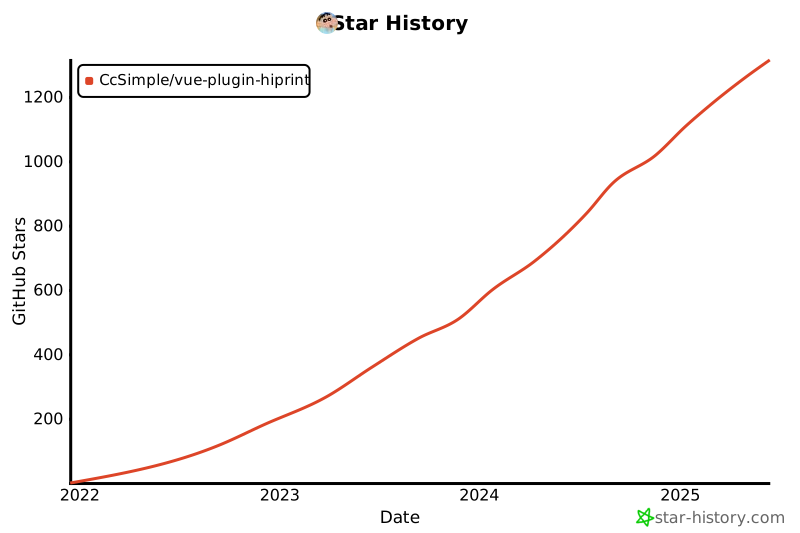
## Star History
[](https://star-history.com/#CcSimple/vue-plugin-hiprint&Date)
## 分支说明
> main: vue2.x + ant1.7.x 融合版 及 npm 包源代码
> npm_demo: vue2.x + ant1.7.x + npm 包使用 示例
> npm_demo_ele: vue2.x + ElementUi 2.x + npm 包使用 示例
> npm_demo_v3: vue3.x + vite + npm 包(0.0.18)使用 示例
## 关于如何融合处理
> 自己融合请查看 vue.config.js 对比 hiprint.bundle.js
> webpack.config.js,是 npm 打包需要处理的
## 开源使用说明
> npm 包是基于 hiprint 官网 2.5.4 版本基础做的调整及优化;<br/>
> 本人对开源协议理解有限,如有侵权不合理的地方,请联系告知我;<br/>
hiprint 开源协议如下:
```
/**
* jQuery Hiprint 2.5.4
*
* Copyright (c) 2016-2021 www.hinnn.com. All rights reserved.
*
* Licensed under the LGPL or commercial licenses
* To use it on other terms please contact us: hinnn.com@gmail.com
*
*/
```
## 关于 LGPL 协议
```
LGPL是GPL的一个为主要为类库使用设计的开源协议。和GPL要求任何使用/修改/衍生之GPL类库的的软件必须采用GPL协议不同。
LGPL允许商业软件通过类库引用(link)方式使用LGPL类库而不需要开源商业软件的代码。这使得采用LGPL协议的开源代码可以被商业软件作为类库引用并发布和销售。
但是如果修改LGPL协议的代码或者衍生,则所有修改的代码,涉及修改部分的额外代码和衍生的代码都必须采用LGPL协议。
因此LGPL协议的开源代码很适合作为第三方类库被商业软件引用,但不适合希望以LGPL协议代码为基础,通过修改和衍生的方式做二次开发的商业软件采用。
GPL/LGPL都保障原作者的知识产权,避免有人利用开源代码复制并开发类似的产品。
```