vue-palette-builder
Version:
A palette builder made with vue and tailwind
76 lines (63 loc) • 1.96 kB
Markdown
Vue Palette Builder is a VueJS component for creating color palettes. Create a selection of colors using [vue-color](https://github.com/xiaokaike/vue-color), and get an array of color values.
[](https://alexharris.github.io/vue-palette-builder/)
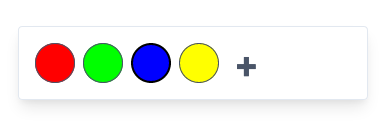
Vue Palette Builder outputs an array of objects that contain a variety of different color formats, such as hex and rgba, like this:
```
[
{
"hsl": {"h": 0,"s": 1,"l": 0.5,"a": 1},
"hex": "#FF0000",
"hex8": "#FF0000FF",
"rgba": {"r": 255,"g": 0,"b": 0,"a": 1},
"hsv": {"h": 0,"s": 1,"v": 1,"a": 1},
"oldHue": 0,
"source": "hsva",
"a": 1
}
]
```
Install on the command line with:
```
npm i vue-palette-builder
```
Import the component in your Vue app:
```
import PaletteBuilder from 'vue-palette-builder' // import the component
export default {
components: {
PaletteBuilder // register the component
},
data() {
return {
palette: [] // create a variable called "palette" to hold the output
}
}
}
```
Add the component to your markup:
```
<PaletteBuilder
v-on:get-palette="palette = $event"
:pickerType="selectedPicker"
:initialPalette="[{'hex':'#FF0000'}]"
id="colorpicker"
class="pb-8 w-full max-w-sm"
/>
```
Now the "palette" variable holds the output of whatever palette is built. You can watch it and do something when it is update by assigning a watcher:
```
watch: {
palette: function() {
// do whatever you want
}
},
```
- **pickerType:** Chrome, Sketch, Slider, Swatches, Compact, Material (see [vue-color](https://github.com/xiaokaike/vue-color))
- **initialPalette:** An initial palette for the palette builder to start with, as an array of hex values in the following format:
```
[{'hex':'#FF0000'},`{'hex':'#FFFF00'}`]
```