vue-next-directive
Version:
177 lines (123 loc) • 3.97 kB
Markdown
# vue-next-directive
## introduction
Based on Vue3's custom instruction library, the instructions currently include:
- loading
- lazy (lazy load img)
## Installation
- yarn add vue-next-directive
- npm i vue-next-directive
- ...
## Usage
### Simple Use
1. project entry file
```js
// ...
import v3Directives from 'vue-next-directive'
// ...
createApp(App).use(v3Directives)
// ...
```
2. Single file component(.vue)
```vue
<template>
<div v-loading:loading.doublesize="loading" style="height: 300px"></div>
<div>
<div class="aaa">
<img v-lazy="img1" src="" alt="" />
</div>
<div class="aaa">
<img v-lazy="img2" src="" alt="" />
</div>
<div class="aaa">
<img v-lazy="img3" src="" alt="" />
</div>
<div class="aaa">
<img v-lazy="img4" src="" alt="" />
</div>
</div>
</template>
<script setup lang="ts">
import { ref } from 'vue'
const loading = ref(true)
const img1 = ref('https://img0.baidu.com/it/u=1674332027,2650649314&fm=253&fmt=auto&app=138&f=JPEG?w=550&h=377')
const img2 = ref('https://img0.baidu.com/it/u=1674332027,2650649314&fm=253&fmt=auto&app=138&f=JPEG?w=550&h=377')
const img3 = ref('https://img0.baidu.com/it/u=1674332027,2650649314&fm=253&fmt=auto&app=138&f=JPEG?w=550&h=377')
const img4 = ref('https://img0.baidu.com/it/u=1674332027,2650649314&fm=253&fmt=auto&app=138&f=JPEG?w=550&h=377')
</script>
<style lang="scss">
url('vue-next-directive/lib/assets/loading.css');
.aaa {
height: 500px;
width: 100%;
margin: 300px 0;
}
</style>
```
3. result
- 
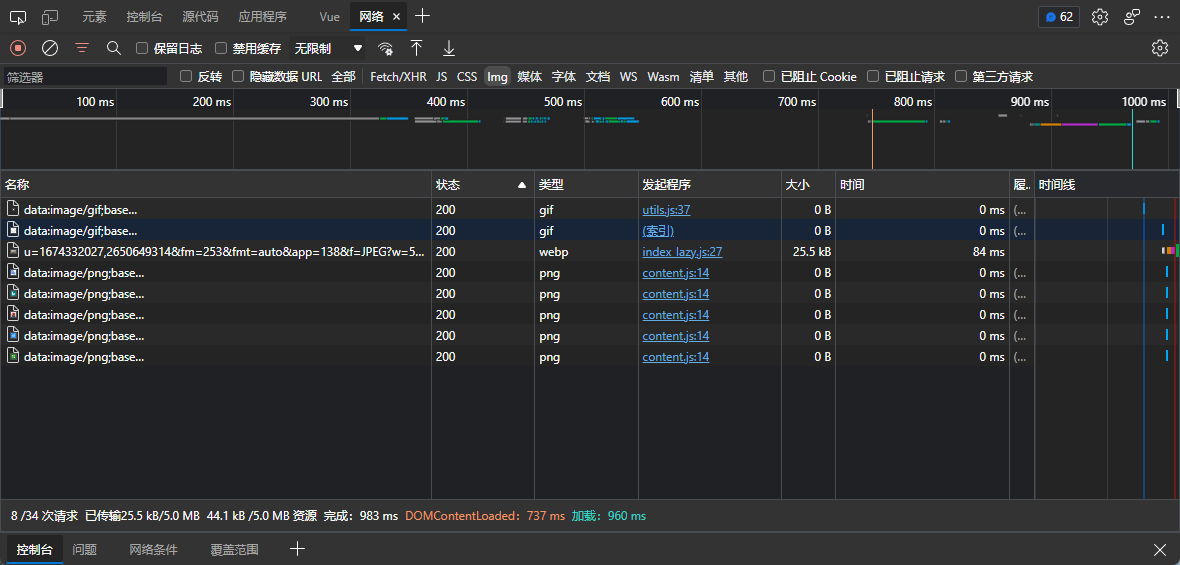
- The picture request in network is only once, because the four pictures URLs are the same, so read the cache afterwards
[](https://imgtu.com/i/jVtMAe)
### Use on demand
1. basic
```js
// loading
import Loading from 'vue-next-directive/lib/directives/loading/index'
createApp(App)..directive('loading', Loading)
// lazy
import Lazy from 'vue-next-directive/lib/directives/lazy/index'
createApp(App).use(Lazy, { name: 'lazy' })
```
2. with vite-plugin-importer plugin
- Installation
- npm install vite-plugin-importer -D
- yarn add vite-plugin-importer -D
- vite.config.js
```js
import usePluginImport from 'vite-plugin-importer'
export default defineConfig({
// ...
plugin: [
// ...
usePluginImport({
libraryName: 'vue-next-directive',
customName: (name, file) => `vue-next-directive/lib/directives/${name.toLowerCase()}/index`,
style: name => {
const needcss = ['loading']
const names = name.split('/')
const fileName = names[names.length - 2]
return needcss.includes(fileName) ? `vue-next-directive/lib/assets/${fileName}.css` : ''
}, // auto import css of component
// style: () => '' won't auto import css of component
})
// ...
]
// ...
})
```
- then, you can use it like this
```js
import { Loading } from 'vue-next-directive'
import { Lazy } from 'vue-next-directive'
```
## Props
### loading
- [vue3 directive](https://staging-cn.vuejs.org/guide/reusability/custom-directives.html)
- v-loading:loading="loading" :后面的loading(指令参数),将作为图标下方的文字展示
- v-loading.doublesize="loading" 'doublesize'修饰符将loading图标的宽高都 * 2
- v-loading:aaa.doublesize="loading" 自定义文字为aaa, 图标宽高 * 2展示
### lazy
#### Custom Lazy configuration
```js
// ...
import Lazyplugin from './directives/lazy/Lazy'
// ...
createApp(App).use(Lazyplugin, { name: 'lazy', loading: '默认不加载时显示的图片链接', error: '加载失败时显示的图片链接' })
```
```js
export interface LazyOption {
name?: string // 自定义指令名, v-后面的, 默认lazy
loading?: string // 不加载时显示的图片链接 可选
error?: string // 加载失败时显示的图片链接 可选
}
```
## 参考