vue-mouse-glow
Version:
Vue移动鼠标光晕效果
247 lines (209 loc) • 5.94 kB
Markdown
## 使用
npm install vue-mouse-glow --save
然后直接在.vue文件下引用
```html
<script setup>
import { GlowCapture, Glow } from 'vue-mouse-glow';
</script>
```
主要是**GlowCapture**和**Glow**组件
其中**GlowCapture**组件的**size**属性设置的是光晕的大小
**Glow**组件的**color**属性是设置光晕的颜色**style**属性是光晕遮罩层的样式**luminance**属性是设置光晕的亮度
## 效果 -> 使用软件录制的GIF图效果看起来和实际效果有色差和帧数区别 实际效果自行拷贝示例代码演示
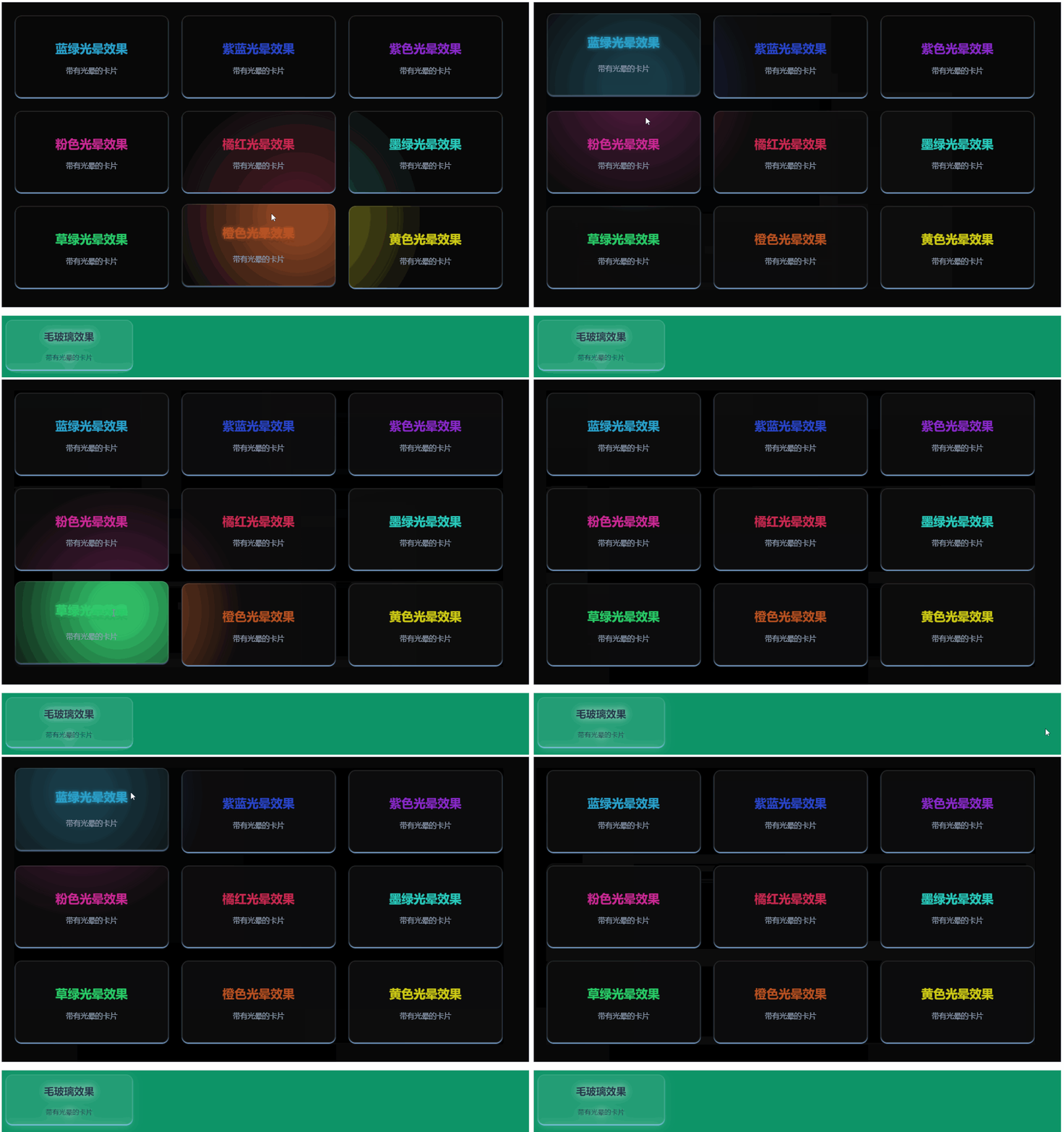
**完整示例代码:**
```html
<template>
<div class="container">
<GlowCapture class="demo-section" :size="600">
<Glow color="rgb(41, 160, 202)" style="border-radius: 1rem;" class="glow-hover" >
<div class="glow-card green">
<h2>蓝绿光晕效果</h2>
<p>带有光晕的卡片</p>
</div>
</Glow>
<Glow color="rgb(41, 69, 202, 1)" style="border-radius: 1rem;" class="glow-hover">
<div class="glow-card blues">
<h2>紫蓝光晕效果</h2>
<p>带有光晕的卡片</p>
</div>
</Glow>
<Glow color="rgb(137, 41, 202, 1)" style="border-radius: 1rem;" class="glow-hover">
<div class="glow-card purples">
<h2>紫色光晕效果</h2>
<p>带有光晕的卡片</p>
</div>
</Glow>
<Glow color="rgb(202, 41, 148, 1)" style="border-radius: 1rem;" class="glow-hover">
<div class="glow-card pink">
<h2>粉色光晕效果</h2>
<p>带有光晕的卡片</p>
</div>
</Glow>
<Glow color="rgb(202, 41, 81, 1)" style="border-radius: 1rem;" class="glow-hover" >
<div class="glow-card orange">
<h2>橘红光晕效果</h2>
<p>带有光晕的卡片</p>
</div>
</Glow>
<Glow color="rgb(41, 202, 188, 1)" style="border-radius: 1rem;" class="glow-hover">
<div class="glow-card darkGreen">
<h2>墨绿光晕效果</h2>
<p>带有光晕的卡片</p>
</div>
</Glow>
<Glow color="rgb(41, 202, 103, 1)" style="border-radius: 1rem;" class="glow-hover" :luminance="0.9">
<div class="glow-card grassGreen">
<h2>草绿光晕效果</h2>
<p>带有光晕的卡片</p>
</div>
</Glow>
<Glow color="rgb(184, 81, 33, 1)" style="border-radius: 1rem;" class="glow-hover" :luminance="0.7">
<div class="glow-card oranges">
<h2>橙色光晕效果</h2>
<p>带有光晕的卡片</p>
</div>
</Glow>
<Glow color="rgb(206, 203, 22, 1)" style="border-radius: 1rem;" class="glow-hover" :luminance="0.5">
<div class="glow-card yellow">
<h2>黄色光晕效果</h2>
<p>带有光晕的卡片</p>
</div>
</Glow>
</GlowCapture>
</div>
<div class="ccc">
<div class="glow-cards">
<h2>毛玻璃效果</h2>
<p>带有光晕的卡片</p>
</div>
</div>
</template>
<script setup>
import { GlowCapture, Glow } from 'vue-mouse-glow';
</script>
<style scoped>
.container {
min-height: 70vh;
background-color: #000000;
padding: 2rem;
}
.ccc {
width: 100%;
height: 300px;
background: #0d9467;
margin-top: 20px;
padding-bottom: 10px;
overflow: hidden;
}
.demo-section {
display: flex;
gap: 2rem;
max-width: 1200px;
margin: 0 auto;
flex-wrap: wrap;
}
.glow-cards{
background: rgba(255, 255, 255, 0.05);
border-radius: 1rem;
margin-left:10px;
margin-top: 10px;
width: 300px;
backdrop-filter: blur(10px);
border: 2px solid rgba(255, 255, 255, 0.1);
transition: border-color 0.3s ease;
box-shadow: 0 2px 2px 0 rgb(147, 197, 253);
filter: drop-shadow(0 0 10px rgba(255, 255, 255, 0.8));
}
.glow-card {
background: rgba(255, 255, 255, 0.05);
border-radius: 1rem;
padding: 2rem;
width: 300px;
backdrop-filter: blur(10px);
border: 2px solid rgba(255, 255, 255, 0.1);
transition: border-color 0.3s ease;
box-shadow: 0 2px 2px 0 rgb(147, 197, 253);
}
.glow-hover:hover {
transform: translateY(-5px) translateZ(0);
}
.glow-card:hover {
transition: all .2s ease-in-out;
box-shadow: 0 3px 3px 0 rgba(147, 197, 253, 0.5);
}
.glow-cards:hover{
transition: all .2s ease-in-out;
box-shadow: 0 3px 3px 0 rgba(147, 197, 253, 0.5);
transform: translateY(-5px) translateZ(0);
}
.glow\:glow-card {
border-color: var(--glow-color);
}
.glow-card h2 {
font-size: 1.8rem;
font-weight: bold;
color: white;
margin-bottom: 1rem;
transition: color 0.3s ease;
}
.glow\:h2 {
color: var(--glow-color);
}
.glow-card p {
font-size: 1.1rem;
line-height: 1.5;
color: #94a3b8;
}
.glow\:glow-card h2 {
text-shadow: 0 0 8px var(--glow-color);
}
.purple h2 {
color: rgb(216, 180, 254);
}
.blue h2 {
color: rgb(147, 197, 253);
}
.red h2 {
color: rgb(252, 165, 165);
}
.red h2 {
color: rgb(252, 165, 165);
}
.green h2 {
color: rgb(41, 160, 202,1);
}
.blues h2 {
color: rgb(41, 69, 202, 1);
}
.purples h2 {
color: rgb(137, 41, 202, 1);
}
.pink h2 {
color: rgb(202, 41, 148, 1);
}
.orange h2 {
color: rgb(202, 41, 81, 1);
}
.darkGreen h2 {
color: rgb(41, 202, 188, 1);
}
.grassGreen h2 {
color: rgb(41, 202, 103, 1);
}
.oranges h2 {
color: rgb(184, 81, 33, 1);
}
.yellow h2 {
color: rgb(206, 203, 22, 1);
}
.glow-card:hover h2 {
text-shadow: 0 0 8px currentColor;
transform: translateY(-10px) translateZ(0);
}
.glow-cards:hover h2 {
text-shadow: 0 0 8px currentColor;
transform: translateY(-5px) translateZ(0);
}
</style>
```