vue-mobcal3
Version:
Vue3 Mobile Calendar
204 lines (171 loc) • 5.67 kB
Markdown
# vue-mobcal3

[](https://github.com/hoythan/Vue-MobCal3)
[](https://www.npmjs.com/package/vue-mobcal3)
[](https://github.com/hoythan/Vue-MobCal3/issues)
[](https://github.com/hoythan/Vue-MobCal3/blob/master/LICENSE)
[](https://www.npmjs.com/package/vue-mobcal3)
### Example
- [CodeSandbox](https://codesandbox.io/p/sandbox/goofy-wiles-8kyyrz?file=%2FREADME.md)
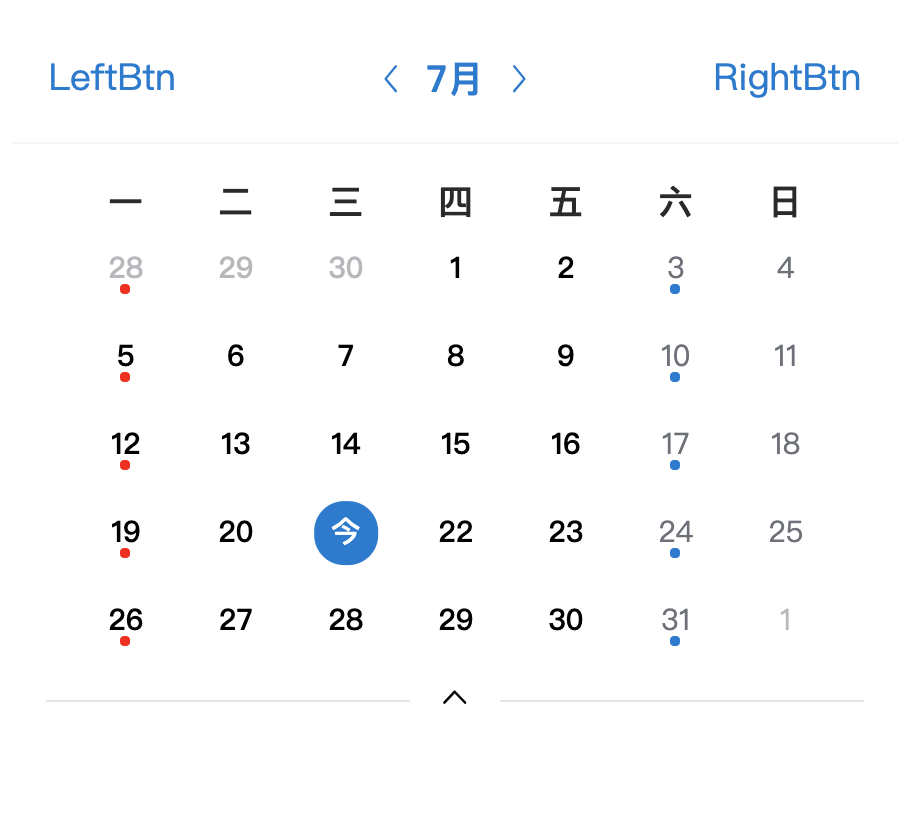
---
### Install
``` bash
npm install vue-mobcal3 --save
# or
yarn add vue-mobcal3
```
### Global Registration
``` javascript
import Vue from 'vue'
import VueMobCal from 'vue-mobcal3'
Vue.use(VueMobCal)
```
### Local Registration
```javascript
import { VueMobCal } from 'vue-mobcal3'
export default {
components: {
VueMobCal
}
}
```
### Usage
#### Basic Usage
```html
<vue-mob-cal v-model:value="currentDate" v-model:mode="mode" color="#007873" />
```
```js
import { VueMobCal } from 'vue-mobcal3';
import "vue-mobcal3/dist/index.css";
import { ref } from 'vue';
export default {
setup() {
const currentDate = ref(new Date());
const mode = ref('month');
}
}
```
#### Custom Slot
```html
<vue-mob-cal v-model:value="currentDate" v-model:mode="mode">
<template #left>
<span>LeftBtn</span>
</template>
<template #right>
<span>RightBtn</span>
</template>
<template #title>
<span>Title</span>
</template>
<template #week="props">
<span>周{{ week(props.day) }}</span>
</template>
<template #day="props">
<span v-if="props.util.isToday(props.date)">今</span>
<span v-else>{{ props.date.getDate() }}</span>
<!-- A dot will appear at the bottom -->
<span v-if="props.date.getDay() === 1" class="mindot" style="background-color: red;"></span>
<span v-if="props.date.getDay() === 6" class="mindot"></span>
<!-- If you want to display the background, you have to configure this -->
<span class="dot"></span>
</template>
</vue-mob-cal>
```
```js
import { ref } from 'vue'
export default {
setup() {
const currentDate = ref(new Date())
const mode = ref('month')
const week = (day) => {
const days = ['一', '二', '三', '四', '五', '六', '日']
day = day || 7
return days[day - 1]
}
}
}
```
### API
#### Props
| Attribute | Description | Type | Default |
| :----- | :---- | :----: | :---- |
| v-model:value | Current calendar date | <span class="t">Date</span> | <span class="v">new Date()</span> |
| v-model:mode | Display mode, support monthly or weekly display, params <i>month</i><i>week</i> | <span class="t">String</span> | <span class="v">month</span> |
| v-model:color | Theme color | <span class="t">String</span> | <span class="v"><span class="dot"></span>#007ad3</span> |
### Slot
| Name | Description | SlotProps |
| :----- | :---- | :---- |
| title | Custom title | <span class="t"> { util: object }</span> |
| week | Custom Week Title | <span class="t">{ day: number }</span> 0-6 |
| left | Custom left icon | - |
| right | Custom right icon | - |
| day | Custom Calendar Item | <span class="t"> { date: date, util: object }</span> |
| - util | Common method | <div class="t">{<br> isToday: function, <br> isWorkDay: function, <br> isOtherMonth: function, <br> isActiveDay: function, <br> onPrev: function, <br> onNext: function, <br> onChangeMode: function<br>}</div> |
### Event
| Event | Description | Arguments |
| :----- | :---- | :---- |
| onPrev | Change to last month/week | - |
| onNext | Change to next month/week | - |
| onChange | When the time is selected, it will be triggered and returns the Date() object of the selected time. | - |
| onChangeMode | Toggles display mode or set display mode | <span class="t">mode:!string</span> |
---
### CDN
``` html
<script src="https://cdn.jsdelivr.net/npm/vue@3.2.1/dist/vue.global.js"></script>
<script type="text/javascript" src="https://unpkg.com/vue-mobcal3/dist/vue-mobcal3.umd.js"></script>
<div id="app">
<vue-mob-cal v-model:value="currentDate" v-model:mode="mode">
</vue-mob-cal>
</div>
<script type="text/javascript">
new Vue({
el: '#app',
data: {
mode: 'month',
currentDate: new Date()
}
})
</script>
```
### Changelog
Detailed changes for each release are documented in the [release notes](https://github.com/hoythan/vue-mobcal3/blob/master/CHANGELOG.md).
### License
[MIT](https://github.com/hoythan/vue-mobcal3/blob/master/LICENSE)
<!-- <style>
table {
font-size: 12px;
width: 100%;
}
.t {
color:green;
}
.v {
color: #58727e;
background-color:#f7f8fa;
padding: 2px 5px;
border-radius: 4px;
}
.var {
color: #1989fa;
background-color: rgba(25, 137, 250, 0.1);
padding: 2px 5px;
border-radius: 4px;
margin-left: 4px;
}
i {
color: #58727e;
background-color:#f7f8fa;
padding: 2px 5px;
border-radius: 4px;
margin-right: 4px;
}
.dot {
display: inline-block;
background: #007ad3;
width: 10px;
height: 10px;
margin-right: 6px;
border-radius: 100px;
}
</style> -->