vue-ios-select
Version:
typescript+vue开发的日期滚轮组件,基于iosselect库进行封装,简单易用
145 lines (103 loc) • 4.46 kB
Markdown
### vue 日期滚轮组件
typescript+vue开发的日期滚轮组件,基于iosselect库进行封装,简单易用。组件在iosselect的基础上进行了扩展,让使用者对于日期的定义变得更加简单易用,无需使用者单独处理,使用者只需要定义**开始日期**、**当前日期**、**结束日期**即可。对于iosselect原来的option配置没有做任何的修改,使用者可以参考github上[iosselect](https://github.com/zhoushengmufc/iosselect)的配置,即可完成自己想要的配置设置
**备注**:该日期滚轮组件,目前只是支持3级的定义,最后感谢**iOSselect**库的开发者跟维护者们
[](LICENSE)
[](https://www.npmjs.com/package/vue-component-dateselect)
[](https://www.npmjs.com/package/vue-component-dateselect)
### iOSselect
html下拉菜单select在安卓和IOS下表现不一样,iosselect正是为统一下拉菜单样式而生,我们以IOS下select的交互和样式为蓝本,开发了这一组件。
## 主要维护人员
https://github.com/zhoushengmufc
https://github.com/pengweifu
## 官网
http://zhoushengfe.com/iosselect/website/index.html
### 特点
* 0依赖,只需引用一个js和css即可
* 样式可自己定制,也可使用默认样式
* 一个页面同时实例化多个组件
* jquery zepto angular vue react均适用
* 支持最多6级级联
* 支持设置高度和高度单位
* 适用于android和iOS设备(PC端支持IE9+,不过PC端上滑动体验不太实用)
#### 代码示例
**组件通过v-model数据双向绑定来控制显示跟隐藏**
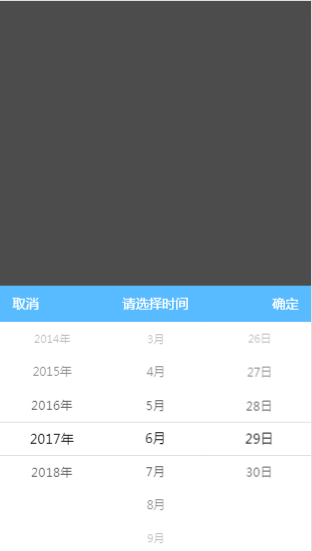
- 安装组件包
```
npm install vue-component-dateselect --save-dev
```
- js代码
```js
import Vue from 'vue';
import VueDselect from "vue-component-dateselect";
new Vue({
el: '#app',
components: {
VueDselect
},
data() {
return {
visible: true,
options: {
config: {
level: 3,
title: "请选择时间",
sureText: "确定",
closeText: "取消",
showAnimate: true,
},
data: {
currentDate: "2017-06-29",
beginDate: "2000-01-01",
endDate: "2018-08-29",
}
}
}
},
methods: {
confirmHandle: function (yearModel, monthModel, dayModel) {
console.log(yearModel);
console.log(monthModel);
console.log(dayModel);
}
}
});
```
- html模板
```html
<div id="app">
<vue-dselect
v-model="visible"
@on-ok="confirmHandle"
:option="options">
</vue-dselect>
</div>
<script src="https://cdn.bootcss.com/vue/2.5.16/vue.min.js"></script>
<script src="./dist/index.js"></script>
```
### 组件API
- 组件 props
| 属性 | 说明 | 类型 | 默认值 |
| ------ | ---------------------------------------- | ------ | ---- |
| option | option对象提供2个属性值:<br><br>**config**:iosselect组件提供的配置项,详情请参考[iosselect](https://github.com/zhoushengmufc/iosselect),<br>**data**:使用者自定义的日期,该属性有3个属性值:<br>beginDate(开始时间:yyyy-MM-dd格式),<br>endDate(结束时间:yyyy-MM-dd格式),<br>currentDate(当前时间:yyyy-MM-dd格式) | object | 空对象 |
- 组件 events
| 方法名称 | 说明 | 参数 |
| ----- | ------------ | ---------------------------------------- |
| on-ok | 点击组件【确定】按钮触发 | 事件参数有3个:<br><br>**yearModel**:选中的年份数据对象,<br>**monthModel**:选中的月份数据对象,<br>**dayModel**:选中的天数据对象 |
### 组件开发说明
- 安装依赖
```
npm/cnpm install
```
- 编译
```
npm run build
```
- demo运行
```
# cd test
# npm/cnpm install
# npm run build
#把test目录的index.html在浏览器打开,切换到移动的端模拟器,可以预览在手机端的展示结果
```
## 最后,欢迎大家使用,并且issue