vue-form-create2
Version:
一个基于Vue3.0 + TS 的表单设计器
249 lines (177 loc) • 7.59 kB
Markdown
# vue-form-create
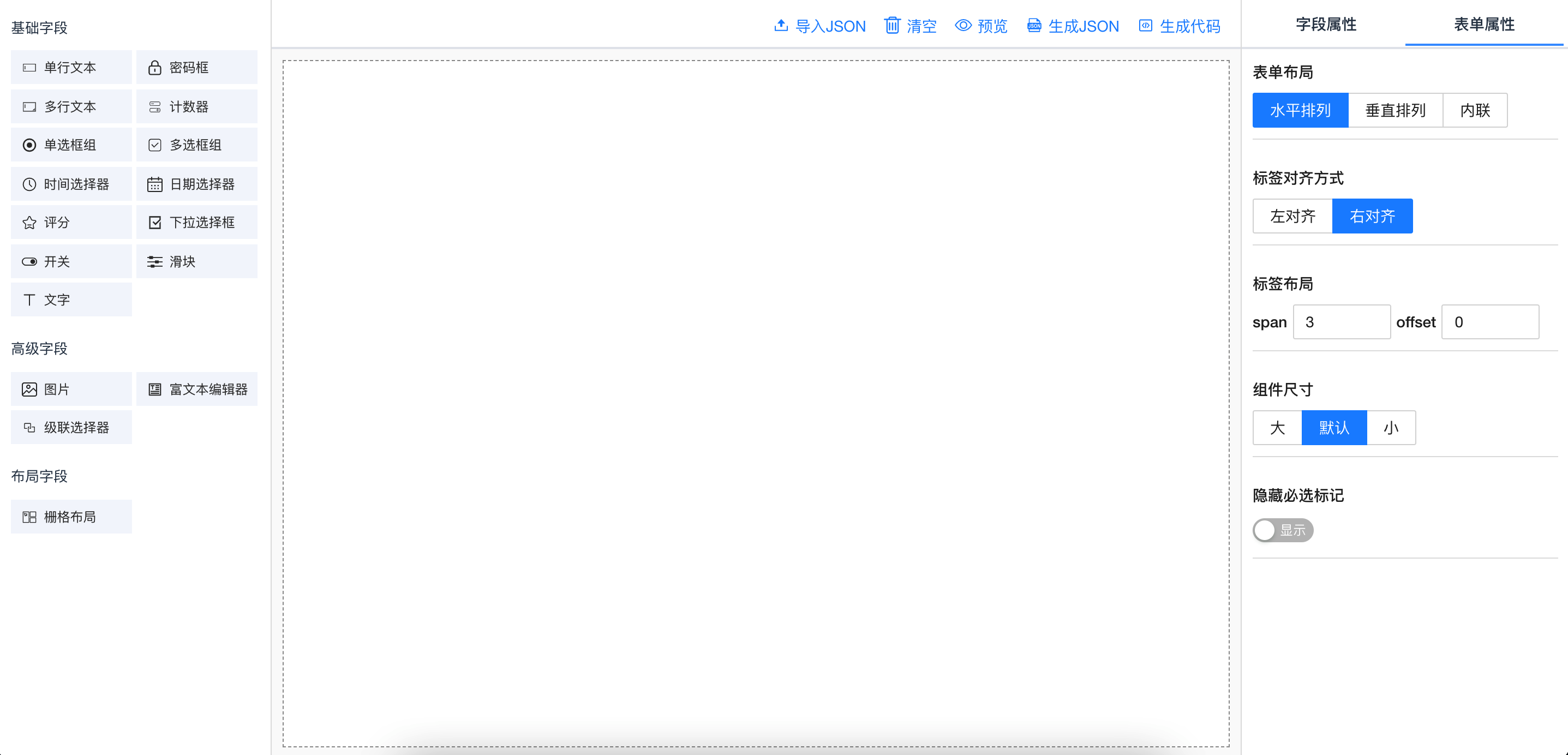
基于 Vue3.0 + TS 的自定义表单生成器。支持 npm 与 cdn 引入的方式。UI 库支持 ant-design-vue 与 element-plus。
### 支持功能
- 远端数据获取
- 图片上传
- 富文本编辑器
- 栅格布局
- 生成 JSON
- 生成代码
### 演示地址(github)
[https://fuchengwei.github.io/vue-form-create/example/index.html](https://fuchengwei.github.io/vue-form-create/example/index.html)
### 演示地址(gitee)
[http://fuchengwei.gitee.io/vue-form-create](http://fuchengwei.gitee.io/vue-form-create)
### github
[https://github.com/fuchengwei/vue-form-create](https://github.com/fuchengwei/vue-form-create)
### npm
[https://www.npmjs.com/package/vue-form-create](https://www.npmjs.com/package/vue-form-create)
## 1 安装
### 使用 npm 或 yarn 安装
**我们推荐使用 npm 或 yarn 的方式进行开发**,不仅可在开发环境轻松调试,也可放心地在生产环境打包部署使用,享受整个生态圈和工具链带来的诸多好处。
```shell
$ npm install vue-form-create --save
```
```shell
$ yarn add vue-form-create
```
### 浏览器引入
在浏览器中使用 `script` 标签直接引入文件,并使用全局变量 `formCreate`。
我们在 npm 发布包内的 `vue-form-create/dist`提供了 `formCreate.common.js` `formCreate.umd.js` `formCreate.umd.min.js`。你也可以通过 [](https://www.jsdelivr.com/package/npm/vue-form-create) 或 [UNPKG](https://unpkg.com/vue-form-create/dist/) 进行下载。
```javascript
<script src='https://unpkg.com/vue-form-create/dist/formCreate.umd.min.js'></script>
```
### 注意
1. 无论 npm 或者 cdn 引入都需要在全局引入 [ant-design-vue](https://2x.antdv.com/docs/vue/introduce-cn) 或 [element-plus](https://element-plus.gitee.io/#/zh-CN) 。并且项目依赖了 [acejs](https://github.com/ajaxorg/ace) , 需要在全局使用 cdn 的方式引入。
```javascript
<script src='https://unpkg.com/ace-builds/src-noconflict/ace.js'></script>
```
2. cdn 引入 ant-design-vue 需要自行引入 [moment](http://momentjs.com/) 。
3. 不想在全局安装也可以在组件内直接使用相应的组件。
```javascript
import {
AntdDesignForm,
ElDesignForm,
AntdGenerateForm,
ElGenerateForm
} from 'vue-form-create'
```
### 示例
**npm 引入**
```javascript
import { createApp } from 'vue'
import antd from 'ant-design-vue'
import App from './App.vue'
import DesignForm from 'vue-form-create'
import 'ant-design-vue/dist/antd.css'
createApp(App)
.use(antd)
.use(DesignForm)
.mount('#app')
```
**浏览器引入**
```html
<!DOCTYPE html>
<html>
<head>
<meta charset="UTF-8" />
<link
rel="stylesheet"
href="https://unpkg.com/ant-design-vue@next/dist/antd.min.css"
/>
</head>
<body>
<div id="app">
<antd-design-form />
</div>
<script src="https://unpkg.com/vue@next/dist/vue.global.prod.js"></script>
<script src="https://unpkg.com/vue-form-create/dist/formCreate.umd.min.js"></script>
<script src="https://unpkg.com/ace-builds/src-noconflict/ace.js"></script>
<script src="https://unpkg.com/moment/moment.js"></script>
<script src="https://unpkg.com/ant-design-vue@next/dist/antd.min.js"></script>
<script>
const { createApp, reactive, toRefs } = Vue
createApp({})
.use(antd)
.use(formCreate)
.mount('#app')
</script>
</body>
</html>
```
## 2 组件说明
### 表单设计器(AntdDesignForm)
#### 示例
```html
<template>
<AntdDesignForm ref="designForm" />
</template>
```
#### API
##### Props
| 参数 | 说明 | 类型 | 默认值 |
| :-----------: | :--------------------: | :-----: | :----: |
| preview | 设计器预览操作按钮 | boolean | true |
| generateCode | 设计器生成代码按钮 | boolean | true |
| generateJson | 设计器生成 Json 按钮 | boolean | true |
| uploadJson | 设计器导入 JSON 按钮 | boolean | true |
| clearable | 设计器清空按钮 | boolean | true |
| basicFields | 设计器左侧基础字段配置 | array | - |
| advanceFields | 设计器左侧高级字段配置 | array | - |
| layoutFields | 设计器左侧布局字段配置 | array | - |
##### 方法
通过 ref 可以获取到实例并调用实例方法
| 方法名 | 说明 | 参数 |
| :---------------: | :--------------------------------: | :---------------------------: |
| getJson() | 获取设计器配置的 JSON 数据 | - |
| setJson(value) | 设置设计器的配置信息 | 通过 getJson 获取的数据 |
| clear() | 清空设计器 | |
| getTemplate(type) | 获取设计器生成的可以直接使用的代码 | type 的类型为 'vue' 或 'html' |
##### 字段说明
基础字段(basicFields)
| type | 字段名 |
| :------: | :--------: |
| input | 单行文本 |
| password | 密码框 |
| textarea | 多行文本 |
| number | 计数器 |
| radio | 单选框组 |
| checkbox | 多选框组 |
| time | 时间选择器 |
| date | 日期选择器 |
| rate | 评分 |
| select | 下拉选择框 |
| switch | 开关 |
| slider | 滑块 |
| text | 文字 |
高级字段(advanceFields)
| type | 字段名 |
| :-------------: | :----------: |
| img-upload | 图片 |
| richtext-editor | 富文本编辑器 |
| cascader | 级联选择器 |
布局字段(layoutFields)
| type | 字段名 |
| :--: | :------: |
| grid | 栅格布局 |
### 表单生成器(AntdGenerateForm)
#### 示例
```html
<template>
<AntdGenerateForm ref="generateForm" />
</template>
```
#### API
##### Props
| 参数 | 说明 | 类型 | 默认值 |
| :------: | :-------------------------------------------: | :-----: | :----: |
| data | 表单 json 配置数据(从表单设计器获取的 json) | object | - |
| value | 表单数据(从表单生成器获取的 value) | object | - |
| disabled | 是否禁用 | boolean | false |
##### 方法
通过 ref 可以获取到实例并调用实例方法
| 方法名 | 说明 | 参数 |
| :-------: | :--------------------------: | :---------------------: |
| getData() | 获取表单数据(返回 Promise) | - |
| reset() | 重置表单数据 | 通过 getJson 获取的数据 |
## 3 功能说明
### 远端数据
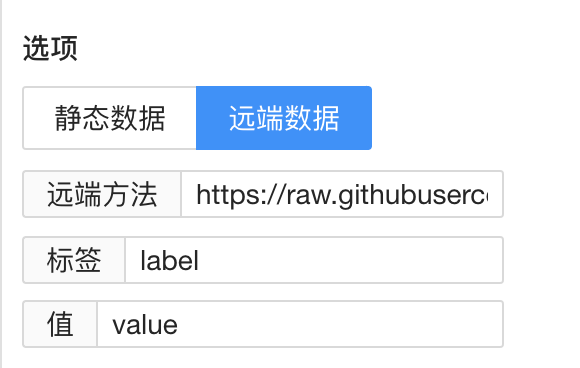
单选框,多选框,下拉选择框、级联选择器等选择项需要通过数据生成,这时可以配置远端数据。
设置远端方法地址与返回值。
### 文件上传
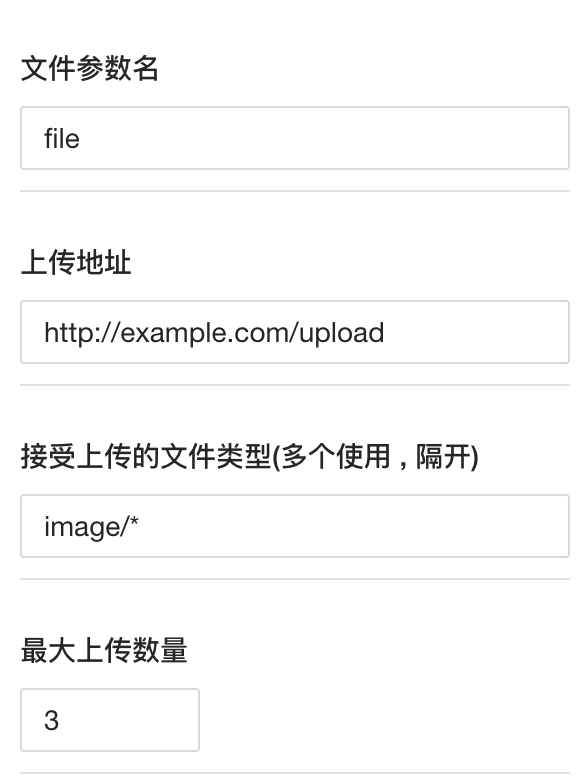
填写服务器上传地址、参数名等配置信息。
## 4 后续规划
目前是 v1.0.0 的初版,后面预计支持更多的功能组件与布局组件,以及对移动端的支持。
最后如果大家觉得还不错挺好用的话,麻烦给个 Star 😜😜😜。