vue-drag-n-drop
Version:
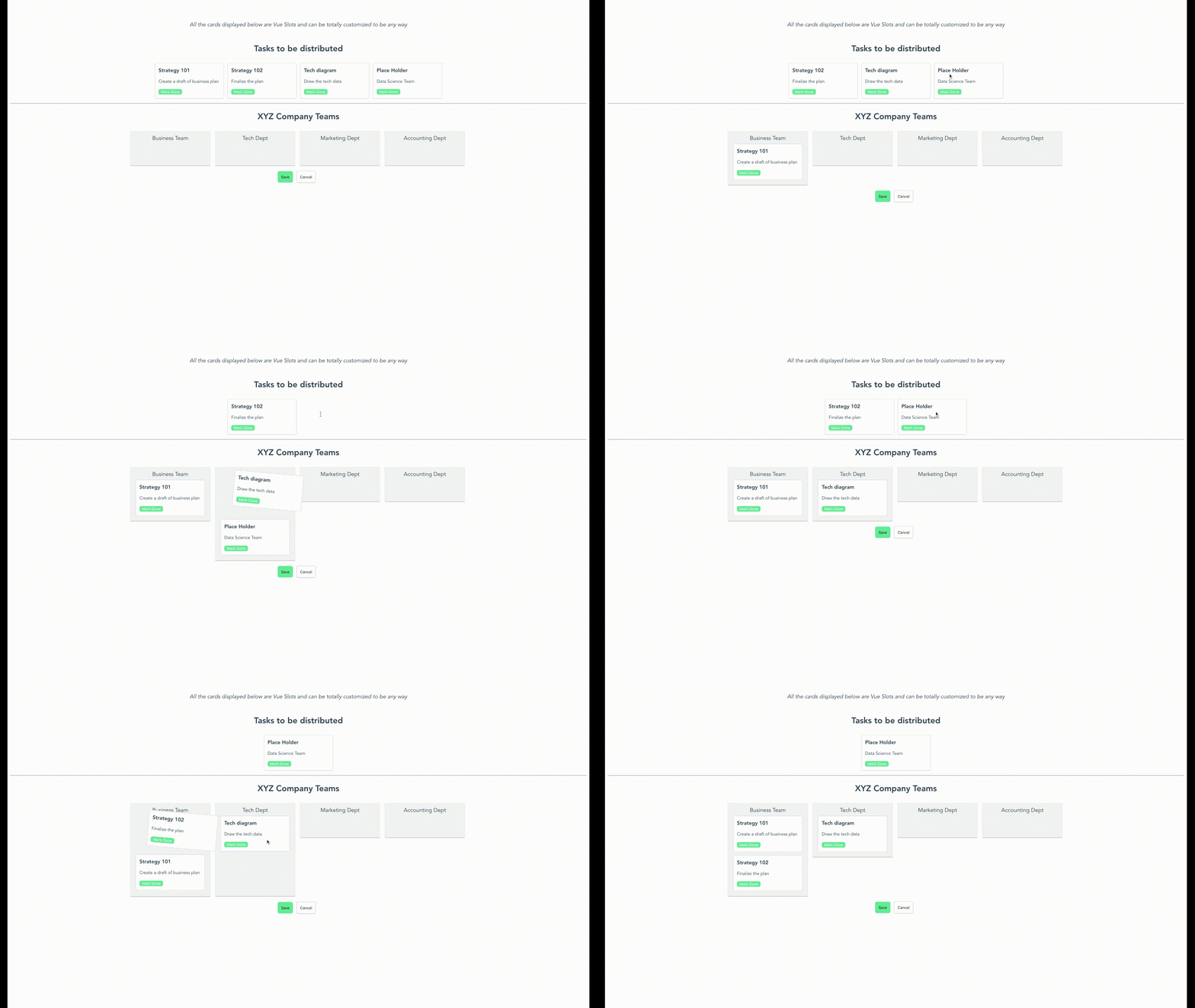
A simple kanban board where the items can be dragged and dropped from the list. This is a hybrid implementation of vue-smooth-dnd.
277 lines (228 loc) • 8.5 kB
Markdown
<div align="center">
<img width="300" src="https://raw.githubusercontent.com/smaharj1/vue-drag-and-drop-kanban/develop/public/logo.png" alt="Logo">
</div>
<div align="center">
<img src="https://github.com/smaharj1/vue-drag-and-drop-kanban/workflows/npm-publish/badge.svg?event=push" alt="npm-health">
<img src="https://img.shields.io/npm/v/vue-drag-n-drop?color=blue" alt="npm version">
<img src="https://img.shields.io/npm/dt/vue-drag-n-drop" alt="npm downloads">
</div>
A simple kanban board where the items can be dragged and dropped from the list. This is a hybrid implementation of vue-smooth-dnd.
## Demo
## Usage
#### Installation
To use the vue-drag-n-drop module, you first need to install the module.
```
npm install vue-drag-n-drop
```
or
```
yarn add vue-drag-n-drop
```
#### Use Case
``` html
<template>
<div id="app">
<drag-drop
:dropzones="dropGroups"
:dropzonesTitle="'XYZ Company Teams'"
:originalData="stories"
:originalTitle="'Tasks to be distributed'"
:inPlace="true"
:enableSave="true"
:enableCancel="true"
@dropInOriginalBucket="originalBucketDropEvent"
@dropInDestinationBucket="destinationBucketDropEvent"
@save="save"
@cancel="cancel"
>
<template #dd-card="{ cardData }">
<custom-card
:data="cardData"
@done="doneMarked"
/>
</template>
</drag-drop>
</div>
</template>
<script>
import DragDrop from 'vue-drag-n-drop'
import MyComponent from './MyComponent.vue'
export default {
components: {
DragDrop,
MyComponent
},
data() {
return {
stories: [
{
title: 'Strategy 101',
description: 'Create a draft of business plan',
time: '3 days',
done: false
},
{
title: 'Strategy 102',
description: 'Finalize the plan',
time: '4 days',
done: false
},
{
title: 'Tech diagram',
description: 'Draw the tech data',
time: '4 days',
done: false
},
{
title: 'Place Holder',
description: 'Data Science Team',
time: '5 days',
done: false
}
],
dropGroups: [
{
name: 'Business Team',
children: []
},
{
name: 'Tech Dept',
children: []
},
{
name: 'Marketing Dept',
children: []
}
]
}
},
}
</script>
```
`MyComponent.vue`
```html
<template>
<div class="cc-card">
<h3>{{data.title}}</h3>
<p>
{{data.description}}
</p>
<button v-if="!data.done" class="cc-btn" @click="markDone()">
Mark Done
</button>
</div>
</template>
<script>
export default {
name: 'MyComponent',
props: ['data'],
methods: {
markDone() {
this.$emit('done', this.data);
}
}
}
</script>
```
## Documentation
#### Instantiating the component
To put the component in your code, you can simply run `import DragDrop from 'vue-drag-n-drop';`. Then, use it in the code as:
```html
<drag-drop
:dropzones="dropGroups"
:dropzonesTitle="'XYZ Company Teams'"
:originalData="stories"
:originalTitle="'Tasks to be distributed'"
/>
```
`originalData` in the above code is assumed to be a list of string. However, you can also pass in the list of custom objects like this:
```js
[
{
title: 'Strategy 101',
description: 'Create a draft of business plan',
time: '3 days',
done: false
},
{
title: 'Strategy 102',
description: 'Finalize the plan',
time: '4 days',
done: false
}
]
```
When you pass your own objects instead of a list of string, you also need to provide a custom component to handle view/action of this object since you can virtually pass any kind of object.
#### Events
When you use the component, you can also listen to some events that happen inside the component like drag, drop, save and cancel
```html
<drag-drop
:dropzones="dropGroups"
:dropzonesTitle="'XYZ Company Teams'"
:originalData="stories"
:originalTitle="'Tasks to be distributed'"
@dropInOriginalBucket="originalBucketDropEvent"
@dropInDestinationBucket="destinationBucketDropEvent"
@save="save"
@cancel="cancel"
/>
```
`save` - This event is triggered when you click save from inside the component. It gives back the final state of the data in corresponding buckets.
`cancel` - This gives you a choice on how to handle the cancellationn event.
`dropInOriginalBucket` - This event is emitted everytime there is a drop event for original bucket. You provides an object with `startIndex`, `endIndex` and `payload`.
`dropInDestinationBucket` - This event is emitted for each dropzone in the destination bucket. First parameter returns the dropzone name and second parameter returns the drop info `startIndex`, `endIndex` and `payload`.
#### Custom Component for list of objects
`vue-drag-n-drop` uses Vue Named Slots. So, the users can pass in custom component that will have access to the data for the single item. You can impolement the slots like below:
```html
<drag-drop
:dropzones="dropGroups"
:dropzonesTitle="'XYZ Company Teams'"
:originalData="stories"
:originalTitle="'Tasks to be distributed'"
>
<template #dd-card="{ cardData }">
<custom-card
:data="cardData"
@done="doneMarked"
/>
</template>
</drag-drop>
```
Here, `dd-card` is the slot name. The component provides a `cardData` variable provides the access of a single object from the original data. If slots aren't used, the component assumes that original data is a list of string. This makes it compatible with older version.
#### CSS Modification
To modify the CSS style, you can override these css classes from your component:
```
.vue-drag-n-drop # This holds the whole container.
.dd-title # Class for modifying the titles
.dd-first-group # Class to modify the first (original) container. It holds the list of
cards
.dd-card-ghost # Class provided for drag class by smooth-dnd
.dd-card-ghost-drop # Class provided for drop by smooth-dnd
.dd-result-group # Class to modify the second drop container (Result container)
.dd-drop-container # Class to modify the style of each column for second container
```
## Support for SSR/Nuxt
Currently, Server Side Rendering is **not** supported. To use it in SSR/Nuxt project, you need to specify Nuxt that this plugin needs to render on the client side.
To specify Nuxt to render it on client-side, create a JS file under `~/plugins/` or add to existing one:
`~/plugins/vue-drap-n-drop.js`
```
import Vue from 'vue';
import DragDrop from 'vue-drag-n-drop';
Vue.use(DragDrop);
```
Add the plugin to `nuxt.config.js`
```
plugins: [
{
src: './plugins/vue-drag-n-drop.js',
ssr: false
}
],
```
## Contributions
Feel free to raise an issue or create a Pull Request if you see ways that can improve this library.
## Current Contributors
[](https://sourcerer.io/fame/smaharj1/smaharj1/vue-drag-and-drop-kanban/links/0)[](https://sourcerer.io/fame/smaharj1/smaharj1/vue-drag-and-drop-kanban/links/1)[](https://sourcerer.io/fame/smaharj1/smaharj1/vue-drag-and-drop-kanban/links/2)[](https://sourcerer.io/fame/smaharj1/smaharj1/vue-drag-and-drop-kanban/links/3)[](https://sourcerer.io/fame/smaharj1/smaharj1/vue-drag-and-drop-kanban/links/4)[](https://sourcerer.io/fame/smaharj1/smaharj1/vue-drag-and-drop-kanban/links/5)[](https://sourcerer.io/fame/smaharj1/smaharj1/vue-drag-and-drop-kanban/links/6)[](https://sourcerer.io/fame/smaharj1/smaharj1/vue-drag-and-drop-kanban/links/7)
## License
[MIT](https://opensource.org/licenses/MIT)