vue-datetime
Version:
Mobile friendly datetime picker for Vue. Supports date, datetime and time modes, i18n and disabling dates.
208 lines (144 loc) • 6.4 kB
Markdown
# vue-datetime
[](LICENSE)
[](https://npmjs.com/package/vue-datetime)
[](https://www.npmjs.com/package/vue-datetime)
[](https://vuejs.org)
[](https://travis-ci.org/mariomka/vue-datetime)
[](https://codecov.io/gh/mariomka/vue-datetime)
> Mobile friendly datetime picker for Vue. Supports date, datetime and time modes, i18n and more.
## Demo
**[Go to demo](http://mariomka.github.io/vue-datetime)**.
[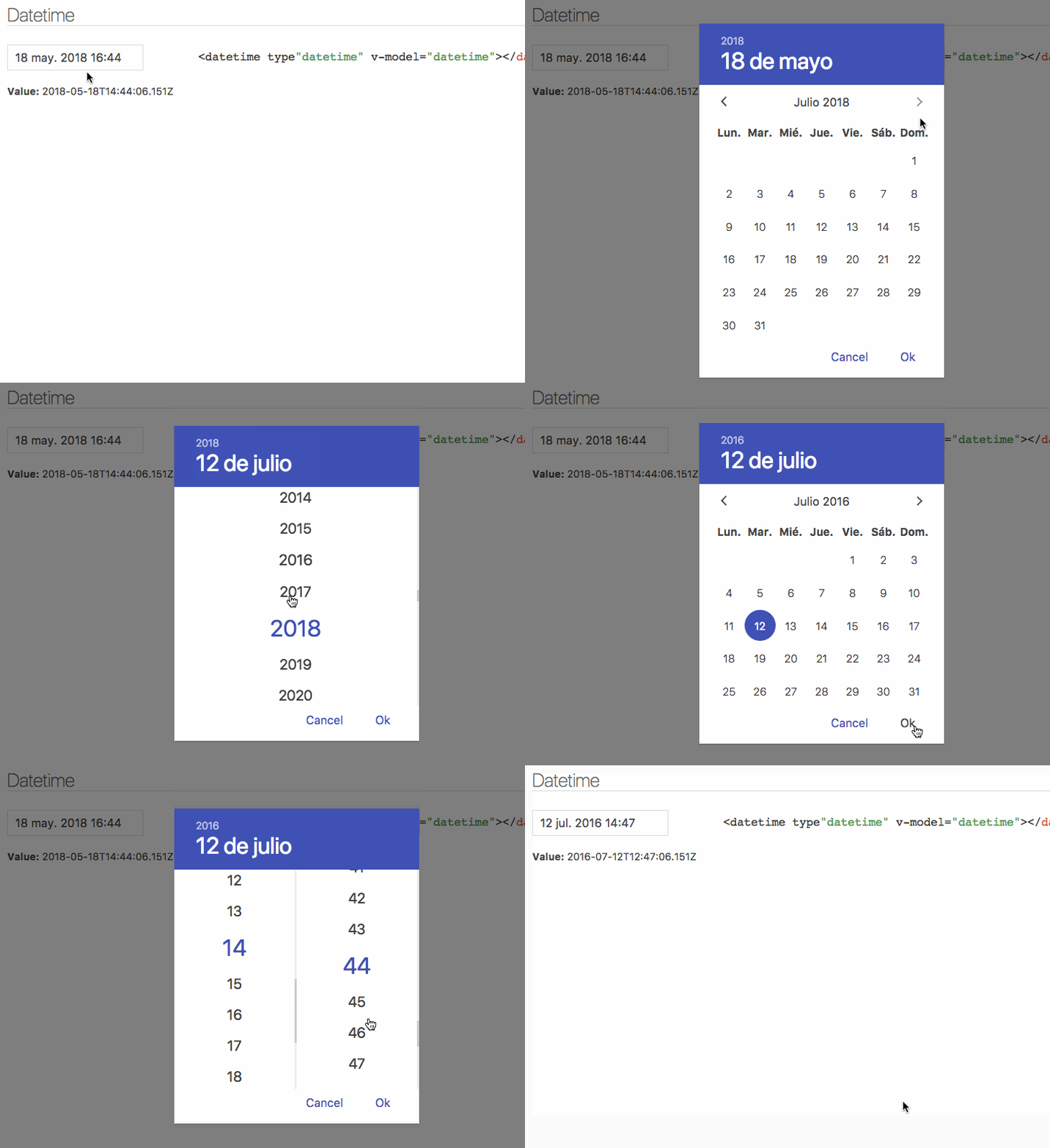](http://mariomka.github.io/vue-datetime)
## Installation
### Bundler (Webpack, Rollup...)
```bash
yarn add luxon vue-datetime weekstart
```
Or
```bash
npm install --save luxon vue-datetime weekstart
```
**weekstart** is optional, is used to get the first day of the week.
#### Register
```js
import Vue from 'vue'
import { Datetime } from 'vue-datetime'
// You need a specific loader for CSS files
import 'vue-datetime/dist/vue-datetime.css'
Vue.use(Datetime)
```
#### Register manually
##### Global
```js
import { Datetime } from 'vue-datetime';
Vue.component('datetime', Datetime);
```
##### Local
```js
import { Datetime } from 'vue-datetime';
Vue.extend({
template: '...',
components: {
datetime: Datetime
}
});
```
### Browser
Download vue, luxon, weekstart and vue-datetime or use a CDN like unpkg.
```html
<link rel="stylesheet" href="vue-datetime.css"></link>
<script src="vue.js"></script>
<script src="luxon.js"></script>
<script src="weekstart.js"></script>
<script src="vue-datetime.js"></script>
```
The component registers itself automatically as `<datetime>`. If you want to use a different name then register it explicitly:
```js
Vue.component('vue-datetime', window.VueDatetime.Datetime);
```
**weekstart** is optional, is used to get the first day of the week.
## Usage
### Minimal
```html
<datetime v-model="date"></datetime>
```
## Setup
### Parameters
Parameter | Type | Default | Description
--------- | ---- | ------- | -----------
v-model (*required*) | ISO 8601 `String` | - | Datetime.
type | `String` | `date` | Picker type: date, datetime or time.
input-id | `String` | `''` | Id for the input.
input-class | `String`, `Array` or `Object` | `''` | Class for the input.
input-style | `String`, `Array` or `Object` | `''` | Style for the input.
hidden-name | `String` | `null` | Name for hidden input with raw value. See #51.
value-zone | `String` | `UTC` | Time zone for the value.
zone | `String` | `local` | Time zone for the picker.
format | `Object` or `String` | `DateTime.DATE_MED`, `DateTime.DATETIME_MED` or `DateTime.TIME_24_SIMPLE` | Input date format. Luxon [presets](https://moment.github.io/luxon/docs/manual/formatting.html#tolocalestring--strings-for-humans-) or [tokens](https://moment.github.io/luxon/docs/manual/formatting.html#formatting-with-tokens--strings-for-cthulhu-).
phrases | `Object` | `{ok: 'Ok', cancel: 'Cancel'}` | Phrases.
use12-hour | `Boolean` | `false` | Display 12 hour (AM/PM) mode
hour-step | `Number` | `1` | Hour step.
minute-step | `Number` | `1` | Minute step.
min-datetime | ISO 8601 `String` | `null` | Minimum datetime.
max-datetime | ISO 8601 `String` | `null` | Maximum datetime.
auto | `Boolean` | `false` | Auto continue/close on select.
week-start | `Number` | auto from locale if _weekstart_ is available or `1` | First day of the week. 1 is Monday and 7 is Sunday.
flow | `Array` | Depends of *type* | Customize steps flow, steps available: time, date, month, year. Example: ['year', 'date', 'time']
title | `String` | `''` | Popup title.
hide-backdrop | `Boolean` | `false` | Show/Hide backdrop.
backdrop-click | `Boolean` | `true` | Enable/Disable backdrop click to cancel (outside click).
Input inherits all props not defined above but `style` and `class` will be inherited by root element. [See inheritAttrs option](https://vuejs.org/v2/api/#inheritAttrs)
The component is based on [Luxon](https://github.com/moment/luxon), check out [documentation](https://moment.github.io/luxon/docs/index.html) to set [time zones](https://moment.github.io/luxon/docs/manual/zones.html) and [format](https://moment.github.io/luxon/docs/manual/formatting.html).
### Internationalization
Date internationalization depends on luxon. [Set the default locale](https://moment.github.io/luxon/docs/manual/intl.html#setting-the-default).
```js
import { Settings } from 'luxon'
Settings.defaultLocale = 'es'
```
### Events
Component emits the `input` event to work with `v-model`. [More info](https://vuejs.org/v2/guide/components.html#Form-Input-Components-using-Custom-Events).
`close` event is emitted when the popup closes.
Also, input text inherits all component events.
### Slots
You can customize the component using named slots.
Available slots: `before`, `after`, `button-cancel` and `button-confirm`
#### Button customization example:
```html
<datetime v-model="date" input-id="startDate">
<label for="startDate" slot="before">Field Label</label>
<span class="description" slot="after">The field description</span>
<template slot="button-cancel">
<fa :icon="['far', 'times']"></fa>
Cancel
</template>
<template slot="button-confirm">
<fa :icon="['fas', 'check-circle']"></fa>
Confirm
</template>
</datetime>
```
You can also use `slot-scope` to determine which view is currently active:
```html
<template slot="button-confirm" slot-scope="scope">
<span v-if='scope.step === "date"'>Next <i class='fas fa-arrow-right' /></span>
<span v-else><i class='fas fa-check-circle' /> Publish</span>
</template>
```
## Theming
Theming is supported by overwriting CSS classes.
## Development
### Launch lint and tests
```bash
yarn test
```
### Launch visual tests
```bash
yarn dev
```
### Build
Bundle the js and css to the `dist` folder:
```bash
yarn build
```
## License
[The MIT License](http://opensource.org/licenses/MIT)