vue-date-range
Version:
A vue component for choosing dates and date ranges. Uses Moment.js for date operations. Support Chinese lunar.
298 lines (265 loc) • 7.74 kB
Markdown
# vue-date-range
[](https://travis-ci.org/ParadeTo/vue-date-range)
[](https://coveralls.io/github/ParadeTo/vue-date-range)
A vue component for choosing dates and date ranges. Uses Moment.js for date operations. Support Chinese lunar.
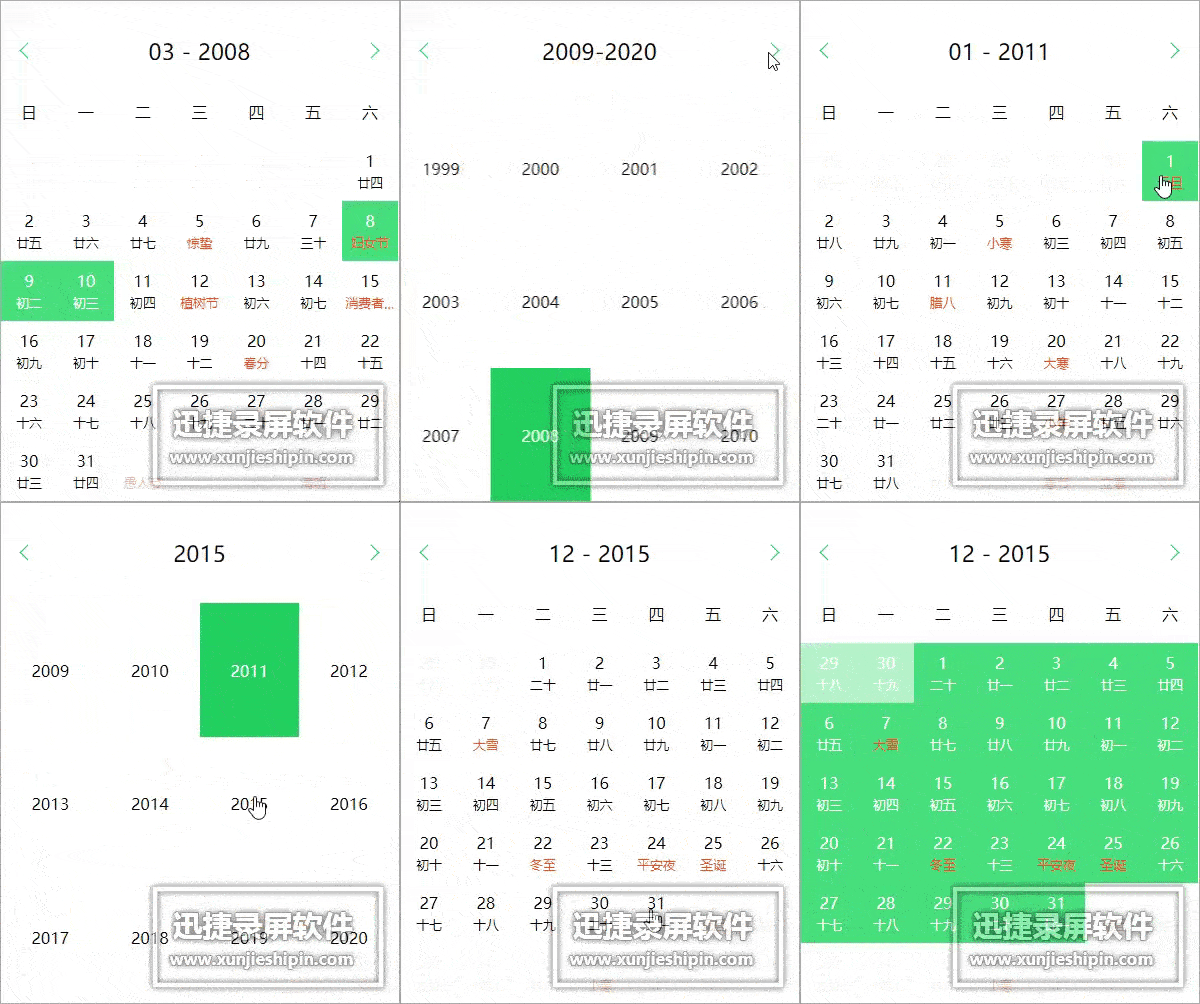
[Live Demo](http://paradeto.com/vue-date-range/)
# use
## npm
``npm install vue-date-range``
### Calendar
```
<calendar class="calendar"
:show-lunar="true"
:first-day-of-week="1"
:disable-days-before-today="disableDaysBeforeToday"
:sync-date.sync="date"
:lang="lang" @change="onChange"></calendar>
...
import {Calendar} from 'vue-date-range';
export default {
components: {
Calendar
},
data() {
return {
disableDaysBeforeToday: true,
lang: 'zh',
date: moment()
};
},
methods: {
onChange(date) {
this.date = date;
}
}
}
```
### DateRange
```
<daterange class="calendar" :sync-range.sync="range" :lang="lang" @change="onChange"></daterange>
...
import {DateRange} from 'vue-date-range';
export default {
components: {
DateRange
},
data() {
return {
lang: 'en',
range: {
startDate: moment(),
endDate: moment().add(7, 'days')
}
};
},
methods: {
onChange(range) {
this.range = range;
},
setRange (p) {
if (typeof p === 'number') {
console.log(p)
this.range = {
startDate: moment().add(p, 'days'),
endDate: moment()
}
}
},
}
}
```
## browser
Download vue-date-range.min.js from dist/ and import in your web page. Example:
```
...
<div id="calendarLunar" class="calendar-wrapper">
<span>{{date.format('YYYY-MM-DD')}}</span>
<calendar class="calendar"
:show-lunar="true"
:first-day-of-week="1"
:disable-days-before-today="disableDaysBeforeToday"
:sync-date="date"
:lang="lang" @change="onChange"></calendar>
</div>
...
<div id="range" class="calendar-wrapper">
<span>{{range.startDate.format('YYYY-MM-DD')}}</span>~<span>{{range.endDate.format('YYYY-MM-DD')}}</span>
<daterange class="calendar" :sync-range="range" :lang="lang" @change="onChange"></daterange>
<button @click.stop.prevent="setRange(-7)">Last 7 days</button>
<button @click.stop.prevent="setRange(-30)">Last 1 month</button>
</div>
...
<script src="//cdn.bootcss.com/moment.js/2.17.1/moment.min.js"></script>
<script src="https://unpkg.com/vue/dist/vue.js"></script>
<script src="../dist/vue-date-range.min.js"></script>
<script>
new Vue({
el: '#calendarLunar',
components: {
'calendar':daterange.Calendar
},
data() {
return {
disableDaysBeforeToday: true,
lang: 'zh',
date: moment()
};
},
methods: {
onChange(date) {
this.date = date;
}
}
});
new Vue({
el: '#range',
components: {
'daterange':daterange.DateRange
},
data() {
return {
lang: 'en',
range: {
startDate: moment(),
endDate: moment().add(7, 'days')
}
};
},
methods: {
onChange(range) {
this.range = range;
},
setRange (p) {
if (typeof p === 'number') {
console.log(p)
this.range = {
startDate: moment().add(p, 'days'),
endDate: moment()
}
}
},
}
});
</script>
```
# .sync
For Vue2.3.0+, we can use [`.sync` modifier](https://vuejs.org/v2/guide/components.html#sync-Modifier):
```javascript
<calendar :sync-date.sync="date"></calendar>
<date-range :sync-range.sync="range"></date-range>
```
# v-model
We can also use [`v-model` modifier](https://vuejs.org/v2/guide/components.html#Form-Input-Components-using-Custom-Events) (these can be configured in 2.2.0+):
```javascript
<calendar v-model="date"></calendar>
<date-range v-model="range"></date-range>
```
# Props
## Calendar
* open-transition: Open transition or not. Default is true.
* show-lunar: Show lunar or not. Default is false.
* disable-days-before-today: Disable days before today or not.
* days-disabled-start: Disable days after this day.
* days-disabled-end: Disable days before this day.
* disabled-func: Used to decide if the day is disabled or not.
```javascript
...
// set odd days to disabled
disabledFunc: function (dayMoment) {
var date = dayMoment.date()
if (date % 2 === 1) {
return true
}
return false
}
...
```
* day-class-func: Used to add class to day.
```javascript
...
// add 'today, important' class to today
dayClassFunc: function (dayMoment) {
if (dayMoment.format('YYYY-MM-DD') === moment().format('YYYY-MM-DD')) {
return ['today', 'important']
}
}
...
```
* first-day-of-week: Set the first day of Week. Default is 0 (Sunday).
* month-year-format: The displaying format for month and year. Default is 'MM - YYYY'.
* lang: Language
| addr. | language |
| ---- | ---- |
|da|Danish|
|en|English|
|es|Spanish|
|fi|Finnish|
|fr|French|
|hr|Hrvatski|
|it|Italian|
|lt|Lithuanian|
|nl|Nederlandse|
|de|German|
|pt-br|Portuguese|
|vi|Vietnamese|
|zh|Chinese|
|ja|Japanese|
|he|Hebrew|
|cs|Czech|
|ru|Russian|
|bg|Bulgarian|
|sv|Swedish|
|th|Thai|
|ro|Roman|
|sl-si|Slovenian|
|uk|Ukrainian|
* sync-date: The default selected date. Can be used as the “two-way binding” for date (Vue 2.3.0+). e.g.:
```html
<calendar :sync-date.sync="date"></calendar>
```
* range: The selected date range. e.g.:
```javascript
range: {startDate: moment(), endDate: moment().add(7, 'days')}
```
* day-of-month-prop: Any day of initial selected month. If not set, it will equal to `value` or `syncDate` or`range.startDate` or `moment()`.
## DateRange
This component is build on ``Calendar``, so it has all the props of ``Calendar`` except ``sync-date``
Also it has its specific props:
* emitChangeOnStep0: If set to true, it will emit result after selecting one date. Or it emits result after selecting two dates. Default is false.
* sync-range: The default date range. Can be used as the “two-way binding” for range (Vue 2.3.0+). e.g.:
```html
<date-range :sync-range.sync="range"></date-range>
```
# custom style
This is a day html structure example:
```html
<span title="重阳" class="v-date-cell v-date-selected">
<div class="v-date-cell-text">
<p class="v-date-solar">3</p>
<p class="v-date-lunar">十八</p>
</div>
</span>
```
The span tag will has different classes (`v-date-selected`, `v-date-passive`, `v-date-in-range`, `v-date-start-day`, `v-date-end-day`) according to the dates selected.
You can set your custom style using these classes. e.g.:
```html
.v-date-day-cell.v-date-start-day {
border-bottom-left-radius: 50%;
border-top-left-radius: 50%;
background-color: transparent;
}
.v-date-day-cell.v-date-end-day {
border-bottom-right-radius: 50%;
border-top-right-radius: 50%;
background-color: transparent;
}
.v-date-day-cell.v-date-in-range {
background-color: orange;
}
```
# Thanks
* [迅捷屏幕录像工具](http://www.shipinzhuanhuan.cn/xunjie_video_recorder/index.html)
* [EZGIF.COM](https://ezgif.com/)
# License
MIT