vue-color-kit
Version:
Vue color picker
100 lines (85 loc) • 5.07 kB
Markdown
# vue-color-kit
## [LiveDemo](https://vue-color-kit.vercel.app)
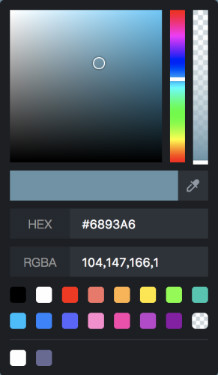
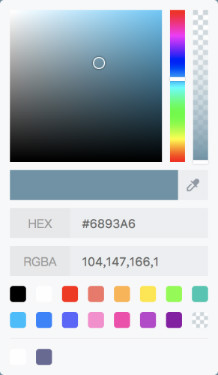
## Install
```bash
$ yarn add vue-color-kit
```
## Example
```html
<template>
<div :style="{background: color}">
<ColorPicker
theme="light"
:color="color"
:sucker-hide="false"
:sucker-canvas="suckerCanvas"
:sucker-area="suckerArea"
@changeColor="changeColor"
@openSucker="openSucker"
@inputFocus="inputFocus"
@inputBlur="inputBlur"
/>
</div>
</template>
<script>
import { ColorPicker } from 'vue-color-kit'
import 'vue-color-kit/dist/vue-color-kit.css'
export default {
components: {
ColorPicker,
},
data() {
return {
color: '#59c7f9',
suckerCanvas: null,
suckerArea: [],
isSucking: false,
}
},
methods: {
changeColor(color) {
const { r, g, b, a } = color.rgba
this.color = `rgba(${r}, ${g}, ${b}, ${a})`
},
openSucker(isOpen) {
if (isOpen) {
// ... canvas be created
// this.suckerCanvas = canvas
// this.suckerArea = [x1, y1, x2, y2]
} else {
// this.suckerCanvas && this.suckerCanvas.remove
}
},
inputFocus(event: FocusEvent) {
// this will get triggered on input field (hex and rgba) get focus
// prop value will be FocusEvent object associated with the input
},
inputBlur(event: FocusEvent) {
// this will get triggeredon input field (hex and rgba) get out of focus (blur event)
// prop value will be FocusEvent object associated with the input
},
},
}
</script>
```
## Options
| Name | Type | Default | Description |
| ------------------ | ----------------- | ---------------------------------------------------------------------------------------------------------------------------------------------------------------------------------------- | --------------------------------------- |
| theme | String | `dark` | `dark` or `light` |
| color | String | `#000000` | `rgba` or `hex` |
| colors-default | Array | `['#000000', '#FFFFFF', '#FF1900', '#F47365', '#FFB243', '#FFE623', '#6EFF2A', '#1BC7B1', '#00BEFF', '#2E81FF', '#5D61FF', '#FF89CF', '#FC3CAD', '#BF3DCE', '#8E00A7', 'rgba(0,0,0,0)']` | like `['#ff00ff', '#0f0f0f', ...]` |
| colors-history-key | String | `vue-color-kit-history` |
| sucker-hide | Boolean | `true` | `true` or `false` |
| sucker-canvas | HTMLCanvasElement | `null` | like `document.createElement('canvas')` |
| sucker-area | Array | `[]` | like `[x1, y1, x2, y2]` |
> `color` is one-way data flow, so you can't use `v-model`. why? because you'll listen `changeColor` event do more things, so i think it's not necessary here.
## Events
| Name | Type | Args | Description |
| ----------- | -------- | ------ | ------------------------------- |
| changeColor | Function | color | `{ rgba: {}, hsv: {}, hex: ''}` |
| openSucker | Function | isOpen | `true` or `false` |
| inputFocus | Function | Event | `FocusEvent` Object |
| inputBlur | Function | Event | `FocusEvent` Object |
> if you want use sucker, then `openSucker`, `sucker-hide`, `sucker-canvas`, `sucker-area` is necessary. when you click sucker button, you can click it again or press key of `esc` to exit.