vs-deploy
Version:
Commands for deploying files of your workspace to a destination.
336 lines (271 loc) • 14 kB
Markdown
# vs-deploy
[](https://marketplace.visualstudio.com/items?itemName=mkloubert.vs-deploy)
[](https://marketplace.visualstudio.com/items?itemName=mkloubert.vs-deploy)
[](https://marketplace.visualstudio.com/items?itemName=mkloubert.vs-deploy#review-details)
[](https://gitter.im/mkloubert/vs-deploy?utm_source=badge&utm_medium=badge&utm_campaign=pr-badge)
[Visual Studio Code](https://code.visualstudio.com/) (VS Code) extension that provides commands to deploy files of a workspace to a destination.
The extension supports the following destination types:
| Type | Supports download / pull? |
| ---- |:--:|
| [Amazon AWS S3 buckets](https://github.com/mkloubert/vs-deploy/wiki/target_s3bucket) | X |
| [Apps / executables / scripts (bash, batch, e.g.)](https://github.com/mkloubert/vs-deploy/wiki/target_app) | |
| [Azure blob storages](https://github.com/mkloubert/vs-deploy/wiki/target_azureblob) | X |
| [DropBox](https://github.com/mkloubert/vs-deploy/wiki/target_dropbox) | X |
| [External Node.js based scripts](https://github.com/mkloubert/vs-deploy/wiki/target_script) | X |
| [FTP](https://github.com/mkloubert/vs-deploy/wiki/target_ftp) | X |
| [HTTP(s)](https://github.com/mkloubert/vs-deploy/wiki/target_http) | |
| [Local or shared network folders inside a LAN](https://github.com/mkloubert/vs-deploy/wiki/target_local) | X |
| [Mail (SMTP)](https://github.com/mkloubert/vs-deploy/wiki/target_mail) | |
| [Remote machines like other VS Code instances](https://github.com/mkloubert/vs-deploy/wiki/target_remote) | |
| [REST APIs](https://github.com/mkloubert/vs-deploy/wiki/target_api) like [vs-rest-api](https://github.com/mkloubert/vs-rest-api) | X |
| [SFTP](https://github.com/mkloubert/vs-deploy/wiki/target_sftp) | X |
| [Slack](https://github.com/mkloubert/vs-deploy/wiki/target_slack) | |
| [SQL](https://github.com/mkloubert/vs-deploy/wiki/target_sql) | |
| [ZIP files](https://github.com/mkloubert/vs-deploy/wiki/target_zip) | X |
There is also build-in support for the following [compilers and processors](https://github.com/mkloubert/vs-deploy/wiki/targetoperations#compile-):
* [CoffeeScript](http://coffeescript.org/)
* [html-minifier](https://www.npmjs.com/package/html-minifier)
* [Less](http://lesscss.org/)
* [Pug](https://pugjs.org/)
* [TypeScript](https://www.typescriptlang.org/)
* [UglifyJS 2](https://github.com/mishoo/UglifyJS2)
... and these languages:
* brazilian portuguese (thanks to [Celio Rodrigues](https://github.com/rodriguescelio)!)
* english
* french (thanks to [neiobaf](https://github.com/neiobaf) and [Mathieu Lesniak](https://github.com/mathieulesniak)!)
* german
* spanish (thanks to [alejandroivan](https://github.com/alejandroivan)!)
* russian (thanks to [sag3ll0](https://github.com/sag3ll0)!)
If you would like to add another translation, please read [that issue](https://github.com/mkloubert/vs-deploy/issues/18) first.
[](https://paypal.me/MarcelKloubert)
## Table of contents
1. [Demos](#demos-)
* [Deploying to SFTP](#deploying-to-sftp-)
* [Deploy on change](#deploy-on-change-)
* [Download / pull from SFTP](#download--pull-from-sftp-)
* [Check for newer files](#check-for-newer-files-)
* [Sync when open](#sync-when-open-)
* [ZIP file](#deploy-to-zip-file-)
* [Deploy to remote Visual Studio Code instance](#deploy-to-remote-visual-studio-code-instance-)
2. [Recoded version](#recoded-version-)
3. [Install](#install-)
4. [How to use](#how-to-use-)
* [Settings](#settings-)
* [Packages](#packages-)
* [Targets](#targets-)
* [How to execute](#how-to-execute-)
## Recoded version [[↑](#table-of-contents)]
I have started a new and recoded version of that extension, called [vscode-deploy-reloaded](https://github.com/mkloubert/vscode-deploy-reloaded), which is still in a preview, but good beta state.
## Demos [[↑](#table-of-contents)]
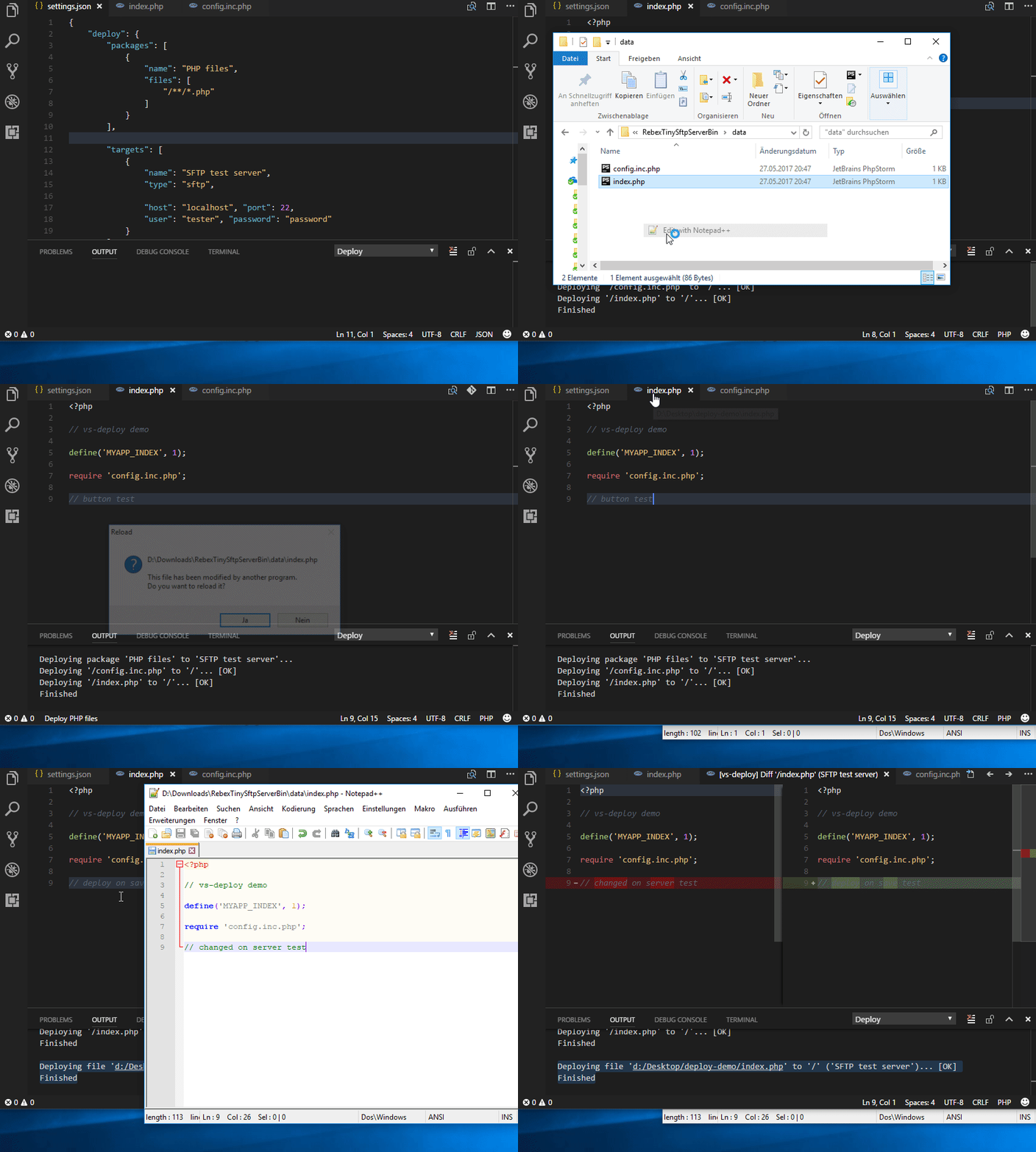
### Deploying to SFTP [[↑](#demos-)]
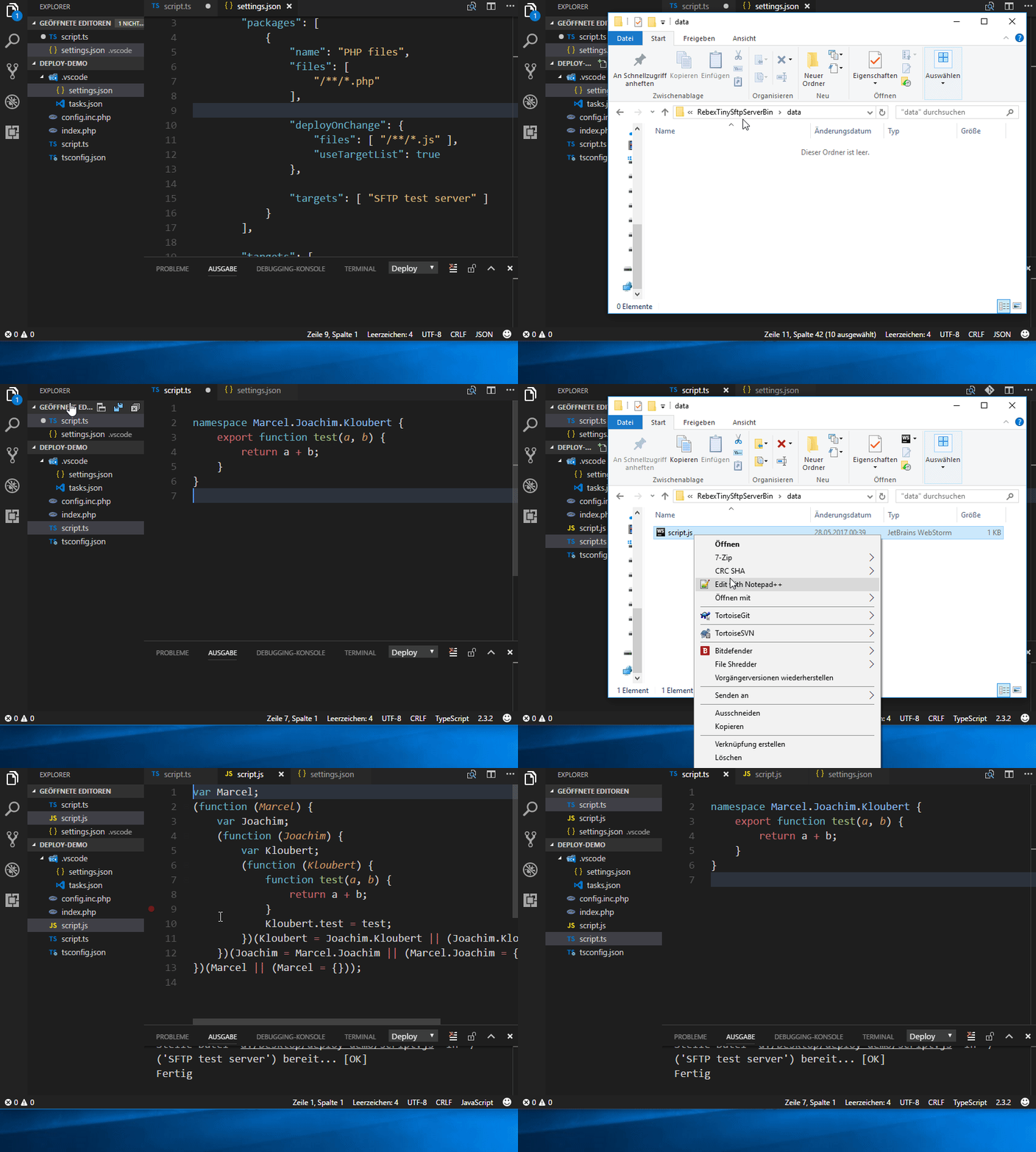
### Deploy on change [[↑](#demos-)]
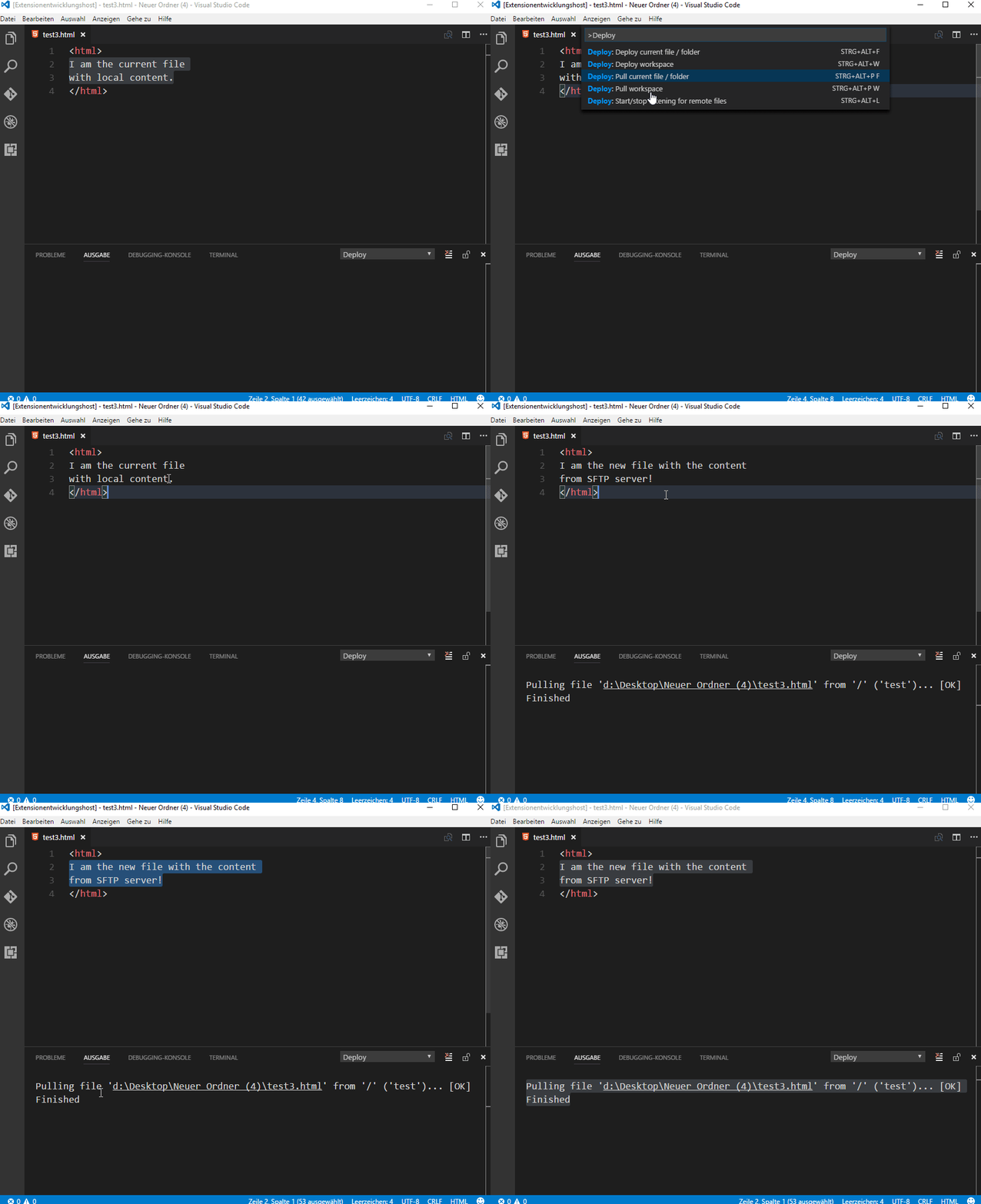
### Download / pull from SFTP [[↑](#demos-)]
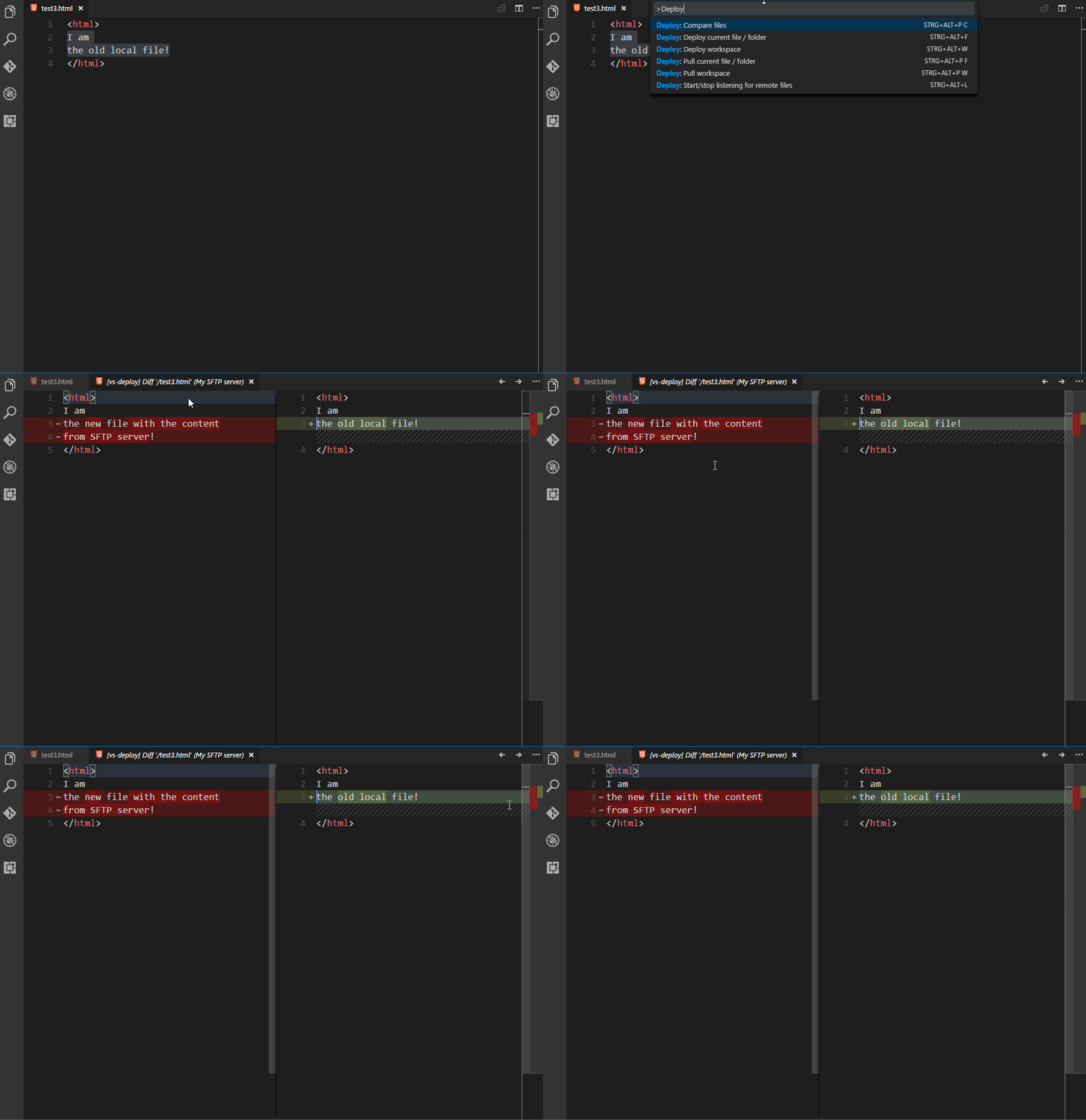
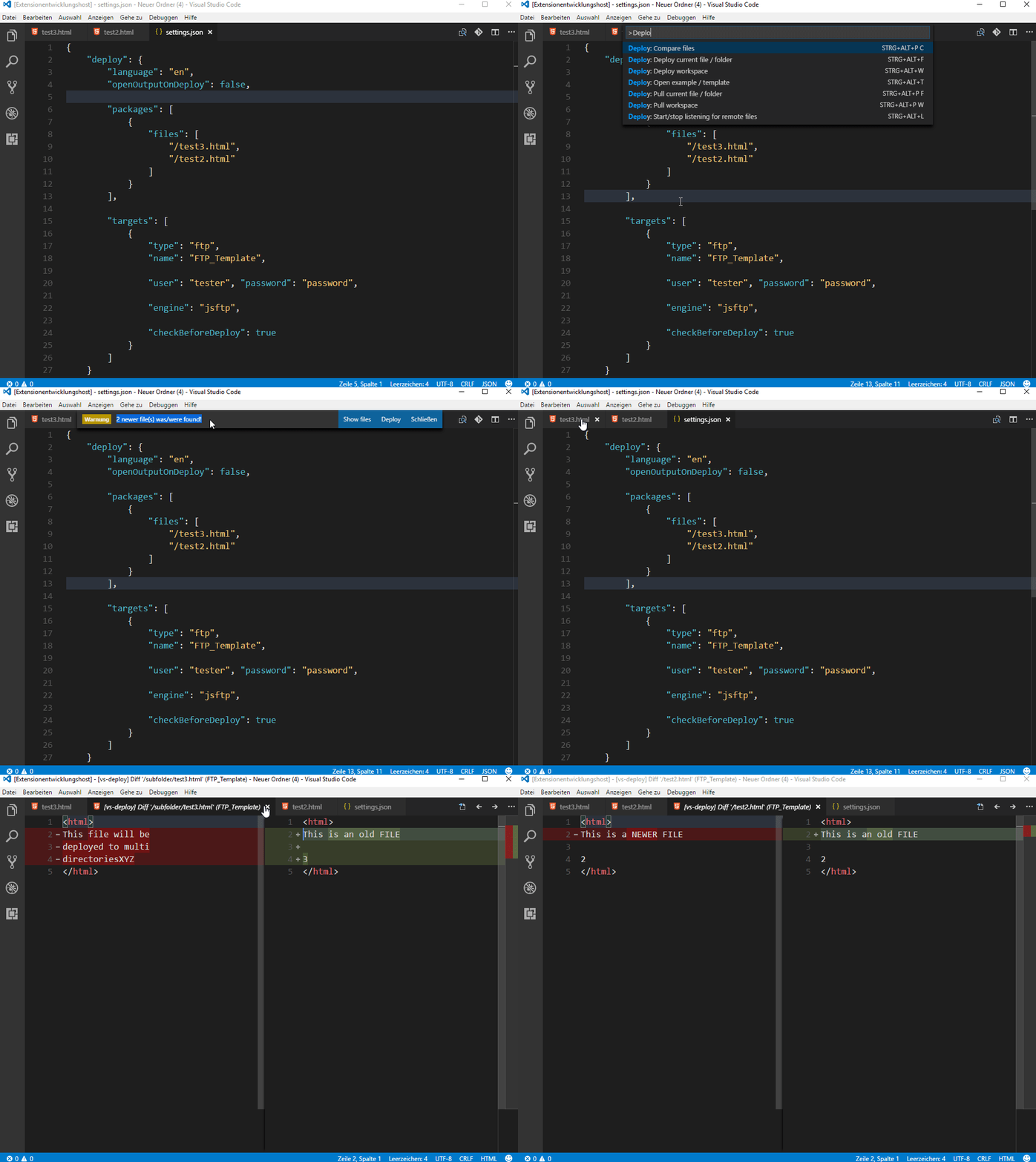
### Compare files [[↑](#demos-)]
### Check for newer files [[↑](#demos-)]
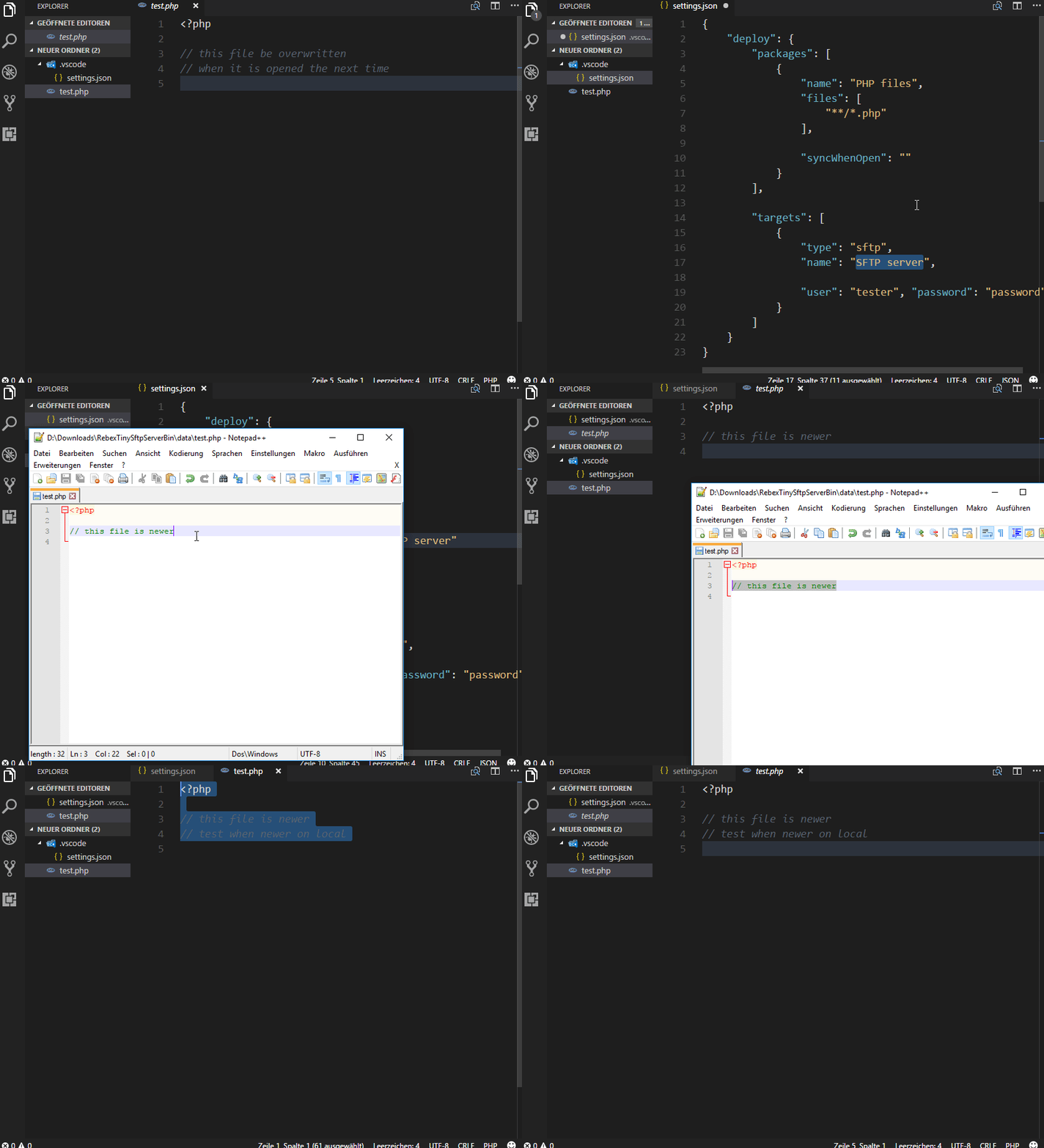
### Sync when open [[↑](#demos-)]
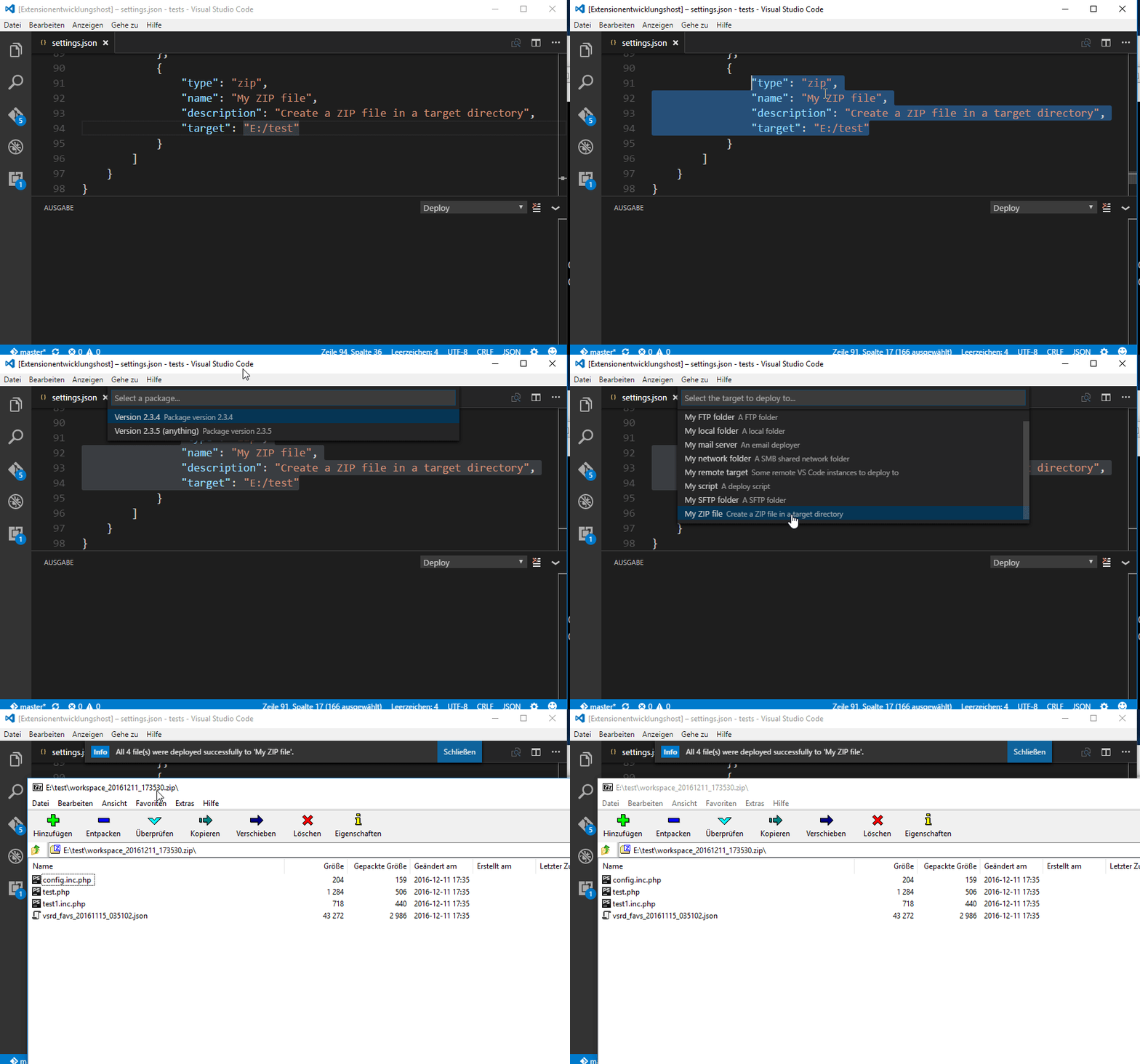
### Deploy to ZIP file [[↑](#demos-)]
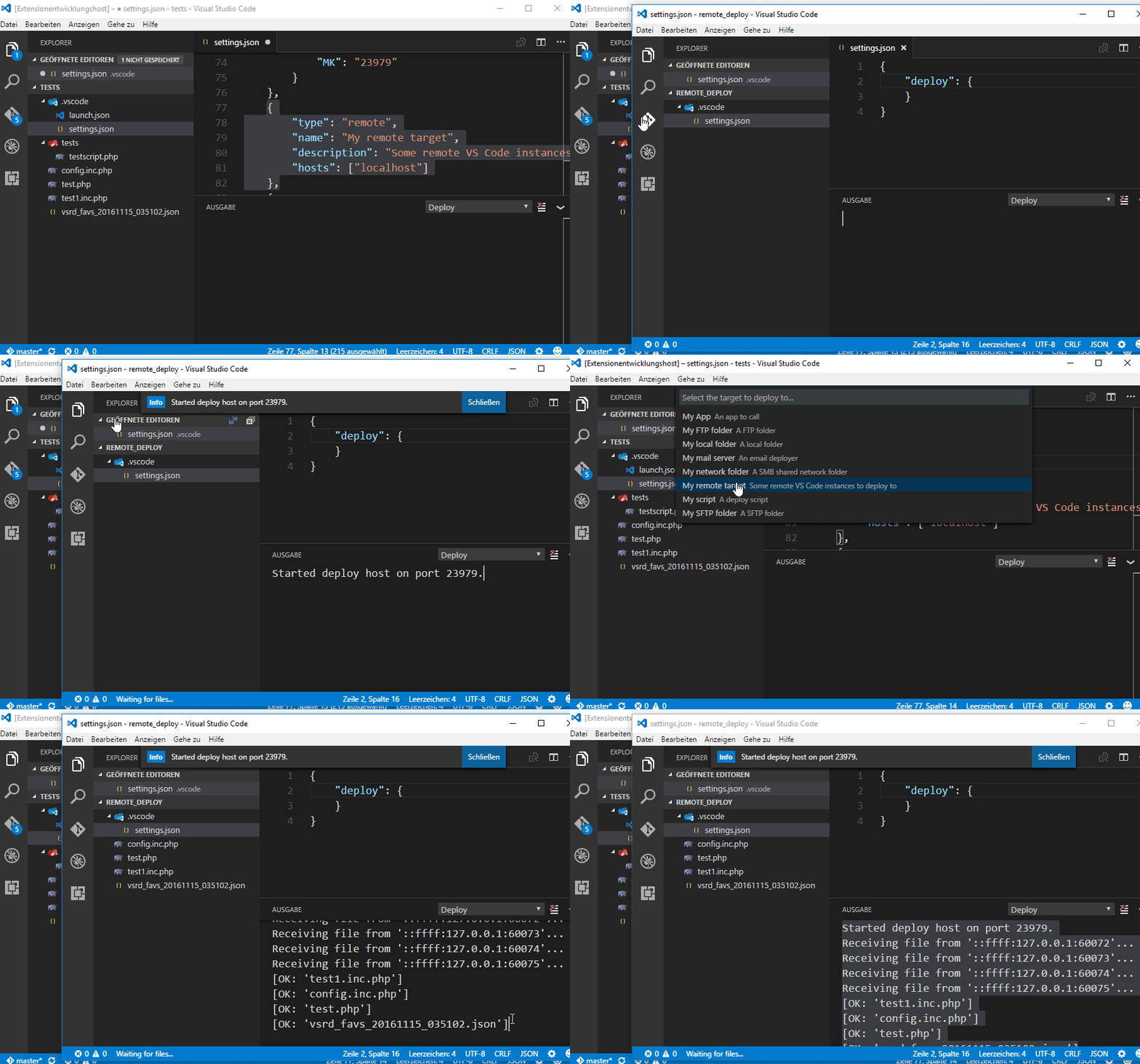
### Deploy to remote Visual Studio Code instance [[↑](#demos-)]
## Install [[↑](#table-of-contents)]
Launch VS Code Quick Open (Ctrl+P), paste the following command, and press enter:
```bash
ext install vs-deploy
```
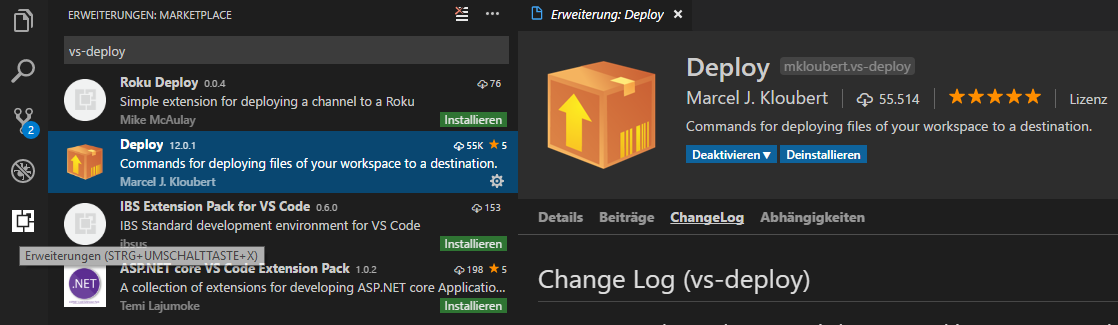
Or search for things like `vs-deploy` in your editor:
## How to use [[↑](#table-of-contents)]
Detailed information can be found at the [wiki](https://github.com/mkloubert/vs-deploy/wiki).
Otherwise...
### Settings [[↑](#how-to-use-)]
Open (or create) your `settings.json` in your `.vscode` subfolder of your workspace.
Add a `deploy` section:
```json
{
"deploy": {
}
}
```
#### Packages [[↑](#settings-)]
A package is a description of files of your workspace that should be deployed.
Add the subsection `packages` and add one or more entry:
```json
{
"deploy": {
"packages": [
{
"name": "Version 2.3.4",
"description": "Package version 2.3.4",
"files": [
"**/*.php",
"/*.json"
],
"exclude": [
"tests/**"
],
"deployOnSave": true
}
]
}
}
```
Look at the [wiki](https://github.com/mkloubert/vs-deploy/wiki#packages-) to get more information about packages.
#### Targets [[↑](#settings-)]
A target describes where a file or package should be transfered to.
Add the subsection `targets` and add one or more entry:
```json
{
"deploy": {
"targets": [
{
"type": "sftp",
"name": "My SFTP folder",
"description": "A SFTP folder",
"dir": "/my_package_files",
"host": "localhost", "port": 22,
"user": "tester", "password": "password",
"checkBeforeDeploy": true,
"mappings": [
{
"source": "dir/of/files/that/should/be/mapped",
"target": "dir/on/target"
}
]
},
{
"type": "ftp",
"name": "My FTP folder",
"description": "A FTP folder",
"dir": "/my_package_files",
"host": "localhost", "port": 21,
"user": "anonymous", "password": "",
"deployed": [
{
"type": "sql",
"engine": "mysql",
"queries": [
"TRUNCATE TABLE `debug`",
"TRUNCATE TABLE `logs`"
]
},
{
"target": "https://github.com/mkloubert"
}
]
},
{
"type": "local",
"name": "My local folder",
"description": "A local folder",
"dir": "E:/test/my_package_files"
},
{
"type": "local",
"name": "My network folder",
"description": "A SMB shared network folder",
"dir": "\\\\MyServer\\my_package_files"
},
{
"type": "zip",
"name": "My ZIP file",
"description": "Create a ZIP file in a target directory",
"target": "E:/test"
},
{
"type": "mail",
"name": "My mail server",
"description": "An email deployer",
"host": "smtp.example.com", "port": 465,
"secure": true, "requireTLS": true,
"user": "mkloubert@example.com", "password": "P@assword123!",
"from": "mkloubert@example.com",
"to": "tm@example.com, ys@example.com"
},
{
"type": "script",
"name": "My script",
"description": "A deploy script",
"script": "E:/test/deploy.js",
"options": {
"TM": 5979,
"MK": "23979"
}
},
{
"type": "http",
"name": "My HTTP service",
"description": "A HTTP service on a HTTP server, e.g.",
"url": "https://host.example.com/webdav/?file=${VSDeploy-File}",
"user": "mkloubert", "password": "P@ssword123!"
},
{
"type": "remote",
"name": "My remote target",
"description": "Some remote VS Code instances to deploy to",
"hosts": ["localhost", "192.168.0.101", "192.168.0.101:5979"]
},
{
"type": "app",
"name": "My App",
"description": "An app to call",
"app": "E:/test/deploy.cmd",
"arguments": ["a", "b", "c"]
},
{
"type": "batch",
"name": "My Batch",
"description": "A batch operation",
"targets": ["My mail server", "My ZIP file"]
},
{
"type": "azureblob",
"name": "My Azure blob storage",
"description": "An container in an Azure blob storage",
"container": "my-container",
"account": "my-storage-account",
"accessKey": "<ACCESS-KEY-FROM-AZURE-PORTAL>"
},
{
"type": "s3bucket",
"name": "My Amazon Bucket",
"description": "An Amazon AWS S3 bucket",
"bucket": "my-bucket"
},
{
"type": "dropbox",
"name": "My DropBox folder",
"description": "Deploy to my DropBox folder",
"token": "<ACCESS-TOKEN>"
},
{
"type": "api",
"name": "My REST API",
"description": "Deploys to a vs-rest-api",
"host": "vscode.example.com",
"user": "rgrimes", "password": "lori"
}
]
}
}
```
Look at the [wiki](https://github.com/mkloubert/vs-deploy/wiki#targets-) to get more information about targets.
### How to execute [[↑](#how-to-use-)]
Press `F1` to open the list of commands and enter one of the following commands:
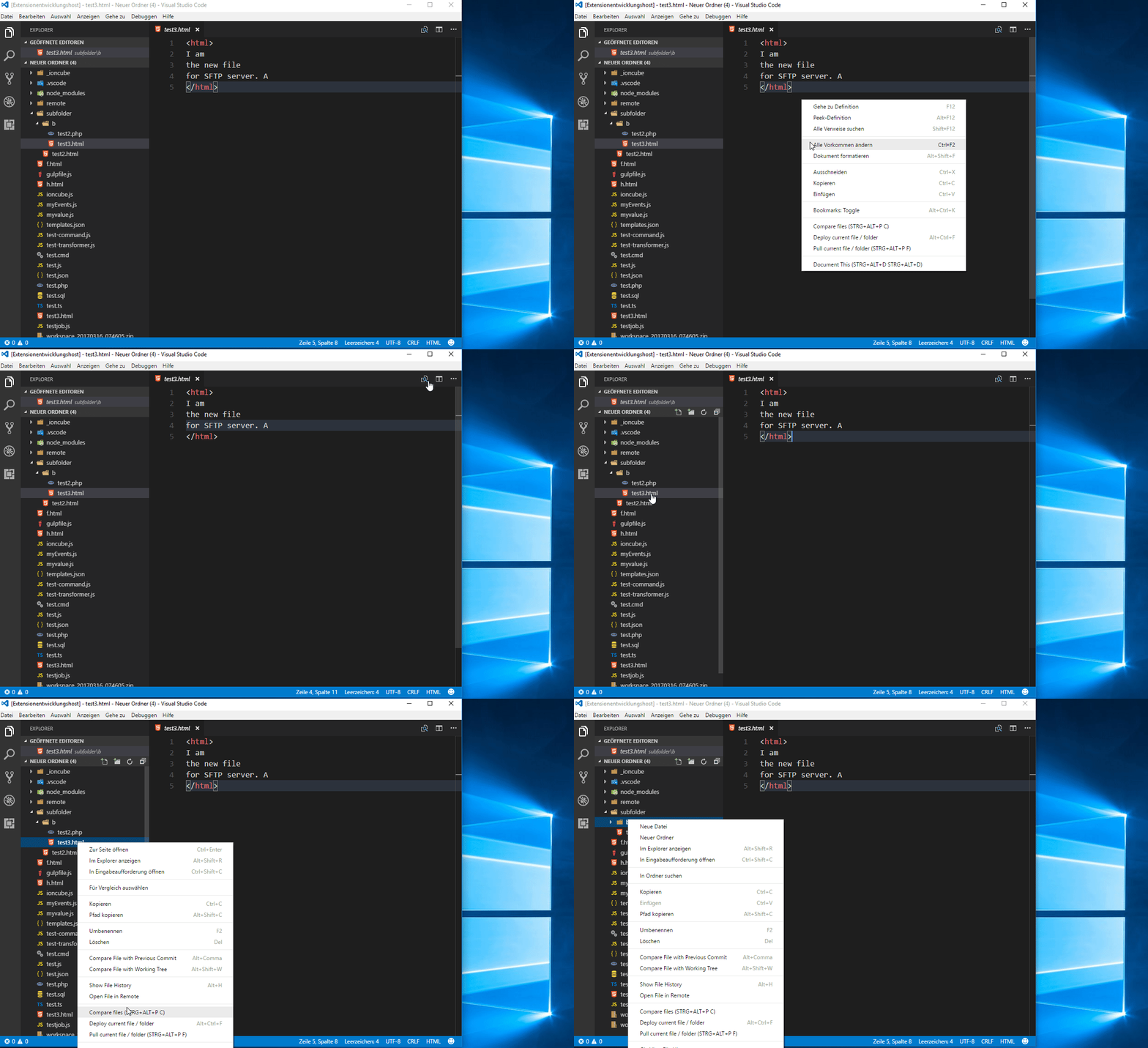
| Name | Description | Shortcut (`CTRL` is `CMD` on Mac) |
| ---- | --------- | --------- |
| `Deploy: Change switch` | Changes the options of a [switch](https://github.com/mkloubert/vs-deploy/wiki/target_switch). | This command does not have a default key binding. If you want to setup a shortcut for `extension.deploy.changeSwitch`, you can update `keybindings.json` as described [here](https://code.visualstudio.com/docs/getstarted/keybindings#_advanced-customization). |
| `Deploy: Compare files` | Compares a local file with a remote one. | `CTRL+ALT+P, C` |
| `Deploy: Deploy current file / folder` | Deploys the current opened file. | `CTRL+ALT+F` |
| `Deploy: Deploy workspace` | Deploys a specific package. | `CTRL+ALT+W` |
| `Deploy: Open example / template` | Opens a [template](https://github.com/mkloubert/vs-deploy/wiki/templates) from one or more offical and/or custom repository. | This command does not have a default key binding. If you want to setup a shortcut for `extension.deploy.openTemplate`, you can update `keybindings.json` as described [here](https://code.visualstudio.com/docs/getstarted/keybindings#_advanced-customization). |
| `Deploy: Pull current file / folder` | Pulls the current opened file. | `CTRL+ALT+P, F` |
| `Deploy: Pull workspace` | Pulls a specific package. | `CTRL+ALT+P, W` |
| `Deploy: Select workspace` | Changes the current workspace, s. [Multi-root Workspaces](https://code.visualstudio.com/docs/editor/multi-root-workspaces). | This command does not have a default key binding. If you want to setup a shortcut for `extension.deploy.selectWorkspace`, you can update `keybindings.json` as described [here](https://code.visualstudio.com/docs/getstarted/keybindings#_advanced-customization). |
| `Deploy: Start/stop listening for files` | Start/stop listening for files from a remote machine. | `CTRL+ALT+L` |