vanilla-jsoneditor
Version:
A web-based tool to view, edit, format, transform, and validate JSON
272 lines (216 loc) • 7.91 kB
Markdown
A web-based tool to view, edit, format, transform, and validate JSON.
Try it out: https://jsoneditoronline.org
This is the vanilla variant of `svelte-jsoneditor`, which can be used in vanilla JavaScript or frameworks like SolidJS, React, Vue, Angular.
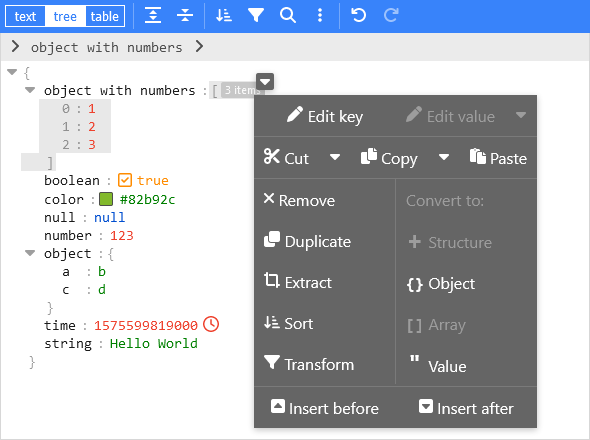
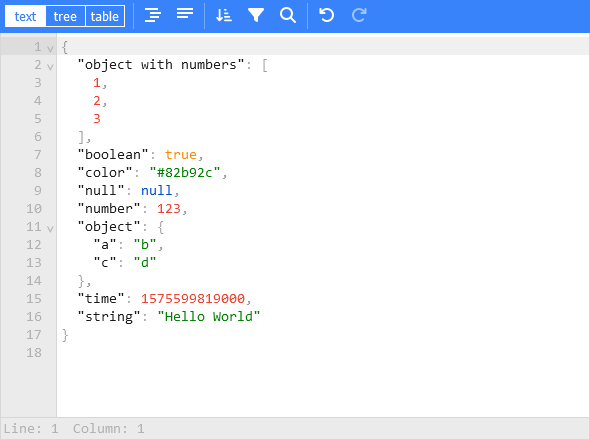
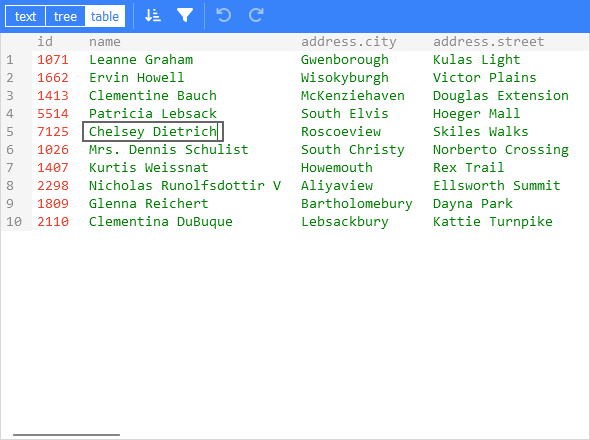
- View and edit JSON
- Has a low level text editor and high level tree view and table view
- Format (beautify) and compact JSON
- Sort, query, filter, and transform JSON
- Repair JSON
- JSON schema validation and pluggable custom validation
- Color highlighting, undo/redo, search and replace
- Utilities like a color picker and timestamp tag
- Handles large JSON documents up to 512 MB
Install using npm:
```
npm install vanilla-jsoneditor
```
Remark: for usage in a Svelte project, install and use `svelte-jsoneditor` instead of `vanilla-jsoneditor`.
If you have a setup for your project with a bundler (like Vite, Rollup, or Webpack), it is best to use the default ES import:
```ts
// for use in a React, Vue, or Angular project
import { JSONEditor } from 'vanilla-jsoneditor'
```
If you want to use the library straight in the browser, use the provided standalone ES bundle:
```ts
// for use directly in the browser
import { JSONEditor } from 'vanilla-jsoneditor/standalone.js'
```
The standalone bundle contains all dependencies of `vanilla-jsoneditor`, for example `lodash-es` and `Ajv`. If you use some of these dependencies in your project too, it means that they will be bundled twice in your web application, leading to a needlessly large application size. In general, it is preferable to use the default `import { JSONEditor } from 'vanilla-jsoneditor'` so dependencies can be reused.
```html
<!doctype html>
<html lang="en">
<head>
<title>JSONEditor</title>
</head>
<body>
<div id="jsoneditor"></div>
<script type="module">
import { JSONEditor } from 'vanilla-jsoneditor/standalone.js'
// Or use it through a CDN (not recommended for use in production):
// import { JSONEditor } from 'https://unpkg.com/vanilla-jsoneditor/index.js'
// import { JSONEditor } from 'https://cdn.jsdelivr.net/npm/vanilla-jsoneditor/index.js'
let content = {
text: undefined,
json: {
greeting: 'Hello World'
}
}
const editor = new JSONEditor({
target: document.getElementById('jsoneditor'),
props: {
content,
onChange: (updatedContent, previousContent, { contentErrors, patchResult }) => {
// content is an object { json: JSONData } | { text: string }
console.log('onChange', { updatedContent, previousContent, contentErrors, patchResult })
content = updatedContent
}
}
})
// use methods get, set, update, and onChange to get data in or out of the editor.
// Use updateProps to update properties.
</script>
</body>
</html>
```
Depending on whether you are using JavaScript of TypeScript, create either a JSX or TSX file:
```tsx
//
// JSONEditorReact.tsx
//
import { useEffect, useRef } from 'react'
import { JSONEditor, JSONEditorPropsOptional } from 'vanilla-jsoneditor'
const JSONEditorReact: React.FC<JSONEditorPropsOptional> = (props) => {
const refContainer = useRef<HTMLDivElement>(null)
const refEditor = useRef<JSONEditor | null>(null)
useEffect(() => {
// create editor
refEditor.current = new JSONEditor({
target: refContainer.current!,
props: {}
})
return () => {
// destroy editor
if (refEditor.current) {
refEditor.current.destroy()
refEditor.current = null
}
}
}, [])
useEffect(() => {
// update props
if (refEditor.current) {
refEditor.current.updateProps(props)
}
}, [props])
return <div ref={refContainer} />
}
export default JSONEditorReact
```
```jsx
//
// JSONEditorReact.jsx
//
import { useEffect, useRef } from 'react'
import { JSONEditor, JSONEditorPropsOptional } from 'vanilla-jsoneditor'
const JSONEditorReact = (props) => {
const refContainer = useRef(null)
const refEditor = useRef(null)
useEffect(() => {
// create editor
refEditor.current = new JSONEditor({
target: refContainer.current,
props: {}
})
return () => {
// destroy editor
if (refEditor.current) {
refEditor.current.destroy()
refEditor.current = null
}
}
}, [])
// update props
useEffect(() => {
if (refEditor.current) {
refEditor.current.updateProps(props)
}
}, [props])
return <div ref={refContainer} />
}
export default JSONEditorReact
```
If you are using NextJS, you will need to use a dynamic import to only render the component in the browser (disabling server-side rendering of the wrapper), as shown below in a NextJS TypeScript example.
If you are using React in an conventional non-NextJS browser app, you can import the component using a standard import statement like `import JSONEditorReact from '../JSONEditorReact'`
```tsx
//
// demo.tsx for use with NextJS
//
import dynamic from 'next/dynamic'
import { useCallback, useState } from 'react'
//
// In NextJS, when using TypeScript, type definitions
// can be imported from 'vanilla-jsoneditor' using a
// conventional import statement (prefixed with 'type',
// as shown below), but only types can be imported this
// way. When using NextJS, React components and helper
// functions must be imported dynamically using { ssr: false }
// as shown elsewhere in this example.
//
import type { Content, OnChangeStatus } from 'vanilla-jsoneditor'
//
// In NextJS, the JSONEditor component must be wrapped in
// a component that is dynamically in order to turn off
// server-side rendering of the component. This is neccessary
// because the vanilla-jsoneditor code attempts to use
// browser-only JavaScript capabilities not available
// during server-side rendering. Any helper functions
// provided by vanilla-jsoneditor, such as toTextContent,
// must also only be used in dynamically imported,
// ssr: false components when using NextJS.
//
const JSONEditorReact = dynamic(() => import('../JSONEditorReact'), { ssr: false })
const TextContent = dynamic(() => import('../TextContent'), { ssr: false })
const initialContent = {
hello: 'world',
count: 1,
foo: ['bar', 'car']
}
export default function Demo() {
const [jsonContent, setJsonContent] = useState<Content>({ json: initialContent })
const handler = useCallback(
(content: Content, previousContent: Content, status: OnChangeStatus) => {
setJsonContent(content)
},
[]
)
return (
<div>
<JSONEditorReact content={jsonContent} onChange={handler} />
<TextContent content={jsonContent} />
</div>
)
}
```
```tsx
//
// TextContent.tsx
//
// (wrapper around toTextContent for use with NextJS)
//
import { Content, toTextContent } from 'vanilla-jsoneditor'
interface IOwnProps {
content: Content
}
const TextContent = (props: IOwnProps) => {
const { content } = props
return (
<p>
The contents of the editor, converted to a text string, are: {toTextContent(content).text}
</p>
)
}
export default TextContent
```