utquidem
Version:
The meta-framework suite designed from scratch for frontend-focused modern web development.
141 lines (95 loc) • 4.48 kB
Markdown
---
title: useModel
sidebar_position: 1
---
:::info 补充信息
`useModel` 用于从全局的 **Store** 上获取所传入 **Model** 的 **state**、**actions**。也会动态挂载相应 **Model** 到全局 **Store** 上。
```ts
import { useModel } from '@modern-js/runtime/model';
```
:::
## API
### 基本用法
`useModel(models) => [ state, actions ]`
传入一个到多个 Model。返回一个数组,数组第一个元素为合并操作返回的 **state**,第二个元素为合并操作返回的 **actions**。
#### 参数
- models:`Model | Model[]`,传入一个 Model 或 Model 数组。
#### 返回值
- state:[`State`](/docs/apis/runtime/model/state),**Model** 的 **state**。
- actions:[`Actions`](/docs/apis/runtime/model/actions),**Model** 的 **actions**。
:::info 注
state、action 做合并操作时,如果有同名属性,后面 Model(state、action) 会覆盖前一个 Model 的。
:::
### selector 用法
`useModel(models, [stateSelector], [actionSelector]) => [ state, actions ]`
#### 参数
- models:`Model[]`,前 n 个元素为 Model,将 n 个 Model 的 state 依次传到第二个参数 SelectorState 函数中,将 n 个 Model 的 actions 依次传到第三个参数 SelectorActions 函数中。
- [stateSelector]:`(mode1State1, modelState2, modelState3, /*modelState*/) => object`,前 n 个参数为 n 个 Model 对应的 state。返回的数据作为 useModel 返回值数组的第一个元素
- [actionSelector]:`(modelActions1, modelActions2, modelActions3, /*modelActions1*/) => object`,前 n 个参数为 n 个 Model 对应的 actions。返回的数据作为 useModel 返回值数组的第二个元素。
#### 返回值
此时 `useModel` 返回一个数组,数组第一个元素为 SelectorState 返回值,第二个元素为 SelectorActions 返回值。
- state:[`State`](/docs/apis/runtime/model/state),**Model** 的 **state**。
- actions:[`Actions`](/docs/apis/runtime/model/actions),**Model** 的 **actions**。
:::info
如果忽略该函数,则会默认将所有 Model 的 actions 合并作为 useModel 返回值数组的第二个元素。
:::
## 示例
### 基本用法
```tsx
import todoModel from 'models/todo';
import filterModel from 'models/filter';
function Test(props) {
const [state, actions] = useModel([todoModel, filterModel]);
actions.add(); // 调用 todoModel add action
actions.setVisibleStatus(); // 调用 filterModel filterModel action
state.items; // 获取 todoModel state items
state.visibleStatus;// 获取 filterModel state visibleStatus
}
```
:::info 注
上述方式若 todoModel、filterModel 其中一个任一 model、任一状态改变,都会触发 `Test 组件` 的 rerender。
对于性能敏感的应用或场景可以借助 `selector` 进行优化。
:::
### selector 用法
```js
import todoModel from 'models/todo';
import filterModel from 'models/filter';
function Test(props) {
const [state, actions] = useModel([
todoModel, filterModel,
(todoState, filterState) => ({
items: todoState.items,
visibleStatus: `${props.prefix}-${filterState.visibleStatus}`,
}),
(todoActions, filterActions) => ({
...todoActions,
...filterActions
}),
// NOTICE: SelectorState 函数中依赖了 props.prefix,所以要将该值作为 dep 传入
], [props.prefix]);
actions.add(); // 调用 todoModel add action
actions.setVisibleStatus(); // 调用 filterModel filterModel action
state.items; // 获取 todoModel state items
state.visibleStatus;
}
```
### 微前端通信
使用方式与上述使用形式相同。
```ts
import { useModel } from '@modern-js/runtime/model';
import parentModel from '@MasterApp/models/todoModel';
function SubModelApp() {
const [state, actions] = useModel(parentModel);
return <div>...</div>
}
```
当该 **Model** 在主应用 **Store** 上不存在的时候,会自动挂载到子应用自身的 **Store** 上。
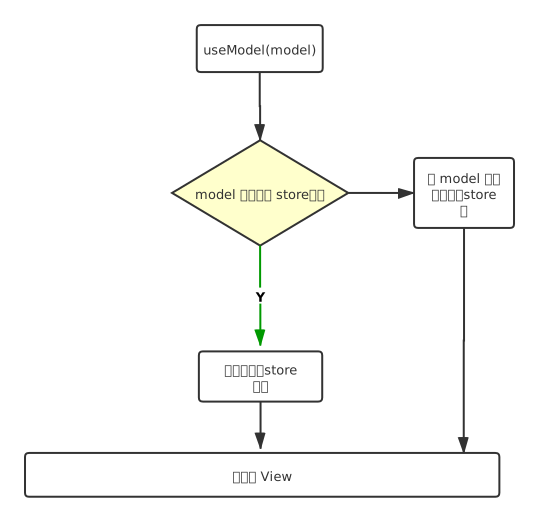
需要注意的是,子应用在使用 `useModel` 去访问主应用 **Model** 的时候,如果主应用 **Model** 未初始化(还未挂载到 **Store** 上),会自动降级挂载到子应用自身的 **Store** 上。
为了避免意外降级挂载,建议将主应用所需要共享的 model 预先挂载。
```ts
App.models = [
sharedModel1,
sharedModel2
]
```