utquidem
Version:
The meta-framework suite designed from scratch for frontend-focused modern web development.
87 lines (62 loc) • 2.23 kB
Markdown
sidebar_label: proxy
sidebar_position: 1
# dev.proxy
:::info 适用的工程方案
* MWA
:::
* 类型: `string | Object`
* 默认值: `null`
配置该选项后,开发环境时会启动全局代理,类似 [Fiddler](https://www.telerik.com/fiddler), [Charles](https://www.charlesproxy.com/) 等 web 代理调试工具,可以用来查看、修改 HTTP/HTTPS 请求、响应、也可以用作代理服务器。
:::tip 提示
使用该选项需要提前安装 `@modern-js/plugin-proxy`。
:::
值为 `Object` 时,对象的 `key` 对应匹配的 `pattern`,对象的 `value` 对应匹配的 `target`。
例如:
```js title="modern.config.js"
export default defineConfig({
dev: {
proxy: {
'https://www.baidu.com': 'https://google.com.hk',
//可以通过 file 协议直接返回静态文件。
'https://example.com/api': 'file://./data.json',
}
}
});
```
值为 `string` 时, 可以用来指定单独的代理文件,例如:
```js title="modern.config.js"
export default defineConfig({
dev: {
proxy: './proxy.js',
},
});
```
```js title="proxy.js"
module.exports = {
name: 'my-app',
rules: `
^example.com:8080/api/*** http://localhost:3001/api/$
`,
};
```
:::info 注
Modern.js 全局代理实现底层基于 [whistle](https://wproxy.org/whistle/), 更多匹配模式请参考: [匹配模式](https://wproxy.org/whistle/pattern.html)
:::
执行 `dev`, 提示如下时,即代理服务器启动成功:
```bash
Compiled successfully in 3178ms
App running at:
Local: http://localhost:8080/
Network: http://10.2.210.160:8080/
Note that the development build is not optimized.
To create a production build, execute build command.
ℹ info Starting the proxy server.....
✔ success Proxy Server start on localhost:8899
```
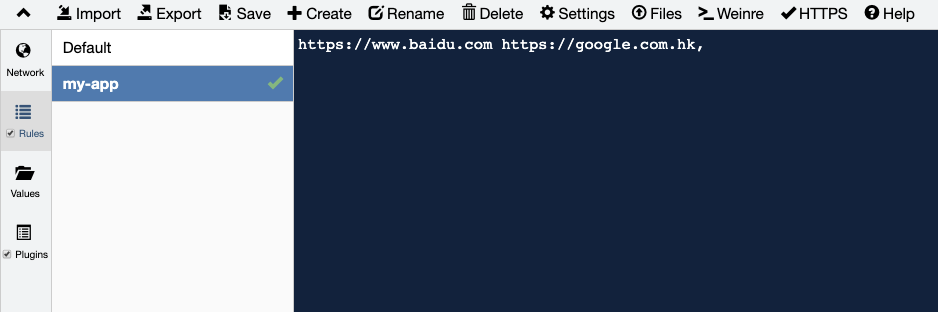
访问 `localhost:8899`, 可以在 UI 界面上查看 Network 以及配置代理规则:
:::caution 注意
https 代理自动安装证书需要获取 root 权限, 请根据提示输入密码即可。**密码仅在信任证书时使用,不会泄漏或者用于其他环节**。
:::