utquidem
Version:
The meta-framework suite designed from scratch for frontend-focused modern web development.
41 lines (28 loc) • 1.53 kB
Markdown
sidebar_position: 2
```bash
Usage: modern build [options]
构建模块命令
Options:
-w, --watch 使用 Watch 模式构建模块
--tsconfig [tsconfig] 指定 tsconfig.json 文件的路径 (default:
"./tsconfig.json")
--style-only 只构建样式文件
--platform [platform] 构建其他平台产物
--no-tsc 关闭 tsc 编译
--no-clear 不清理产物目录
-h, --help display help for command
```
import CommandTip from '@site/docs/components/command-tip.md'
<CommandTip />
`modern build` 命令默认在 `dist` 目录输出模块构建产物。 产物目录结构如下:
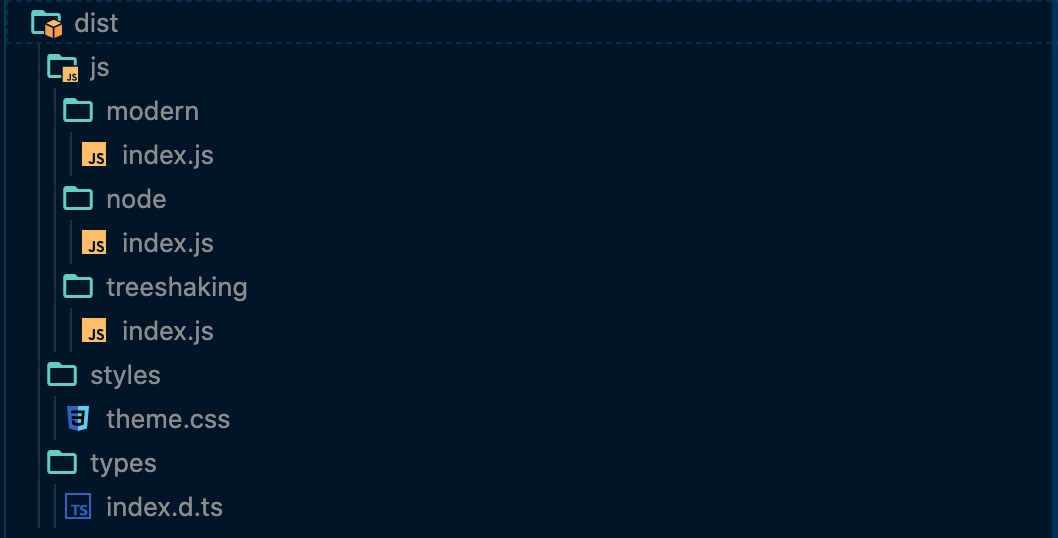
其中:
* `types` 目录包含所有生成的 `d.ts` 文件。
* `modern`、`node`、`treeshaking` 目录分别对应不同语法和模块化规范的构建产物。修改 Modern.js 配置文件的 `output.packageMode` 或者 `output.packageFields` 配置项会改变构建产物的语法和模块规范。
* `dist/js/styles` 目录包含所有 `src` 目录中非 `(js|ts)x` 的原文件。
* `dist/styles` 目录包含所有 styles 目录中编译后的文件。
一些重要的命令参数如下:
* `--watch` 监听模块源文件变化自动重新编译输出产物,在开发调试模块阶段非常有帮助。
* `--no-tsc` 关闭类型检查以及 `.d.ts` 类型文件的生成,对应构建的速度的也会有提升。