typescript-yaml-plugin
Version:
TypeScript Language Service plugin for YAML
53 lines (35 loc) • 2.02 kB
Markdown
# typescript-yaml-plugin
[](https://npmjs.com/package/typescript-yaml-plugin)
[](https://github.com/cabralpinto/typescript-yaml-plugin/blob/main/LICENSE)
[](https://www.typescriptlang.org/)
Import `.yaml` files in TypeScript 5+ with autocomplete and type checking.
<sub>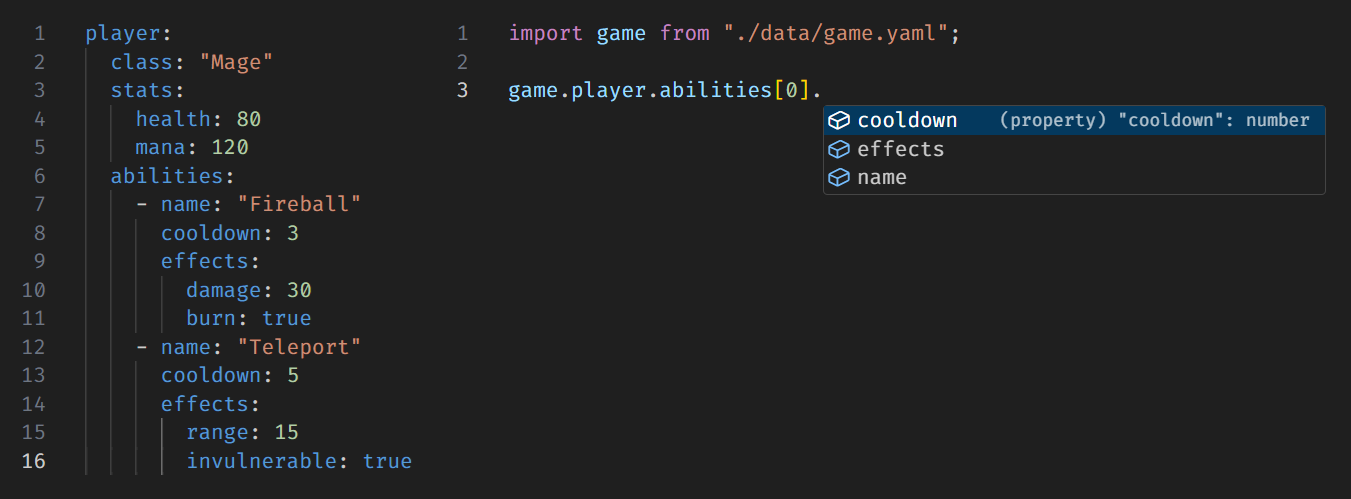</sub>
## Usage
Install the plugin:
```bash
npm install --save-dev typescript-yaml-plugin
```
Update your tsconfig.json:
```json
{
"compilerOptions": {
"plugins": [{ "name": "typescript-yaml-plugin" }]
}
}
```
Start importing YAML files! 🎉
```ts
import schema from './schema.yaml';
```
### VSCode Users
Make sure your editor is using the workspace version of TypeScript (the one where the plugin is installed). To do this:
1. Open the Command Palette (`Ctrl+Shift+P` or `Cmd+Shift+P`)
2. Run `TypeScript: Select TypeScript Version`
3. Choose `Use Workspace Version`
## Notes
- This plugin uses the [`yaml`](https://www.npmjs.com/package/yaml) package under the hood. Supported features and limitations are fully inherited from that library.
- This plugin is **only for editor support** (autocomplete and type-checking). It does **not** make `.yaml` files work at runtime. To actually be able to import YAML files in your running code, you’ll need to pair this with a runtime plugin that handles `.yaml` files like [`bun-plugin-yaml`](https://www.npmjs.com/package/bun-plugin-yaml)
or [`@modyfi/vite-plugin-yaml`](https://www.npmjs.com/package/@modyfi/vite-plugin-yaml), depending on your runtime.
- This plugin was inspired by [`typescript-plugin-yaml`](https://github.com/await-ovo/typescript-plugin-yaml), which is no longer maintained and does not support TypeScript 5+.
## Contributing
Issues and PRs are welcome!