tui-image-editor.upgrade
Version:
TOAST UI Component: ImageEditor(fix bug)
313 lines (239 loc) • 14.4 kB
Markdown
# 
> Full featured image editor using HTML5 Canvas. It's easy to use and provides powerful filters.
[](https://github.com/nhnent/tui.image-editor/releases/latest) [](https://www.npmjs.com/package/tui-image-editor) [](https://github.com/nhnent/tui.image-editor/releases/latest) [](https://github.com/nhnent/tui.image-editor/blob/master/LICENSE) [](https://github.com/nhnent/tui.image-editor/issues?q=is%3Aissue+is%3Aopen+label%3A%22help+wanted%22)[](https://github.com/nhnent)

## 🚩 Table of Contents
* [Browser Support](#-browser-support)
* [Has full features that stick to the basic.](#-has-full-features-that-stick-to-the-basic)
* [Photo manipulation](#photo-manipulation)
* [Integration function](#integration-function)
* [Powerful filter function](#powerful-filter-function)
* [Select only the desired function](#select-only-the-desired-function)
* [Easy to apply the size and design you want](#-easy-to-apply-the-size-and-design-you-want)
* [Can be used everywhere](#can-be-used-everywhere)
* [Nice default & Fully customizable Themes](#nice-default--fully-customizable-themes)
* [Features](#-features)
* [Install](#-install)
* [Via Package Manager](#via-package-manager)
* [Via Contents Delivery Network (CDN)](#via-contents-delivery-network-cdn)
* [Download Source Files](#download-source-files)
* [Usage](#-usage)
* [HTML](#html)
* [JavaScript](#javascript)
* [Development](#-development)
* [Setup](#setup)
* [Run webpack-dev-server](#run-webpack-dev-server)
* [Documents](#-documents)
* [Contributing](#-contributing)
* [Dependency](#-dependency)
* [TOAST UI Family](#-toast-ui-family)
* [License](#-license)
## 🌏 Browser Support
| <img src="https://user-images.githubusercontent.com/1215767/34348387-a2e64588-ea4d-11e7-8267-a43365103afe.png" alt="Chrome" width="16px" height="16px" /> Chrome | <img src="https://user-images.githubusercontent.com/1215767/34348590-250b3ca2-ea4f-11e7-9efb-da953359321f.png" alt="IE" width="16px" height="16px" /> Internet Explorer | <img src="https://user-images.githubusercontent.com/1215767/34348380-93e77ae8-ea4d-11e7-8696-9a989ddbbbf5.png" alt="Edge" width="16px" height="16px" /> Edge | <img src="https://user-images.githubusercontent.com/1215767/34348394-a981f892-ea4d-11e7-9156-d128d58386b9.png" alt="Safari" width="16px" height="16px" /> Safari | <img src="https://user-images.githubusercontent.com/1215767/34348383-9e7ed492-ea4d-11e7-910c-03b39d52f496.png" alt="Firefox" width="16px" height="16px" /> Firefox |
| :---------: | :---------: | :---------: | :---------: | :---------: |
| Yes | 9+ | Yes | Yes | Yes |
## 💪 Has full features that stick to the basic.
### Photo manipulation
- Crop, Flip, Rotation, Drawing, Shape, Icon, Text, Mask Filter, Image Filter
### Integration function
- Download, Image Load, Undo, Redo, Reset, Delete Object(Shape, Line, Mask Image...)
<table>
<tr>
<th width="20%">Crop</th>
<th width="20%">Flip</th>
<th width="20%">Rotation</th>
<th width="20%">Drawing</th>
<th width="20%">Shape</th>
</tr>
<tr>
<td><img src="https://user-images.githubusercontent.com/35218826/40904241-0c28ec68-6815-11e8-8296-89a1716b22d8.png" alt="2018-06-04 4 33 16" style="max-width:100%;"></td>
<td><img src="https://user-images.githubusercontent.com/35218826/40904521-f7c6e184-6815-11e8-8ba3-c94664da69a2.png" alt="2018-06-04 4 40 06" style="max-width:100%;"></td>
<td><img src="https://user-images.githubusercontent.com/35218826/40904664-656aa748-6816-11e8-9943-6607c209deac.png" alt="2018-06-04 4 43 02" style="max-width:100%;"></td>
<td><img src="https://user-images.githubusercontent.com/35218826/40904850-0f26ebde-6817-11e8-97d0-d3a7e4bc02da.png" alt="2018-06-04 4 47 40" style="max-width:100%;"></td>
<td><img src="https://user-images.githubusercontent.com/35218826/40905037-a026296a-6817-11e8-9d28-9e1ca7bc58c4.png" alt="2018-06-04 4 51 45" style="max-width:100%;"></td>
</tr>
<tr>
<th>Icon</th>
<th>Text</th>
<th>Mask</th>
<th>Filter</th>
<th></th>
</tr>
<tr>
<td><img src="https://user-images.githubusercontent.com/35218826/40931205-2d255db6-6865-11e8-98af-ad34c5a01da1.png" alt="2018-06-05 2 06 29" style="max-width:100%;"></td>
<td><img src="https://user-images.githubusercontent.com/35218826/40931484-46253948-6866-11e8-8a04-fa042920e457.png" alt="2018-06-05 2 14 36" style="max-width:100%;"></td>
<td><img src="https://user-images.githubusercontent.com/35218826/40931743-21eeb346-6867-11e8-8e31-a59f7a43482b.png" alt="2018-06-05 2 20 46" style="max-width:100%;"></td>
<td><img src="https://user-images.githubusercontent.com/35218826/40932016-093ed1f4-6868-11e8-8224-a048c3ee8a09.png" alt="2018-06-05 2 27 10" style="max-width:100%;"></td>
<td></td>
</tr>
</tbody>
</table>
### Powerful filter function
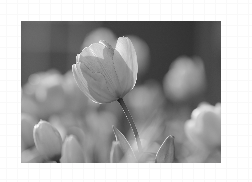
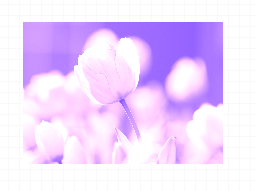
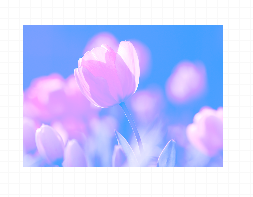
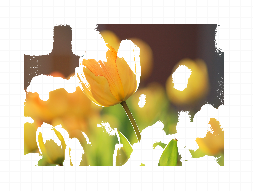
- Grayscale, Invert, Sepia, Blur Sharpen, Emboss, RemoveWhite, GradientTransparency, Brightness, Noise, Pixelate, ColorFilter, Tint, Multiply, Blend
| Grayscale | Noise | Gradient | Emboss | Pixelate |
| --- | --- | --- | --- | --- |
|  |  |  |  |  |
| Sepia | Sepia2 | Blend-righten | Blend-diff | Invert |
| --- | --- | --- | --- | --- |
|  |  |  |  |  |
| Multifly | Tint | Brightness | Remove-white | Sharpen |
| --- | --- | --- | --- | --- |
|  |  |  |  |  |
### Select only the desired function
```javascripot
var imageEditor = new tui.ImageEditor('#tui-image-editor-container', {
includeUI: {
menu: ['shape', 'crop']
...
},
...
```
## 🙆 Easy to apply the size and design you want
### Can be used everywhere.
- Widely supported in browsers including IE9, which is the minimum requirement to support canvas.
- Option to support various display sizes.
(allows you to use the editor features on your web pages at least over **550 * 450 sizes**)

### Nice default & Fully customizable Themes
- Has a white and black theme, and you can modify the theme file to customize it.
- Has an API so that you can create your own instead of the built-in.
| black - top | black - bottom | white - left | white - right |
| --- | --- | --- | --- |
|  |  | 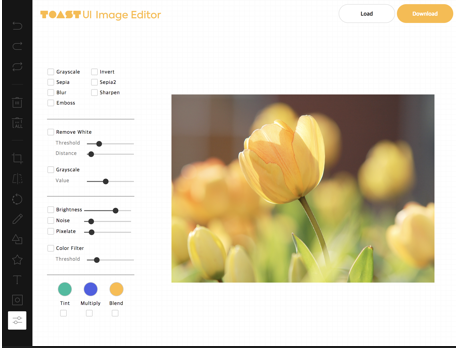 | 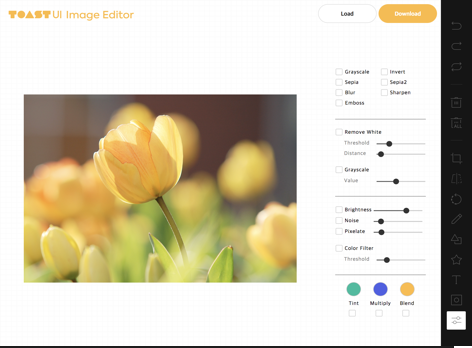 |
## 🎨 Features
* Load image to canvas
* Undo/Redo (With shortcut)
* Crop
* Flip
* Rotation
* Free drawing
* Line drawing
* Shape
* Icon
* Text
* Mask Filter
* Image Filter
## 💾 Install
The TOAST UI products can be installed by using the package manager or downloading the source directly.
However, we highly recommend using the package manager.
### Via Package Manager
You can find TOAST UI producs via [npm](https://www.npmjs.com/) and [bower](https://bower.io/) package managers.
Install by using the commands provided by each package manager.
When using npm, be sure [Node.js](https://nodejs.org) is installed in the environment.
#### npm
```sh
$ npm install --save tui-image-editor # Latest version
$ npm install --save tui-image-editor@<version> # Specific version
```
#### bower
```sh
$ bower install tui-image-editor # Latest version
$ bower install tui-image-editor#<tag> # Specific version
```
### Via Contents Delivery Network (CDN)
TOAST UI products are available over the CDN powered by [TOAST Cloud](https://www.toast.com).
You can use the CDN as below.
```html
<link rel="stylesheet" href="https://uicdn.toast.com/tui-image-editor/latest/tui-image-editor.css">
<script src="https://uicdn.toast.com/tui-image-editor/latest/tui-image-editor.js"></script>
```
If you want to use a specific version, use the tag name instead of `latest` in the URL.
The CDN directory has the following structure.
```
tui-image-editor/
├─ latest/
│ ├─ tui-image-editor.js
│ ├─ tui-image-editor.min.js
│ └─ tui-image-editor.css
├─ v3.1.0/
│ ├─ ...
```
### Download Source Files
* [Download bundle files from `dist` folder](https://github.com/nhnent/tui.image-editor/tree/production/dist)
* [Download all sources for each version](https://github.com/nhnent/tui.image-editor/releases)
## 🔨 Usage
### HTML
Add the container element where TOAST UI ImageEditor will be created.
``` html
<body>
...
<div id="tui-image-editor"></div>
...
</body>
```
### javascript
Add dependencies & initialize ImageEditor class with given element to make an image editor.
```javascript
var ImageEditor = require('tui-image-editor');
var blackTheme = require('./js/theme/black-theme.js');
var instance = new ImageEditor(document.querySelector('#tui-image-editor'), {
includeUI: {
loadImage: {
path: 'img/sampleImage.jpg',
name: 'SampleImage'
},
theme: blackTheme, // or whiteTheme
initMenu: 'filter',
menuBarPosition: 'bottom'
},
cssMaxWidth: 700,
cssMaxHeight: 500,
selectionStyle: {
cornerSize: 20,
rotatingPointOffset: 70
}
});
```
Or ~ UI
```javascript
var ImageEditor = require('tui-image-editor');
var instance = new ImageEditor(document.querySelector('#tui-image-editor'), {
cssMaxWidth: 700,
cssMaxHeight: 500,
selectionStyle: {
cornerSize: 20,
rotatingPointOffset: 70
}
});
```
See [details](https://nhnent.github.io/tui.image-editor/latest) for additional informations.
## 🔧 Development
The TOAST UI products are open-source.
After fixing issues, create a pull request(PR).
Run npm scripts and develop with the following process.
### Setup
Fork `master` branch into your personal repository.
Clone to local computer.
Install node modules.
Before starting development, check for any errors.
```sh
$ git clone https://github.com/{username}/tui.image-editor.git
$ cd tui.image-editor
$ npm install
$ npm run test
```
### Run webpack-dev-server
```sh
$ npm run serve
```
## 📙 Documents
* **Tutorial** : [https://github.com/nhnent/tui.image-editor/tree/master/docs](https://github.com/nhnent/tui.image-editor/tree/master/docs)
* **Example** : [http://nhnent.github.io/tui.image-editor/latest/tutorial-example01-includeUi.html](http://nhnent.github.io/tui.image-editor/latest/tutorial-example01-includeUi.html)
* **API** : [http://nhnent.github.io/tui.image-editor/latest/](http://nhnent.github.io/tui.image-editor/latest/)
## 💬 Contributing
* [Code of Conduct](CODE_OF_CONDUCT.md)
* [Contributing guideline](CONTRIBUTING.md)
* [Issue guideline](ISSUE_TEMPLATE.md)
* [Commit convention](https://github.com/nhnent/tui.image-editor/blob/production/docs/COMMIT_MESSAGE_CONVENTION.md)
## 🔩 Dependency
* [fabric.js](https://github.com/kangax/fabric.js/releases/tag/v1.6.7) >=1.6.7
* [tui.code-snippet](https://github.com/nhnent/tui.code-snippet/releases/tag/v1.2.5) >=1.3.0
* [tui.color-picker](https://github.com/nhnent/tui.color-picker/releases/tag/v2.2.0) >=2.2.0
## 🍞 TOAST UI Family
* [TOAST UI Editor](https://github.com/nhnent/tui.editor)
* [TOAST UI Grid](https://github.com/nhnent/tui.grid)
* [TOAST UI Chart](https://github.com/nhnent/tui.chart)
* [TOAST UI Calendar](https://github.com/nhnent/tui.calendar)
* [TOAST UI Components](https://github.com/nhnent)
## 📜 License
[MIT LICENSE](https://github.com/nhnent/tui.image-editor/blob/master/LICENSE)