tree-lens
Version:
A simple and powerful CLI tool to generate a tree-like structure of a directory and its contents.
48 lines (30 loc) • 1.98 kB
Markdown
# 📂 tree-lens
**A simple and powerful CLI tool to generate a tree-like structure of a directory and its contents.**
[](https://www.npmjs.com/package/tree-lens) 📦 Available on **[npm](https://www.npmjs.com/package/tree-lens)**
## 🚀 Features
- ✅ **Instant Directory Visualization** – Generate a structured tree representation of any directory.
- ✅ **Easy to Use** – Just install and run a single command.
- ✅ **Minimal & Lightweight** – No unnecessary dependencies.
- ✅ **Customizable Output** – Future updates may include filtering, formatting, and exporting options.
## 📥 Installation
Install `tree-lens` globally using npm:
```sh
npm install -g tree-lens
```
## 📌 Usage
**Generate a tree for the current directory**
```sh
tree-lens "path/to/directory"
```
| Option | Description |
| :----------- | :-------------------------------------------------------------------------------------------- |
| `--A` | Show all files and folders |
| `--F` | Show only folders **(default behavior)** |
| `--<number>` | Maximum depth level (e.g., --3 for 3 levels deep -- **default is All files in the directory** |
| Example | `tree-lens ./` or `tree-lens ./src/ --F --5` or `tree-lens ./ --A --3` |
## 📝 Example Output
(in the generated directory_structure.txt file)
[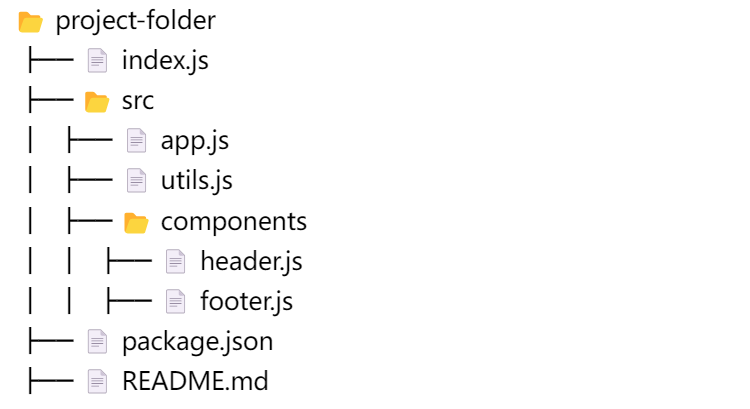](https://i.postimg.cc/0jxz4YTQ/structure.png "asd")
## 🤝 Contributing
Contributions are welcome! If you have ideas or find bugs, feel free to open an issue or submit a pull request.
#### Made with ❤️ by Mohammad Khakshoor