toast-me
Version:
Creates toast messages
275 lines (233 loc) • 9.12 kB
Markdown
# toast-me
[](https://badge.fury.io/js/toast-me)
Tiny, easy to use tool to show toast-like notifications on the web page.
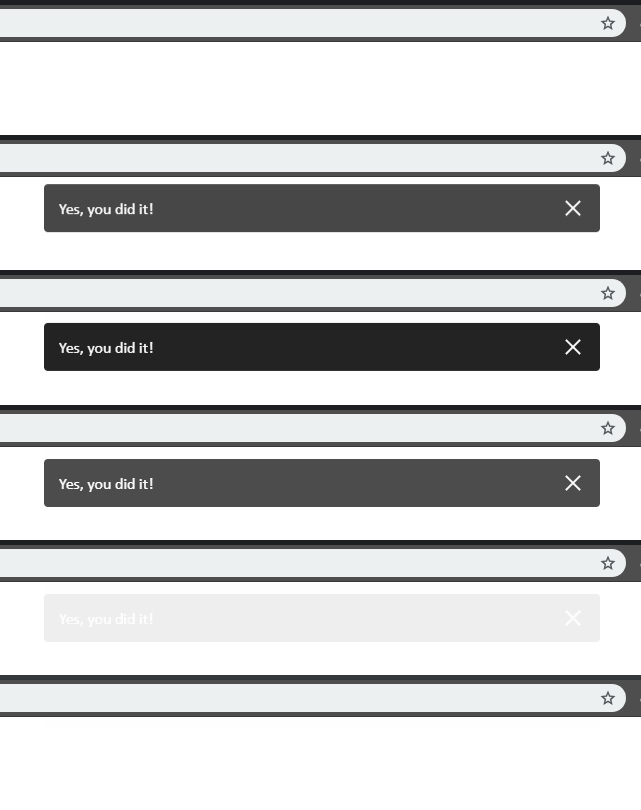
You can read the [CHANGELOG](./CHANGELOG.md).
## Table of Contents
* [Features](#features)
* [How to use](#how-to-use)
* [Install](#install)
* [Import module to your script](#import-module-to-your-script)
* [Use](#use)
* [Use with own customization](#use-with-own-customization)
* [Use with options preset](#use-with-options-preset)
* [Use with own customization and action button](#use-with-own-customization-and-action-button)
* [Use with action button but no customizations](#use-with-action-button-but-no-customizations)
* [Use with HTML](#use-with-html)
* [Use with React](#use-with-react)
* [Toast function arguments](#toast-function-arguments)
* [Message argument](#message-argument)
* [Options argument](#options-argument)
* [Accepted options](#accepted-options)
* [Options presets](#options-presets)
* [Action argument](#action-argument)
* [Instance of ToastMeClass](#instance-of-toastmeclass)
* [class ToastMeClass](#class-toastmeclass)
* [Contributing](#contributing)
* [Getting started](#getting-started)
* [Scripts](#scripts)
* [Structure](#structure)
* [Readings](#readings)
## Features
* Exported in a [umd](https://github.com/umdjs/umd) format so works everywhere
* Fully compatible with popular frameworks, such as
__React__, __Vue__, __Angular__, __jQuery__, etc
* Customizable
* Light-weight (17kB until gzip, 6kB zipped)
* Supports actions' button inside toast
* Closeable
* Pauses toast's timer on hover
* Accepts CSS classes for styling
## How to use
##### Install package from npm
```
yarn add toast-me
# or
npm install toast-me
```
##### Import module to your script
```javascript
import toast from 'toast-me';
```
##### Use
```javascript
toast('My message');
// or with the instance
const toastInstance = toast('My message');
```
##### Use with own customization
```javascript
toast('My message', { duration: 3000, toastClass: 'my-toast-class' /* ... */ });
```
##### Use with options preset
```javascript
toast('My message', 'error');
```
##### Use with own customization and action button
```javascript
toast(
'My message',
{ duration: 1000 },
{
label: 'Confirm',
action: () => alert('Cool!'),
class: 'my-custom-class', // optional, CSS class name for action button
},
);
```
##### Use with action button but no customizations
```javascript
toast(
'My message',
null,
{
label: 'Confirm',
action: () => alert('Cool!'),
},
);
```
##### Use with HTML
```javascript
toast(
'<i>My message</i> ☻',
{ useUnsafeHtmlContent: true },
);
```
##### Use with React
```javascript
const uniqId = 'messageRoot_' + Math.random().toString().slice(2);
toast(`<div id="${uniqId}" />`, { useUnsafeHtmlContent: true });
ReactDOM.render(
<div>My message</div>,
document.getElementById(uniqId)
)
```
## Toast function arguments
```javascript
toast(message, [options, [action]]);
```
Function accepts three arguments:
* `message` - message to show in toast,
* `options` - toast customization options,
* `action` - some action button options.
Returns instance of ToastMeClass. You can learn method of it [here](#instance-of-toastmeclass)
### Message argument
Accepts `string`, any message to put in toast.
Text shown in one line, no wraps allowed.
Overflowed text will be hidden with ellipsis.
Complete text shown on hover with the `title` attribute on toast node.
### Options argument
*Optional*. Accepts `object` with any allowed fields, or `string` as a name of options preset, or `null`.
If you don't need to set options, but need to pass an action - pass `null` instead options.
#### Accepted options
Default options preset (all available options with their default values):
```js
const defaults = {
position: 'top',
type: 'over',
toastClass: '',
removedToastClass: '',
containerClass: '',
useUniqueContainer: false,
useUnsafeHtmlContent: false,
closeable: true,
timeoutOnRemove: 1000,
duration: 5000,
}
```
* `position` - *string*, one of `"top"` `"bottom"`. Default `"top"`.
* `type` - *string*, one of `"over"` `"chain"`. When `"chain"` - all messages shown in line,
and when `"over"` - message covers previous. Default `"over"`. NOTE: when you use
toasts of different types in one app - that could cause toast display collisions.
* `toastClass` - *string*, CSS class name for toast node, can be used for custom toast styling.
Default `""` - empty string
* `removedToastClass` - *string*, CSS class name for removed toast node, can be used for custom CSS
animation or styling. Default `""` - empty string
* `containerClass` - *string*, CSS class name for toast's container node, can be used for custom
container styling. Once it is set, container node will have that class (classname won't be erased
on next toast creating). If you want prevent this behaviour - set `useUniqueContainer` option
to `true` when set `containerClass`. Default `""` - empty string
* `useUniqueContainer` - *boolean*, create new toast's container node, instead of re-using existing
one, if it is presented. Default `false`
* `useUnsafeHtmlContent` - *boolean*, allows passing HTML string as content. Default `false`
* `closeable` - *boolean*, enables/hides "close" button on toast. Default `true`
* `timeoutOnRemove` - *number*, time in ms, till node should be removed from DOM after toast hides.
Can be useful when you change hide animation by CSS and set new animation duration.
To avoid element disappearing until animation ends set this option to larger or equal
value than animation duration. Default `1000`
* `duration` - *number*, time in ms, how long should toast be shown. Default `5000`
#### Options presets
* `default` - all default options,
* `error` - everything default, except background color - `#D40D00`, set by CSS class.
### Action argument
*Optional*. Accepts object with three fields:
* `label` - *string*, text to put in button.
* `action` - callback *function* - to be called on button click.
* `class` - *string*, CSS class for button node.
## Instance of ToastMeClass
Has methods:
* `close()` - Closes current toast.
* `startTimer()` - Starts/restarts timer with timeout, set in options object on toast create.
* `stopTimer()` - Stops timer, the toast won't disappear. After calling this
you should handle toast's behavior by yourself
(i.e. with `close()` method).
```javascript
import toast from 'toast-me';
const message = toast('Something');
// ...
message.stopTimer();
// ...
message.close();
```
## class ToastMeClass
Has static methods:
* `removeAll(position)` - Closes all toasts in that position. Accepts one argument
`position`, default `"top"` (described in [options section](#accepted-options))
```javascript
import { ToastMeClass } from 'toast-me';
ToastMeClass.removeAll('bottom');
```
This method has separate simplified alias
```js
import { removeAllToasts } from 'toast-me';
removeAllToasts('bottom')
```
## Contributing
## Getting started
You will need [node.js](https://nodejs.org/en/) and preferred to have
[yarn](https://yarnpkg.com/lang/en/) to run the project.
Copy project to your local folder and then run in project's root
folder next command to load dependencies:
```
yarn
```
## Scripts
When you load all dependencies, you able to run several commands:
* `yarn build` - produces production pack of library under the `lib` folder
* `yarn run-dev` - produces development version of your library, runs file watcher
and http server on [http://localhost:3005](http://localhost:3005)
* `yarn watch` - produces development version of your library, runs a file watcher
* `yarn test` - runs the tests
## Structure
* `Root folder`
* `dev/` - Folder, containing development environment files. This folder is
server with `webpack-dev-server` with `yarn run-dev` command. `toast-me.js`
and `toast-me.js.map` files inside are generated by webpack watcher from
`/src` folder. You are able to change files in both folders and they are to
be reloaded in browser.
* `lib/` - The place production pack will be located after build. Usually you won't
need it, until you wan't to compile library by yourself and insert in your
project manually
* `scripts/` - Node.js executable scripts' folder, such as `dev-server.js` or `test.js`.
* `config/` - Configuration files' folder.
* `src/` - Here is the code of library itself.
## Readings
1. [Git-flow workflow](https://www.atlassian.com/git/tutorials/comparing-workflows/gitflow-workflow)
1. [AirBnB Style Guide](https://airbnb.io/javascript/)
1. [Webpack](https://webpack.js.org/)
1. [Node.js](https://nodejs.org/en/)
1. [Yarn](https://yarnpkg.com/lang/en/)
1. [SASS](http://sass-lang.com/)
1. [Jest](https://jestjs.io/docs/en/getting-started)
## Thanks for contributing:
[@TV-T](https://github.com/TV-T)