tmp-react-map-gl-draw
Version:
A lite version editing layer with react
175 lines (143 loc) • 7.77 kB
Markdown
# React Map GL Draw
`react-map-gl-draw` is a react based drawing library tailored for [`react-map-gl`](https://github.com/uber/react-map-gl).
## Options
- `mode` (String, Optional)
- `EditorModes.READ_ONLY` - Not interactive. This is the default mode.
- `EditorModes.SELECT` - Lets you select, delete, and drag features.
- `EditorModes.EDITTING` - Lets you select, delete, and drag vertices; and drag features.
- `EditorModes.DRAW_PATH` - Lets you draw a GeoJson `LineString` feature.
- `EditorModes.DRAW_POLYGON` - Lets you draw a GeoJson `Polygon` feature.
- `EditorModes.DRAW_POINT` - Lets you draw a GeoJson `Point` feature.
- `EditorModes.DRAW_RECTANGLE` - Lets you draw a `Rectangle` (represented as GeoJson `Polygon` feature).
- `features` (Feature[], Optional) - List of features in GeoJson format. If `features` are provided from users, then `react-map-gl-draw` respect the users' input, and therefore ignore any internal `features`. But if `features` are not provided, then `react-map-gl-draw` manages `features` internally, and users can access and manipulate the features by calling `getFeatures`, `addFeatures`, and `deleteFeatures`.
- `selectedFeatureIndex` (String, Optional) - Index of the selected feature.
- `clickRadius` (Number, Optional) - Radius to detect features around a hovered or clicked point. Default value is `0`
- `onSelect` (Function, Optional) - callback when clicking a position under `SELECT` and `EDITTING` mode. Receives an object containing the following parameters
- `selectedFeature`: selected feature. `null` if clicked an empty space.
- `selectedFeatureIndex`: selected feature index.`null` if clicked an empty space.
- `editHandleIndex`: selected editHandle index. `null` if clicked an empty space.
- `screenCoords`: screen coordinates of the clicked position.
- `mapCoords`: map coordinates of the clicked position.
- `onUpdate` (Function, Optional) - callback when anything is updated. Receives an object containing the following parameters
- `features` (Feature[]) - the updated list of GeoJSON features.
- `editType` (String) - `addFeature`, `addPosition`, `finishMovePosition`
- `editContext` (Array) - list of edit objects, depend on `editType`, each object may contain `featureIndexes`, `editHandleIndexes`, `screenCoords`, `mapCoords`.
**Feature object structure:**
```js
{
id, // an unique identified generated inside react-map-gl-draw library
geometry: {
coordinates, // latitude longitude pairs of the geometry points
type // geojson type, one of `Point`, `LineString`, or `Polygon`
},
properties: {
renderType, // Mainly used for styling, one of `Point`, `LineString`, `Polygon`, or `Rectangle`. Different from `geometry.type`. i.e. a rectangle's renderType is `Rectangle`, and `geometry.type` is `Polygon`. An incomplete (not closed) Polygon's renderType is `Polygon`, `geometry.type` is `LineString`
...otherProps // other properties user passed in
}
}
```
### Styling related options
- `featureStyle` (Object|Function, Optional) : Object - Either a [style objects](https://reactjs.org/docs/dom-elements.html#style) or a function to style a feature, function parameters are
- `feature`: feature to style.
- `index`: index of the feature.
- `state`: one of `SELECTED`, `HOVERED`, `INACTIVE`, `UNCOMMITTED`, `CLOSING`.
Returns is a map of [style objects](https://reactjs.org/docs/dom-elements.html#style) passed to SVG `path` elements.
- `featureShape` (String|Function, Optional): if is a string, should be one of `rect` or `circle`. If is a function, will receive the following parameters
- `feature`: feature to style.
- `index`: index of the feature.
- `state`: one of `SELECTED`, `HOVERED`, `INACTIVE`, `UNCOMMITTED`, `CLOSING`.
- `editHandleStyle` (Object|Function, Optional) : Object - Either a [style objects](https://reactjs.org/docs/dom-elements.html#style) or a function to style an `editHandle, function parameters are
- `feature`: feature to style.
- `index`: index of the editHandle vertex in the feature.
- `state`: one of `SELECTED`, `HOVERED`, `INACTIVE`, `UNCOMMITTED`, `CLOSING`.
- `shape`: shape resolved from `editHandleShape`.
Returns is a map of [style objects](https://reactjs.org/docs/dom-elements.html#style) passed to SVG `circle` or `rect` elements.
- `editHandleShape` (String|Function, Optional): if is a string, should be one of `rect` or `circle`. If is a function, will receive the following parameters
- `feature`: feature to style.
- `index`: index of the editHandle vertex in the feature.
- `state`: one of `SELECTED`, `HOVERED`, `INACTIVE`, `UNCOMMITTED`, `CLOSING`.
## Explanations
- `Feature`: any drawn shape, one of point, line, polygon or rectangle.
- `EditHandle`: vertex of the feature being edited.
### State related concepts:
- `INACTIVE`: neither selected nor hovered, default state of a complete `feature` or `editHandle`.
- `SELECTED`: being clicked or dragged.
- `HOVERED`: hovered over by the mouse pointer.
- `UNCOMMITTED`: in the middle of drawing, not yet added to the feature being edited.
- `CLOSING`: closing a polygon.
### Styling based on `state`:
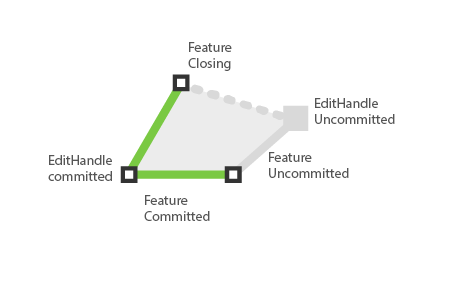
As shown in the above image, for the feature currently being edited,
- `featureStyle({feature, state: SELECTED})` will be applied to the committed parts of the feature. (Green strokes)
- `editHandleStyle({state: SELECTED})` will be applied to the committed editHandle vertices. (Vertices with black stroke)
- `featureStyle({feature, state: UNCOMMITTED})` will be applied to the uncommitted parts of the feature. (Gray stroke)
- `editHandleStyle({state: UNCOMMITTED})` will be applied to the uncommitted editHandle vertex. (Gray vertex)
## Methods
##### `getFeatures`
- Return a list of finished GeoJson features.
##### `addFeatures` (Feature | Feature[])
- Add a single or multiple GeoJson features to editor.
##### `deleteDeatures` (Feature | Feature[])
- Delete a single or multiple GeoJson features to editor.
## Code Example
```js
import React, { Component } from 'react';
import MapGL from 'react-map-gl';
import { Editor, EditorModes } from 'react-map-gl-draw';
const MODES = [
{ id: EditorModes.EDITING, text: 'Select and Edit Feature'},
{ id: EditorModes.DRAW_POINT, text: 'Draw Point'},
{ id: EditorModes.DRAW_PATH, text: 'Draw Polyline'},
{ id: EditorModes.DRAW_POLYGON, text: 'Draw Polygon'},
{ id: EditorModes.DRAW_RECTANGLE, text: 'Draw Rectangle'}
];
const DEFAULT_VIEWPORT = {
width: 800,
height: 600,
longitude: -122.45,
latitude: 37.78,
zoom: 14
};
class App extends Component {
state = {
// map
viewport: DEFAULT_VIEWPORT,
// editor
selectedMode: EditorModes.READ_ONLY
};
_switchMode = evt => {
const selectedMode = evt.target.id;
this.setState({
selectedMode: selectedMode === this.state.selectedMode ? null : selectedMode
});
};
_renderToolbar = () => {
return (
<div style={{position: absolute, top: 0, right: 0, maxWidth: '320px'}}>
<select onChange={this._switchMode}>
<option value="">--Please choose a mode--</option>
{MODES.map(mode => <option value={mode.id}>{mode.text}</option>)}
</select>
</div>
);
};
render() {
const { viewport, selectedMode } = this.state;
return (
<MapGL
{...viewport}
width="100%"
height="100%"
mapStyle={'mapbox://styles/mapbox/light-v9'}
onViewportChange={this.setState({ viewport })}
>
<Editor
clickRadius={12}
mode={selectedMode}
/>
{this._renderToolbar()}
</MapGL>
);
}
}
```