tilemill-reference-layer
Version:
Add MapBox Streets or a custom map as a base layer.
44 lines (24 loc) • 1.81 kB
Markdown
# Reference Layer for TileMill
This TileMill plugin adds a custom map as a reference layer to your TileMill projects.
This reference layer will be visible while designing & previewing a map, but will not be included in any exports.
## Installation
The plugin should be available from the Plugins panel in TileMill.
You can also install it manually by cloning this repository into your TileMill plugins directory.The plugins directory for TileMill is located at `~/.tilemill/node_modules`. It will not exist if you have not already installed a plugin. So you may need to create it yourself. You can create the plugins directory and install this plugin manually like:
```sh
mkdir -p ~/.tilemill/node_modules
cd ~/.tilemill/node_modules
git clone https://github.com/mapbox/tilemill-reference-layer.git
```
__Note:__ This plugin is not tested to work with other plugins.
## Use
- Enable the plugin

- Go to a projects settings, and enter a map ID from your Mapbox.com map, or a URL for a TileJSON Service, in the Reference Layer field.

- You can get the map ID from the Project settings on [Mapbox.com](https://www.mapbox.com/editor).
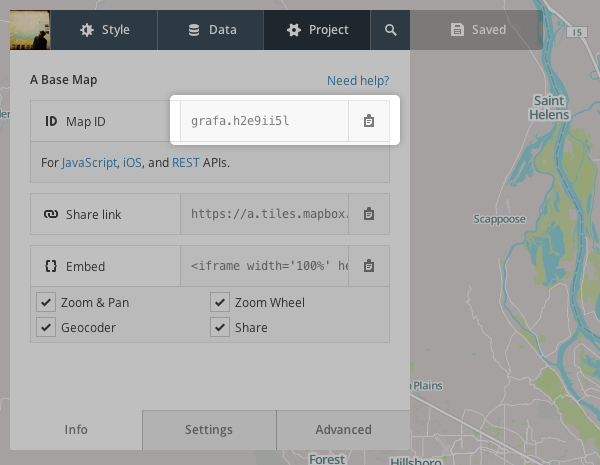
- If you have a custom tileset available elsewhere, you'll need a TileJSON service to describe this map. You can use the URL of this service for the Reference Layer field.
- Design a map with a transparent `Map` background
- Upload your map to [Mapbox](http://mapbox.com)
- Add your map to a [composite](http://mapbox.com/hosting/compositing/) with your map
- [Share](http://mapbox.com/hosting/embeds-vs-api/) your map!