three-laser-pointer
Version:
Laser pointer object using three.js
192 lines (120 loc) • 7.23 kB
Markdown
# three-laser-pointer
[![NPM][npm-badge]][npm-url]
[![MIT licensed][mit-badge]][mit-url]
[![CI][actions-badge]][actions-url]
[npm-badge]: https://img.shields.io/npm/v/three-laser-pointer.svg
[npm-url]: https://www.npmjs.com/package/three-laser-pointer
[mit-badge]: https://img.shields.io/badge/license-MIT-blue.svg
[mit-url]: https://github.com/w3reality/three-laser-pointer/blob/master/LICENSE
[actions-badge]: https://github.com/w3reality/three-laser-pointer/workflows/CI/badge.svg
[actions-url]: https://github.com/w3reality/three-laser-pointer/actions
**three-laser-pointer** is a three.js based library class that provides a reflective laser pointer. It is especially suitable for adding a laser pointing interface in VR-like scenes where the camera is serving as first-person shooter, and not limited to this use case.
The laser object has methods that are useful for
- shooting interactive laser beams that self-reflect on `THREE.Mesh` objects in the scene,
- drawing dynamic 3D lines that consist of multiple line segments (good for making CAD-like tools), and
- mouse-to-laser translation (see how it works in demos).
## Demo
We present two live demos using this three-laser-pointer library.
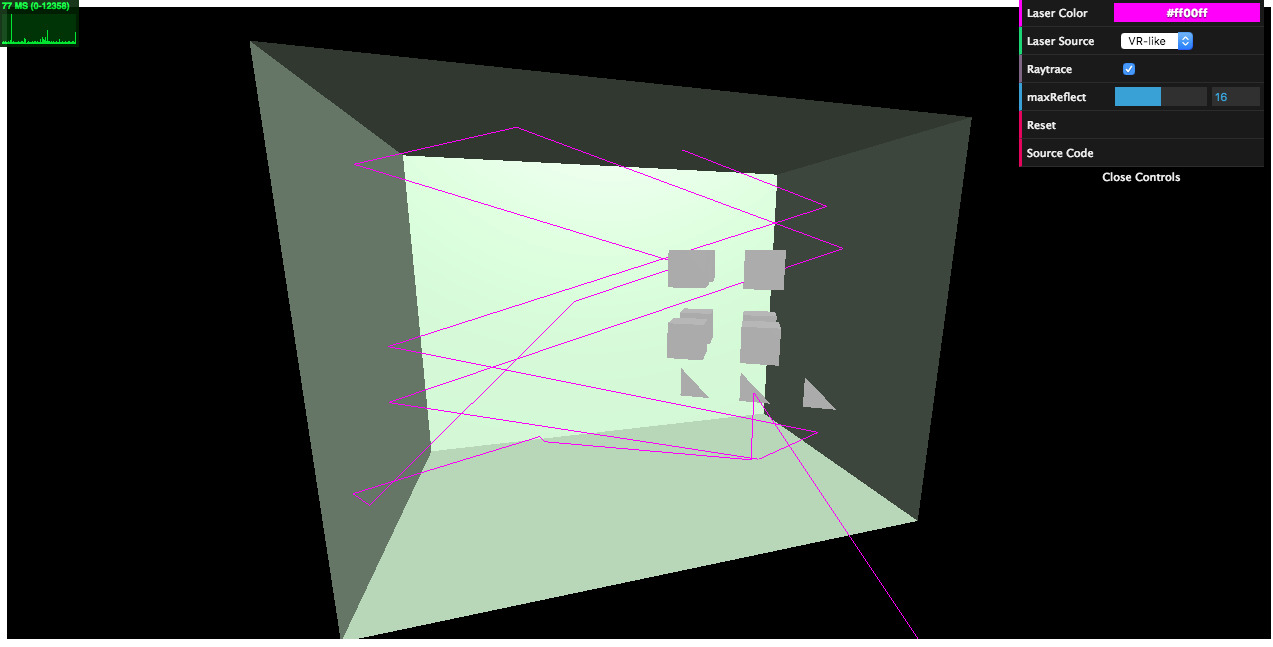
- [demo-api](https://w3reality.github.io/three-laser-pointer/examples/demo-api/index.html):
Shooting a reflective laser onto simple `THREE.Mesh` objects. Observe that the source/target points, colors, and raytracing parameters are fully configurable via API.
[](https://w3reality.github.io/three-laser-pointer/examples/demo-api/index.html)
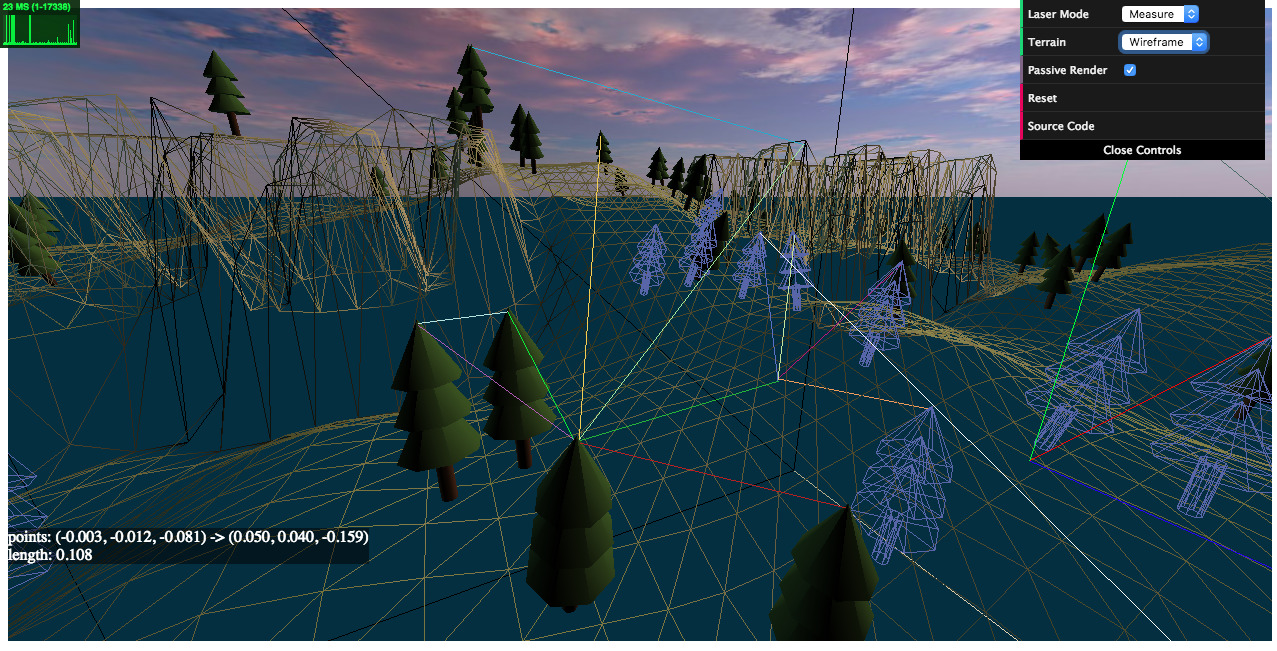
- [demo-terrains](https://w3reality.github.io/three-laser-pointer/examples/demo-terrains/dist/index.html):
Laser interaction with `THREE.Mesh` models including a terrain. Selecting "Measure" in Laser Mode allows us to pick precise 3D points on the models and measure the Euclidean distances between them. Credits: we have used [the THREE.Terrain library](https://github.com/IceCreamYou/THREE.Terrain) for generating the terrain model.
[](https://w3reality.github.io/three-laser-pointer/examples/demo-terrains/dist/index.html)
## Setup
**Installation**
```
$ npm i three-laser-pointer
```
**Loading**
Script tag: use `Laser` after
```
<script src="dist/three-laser-pointer.min.js"></script>
```
ES6:
```
import Laser from 'dist/three-laser-pointer.esm.js';
```
## Usage
- VR-like laser pointing
```js
// create and add a red laser in the scene
var laser = new Laser({color: 0xff0000});
scene.add(laser);
var pt = new THREE.Vector3(0, 0, -1); // the target point to shoot
// set the source point relative to the camera
// with offset (0.3, -0.4, -0.2)
laser.setSource(new THREE.Vector3(0.3, -0.4, -0.2), camera);
// shoot the target from the source point
laser.point(pt);
```
- VR-like laser pointing with raytrace enabled against `THREE.Mesh` objects in the scene
```js
// create and add a green laser in the scene
var laser = new Laser({color: 0x00ff00});
scene.add(laser);
var pt = new THREE.Vector3(0, 0, 1); // the target point to shoot
// prepare an array of THREE.Mesh objects that interact with the laser
var meshes = [...];
// set the source point relative to the camera
laser.setSource(new THREE.Vector3(0.3, -0.4, -0.2), camera);
// shoot the target with raytrace considering the meshes in the scene
laser.pointWithRaytrace(pt, meshes);
```
## API
`Laser`
- `constructor(opts={})`
Create a laser object with optional parameters. For example, `new Laser({color: 0x00ff00, maxPoints: 16})` creates a green laser object that can maximally consist of 15 (=16-1) line segments.
- `opts.color`=0xff0000 **number (integer)** An integer (0x000000 - 0xffffff) encoding an RGB color.
- `opts.maxPoints`=256 **number (integer)** The max number of 3D points that consist of the laser.
- `opts.infLength`=9999.0 **number** The length of the last laser segment when raytracing goes to an infinity point.
- `setSource(src, camera=null)`
Set the values of `src` to the source point of the laser. When `camera` is provided, `src` is regarded as relative to the camera (i.e. camera coordinates). If not, `src` is interpreted as world coordinates.
- `src` **THREE.Vector3**
- `camera` **THREE.PerspectiveCamera**
- `getSource()`
Get a new vector instance with values corresponding to the current source point.
Returns **THREE.Vector3**
- `point(pt, color=null)`
Shoot `pt` by the laser rendering a line segment connecting the source point of the laser and `pt`. Optionally, `color` can be specified.
- `pt` **THREE.Vector3** The target point to shoot.
- `color` **number (integer)** 0x000000 - 0xffffff
- `pointWithRaytrace(pt, meshes=[], color=null, maxReflect=16)`
Shoot `pt` by the laser with raytracing enabled. Up to `maxReflect` times, ray reflections by provided `meshes` are computed and rendered. (Note: regardless of `maxReflect`, the number of reflections is also bounded less than or equal to `maxPoints-2`. `maxPoints` can be adjusted when creating a laser object.)
- `pt` **THREE.Vector3** The target point to shoot.
- `meshes` **Array\<THREE.Mesh\>**
- `color` **number (integer)** 0x000000 - 0xffffff
- `maxReflect` **number (integer)** The max number of reflections considered.
- `getPoints()`
Get an array of the (copied) points that consist of the laser.
Returns **Array\<THREE.Vector3\>**
- `getMeshesHit()`
Get an array of the meshes that are hit by the laser after calling `pointWithRaytrace()`.
Returns **Array\<THREE.Mesh\>**
- `updatePoints(arr, isFlatten=false)`
Update (by overriding) the points that represent the laser. If `isFlatten` is `true`, `arr` can be a flatten **number** array, i.e. `[x0, y0, z0, x1, y1, z1, ...]`.
- `arr` **Array\<THREE.Vector3 \| number\>**
- `isFlatten` **boolean**
- `clearPoints()`
Clear the points that consist of the laser. (Thereafter, `getPoints()` will return `[]`.)
- `raycastFromCamera(mx, my, width, height, camera, meshes, recursive=false)`
A utility method that casts a mouse-ray to `meshes` provided. If there are intersects, it returns the nearest intersect from the camera. Otherwise, it returns `null`.
- `mx` **number** Coordinate x of a canvas point.
- `my` **number** Coordinate y of a canvas point.
- `width` **number** Canvas width.
- `height` **number** Canvas height.
- `camera` **THREE.PerspectiveCamera**
- `meshes` **Array\<THREE.Mesh\>** An array of meshes to test raycasting with.
- `recursive` **boolean** If true, test for all descendant mesh objects.
Returns **Object \| null** An [intersect object](https://threejs.org/docs/#api/core/Raycaster.intersectObject) of three.js.
- `setColor(color)`
Set the RGB color of the laser.
- `color` **number (integer)** An integer (0x000000 - 0xffffff) encoding an RGB color.
- `getColor()`
Get the RGB color of the laser.
Returns **number (integer)** An integer (0x000000 - 0xffffff) encoding an RGB color.
## Build
```
$ npm i
$ npm run build
```