testcafe-cucumber-steps
Version:
Cucumber steps (step definitions) written with TestCafe for end-to-end (e2e) tests
587 lines (533 loc) • 30.6 kB
Markdown
# testcafe-cucumber-steps
Cucumber steps (step definitions) written with TestCafe for end-to-end (e2e)
tests - see the presentation of why and how you can easily use
[TestCafe with Cucumber in 5 steps](https://prezi.com/e1wfgwlfvnhr/testcafe-with-cucumber-in-5-steps/)
[](https://github.com/Marketionist/testcafe-cucumber-steps/actions)
[](https://www.npmjs.com/package/testcafe-cucumber-steps)
[](https://github.com/Marketionist/testcafe-cucumber-steps/blob/master/LICENSE)
## Supported versions
<table>
<thead>
<tr>
<th><a href="http://nodejs.org/" rel="nofollow" target="_blank">Node.js</a></th>
<th><a href="https://github.com/DevExpress/testcafe" rel="nofollow" target="_blank">TestCafe</a></th>
<th><a href="https://github.com/cucumber/cucumber-js" rel="nofollow" target="_blank">Cucumber</a></th>
</tr>
</thead>
<tbody>
<tr>
<td>8.x - 20.x</td>
<td>1.x - 3.x</td>
<td>5.x - 10.x</td>
</tr>
</tbody>
</table>
## Table of contents
* [Installation fast](#installation-fast)
* [Installation detailed](#installation-detailed)
* [Writing tests](#writing-tests)
* [Importing and running in CLI](#importing-and-running-in-cli)
* [Importing and running with config file](#importing-and-running-with-config-file)
* [List of predefined steps](#list-of-predefined-steps)
* [Given steps](#given-steps)
* [When steps](#when-steps)
* [Then steps](#then-steps)
* [Bonus feature: use XPath selectors in TestCafe](#bonus-feature-use-xpath-selectors-in-testcafe)
* [Contributing](#contributing)
* [Thanks](#thanks)
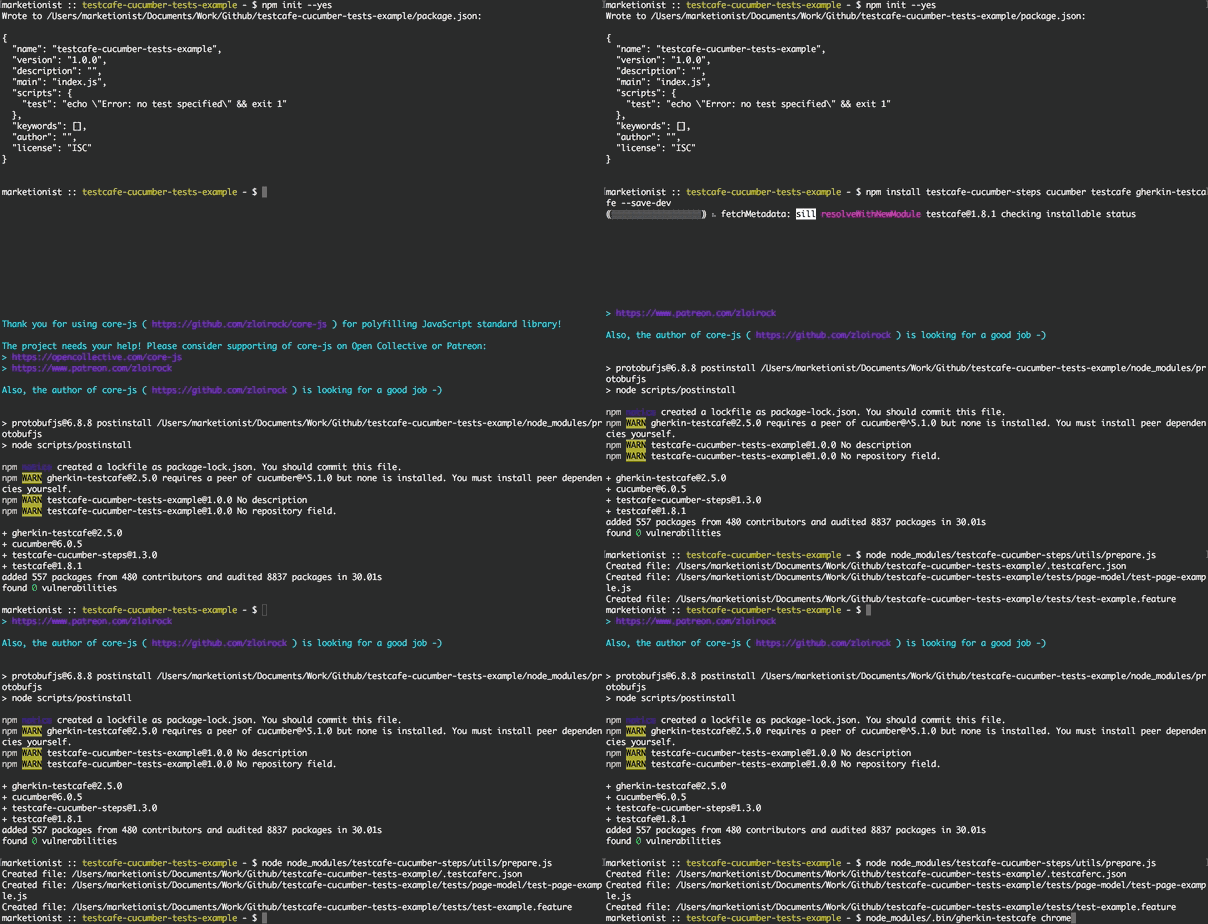
## Installation fast
If you want to start writing tests as fast as possible, here are the commands
you'll need to execute:
```bash
npm init --yes # To create a basic package.json
npm install testcafe-cucumber-steps @cucumber/cucumber testcafe gherkin-testcafe --save-dev # To install dependencies and save them to package.json
node node_modules/testcafe-cucumber-steps/utils/prepare.js # To create basic test and Page Object files
```
Then just see the [list of predefined steps](#list-of-predefined-steps) and
start writing tests (in `tests/*.feature`) and adding Page Objects
(in `tests/page-model/*.js`).
Run the tests with:
```bash
node_modules/.bin/gherkin-testcafe chrome,firefox
```
> Note: all [TestCafe CLI options](https://devexpress.github.io/testcafe/documentation/using-testcafe/command-line-interface.html)
> are supported.
## Installation detailed
> Note: this package is lightweight and has only 3 peerDependencies - it uses:
> - [cucumber](https://github.com/cucumber/cucumber-js) to parse step definitions
> - [testcafe](https://github.com/DevExpress/testcafe) to execute steps
> - [gherkin-testcafe](https://github.com/Arthy000/gherkin-testcafe) to connect TestCafe with Cucumber
First of all you will need to create `package.json` if you do not have one in
the root folder of your project:
```bash
npm init --yes
```
To install the testcafe-cucumber-steps package and its peerDependencies and to
save it to your `package.json` just run:
```bash
npm install testcafe-cucumber-steps @cucumber/cucumber testcafe gherkin-testcafe --save-dev # In case if you want to use Cucumber 7 (the recent one)
```
OR
```bash
npm install testcafe-cucumber-steps cucumber@6.0.5 testcafe gherkin-testcafe@2.5.1 --save-dev # In case if you want to use Cucumber 6
```
OR
```bash
npm install testcafe-cucumber-steps cucumber@5.1.0 testcafe gherkin-testcafe@2.5.1 --save-dev # In case if you want to use Cucumber 5
```
If you also want to have pre-created config (`.testcaferc.json`) and example
test files (`tests/test-example.feature`, `tests/page-model/test-page-example.js`) -
run additionally:
```bash
node node_modules/testcafe-cucumber-steps/utils/prepare.js
```
## Writing tests
To give a short example of how you can write the tests - here is
`test-main-page.feature` feature file:
```gherkin
# tests/test-main-page.feature
Feature: My portal main page tests
As a user of My portal
I should be able to use main page
to log in
Scenario: Open the main page, page title should be present
Given user goes to URL "http://myportal.test/login.html"
Then the title should be "Test1 main page"
Scenario: Products link should lead to Products page
Given user goes to pageMain from main-page
When user clicks linkProducts from main-page
Then URL should contain "/products"
And the title should contain "Test1 Products"
Scenario: Log in, link with username and status should be present
Given user goes to pageMain from main-page
When user types "mytestuser" in inputLogin from main-page
And user types "mytestpassword" in inputPassword from main-page
And user clicks buttonLogin from main-page
Then linkUsernameLoggedIn from main-page should be present
```
And the Page Object file for this tests will look like this:
```javascript
// tests/page-model/main-page.js
let mainPage = {
pageMain: 'http://myportal.test/login.html',
linkProducts: '.link-products',
inputLogin: '#login',
inputPassword: '#pass',
buttonLogin: '.btn-login',
linkUsernameLoggedIn: 'a.username-authorized'
};
module.exports = mainPage;
```
If you want the Page Objects to look even shorter - you can write the same tests
like this:
```gherkin
# tests/test-main-page.feature
Feature: My portal main page tests
As a user of My portal
I should be able to use main page
to log in
Scenario: Open the main page, page title should be present
Given user goes to URL "http://myportal.test/login.html"
Then the title should be "Test1 main page"
Scenario: Products link should lead to Products page
Given user goes to "main-page"."pageMain"
When user clicks "main-page"."linkProducts"
Then URL should contain "/products"
And the title should contain "Test1 Products"
Scenario: Log in, link with username and status should be present
Given user goes to "main-page"."pageMain"
When user types "mytestuser" in "main-page"."inputLogin"
And user types "mytestpassword" in "main-page"."inputPassword"
And user clicks "main-page"."buttonLogin"
Then "main-page"."linkUsernameLoggedIn" should be present
```
See more examples of how to use predefined steps in
[`test1-user.feature`](https://github.com/Marketionist/testcafe-cucumber-steps/blob/master/tests/test1-user.feature) and
[`test2-user.feature`](https://github.com/Marketionist/testcafe-cucumber-steps/blob/master/tests/test2-user.feature).
If you want to get access to Page Objects in your custom Cucumber steps - you can just require them inside any step definitions
file like this:
```javascript
const pageObjects = require('testcafe-cucumber-steps/utils/get-page-objects.js');
```
## Importing and running in CLI
To get access to all Cucumber steps defined in this package just specify the
path to this package when launching tests:
```bash
node_modules/.bin/gherkin-testcafe chrome,firefox node_modules/testcafe-cucumber-steps/index.js tests/**/*.js tests/**/*.feature
```
If you store your Page Objects not in `tests/page-model` folder, then
`PO_FOLDER_PATH` environment variable has to be specified to show the path to
your Page Objects folder:
```bash
PO_FOLDER_PATH='tests/my-custom-page-objects' node_modules/.bin/gherkin-testcafe chrome,firefox node_modules/testcafe-cucumber-steps/index.js tests/**/*.js tests/**/*.feature
```
> Note: you can specify multiple Page Object folders by separating them with commas:
> `PO_FOLDER_PATH='main/my-custom1,login/my-custom2,auth,create/my-custom3'`
Also you can just add `test-e2e` command to `scripts` in `package.json`:
```json
"test-e2e": "PO_FOLDER_PATH='tests/my-custom-page-objects' node_modules/.bin/gherkin-testcafe 'chrome:headless' node_modules/testcafe-cucumber-steps/index.js tests/**/*.js tests/**/*.feature"
```
and then launch tests with:
```
npm run test-e2e
```
> Note: all [TestCafe CLI options](https://devexpress.github.io/testcafe/documentation/using-testcafe/command-line-interface.html)
> are supported.
Additionally, you can specify:
- tags to run:
```bash
node_modules/.bin/gherkin-testcafe chrome,firefox node_modules/testcafe-cucumber-steps/index.js tests/**/*.js tests/**/*.feature --tags @fast
```
When using more than one tag, the list needs to be comma separated:
```bash
node_modules/.bin/gherkin-testcafe chrome node_modules/testcafe-cucumber-steps/index.js tests/**/*.js tests/**/*.feature --tags @fast,@long
```
Negation of a tag (via `~`) is also possible (to run all scenarios that have
tag `fast`, but not `long`):
```bash
node_modules/.bin/gherkin-testcafe chrome node_modules/testcafe-cucumber-steps/index.js tests/**/*.js tests/**/*.feature --tags @fast,~@long
```
- custom parameter types:
```bash
node_modules/.bin/gherkin-testcafe chrome node_modules/testcafe-cucumber-steps/index.js tests/**/*.js tests/**/*.feature --param-type-registry-file ./a-file-that-exports-a-parameter-type-registry.js
```
> Note: see Cucumber Expressions in
> [gherkin-testcafe](https://github.com/kiwigrid/gherkin-testcafe#cucumber-expressions)
> and Custom Parameter types in
> [cucumber.io](https://cucumber.io/docs/cucumber/cucumber-expressions/#custom-parameter-types).
## Importing and running with config file
To make life easier and not to specify all options in CLI command, a
`.testcaferc.json` configuration file can be created in the root directory of
your project to store all settings (pathes to all step definitions and tests
should be specified inside the array in `src`):
```json
{
"browsers": "chrome",
"src": ["node_modules/testcafe-cucumber-steps/index.js", "tests/**/*.js", "tests/**/*.feature"],
"screenshots": {
"path": "tests/screenshots/",
"takeOnFails": true,
"pathPattern": "${DATE}_${TIME}/test-${TEST_INDEX}/${USERAGENT}/${FILE_INDEX}.png"
},
"quarantineMode": false,
"stopOnFirstFail": true,
"skipJsErrors": true,
"skipUncaughtErrors": true,
"concurrency": 1,
"selectorTimeout": 3000,
"assertionTimeout": 1000,
"pageLoadTimeout": 1000,
"disablePageCaching": true
}
```
and then launch tests with:
```bash
node_modules/.bin/gherkin-testcafe
```
or if you use custom Page Objects folder:
```bash
PO_FOLDER_PATH='tests/my-custom-page-objects' node_modules/.bin/gherkin-testcafe
```
All options that are specified in CLI command will override settings from `.testcaferc.json`.
> Note: for all possible settings see:
> - [TestCafe configuration file description](https://devexpress.github.io/testcafe/documentation/using-testcafe/configuration-file.html) and
> [example of .testcaferc.json](https://github.com/DevExpress/testcafe/blob/master/examples/.testcaferc.json)
> - [TestCafe command line options](https://devexpress.github.io/testcafe/documentation/using-testcafe/command-line-interface.html)
## List of predefined steps
### Given steps
1. `I/user go(es) to URL "..."` - open a site (by its URL provided in "" as a
string - for example: `"https://github.com/Marketionist"`) in the current
browser window/tab.
2. `I/user go(es) to "..."."..."` - open a site (by its URL provided in
**"page"."object"**) in the current browser window/tab.
- `I/user go(es) to ... from ...` - open a site (by its URL provided in
**object** from **page**) in the current browser window/tab.
3. `I/user set(s) cookie "..."` - set cookie on the current site (cookie
provided in "" as a string - for example: `"my_test_cookie1=11"`).
- `I/user set(s) cookie "..."."..."` - set cookie on the current site (cookie
provided in **"page"."object"**).
- `I/user set(s) cookie ... from ...` - set cookie on the current site (cookie
provided in **object** from **page**).
4. `I/user send(s) "..." request to "..." with body "..."` - send request
(request method provided in "" as a string - for example: `POST`) to URL
(provided in "" as a string - for example: `"http://httpbin.org/post"`) with
body (provided in "" as JSON - for example: `"{ \"test1\": 1, \"test2\": 2 }"`).
> Note: GET request will be sent with default header `'Content-Type': 'text/html'`,
> all other requests will be sent with default header
> `'Content-Type': 'application/json'`.
- `I/user send(s) "..." request to "..." with body "..."."..."` - send request
(request method provided in "" as a string - for example: `POST`) to URL
(provided in "" as a string - for example: `"http://httpbin.org/post"`) with
body (provided in **"page"."object"**).
- `I/user send(s) "..." request to "..."."..." with body "..."."..."` - send
request (request method provided in "" as a string - for example: `POST`) to URL
(provided in **"page"."object"**) with body (provided in **"page"."object"**).
- `I/user send(s) "..." request to ... from ... with body ... from ...` - send
request (request method provided in "" as a string - for example: `POST`) to URL
(provided in **object** from **page**) with body (provided in **object** from
**page**).
5. `I/user send(s) "..." request to "..." with headers "..." and body "..."` -
send request (request method provided in "" as a string - for example: `POST`)
to URL (provided in "" as a string - for example: `"http://httpbin.org/post"`)
with headers (provided in "" as JSON - for example:
`"{ \"Content-Type\": \"application/json\", \"Authorization\": \"Bearer aBcD1234\" }"`
) and body (provided in "" as JSON - for example:
`"{ \"test1\": 1, \"test2\": 2 }"`).
- `I/user send(s) "..." request to "..." with headers "..."."..." and body "..."."..."` -
send request (request method provided in "" as a string - for example: `POST`) to URL
(provided in "" as a string - for example: `"http://httpbin.org/post"`) with
headers (provided in **"page"."object"**) and body (provided in
**"page"."object"**).
- `I/user send(s) "..." request to "..."."..." with headers "..."."..." and body "..."."..."` -
send request (request method provided in "" as a string - for example: `POST`)
to URL (provided in **"page"."object"**) with headers (provided in
**"page"."object"**) and body (provided in **"page"."object"**).
- `I/user send(s) "..." request to ... from ... with headers ... from ... and body ... from ...` -
send request (request method provided in "" as a string - for example: `POST`) to URL
(provided in **object** from **page**) with headers (provided in **object** from
**page**) and body (provided in **object** from **page**).
### When steps
6. `I/user log(s) in with l: "..." in "..."."..." and p: "..." in
"..."."..." and click(s) "..."."..."` - log in to any site with login (provided
in "" as a string), login/username input (provided in **page1**.**object1** as
CSS selector), password (provided in "" as a string), password input (provided
in **page2**.**object2** as CSS or XPath selector), login button (provided in
**page3**.**object3** as CSS or XPath selector).
- `I/user log(s) in with l: "..." in ... from ... and p: "..." in ...
from ... and click(s) ... from ...` - log in to any site with login (provided
in "" as a string), login/username input (provided in **object1** from **page1**
as CSS or XPath selector), password (provided in "" as a string), password input
(provided in **object2** from **page2** as CSS or XPath selector), login button
(provided in **object3** from **page3** as CSS or XPath selector).
- `I/user log(s) in with l: "..."."..." in "..."."..." and p: "..."."..." in
"..."."..." and click(s) "..."."..."` - log in to any site with login (provided
in **page1**.**object1** as CSS or XPath selector), login/username input
(provided in **page2**.**object2** as CSS or XPath selector), password (provided
in **page3**.**object3** as CSS or XPath selector), password input (provided in
**page4**.**object4** as CSS or XPath selector), login button (provided in
**page5**.**object5** as CSS or XPath selector).
- `I/user log(s) in with l: ... from ... in ... from ... and p: ... from ... in
... from ... and click(s) ... from ...` - log in to any site with login
(provided in **object1** from **page1** as CSS or XPath selector),
login/username input (provided in **object2** from **page2** as CSS or XPath
selector), password (provided in **object3** from **page3** as CSS or XPath
selector), password input (provided in **object4** from **page4** as CSS or
XPath selector), login button (provided in **object5** from **page5** as CSS or
XPath selector).
7. `I/user reload(s) the page` - reload current page.
8. `I/user click(s) "..."."..."` - click on any element (provided in
**"page"."object"** as CSS or XPath selector).
- `I/user click(s) ... from ...` - click on any element (provided in **object**
from **page** as CSS or XPath selector).
9. `I/user right click(s) "..."."..."` - right click on any element (provided in
**"page"."object"** as CSS or XPath selector).
- `I/user right click(s) ... from ...` - right click on any element (provided in
**object** from **page** as CSS or XPath selector).
10. `I/user wait(s) for ... ms` - wait for provided amount of time (in
milliseconds).
11. `I/user wait(s) and click(s) "..."."..."` - wait for 300 ms and then click
on any element (provided in **"page"."object"** as CSS or XPath selector).
- `I/user wait(s) and click(s) ... from ...` - wait for 300 ms and then click on
any element (provided in **object** from **page** as CSS or XPath selector).
12. `I/user wait(s) up to ... ms for "..."."..." to appear` - wait up to
provided amount of time (in milliseconds) for any element (provided in
**"page"."object"** as CSS or XPath selector) to appear.
- `I/user wait(s) up to ... ms for ... from ... to appear` - wait up to provided
amount of time (in milliseconds) for any element (provided in **object** from
**page** as CSS or XPath selector) to appear.
13. `I/user click(s) "..."."..." if present` - click on any element (provided in
**"page"."object"** as CSS or XPath selector) only if it is present on the page.
- `I/user click(s) ... from ... if present` - click on any element (provided in
**object** from **page** as CSS or XPath selector) only if it is present on the
page.
14. `I/user double click(s) "..."."..."` - double click on any element (provided
in **"page"."object"** as CSS or XPath selector).
- `I/user double click(s) ... from ...` - double click on any element (provided
in **object** from **page** as CSS or XPath selector).
15. `I/user type(s) "..." in "..."."..."` - type any text (provided in "" as a
string) in the input field (provided in **"page"."object"** as CSS or XPath
selector).
- `I/user type(s) "..." in ... from ...` - type any text (provided in "" as a
string) in the input field (provided in **object** from **page** as CSS
selector).
- `I/user type(s) "..."."..." in "..."."..."` - type any text (provided in
**"page1"."object1"**) in the input field (provided in **"page2"."object2"** as
CSS selector).
- `I/user type(s) ... from ... in ... from ...` - type any text (provided in
**object1** from **page1**) in the input field (provided in **object2** from
**page2** as CSS or XPath selector).
16. `I/user clear(s) "..."."..." and type(s) "..."` - clear the input field
(provided in **"page"."object"** as CSS or XPath selector) and type any text
(provided in "" as a string).
- `I/user clear(s) ... from ... and type(s) "..."` - clear the input field
(provided in **object** from **page** as CSS or XPath selector) and type any
text (provided in "" as a string).
- `I/user clear(s) "..."."..." and type(s) "..."."..."` - clear the input field (provided in **"page1"."object1"** as CSS or XPath selector) and type any text
(provided in **"page2"."object2"**).
- `I/user clear(s) ... from ... and type(s) ... from ...` - clear the input
field (provided in **object1** from **page1** as CSS or XPath selector) and type
any text (provided in **object2** from **page2**).
17. `I/user select(s) "..." in "..."."..."` - select any option (provided in ""
as a string) in the dropdown (provided in **"page"."object"** as CSS or XPath
selector).
- `I/user select(s) "..." in ... from ...` - select any option (provided in ""
as a string) in the dropdown (provided in **object** from **page** as CSS or
XPath selector).
- `I/user select(s) "..."."..." in "..."."..."` - select any option (provided in
**"page1"."object1"**) in the dropdown (provided in **"page2"."object2"** as CSS
or XPath selector).
- `I/user select(s) ... from ... in ... from ...` - select any option
(provided in **object1** from **page1**) in the dropdown (provided in
**object2** from **page2** as CSS or XPath selector).
18. `I/user move(s) to "..."."..."` - move the mouse pointer over any element
(hover with cursor an element provided in **"page"."object"** as CSS or XPath
selector).
- `I/user move(s) to ... from ...` - move the mouse pointer over any element
(hover with cursor an element provided in **object** from **page** as CSS or
XPath selector).
19. `I/user move(s) to "..."."..." with an offset of x: ...px, y: ...px` - move
the mouse pointer over any element (hover with cursor an element provided in
**"page"."object"** as CSS or XPath selector) with an offset of x: ...px,
y: ...px.
- `I/user move(s) to ... from ... with an offset of x: ...px, y: ...px` - move
the mouse pointer over any element (hover with cursor an element provided in
**object** from **page** as CSS or XPath selector) with an offset of x: ...px,
y: ...px.
20. `I/user switch(es) to "..."."..." frame` - switch the context to iframe
(provided in **"page"."object"** as CSS or XPath selector).
- `I/user switch(es) to ... frame from ...` - switch the context to iframe
(provided in **object** from **page** as CSS or XPath selector).
21. `I/user wait(s) up to ... ms and switch(es) to "..."."..." frame` - wait up
to provided amount of time (in milliseconds) for the iframe to load and then
switch the context to that iframe (provided in **"page"."object"** as CSS or
XPath selector).
- `I/user wait(s) up to ... ms and switch(es) to ... frame from ...` - wait up
to provided amount of time (in milliseconds) for the iframe to load and then
switch the context to that iframe (provided in **object** from **page** as CSS
or XPath selector).
22. `I/user switch(es) to main frame` - switch the context back to default
(initial) frame.
23. `I/user set(s) "..." file path in "..."."..."` - set a file path (provided
in "" as a string) in the input (provided in **"page"."object"** as CSS or XPath
selector). This step can be used to upload files and images.
- `I/user set(s) "..." file path in ... from ...` - set a file path (provided in
"" as a string) in the input (provided in **object** from **page** as CSS
selector).
- `I/user set(s) "..."."..." file path in "..."."..."` - set a file path
(provided in **"page1"."object1"**) in the input (provided in
**"page2"."object2"** as CSS or XPath selector).
- `I/user set(s) ... from ... file path in ... from ...` - set a file path
(provided in **object1** from **page1**) in the input (provided in
**object2** from **page2** as CSS or XPath selector).
24. `I/user execute(s) "..."."..." function` - execute script (JavaScript
function) provided in **"page"."object"**.
- `I/user execute(s) ... function from ...` - execute script (JavaScript
function) provided in **object** from **page**.
25. `I/user drag(s)-and-drop(s) "..."."..." to "..."."..."` - drag-and-drop
element (provided in **"page1"."object1"** as CSS or XPath selector) to another
element (provided in **"page2"."object2"** as CSS or XPath selector).
- `I/user drag(s)-and-drop(s) ... from ... to ... from ...` - drag-and-drop
element (provided in **object1** from **page1** as CSS or XPath selector) to
another element (provided in **object2** from **page2** as CSS or XPath selector
).
26. `I/user accept(s) further browser alerts` - accept (OK) all further browser
alerts (after this step).
27. `I/user dismiss(es) further browser alerts` - dismiss (Cancel) all further
browser alerts (after this step).
28. `I/user open(s) "..." in new browser window` - open a site (by its URL
provided in "" as a string - for example: `"https://github.com/Marketionist"`)
in the new browser window/tab.
- `I/user open(s) "..."."..." in new browser window` - open a site (by its URL
provided in **"page"."object"**) in the new browser window/tab.
- `I/user open(s) ... from ... in new browser window` - open a site (by its URL
provided in **object** from **page**) in the new browser window/tab.
29. `I/user close(s) current browser window` - close current browser window/tab.
30. `I/user press(es) "..."` - press the specified keyboard keys (provided in ""
as a string - see the
[list of supported keys and key combinations](https://devexpress.github.io/testcafe/documentation/test-api/actions/press-key.html#browser-processing-emulation)).
31. `I/user set(s) PAGE_URL environment variable` - take current page URL and
write it to PAGE_URL environment variable.
32. `I/user go(es) to PAGE_URL` - open a site from PAGE_URL environment
variable.
33. `I/user debug(s)` - set a breakpoint to stop the tests execution and start
debugging.
### Then steps
34. `the title should be "..."` - verify that title of the current browser
window/tab equals to the text (provided in "" as a string).
35. `the title should contain "..."` - verify that title of the current browser
window/tab contains the text (provided in "" as a string).
36. `"..."."..." should be present` - verify that element (provided in
**"page"."object"** as CSS or XPath selector) is present on the page.
- `... from ... should be present` - verify that element (provided in
**object** from **page** as CSS or XPath selector) is present on the page.
37. `... "..."."..." should be present` - verify that the number of elements
(provided in **"page"."object"** as CSS or XPath selector) are present on the
page.
- `... ... from ... should be present` - verify that the number of elements
(provided in **object** from **page** as CSS or XPath selector) are present on
the page.
38. `"..."."..." should not be present` - verify that element (provided in
**"page"."object"** as CSS or XPath selector) is not present on the page.
- `... from ... should not be present` - verify that element (provided in
**object** from **page** as CSS or XPath selector) is not present on the page.
39. `"..."."..." text should be "..."` - verify that text of the element
(provided in **"page"."object"** as CSS or XPath selector) equals to the text
(provided in "" as a string).
- `... from ... text should be "..."` - verify that text of the element
(provided in **object** from **page** as CSS or XPath selector) equals to the
text (provided in "" as a string).
- `"..."."..." text should be "..."."..."` - verify that text of the element
(provided in **"page1"."object1"** as CSS or XPath selector) equals to the text
(provided in **"page2"."object2"**).
- `... from ... text should be ... from ...` - verify that text of the
element (provided in **object1** from **page1** as CSS or XPath selector) equals
to the text (provided in **object2** from **page2**).
40. `"..."."..." text should contain "..."` - verify that text of the element
(provided in **"page"."object"** as CSS or XPath selector) contains the text
(provided in "" as a string).
- `... from ... text should contain "..."` - verify that text of the element
(provided in **object** from **page** as CSS or XPath selector) contains the
text (provided in "" as a string).
- `"..."."..." text should contain "..."."..."` - verify that text of the
element (provided in **"page1"."object1"** as CSS or XPath selector) contains
the text (provided in **"page2"."object2"**).
- `... from ... text should contain ... from ...` - verify that text
of the element (provided in **object1** from **page1** as CSS or XPath selector)
contains the text (provided in **object2** from **page2**).
41. `URL should be "..."` - verify that URL of the current page equals to the
text (provided in "" as a string).
- `URL should be "..."."..."` - verify that URL of the current page equals to
the text (provided in **"page"."object"**).
- `URL should be ... from ...` - verify that URL of the current page equals to
the text (provided in **object** from **page**).
42. `URL should contain "..."` - verify that URL of the current page contains
the text (provided in "" as a string).
- `URL should contain "..."."..."` - verify that URL of the current page
contains the text (provided in **"page"."object"**).
- `URL should contain ... from ...` - verify that URL of the current page
contains the text (provided in **object** from **page**).
43. `"..."."..." attribute "..." should contain "..."` - verify that the
attribute (provided in "" as a string) of the element (provided in
**"page"."object"**) contains provided string (provided in "" as a string).
- `... from ... attribute "..." should contain "..."` - verify that the
attribute (provided in "" as a string) of the element (provided in
**"page"."object"**) contains provided string (provided in "" as a string).
## Bonus feature: use XPath selectors in TestCafe
As you know TestCafe does not support XPath selectors out of the box. But now
you can use them in TestCafe Cucumber steps - just write XPath selector in
a Page Object file the same way as you do with CSS selectors - see the example
in [`test1-page.js`](https://github.com/Marketionist/testcafe-cucumber-steps/blob/master/tests/page-model/test1-page.js).
It can also be used in your custom Cucumber steps - for example:
```javascript
const SelectorXPath = require('testcafe-cucumber-steps/utils/selector-xpath.js');
const buttonStartTest = SelectorXPath('//*[ancestor::*[@class="test-panel"] and contains(text(), "Start test")]');
```
## Contributing
You are welcome to contribute to this repository - please see
[CONTRIBUTING.md](https://github.com/Marketionist/testcafe-cucumber-steps/blob/master/CONTRIBUTING.md)
to help you get started. It is not mandatory, so you can just create a pull
request and we will help you refine it along the way.
## Thanks
If this package was helpful to you, please give it a **★ Star** on
[GitHub](https://github.com/Marketionist/testcafe-cucumber-steps).