tern-aui2.0.x
Version:
A Tern plugin adding AlloyUI 2.x support.
113 lines (71 loc) • 5.04 kB
Markdown
# tern-aui2.0.x
[](http://travis-ci.org/angelozerr/tern-aui2.0.x)
[](https://www.npmjs.org/package/tern-aui2.0.x)
[tern-aui2.0.x](https://github.com/angelozerr/tern-aui2.0.x) is a plugin which adds support for [AlloyUI 2.0.x](http://alloyui.com/versions/2.0.x/) to the JavaScript code intelligence system [Tern](http://ternjs.net/).
Please read [Features](https://github.com/angelozerr/tern-aui2.0.x/wiki/Features) section to see the whole feature of this tern plugin.
## Demo
You can play with [online demo](http://demo-angelozerr.rhcloud.com/CodeMirror-Java/aui2.0.x.html) or see demo with CodeMirror (inside Web Browser) [demos/aui.html](https://github.com/angelozerr/tern-aui2.0.x/blob/master/demos/aui.html) :

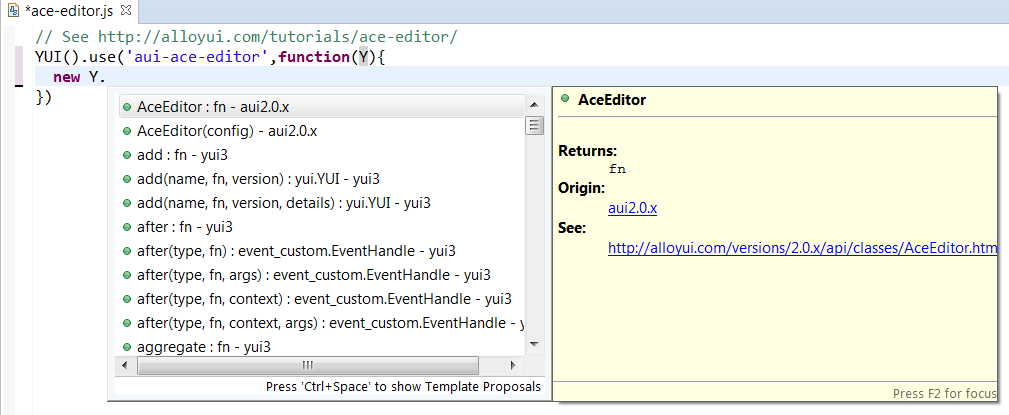
If you wish to use Eclipse as IDE, see [Eclipse AlloyUI support](https://github.com/angelozerr/tern.java/wiki/Tern-&-AlloyUI-support).
## <a name="installation"></a> Installation
`tern-aui2.0.x` works with the NodeJS [tern-server](http://ternjs.net/doc/manual.html#server), and within a browser. It depends on :
* `brower` and `ecma5` JSON Type Definitions coming from the tern.
* [yui3](https://github.com/angelozerr/tern-yui3) tern plugin.
### Short version
After installing Tern according the setup instructions of your desired [editor
plugin]([tern-editor]: http://ternjs.net/doc/manual.html#editor), go to the place where the [Tern package](https://www.npmjs.org/package/tern) was
installed (or the [Tern repo](https://github.com/marijnh/tern) was cloned) and run
```
$ npm install tern-aui2.0.x
```
Or, if you're not sure where Tern was installed, you can try
```
$ npm install -g tern-aui2.0.x
```
### Long version
See [INSTALL.md](INSTALL.md) for instructions tailored to each editor.
## <a name="configuration"></a> Configuration
### With Node.js
In order for Tern to load the tern-aui2.0.x plugin once it is installed, you must
include `aui2.0.x` in the `plugins` section of your [Tern configuration
file](http://ternjs.net/doc/manual.html#configuration). The configuration file can be either a file named
`.tern-project` in your project's root directory, or `.tern-config` in your home directory.
Here is a minimal example `.tern-project` configuration file:
```json
{
"libs": ["ecma5","browser"],
"plugins": {
"yui3": {},
"aui2.0.x": {}
}
}
```
Note that [yui3](https://github.com/angelozerr/tern-yui3) tern plugin must be declared before `aui2.0.x`
<a name="project-dir"></a>
#### "Project directory" and `.tern-project` vs `.tern-config`
Tern looks for `.tern-project` first, walking up the directory tree, and uses
its location as the "project directory". If no `.tern-project` is found, your
`.tern-config` is loaded instead, and *the working directory of the Tern server
process is used as the "project directory"*.
### With WebBrowser (CodeMirror)
See [demos/aui.html](https://github.com/angelozerr/tern-aui2.0.x/blob/master/demos/aui.html)
## How to generate aui2.0.x?
### Introduction
The tern plugin [aui2.0.x.js](https://github.com/angelozerr/tern-aui2.0.x/blob/master/aui2.0.x.js) is generated from the JavaScript sources of [AlloyUI 2.0.x](https://github.com/liferay/alloy-ui/tree/2.0.x). Process of this generation is :
* AlloyUI sources uses [YUIDoc](http://yui.github.io/yuidoc/) comments. [YUIDoc](http://yui.github.io/yuidoc/) is able to generate a JSON representation of JavaScript sources. In this project, we use the this [api.json](https://github.com/angelozerr/tern-aui2.0.x/blob/master/generator/data/api.json) which is a copy/paste of the online [data.json](http://alloyui.com/versions/2.0.x/api/data.json).
* generate JSON Type Definition from [api.json](https://github.com/angelozerr/tern-aui2.0.x/blob/master/generator/data/api.json) (YUIDoc format) by using the transformer [aui2tern.js](https://github.com/angelozerr/tern-aui2.0.x/blob/master/generator/aui2tern.js). Note that you can debug with Chrome this transformer by opening [aui2tern.html](https://github.com/angelozerr/tern-aui2.0.x/blob/master/generator/html/aui2tern.html).
* generate the tern plugin by using the generated JSON Type Definition by calling :
`node generator/node/make_plugin`
### Instruction
Here the steps :
* open cmd
* `cd $HOME/tern-aui2.0.x`
* Generate the tern plugin **aui2.0.x** from [api.json](https://github.com/angelozerr/tern-aui2.0.x/blob/master/generator/data/api.json), by launching :
`node generator/node/make_plugin`
* You can execute tests with
`node test/all`
## Structure
The basic structure of the project is given in the following way:
* `aui2.0.x.js` the tern plugin.
* `demos/` demos with `aui2.0.x` tern plugin which use CodeMirror.