terminal-table
Version:
View a table in the terminal.
84 lines (70 loc) • 2.04 kB
Markdown
terminal-table
==============
View a table in the terminal
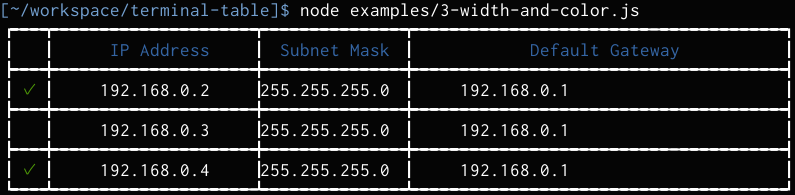
## Features
- To fit the width of the terminal can be displayed
- Centered, right-justified
- Corresponding to the full-width [eastasianwidth](https://github.com/komagata/eastasianwidth)
- Coloring is possible [colors.js](https://github.com/marak/colors.js)
- Border can choose from three styles and user custom style.
## Installation
```bash
$ npm i terminal-table
```
## Usage
``` js
var Table = require("terminal-table");
var t = new Table();
t.push(
["First", "Second"],
["Foo", "Bar"]
);
console.log("" + t);
```
## API
### Constructor options
- borderStyle
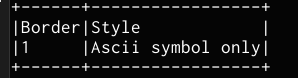
- 1: ascii
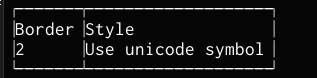
- 2: unicode
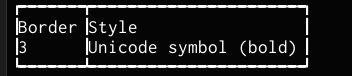
- 3: unicode bold
- 0: user custom
``` js
var t = new Table({
borderStyle: 0,
border: {
sep: "║",
topLeft: "╔", topMid: "╦", top: "═", topRight: "╗",
midLeft: "╠", midMid: "╬", mid: "═", midRight: "╣",
botLeft: "╚", botMid: "╩", bot: "═", botRight: "╝"
}
});
```
- horizontalLine - Boolean
- width - Array
``` js
new Table({
width: [10, "50%", "50%"]
});
```
- leftPadding, rightPadding
### Methods
- push(["item", "item2",,,],,,)
- cell(row, column, text)
- insertRow(rowIndex, ["item", ...])
- insertColumn(columnIndex, ["item", ...])
- attr(row, column, { attrs })
- __attrs__
- align: `left`, `center`, `right`
- color: from colors.js, e.g. `blue`, `red`...
- bg: `blue`, `black`...
- attrRange({ range }, { attrs })
- __range__
- row: [start, end]
- column: [start, end]
- removeCell(row, column)
- removeRow(row)
- removeColumn(column)