terminal-kit
Version:
256 colors, keys and mouse, input field, progress bars, screen buffer (including 32-bit composition and image loading), text buffer, and many more... Whether you just need colors and styles, build a simple interactive command line tool or a complexe termi
163 lines (103 loc) • 7.29 kB
Markdown
[](https://github.com/cronvel/terminal-kit/stargazers)
[](https://github.com/cronvel/terminal-kit)
[](https://www.npmjs.com/package/terminal-kit)
[](https://www.npmjs.com/package/terminal-kit)
[](https://repl.it/github/cronvel/terminal-kit)
[](https://www.npmjs.com/package/terminal-kit)
# Terminal Kit
A full-blown terminal lib featuring: 256 colors, styles, keys & mouse handling, input field, progress bars,
screen buffer (including **32-bit composition** and **image loading**), text buffer, and many more...
Whether you just need colors & styles, build a simple interactive command line tool or a complexe terminal application:
this is the absolute terminal lib for Node.js!
It does **NOT** depend on ncurses.
Some tutorials are available at [blog.soulserv.net/tag/terminal](http://blog.soulserv.net/tag/terminal/).
## Screenshot, PleaZe!
This is a fraction of what Terminal-Kit can do, with only few lines of code.
Click any image to see the documentation related to the feature!
[](doc/low-level.md)
[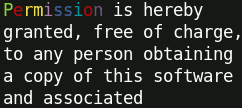](doc/high-level.md#ref.wrapColumn)
← Word-wrapping
[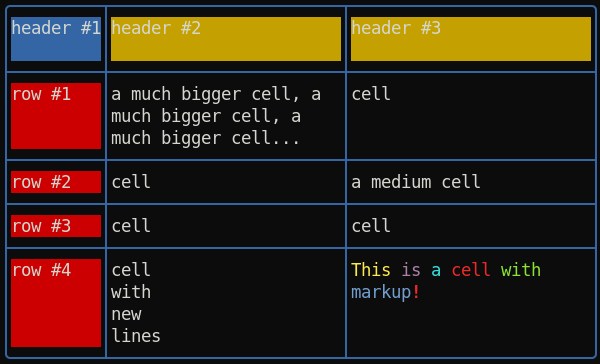](doc/high-level.md#ref.table)
← Table with automatic column computing, cell fitting and word-wrapping
[](doc/high-level.md#ref.inputField)
[](doc/high-level.md#ref.fileInput)
[](doc/high-level.md#ref.inputField)
[](doc/high-level.md#ref.singleLineMenu)
[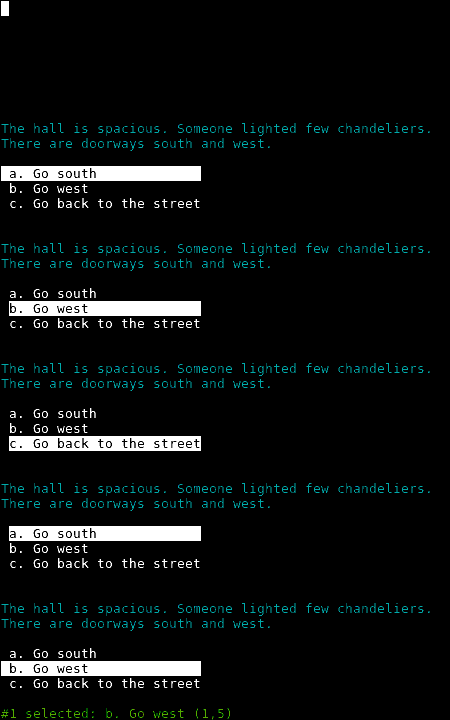](doc/high-level.md#ref.singleColumnMenu)
[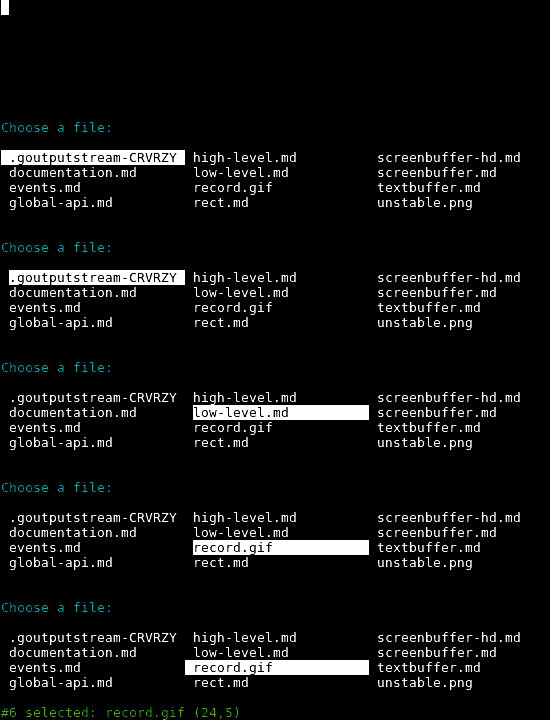](doc/high-level.md#ref.gridMenu)
[](doc/high-level.md#ref.progressBar)
[](doc/high-level.md#ref.progressBar)
[](doc/high-level.md#ref.slowTyping)
[](doc/high-level.md#ref.yesOrNo)
[](doc/ScreenBuffer.md)
← Surfaces and Sprites
[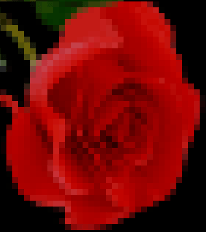](doc/high-level.md#ref.drawImage)
← Load and draw an image inside the terminal
## Key features
*New:* [Document model](doc/document-model.md#top) for building rich app GUI
*New:* [Spinner](doc/high-level.md#ref.spinner)
*New:* [Table](doc/high-level.md#ref.table) with automatic column computing, cell fitting and word-wrapping
*New:* Promises can be used instead of callback everywhere
*New:* [Word-wrapping](doc/high-level.md#ref.wrapColumn) along full terminal width or a pre-defined column-width
*New:* [ScreenBuffer HD](doc/ScreenBufferHD.md#top) 32-bit (RGBA) surfaces with composition and image loading
* [colors, 256 colors or even 24-bit colors](doc/low-level.md#ref.colors), if the terminal supports it
* [styles (bold, underline, italic, and many more)](doc/low-level.md#ref.styles)
* [style mixing](doc/low-level.md#ref.chainable)
* [chainable](doc/low-level.md#ref.chainable)
* [string formatting](doc/low-level.md#ref.string-formatting)
* [short style markup](doc/low-level.md#ref.style-markup)
* [terminal window title](doc/low-level.md#ref.misc)
* [cursor positioning](doc/low-level.md#ref.movingCursor)
* [keyboard input](doc/high-level.md#ref.grabInput)
* [mouse support (GPM is supported for the Linux Console)](doc/high-level.md#ref.grabInput)
* [input field](doc/high-level.md#ref.inputField)
* [single line menu](doc/high-level.md#ref.singleLineMenu)
* [single column menu](doc/high-level.md#ref.singleColumnMenu)
* [grid/table menu](doc/high-level.md#ref.gridMenu)
* [progress bar](doc/high-level.md#ref.progressBar)
* [interactive 'yes or no'](doc/high-level.md#ref.yesOrNo)
* [screen & off-screen buffers (a concept similar to SDL's *Surface*)](doc/ScreenBuffer.md#top)
* [text buffers](doc/TextBuffer.md#top)
* [change the terminal color palette](doc/high-level.md#ref.setPalette)
* [draw an image file (PNG, JPEG, GIF) directly inside the terminal](doc/high-level.md#ref.drawImage)
* [event-driven](doc/events.md#top)
## Quick examples
```js
// Require the lib, get a working terminal
var term = require( 'terminal-kit' ).terminal ;
// The term() function simply output a string to stdout, using current style
// output "Hello world!" in default terminal's colors
term( 'Hello world!\n' ) ;
// This output 'red' in red
term.red( 'red' ) ;
// This output 'bold' in bold
term.bold( 'bold' ) ;
// output 'mixed' using bold, underlined & red, exposing the style-mixing syntax
term.bold.underline.red( 'mixed' ) ;
// printf() style formatting everywhere:
// this will output 'My name is Jack, I'm 32.' in green
term.green( "My name is %s, I'm %d.\n" , 'Jack' , 32 ) ;
// Since v0.16.x, style markup are supported as a shorthand.
// Those two lines produce the same result.
term( "My name is " ).red( "Jack" )( " and I'm " ).green( "32\n" ) ;
term( "My name is ^rJack^ and I'm ^g32\n" ) ;
// Width and height of the terminal
term( 'The terminal size is %dx%d' , term.width , term.height ) ;
// Move the cursor at the upper-left corner
term.moveTo( 1 , 1 ) ;
// We can always pass additional arguments that will be displayed...
term.moveTo( 1 , 1 , 'Upper-left corner' ) ;
// ... and formated
term.moveTo( 1 , 1 , "My name is %s, I'm %d.\n" , 'Jack' , 32 ) ;
// ... or even combined with other styles
term.moveTo.cyan( 1 , 1 , "My name is %s, I'm %d.\n" , 'Jack' , 32 ) ;
// Get some user input
term.magenta( "Enter your name: " ) ;
term.inputField(
function( error , input ) {
term.green( "\nYour name is '%s'\n" , input ) ;
}
) ;
```
### ♥♥ [I want to READ THE DOC NOW!](doc/documentation.md#ref.TOC) ♥♥
#### License: MIT