terabox-upload-tool
Version:
A robust library designed for seamless integration with TeraBox, the leading cloud storage service offering 1 TB of free space. Effortlessly upload files, download files, delete files, manage directories, and retrieve file lists. Ideal for developers seek
238 lines (169 loc) • 6.63 kB
Markdown
# Terabox Upload Tool
**🚀Boost Your Node.js Apps with TeraBox Upload Tool**
Supercharge your Node.js applications with the TeraBox Upload Tool — a powerful library for seamless integration with [TeraBox](https://www.terabox.com/wap), the leading cloud storage platform with 1TB of free space.
✅ Effortlessly:
- Upload, download, retrieve, and delete files
- Manage directories with ease
- Fetch file lists for better organization
Ideal for developers and automation enthusiasts looking for an efficient cloud storage solution in Node.js.
## Features
- File Upload: Easily upload files to Terabox storage.
- Custom Directory Support: Specify the directory where the file should be uploaded.
- Progress Tracking: Monitor the upload progress in real-time.
- Retrieve your Files: Retrieve your files from any directory.
- Download your Files: Get direct file download link.
- Delete or move your files from any directory.
## Coming Soon (Open for Collaboration)
- Video Streaming: Support for streaming videos.
- Fetch Upload History
- Fetch Download History
- Restructure code and files
## Installation
Install the package using npm:
```bash
npm install terabox-upload-tool
```
## Getting Started
### Setting up credentials
```javascript
const TeraboxUploader = require("terabox-upload-tool");
const credentials = {
ndus: "valid_ndus", //Required: Get this from your session (See guide below)
appId: "valid_appId", //Required: Get this from your session (See guide below)
uploadId: "valid_uploadId", //Required: Get this from your session (See guide below)
jsToken: "valid_jsToken", //Required: Get this from your session (See guide below)
browserId: "valid_browserId", //Required: Get this from your session (See guide below)
};
const uploader = new TeraboxUploader(credentials);
```
### Uploading
To upload a file, use the instance of TeraboxUploader and specify the file path.
#### Example: Save File to a Specific Directory
```javascript
async function uploadFile() {
try {
const result = await uploader.uploadFile(
filePath,
showProgress,
"/myUploads"
);
if (result.success) {
console.log("File uploaded successfully!");
console.log("File details:", result.fileDetails);
} else {
console.log("Upload failed:", result.message);
}
} catch (error) {
console.log("An error occurred during the upload:", error.message);
}
}
```
### Fetching files
Fetch the files in a directory
#### Example: Fetch a list of files from Terabox
```javascript
async function fetchFileList() {
try {
const fileList = await uploader.fetchFileList("/myUploads"); //fetching files from 'myuplods' directory, default is '/' directory.
console.log("Files in your directory:", fileList);
} catch (error) {
console.log("Error fetching file list:", error.message);
}
}
```
### Downloading a file
Download a file by it's fs_id aka fileId
```javascript
async function download(fileId) { // fs_id from fetched file information
try {
const res = await uploader.downloadFile(fileId);
console.log(res);
} catch (error) {
console.log(error);
}
}
```
### Delete a file
Delete a list of files, provide an array of path of files to delete
```javascript
async function deleteList() {
try {
const deleteD = await uploader.deleteFiles([
"/FliqloScr.zip",
"/Consent Letter.docx",
]);
console.log(deleteD);
} catch (error) {
console.error("Error fetching file list:", error.message);
}
}
```
### Moving a file
Moves a file from one location to another with a new name.
```javascript
async function moveFile(){
try{
const moved = await uploader.moveFiles('/sample_960x540.mkv', '/uploads', 'sample.mkv') //old path, new path, new name
console.log(moved);
}catch(error){
console.log(error);
}
}
```
## Future Enhancements (Open Collaboration)
We are actively seeking contributors to add the following features:
1. **Error Handling Enhancements:**
- Improve error messages for easier debugging and user guidance.
2. **Automated Tests:**
- Add test cases to ensure reliability and robustness.
3. **Documentation Updates:**
- Expand guides with screenshots and example workflows.
4. **Restructure Code and Files:**
- Restructure the existing code and files
5. **New Features Addition:**
- Addition of new features and enhancements
## Contribution Guidelines
We welcome contributions from the community! Here’s how you can get started:
1. Fork the repository and create a new branch for your feature or bugfix.
2. Make your changes and ensure the code adheres to the project's style guide.
3. Submit a pull request detailing your changes and their purpose.
4. Feel free to open issues for feature requests or bug reports.
## Resources for Developers
- [Node.js File System Documentation](https://nodejs.org/api/fs.html)
- [Chrome Dev-Tools (Networks)](https://developer.chrome.com/docs/devtools/network)
<br>
Terabox Node.js Library
Upload Files to Terabox
Terabox API Integration
Terabox File Management
Node.js Terabox SDK
## Guide
For getting your credentials, go to the terabox, create an account and follow the steps:
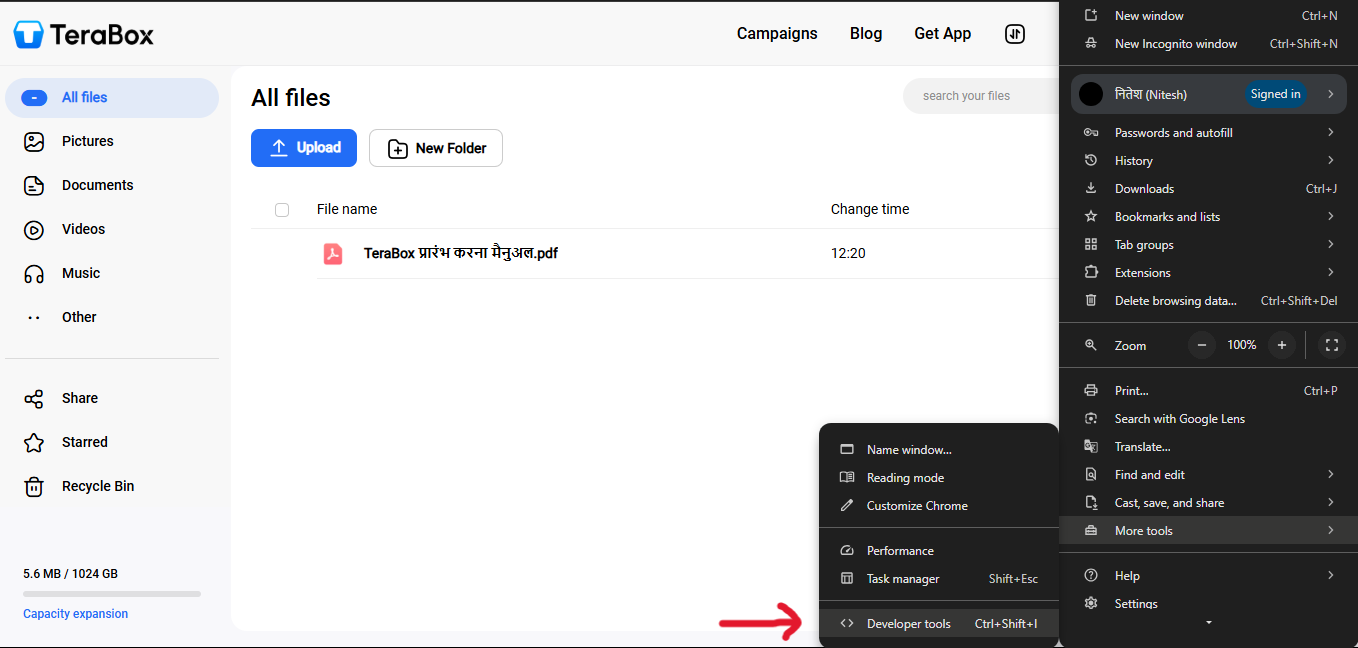
Login you account and open the developer tools
<br>
<br>
<br>
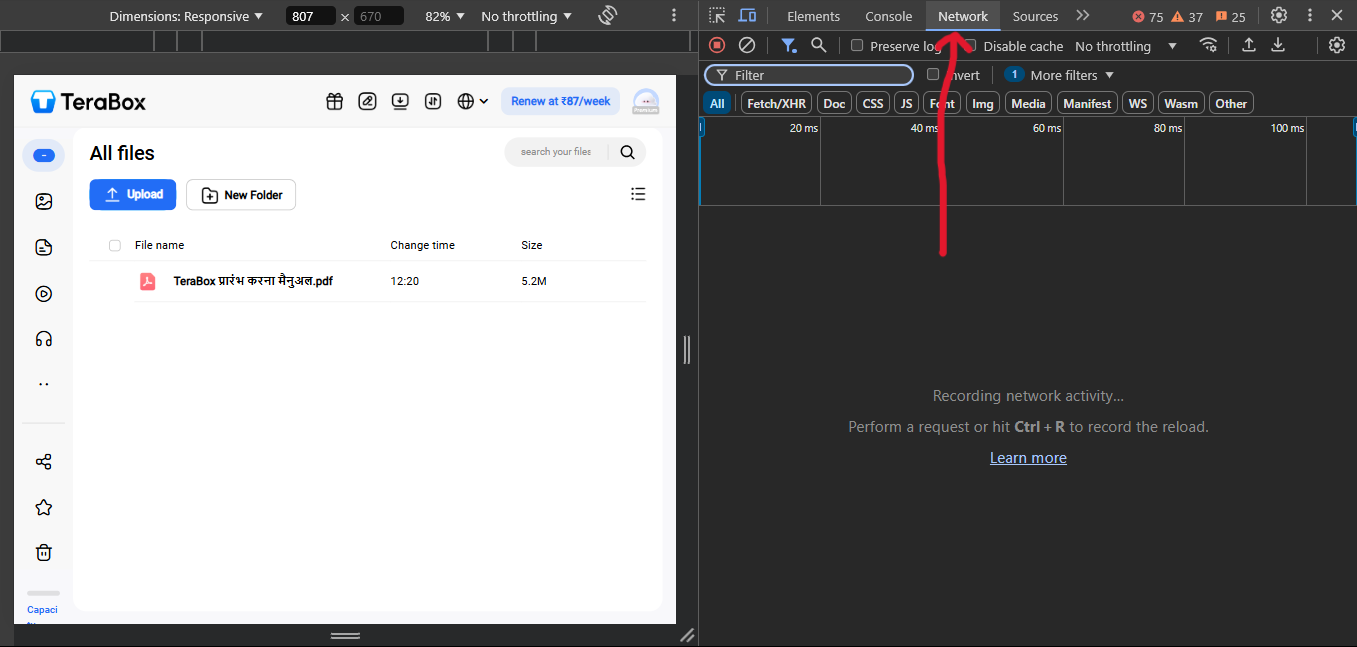
Go to network tab
<br>
<br>
<br>
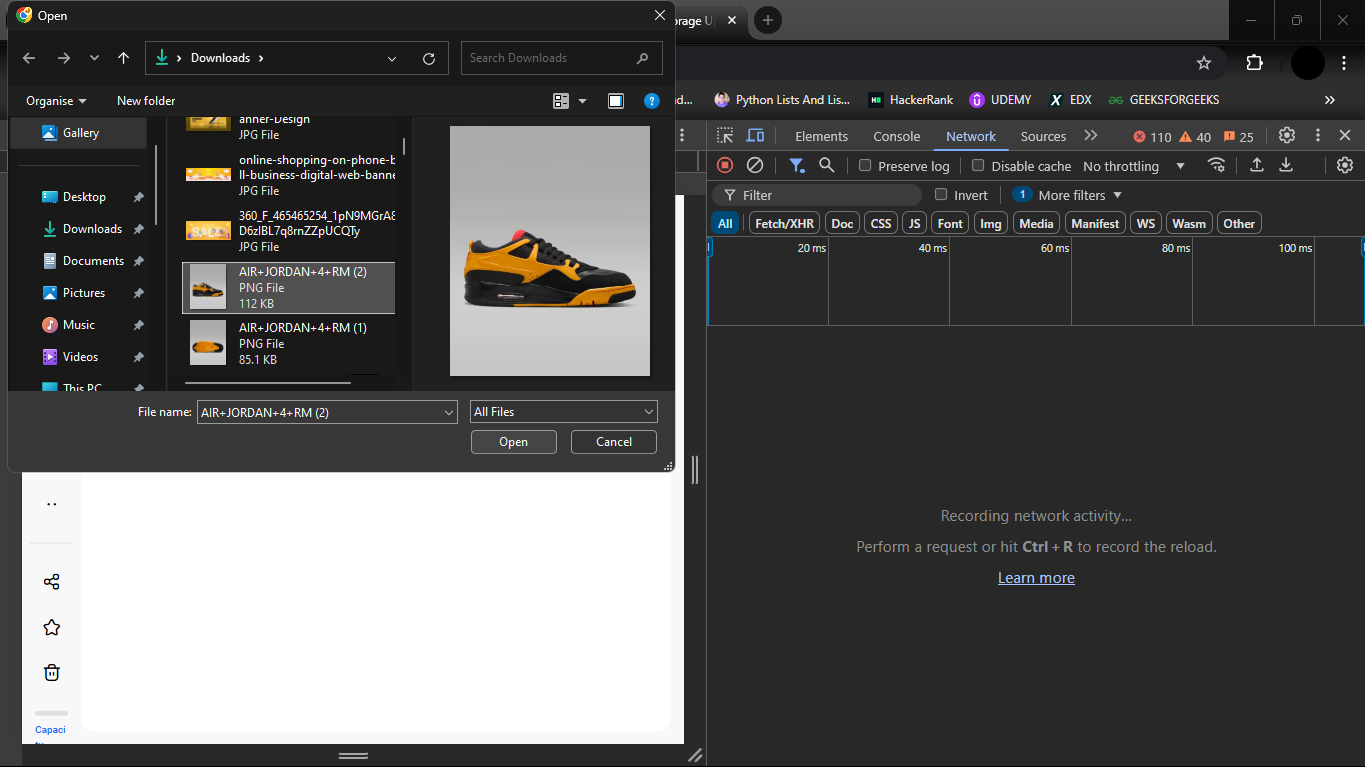
Upload an image from left of your screen
<br>
<br>
<br>
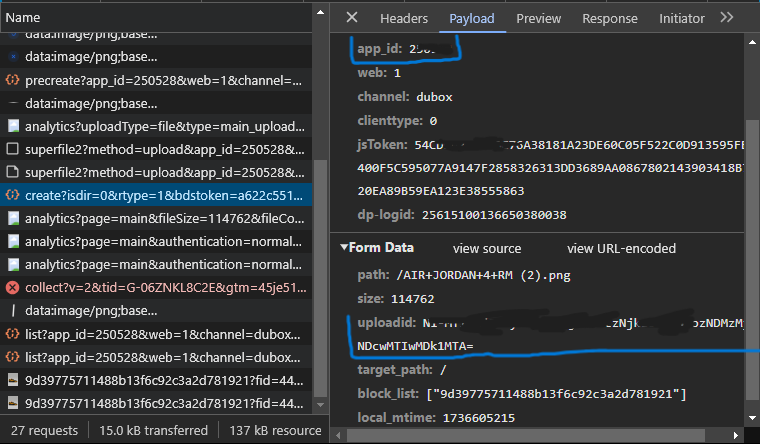
Look for 'appId' and 'uploadId' from following request
<br>
<br>
<br>
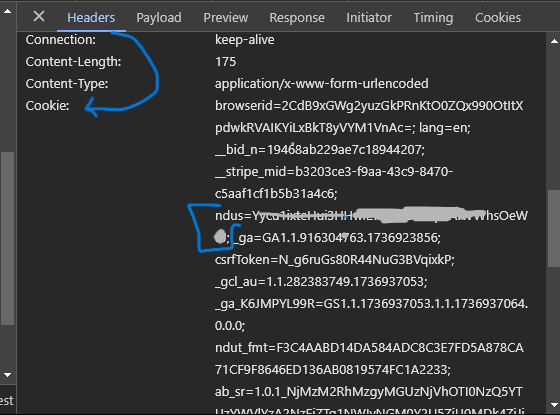
Get the 'ndus' from cookies in the header section
<br>
<br>
<br>
## Licence
This project is licensed under the [MIT License.](./LICENSE)
[Github](https://github.com/Pahadi10/terabox-upload-tool)