tellki-node-windows
Version:
Support for Tellki Agent Windows service.
223 lines (203 loc) • 6.86 kB
JavaScript
/**
* @class nodewindows.EventLogger
* @since 0.1.0
* Use a _non-C++_ based event logging utility with your Windows code.
* This utility can write to the event log, making your logs visible from the Event Viewer.
*
* To create a logger:
*
* var EventLogger = require('node-windows').EventLogger;
*
* var log = new EventLogger('Hello World');
*
* log.info('Basic information.');
* log.warn('Watch out!');
* log.error('Something went wrong.');
*
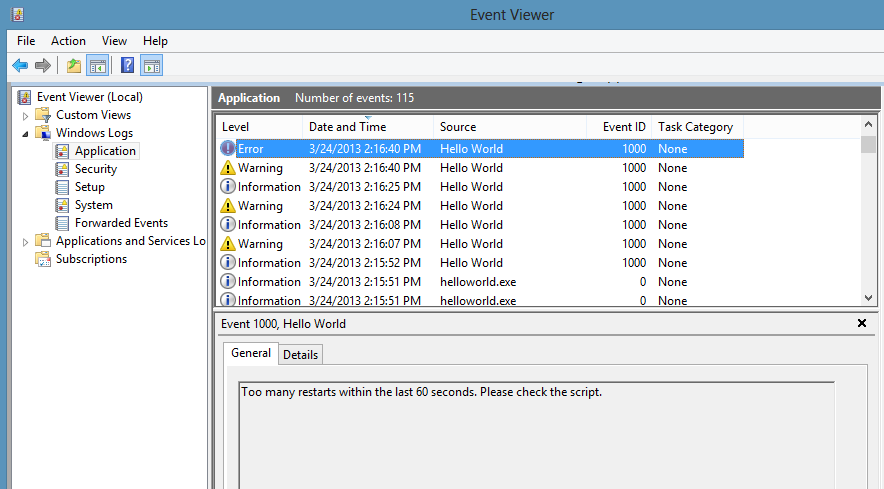
* Looks similar to:
*
* 
*
* Some lesser-used options are also available through node-windows event logging.
*
* log.auditSuccess('AUser Login Success');
* log.auditFailure('AUser Login Failure');
*
* Each log type (info, warn, error, auditSuccess, and auditFailure) method optionally accepts two additional
* arguments, including a _code_ and _callback_. By default, the event code is `1000` if not otherwise specified.
* To provide a custom event code with a log message and write that message to the console, the following code could
* be used:
*
* log.info('Something different happened!', 1002, function(){
* console.log('Something different happened!');
* });
*
* By default, event logs are all part of the `APPLICATION` scope. However; it is also possible to use the `SYSTEM` log.
* To do this, a configuration object must be passed to the new log:
*
* var EventLogger = require('node-windows').EventLogger;
* var log = new EventLogger({
* source: 'My Event Log',
* eventLog: 'SYSTEM'
* });
*/
var wincmd = require('./binaries'),
eventlogs = ['APPLICATION','SYSTEM'],
validtypes = ['ERROR','WARNING','INFORMATION','SUCCESSAUDIT','FAILUREAUDIT'];
// Write a message to the log. This will create the log if it doesn't exist.
var write = function(log,src,type,msg,id,callback){
if (msg == null) {return};
if (msg.trim().length == 0) {return};
log = log || 'APPLICATION';
log = eventlogs.indexOf(log.toUpperCase()) >= 0 ? log : 'APPLICATION';
type = (type || 'INFORMATION').trim().toUpperCase();
type = (validtypes.indexOf(type.trim().toUpperCase()) >= 0 ? type : 'INFORMATION').trim().toUpperCase();
id = typeof id == 'number' ? (id > 0 ? id : 1000) : 1000;
src = (src || 'Unknown Application').trim();
wincmd.elevate("eventcreate /L "+log+" /T "+type+" /SO \""+src+"\" /D \""+msg+"\" /ID "+id,callback);
};
// Basic functionality
var logger = function(config){
config = config || {};
if (typeof config == 'string') {
config = {
source: config
};
}
// Common attributes
Object.defineProperties(this,{
/**
* @cfg {String} [name=Node.js]
* The source of the log information. This is commonly the title of an application
* or the Node.js script name (i.e. MyApp).
*/
source: {
enumerable: true,
writable: true,
configurable: false,
value: config.source || 'Node.js'
},
_logname: {
enumerable: false,
writable: true,
configurable: false,
value: config.eventLog || 'APPLICATION'
},
/**
* @cfg {String} [eventLog=APPLICATION]
* The event log where messages should be written. This is either `APPLICATION` or `SYSTEM`.
*/
eventLog: {
enumerable: true,
get: function(){
return this._logname.toUpperCase();
},
set: function(value) {
if (value){
this._logname = eventlogs.indexOf(value.toUpperCase()) >= 0 ? value.toUpperCase() : 'APPLICATION';
}
}
},
/**
* @method info
* Log an informational message.
* @param {String} message
* The content of the log message.
* @param {Number} [code=1000]
* The event code to assign to the message.
* @param {Function} [callback]
* An optional callback to run when the message is logged.
*/
info: {
enumerable: true,
writable: true,
configurable: false,
value: function(message,code,callback) {
write(this.eventLog,this.source,'INFORMATION',message,code,callback);
}
},
information: {
enumerable: false,
get: function(){
return this.info;
}
},
/**
* @method error
* Log an error message.
* @param {String} message
* The content of the log message.
* @param {Number} [code=1000]
* The event code to assign to the message.
* @param {Function} [callback]
* An optional callback to run when the message is logged.
*/
error: {
enumerable: true,
writable: true,
configurable: false,
value: function(message,code,callback) {
write(this.eventLog,this.source,'ERROR',message,code,callback);
}
},
/**
* @method warn
* Log a warning message.
* @param {String} message
* The content of the log message.
* @param {Number} [code=1000]
* The event code to assign to the message.
* @param {Function} [callback]
* An optional callback to run when the message is logged.
*/
warn: {
enumerable: true,
writable: true,
configurable: false,
value: function(message,code,callback) {
write(this.eventLog,this.source,'WARNING',message,code,callback);
}
},
warning: {
enumerable: false,
get: function(){return this.warn;}
},
/**
* @method auditSuccess
* Log an audit success message.
* @param {String} message
* The content of the log message.
* @param {Number} [code=1000]
* The event code to assign to the message.
* @param {Function} [callback]
* An optional callback to run when the message is logged.
*/
auditSuccess: {
enumerable: true,
writable: true,
configurable: false,
value: function(message,code,callback) {
write(this.eventLog,this.source,'SUCCESSAUDIT',message,code,callback);
}
},
/**
* @method auditFailure
* Log an audit failure message.
* @param {String} message
* The content of the log message.
* @param {Number} [code=1000]
* The event code to assign to the message.
* @param {Function} [callback]
* An optional callback to run when the message is logged.
*/
auditFailure: {
enumerable: true,
writable: true,
configurable: false,
value: function(message,code,callback) {
write(this.eventLog,this.source,'FAILUREAUDIT',message,code,callback);
}
}
});
};
module.exports = logger;