syntax-highlighting
Version:
Syntax Highlighting Colorschemes for many applications
56 lines (37 loc) • 3.22 kB
Markdown
Chrome Devtools - Colorscheme
=============================
[Go to Demopage](http://atelierbram.github.io/syntax-highlighting/chrome-devtools)
One can change the way Chrome Developer Tools look by having a custom CSS stylesheet, named `Custom.css`.
The path for the directory that contains the file:
```
Mac: "Library/Application Support/Google/Chrome/Default/User StyleSheets/"
Linux: "~/.config/chrome/Default/User StyleSheets/"
Windows: "C:\Users\**Your username**\AppData\Local\Google\Chrome\User Data\Default\User StyleSheets\"
```
Method above will not work anymore.
To make Solarized Light Theme work in Crome Canary, follow the instructions on:
* [Official method (Chrome 33+ only) taken from stackoverflow](http://stackoverflow.com/questions/21207474/custom-css-stop-to-work-in-32-0-1700-76-m-google-chrome-update)
* [ZeroDarkMatrix Theme for Chrome](https://github.com/mauricecruz/chrome-devtools-zerodarkmatrix-theme)
[You can download the stylesheet](zero-base-themes/canary-theme-extension/styles.css), but better (edit and) regenerate the [.less file](zero-base-themes/themes/solarized-light.less), which is build on top of [Zero Base Themes](https://github.com/mauricecruz/zero-base-themes).
For tweaking the theme you can use DevTools itself to inspect Devtools:
1. undock DevTools
2. then hit Ctrl-Alt-i or Cmd+alt+i on Mac.
3. now you have yet another undocked DevTools window with all the DevTools markup to inspect the DevTools-window you undocked in step 1 …
## Solarized Light
Solarized Light is a syntax highlighting colorscheme, made by [Ethan Schoonover](http://ethanschoonover.com/). It is well balanced, and thoroughly tested, and comes in two varieties: a dark, or a light background.
For [this Chrome-DevTools colourscheme](http://atelierbram.github.io/syntax-highlighting/chrome-devtools/#solarized-light) the light background-colour variety was the starting point. In a few places the dark background give some extra contrast.
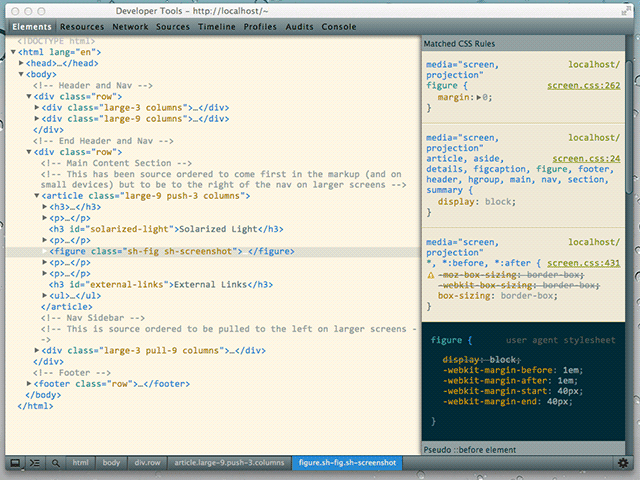
[download the stylesheet, and/or copy and paste the contents in you're Custom.css](https://github.com/atelierbram/syntax-highlighting/blob/master/chrome-devtools/css/Custom-solarized-light.css)
## Colorscheme Lab
* [Colorscheme Lab](http://atelierbram.github.io/syntax-highlighting/lab), a Code Syntax Highlighter Builder
* [Colorscheme Lab on CodePen](http://codepen.io/atelierbram/pen/JnbIt)
* [Colorscheme Lab as Github Gist](https://gist.github.com/atelierbram/6283373)
## External Links
* [Skin your Chrome Inspector, by Darcy Clarke](http://darcyclarke.me/design/skin-your-chrome-inspector/)
* [Tips and links by Addy Osmani](https://plus.google.com/+AddyOsmani/posts/UZF34wPJXsL)
* [more Themes for Chrome Developer Tools](http://devthemez.com/themes/chrome-developer-tools)
* [Solarized project page](http://ethanschoonover.com/solarized)
* [Solarized on Github](https://github.com/altercation/solarized)
## License
Copyright (c) 2013 Bram de Haan
Released under [MIT Licence](http://atelierbram.mit-license.org)