svelte-skeleton-loader
Version:
Make beautiful, animated loading skeletons that automatically adapt to your app. Written for svelte from [react-loading-skeleton](https://github.com/dvtng/react-loading-skeleton)
178 lines (121 loc) • 4.02 kB
Markdown
# Svelte-Skeleton-Loader
Make beautiful, animated loading skeletons that automatically adapt to your app.
Written for svelte from [react-loading-skeleton](https://github.com/dvtng/react-loading-skeleton)
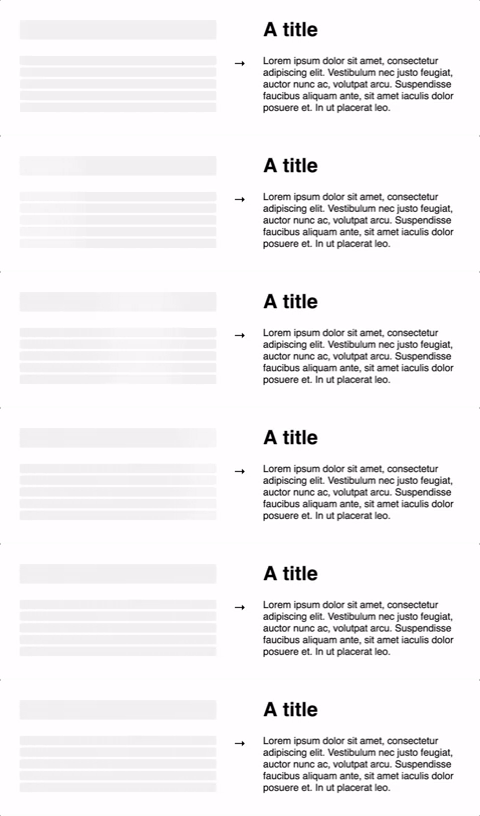
## Basic usage
Install by `npm`/`yarn` with `svelte-loading-skeleton`.
```javascript
<script>
import Skeleton from 'svelte-loading-skeleton';
</script>
<Skeleton/> // Simple, single-line loading skeleton
<Skeleton count={5}/> // Five-line loading skeleton
```
## Principles
### Adapts to the styles you have defined
The `<Skeleton>` component is designed to be used directly in your components,
in place of content while it's still loading.
Unlike other libraries, rather than meticulously crafting a skeleton screen to
match the `font-size`, `line-height` or `margin`s your content takes on,
use a `<Skeleton>` component to have it automatically fill the correct dimensions.
For example:
```javascript
<script>
import Skeleton from 'svelte-loading-skeleton';
</script>
<div style="font-size: 20; line-height:2;">
{#if title && body}
<h1>{title}</h1>
{body}
</div>
{:else}
<h1><Skeleton /></h1>
<Skeleton count={10} />
{/if}
```
...will produce the correctly-sized skeletons for the heading and body sections
without any further configuration of the `<Skeleton>` component.
This ensures the loading state remains up-to-date with any changes
to your layout or typography.
### Don't make dedicated skeleton screens
Instead, make components with _built-in_ skeleton states.
In addition to keeping the styling in-sync, here are some other reasons to do this:
1. Components represent all possible states it can be in - loading included.
1. It allows for more flexible loading patterns - in the example, it's possible to have the `title` load first, and then the `body`, while having both pieces of content show loading skeletons at the right time.
## Theming
Using a `<SkeletonTheme>` component, you can easily change the colors of all
skeleton components below it in the Svelte hierarchy:
```javascript
<script>
import Skeleton, { SkeletonTheme } from "react-loading-skeleton";
</script>
<SkeletonTheme color="#202020" highlightColor="#444">
<p>
<Skeleton count={3} />
</p>
</SkeletonTheme>;
```
## Count
`count`: Number, defaults to 1
```javascript
<Skeleton count={5} />
```
Number of loading skeleton lines.
## Duration
```javascript
<Skeleton duration={2} />
```
`duration`: Number, defaults to 1.2
Duration is how long it takes do one cycle of the skeleton animation.
## Width
`width`: Number | String | null, defaults to null
```javascript
<Skeleton width={100} />
```
Width of the skeleton. Useful when the skeleton is inside an inline element with
no width of its own.
## Height
`height`: Number | String | null, defaults to null
```javascript
<Skeleton height={100} />
```
Height of the skeleton. Useful when you don't want to adapt the skeleton to a text element but for instance
a card. Also needed for the prop `circle` (see below).
## Wrapper
`wrapper`: svelte:component | null, defaults to null
```javascript
<style>
a {
border: "1px solid #ccc",
display: "block",
font-size: 16,
line-height: 2,
padding: 20,
margin-bottom: 10,
width: 100,
}
</style>
<a>
<slot />
</a>
<Skeleton wrapper={Box} />
```
Prop for wrap the skeleton in a custom component.
## Circle
`circle`: Boolean, defaults to false
```javascript
<Skeleton circle={true} height={50} width={50} />
```
Prop for making the skeleton look like a circle, for when you are creating a user card with a profile picture for instance.
<!-- ## Style
`style`: CSSProperties, defaults to {}
```javascript
<Skeleton style={{ borderRadius: 10 }} />
```
Prop for adding custom CSS styles to the skeleton. -->
## ClassName
`class`: String, defaults to ""
```javascript
<Skeleton class='foobar' />
```
Prop for adding custom CSS classname to the skeleton.