svader
Version:
Create GPU-rendered Svelte components
288 lines (203 loc) • 13.2 kB
Markdown
<p align="center">
<picture>
<source media="(prefers-color-scheme: dark)" srcset="https://raw.githubusercontent.com/sockmaster27/svader/master/resources/logoDark.png">
<img width="150" alt="Svader Logo" src="https://raw.githubusercontent.com/sockmaster27/svader/master/resources/logoLight.png">
</picture>
<br>
<a target="_blank" href="https://github.com/sockmaster27/svader/blob/master/LICENSE.md"><img alt="MIT License" src="https://img.shields.io/badge/license-MIT-blue"></a>
<a target="_blank" href="https://github.com/sockmaster27/svader/actions/workflows/ci.yml"><img alt="CI Status" src="https://github.com/sockmaster27/svader/actions/workflows/ci.yml/badge.svg"></a>
<br>
<a target="_blank" href="https://www.npmjs.com/package/svader"><img alt="NPM Version" src="https://img.shields.io/npm/v/svader"></a>
</p>
# Svader
Create GPU-rendered Svelte components with WebGL and WebGPU fragment shaders.
Supports Svelte 4 and Svelte 5.
## What is a fragment shader?
In short, a _fragment shader_ can be written as a program that takes the coordinates of a pixel on the screen and returns the color that this pixel should have.
This program can be executed on the GPU, ensuring massive parallelism and speed.
To learn more about how to write fragment shaders, check out [The Book of Shaders](https://thebookofshaders.com/).
The following is a collection of examples all made using Svader. The live version of all of these can be previewed on [svader.vercel.app](https://svader.vercel.app/),
and the source code can be found in the [`src/routes/`](https://github.com/sockmaster27/svader/tree/master/packages/tests-svelte5/src/routes) directory.
## Installation
```bash
# npm
npm i -D svader
# pnpm
pnpm i -D svader
# Bun
bun i -D svader
# Yarn
yarn add -D svader
```
## Usage
To use a fragment shader component, you first need to decide whether to use WebGL or WebGPU.
If you're unsure about what to use, see the [WebGL vs. WebGPU](#webgl-vs-webgpu) section.
### Sections
- [WebGL](#webgl)
- [WebGL parameters](#webgl-parameters)
- [WebGL built-in values](#webgl-built-in-values)
- [WebGPU](#webgpu)
- [WebGPU parameters](#webgpu-parameters)
- [WebGPU built-in values](#webgpu-built-in-values)
### WebGL
The following is a minimal example of a WebGL fragment shader component.
[**View in playground**](https://svelte.dev/playground/3e4a38bca5ca49fa94e1106a841063d5?version=5.16.2)
```svelte
<script>
import { WebGlShader } from "svader";
const shaderCode = `#version 300 es
precision highp float;
out vec4 fragColor;
uniform vec2 u_resolution;
uniform vec2 u_offset;
void main() {
vec2 pos = gl_FragCoord.xy + u_offset;
vec2 st = pos / u_resolution;
fragColor = vec4(st, 0.0, 1.0);
}
`;
</script>
<WebGlShader
width="500px"
height="500px"
code={shaderCode}
parameters={[
{ name: "u_resolution", value: "resolution" },
{ name: "u_offset", value: "offset" },
]}
>
<div class="fallback">WebGL not supported in this environment.</div>
</WebGlShader>
```
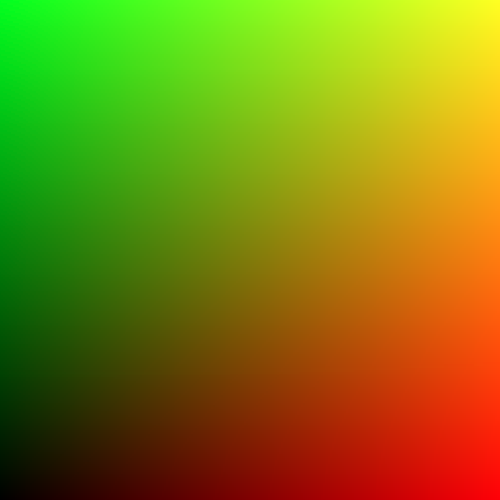
This produces the following output:
Here, the `shaderCode` variable is a string containing the [GLES](https://en.wikipedia.org/wiki/OpenGL_ES) shader code.
For simplicity, this is stored as a string, but it would typically be stored in a separate `myShader.frag` file.
When loading the shader from a file, it might be useful to know that the `code` property accepts both a `string` and a `Promise<string>`.
What this code does is:
1. Add the given `u_offset` uniform to the 2D coordinates of the pixel given by `gl_FragCoord.xy`.
2. Divide the resulting coordinates entrywise by the `u_resolution` uniform to normalize the coordinates between 0 and 1.
3. Return the normalized coordinates as the color of the pixel, such that the `x` coordinate becomes the red channel and the `y` coordinate becomes the green channel. The blue channel is always set to 0, and the alpha (opacity) channel is always set to 1 (fully opaque).
In GLES, _uniforms_ are inputs to the shader program, that are the same for every pixel on the screen.
These need to be passed in via the `parameters` property of the `<WebGlShader>` component.
In this case, we need to pass in two uniforms: `u_resolution` and `u_offset`.
Since these specific parameters are very commonly used, they are specially implemented in Svader
such that the `value` property of each parameter can simply be set to `"resolution"` and `"offset"` respectively.
Lastly, the `<WebGlShader>` component accepts a fallback slot, which is rendered when the browser cannot render the shader.
#### WebGL parameters
The `parameters` property is an array of objects with the following properties:
- **`name`**: The name of the uniform parameter, e.g. `"my_uniform"`.
This must match the name of the parameter in the shader code.
- **`type`**: The type of the uniform parameter as it is written in the shader code, e.g. `"float"`.
If the `value` property is a [built-in value](#webgl-built-in-values), such as `"resolution"`,
the `type` will be determined automatically and should not be set.
- **`value`**: The value of the uniform parameter, or a string specifying a [built-in value](#webgl-built-in-values).
If not a built-in value, the type of this property must correspond to the `type` property, such that:
- **`float`, `int`, `uint`** is a `number`,
- **`vecN`, `ivecN`, `uvecN`** is a `number[]` with a length of `N`, e.g. `vec2` -> `[1.2, 3.4]`.
- **`matN`** is a `number[]` with a length of `N * N`, e.g. `mat2` -> `[1, 2, 3, 4]`.
##### WebGL built-in values
Some types of uniforms are used very often. These are implemented in Svader itself, and referred to as _built-in values_.
To use these, the `value` property of the parameter object must be set to a string matching one of the following:
- **`"resolution"`**: A `vec2` of the canvas width and height in physical device pixels.
- **`"scale"`**: A `float` of the ratio between CSS pixels and physical device pixels, i.e. zoom level.
For example, if the browser has been zoomed to 150%, the `scale` parameter will be `1.5`.
- **`"time"`**: A `float` of the current time in seconds.
NOTE: Passing this parameter to the shader will cause it to rerender every frame.
- **`"offset"`**: A `vec2` to be added to the `gl_FragCoord.xy` of the fragment shader.
Sometimes the size of the canvas is limited by hardware.
To compensate for this, Svader creates a virtual canvas with a smaller cutout shifting around to cover the screen.
The `"resolution"` parameter is automatically adjusted to match the size of this virtual canvas, but for technical reasons,
the `gl_FragCoord.xy` cannot be adjusted from the outside.
Therefore, the `"offset"` parameter is provided to be manually added to these coordinates.
### WebGPU
The following is a minimal example of a WebGPU fragment shader component.
[**View in playground**](https://svelte.dev/playground/498446d091964bb199e6a88bce90feae?version=5.16.3)
```svelte
<script>
import { WebGpuShader } from "svader";
const shaderCode = `
(0) (0) var<uniform> resolution: vec2f;
(0) (1) var<uniform> offset: vec2f;
fn main((position) raw_pos: vec4f) -> (0) vec4f {
let pos = raw_pos.xy + offset;
let st = pos / resolution;
return vec4f(st, 0.0, 1.0);
}
`;
</script>
<WebGpuShader
width="500px"
height="500px"
code={shaderCode}
parameters={[
{ label: "Resolution", binding: 0, value: "resolution" },
{ label: "Offset", binding: 1, value: "offset" },
]}
>
<div class="fallback">WebGPU not supported in this environment.</div>
</WebGpuShader>
```
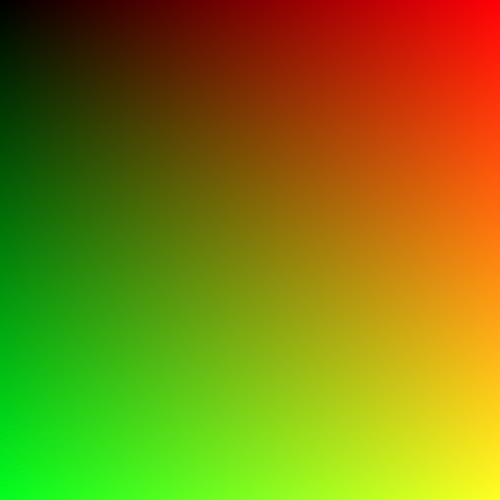
This produces the following output:
Here, the `shaderCode` variable is a string containing the [WGSL](https://google.github.io/tour-of-wgsl/) shader code.
For simplicity, this is stored as a string, but it would typically be stored in a separate `myShader.wgsl` file.
When loading the shader from a file, it might be useful to know that the `code` property accepts both a `string` and a `Promise<string>`.
What this code does is:
1. Add the given `offset` uniform variable to the 2D coordinates of the pixel given by `raw_pos.xy`.
2. Divide the resulting coordinates entrywise by the `resolution` uniform to normalize the coordinates between 0 and 1.
3. Return the normalized coordinates as the color of the pixel, such that the `x` coordinate becomes the red channel and the `y` coordinate becomes the green channel. The blue channel is always set to 0, and the alpha (opacity) channel is always set to 1 (fully opaque).
In WGSL, these `var<uniform>`s are the primary way to pass in parameters to the shader.
These need to be passed in via the `parameters` property of the `<WebGpuShader>` component.
In this case, we need to pass in two uniforms: `resolution` and `offset`.
Since these specific parameters are very commonly used, they are specially implemented in Svader
such that the `value` property of each parameter can simply be set to `"resolution"` and `"offset"` respectively.
Lastly, the `<WebGpuShader>` component accepts a fallback slot, which is rendered when the browser cannot render the shader.
#### WebGPU parameters
The `parameters` property is an array of objects with the following properties:
- **`label`**: The name of the parameter to be used for debugging.
This does not have to correspond to the name of the parameter in the shader code.
- **`binding`**: An integer used to match the parameter to the variable in the shader code.
This has to match the `binding` property of the parameter in the shader code, e.g. for the variable declaration
```WGSL
(0) (42) var<uniform> my_variable: f32;
```
the `binding` property should be `42`.
- **`value`**: The value of the parameter, or a string specifying a [built-in value](#webgpu-built-in-values).
If not a built-in value, this parameter should be an `ArrayBuffer`/`ArrayBufferView`.
For example, to pass in a number to an `f32` parameter, it can be constructed like `new Float32Array([myNumberValue])`.
- **`storage`**: [Optional - defaults to `false`] Whether the parameter is a storage variable rather than a uniform variable.
This has to match the declaration in the shader code, e.g. for the variable declaration
```WGSL
(0) (0) var<uniform> my_variable: f32;
```
the `storage` property should be `false` or omitted, and for
```WGSL
(0) (0) var<storage, read> my_variable: f32;
```
it should be `true`.
Note that Svader currently only supports `var<storage, read>` and not `var<storage, read_write>`.
##### WebGPU built-in values
Some types of inputs are used very often. These are implemented in Svader itself, and referred to as _built-in values_.
To use these, the `value` property of the parameter object must be set to a string matching one of the following:
- **`"resolution"`**: A `vec2f` of the canvas width and height in physical device pixels.
- **`"scale"`**: An `f32` of the ratio between CSS pixels and physical device pixels, i.e. zoom level.
For example, if the browser has been zoomed to 150%, the `scale` parameter will be `1.5`.
- **`"time"`**: An `f32` of the current time in seconds.
NOTE: Passing this parameter to the shader will cause it to rerender every frame.
- **`"offset"`**: A `vec2f` to be added to the `(position)` of the fragment shader.
Sometimes the size of the canvas is limited by hardware.
To compensate for this, Svader creates a virtual canvas with a smaller cutout shifting around to cover the screen.
The `"resolution"` parameter is automatically adjusted to match the size of this virtual canvas, but for technical reasons,
the `(position)` cannot be adjusted from the outside.
Therefore, the `"offset"` parameter is provided to be manually added to these coordinates.
## WebGL vs. WebGPU
**For practical applications, default to using WebGL.**
WebGL and WebGPU are both rendering APIs that allow web applications to render GPU-accelerated graphics.
WebGL is the older of the two and is supported by [all modern browsers](https://caniuse.com/webgl).
WebGPU is still in the experimental stage and is only supported in a [few browsers](https://caniuse.com/webgpu).
However, it supports certain features that WebGL does not. For example, as of writing, WebGL in Google Chrome only supports having 8 canvases active in the document at once, while WebGPU supports a practically unlimited number.
## License
Svader is licensed under the [MIT License](https://github.com/sockmaster27/svader/blob/master/LICENSE.md).