suneditor
Version:
Pure JavaScript based WYSIWYG web editor
986 lines (886 loc) • 42 kB
Markdown
# SunEditor
Pure javscript based WYSIWYG web editor, with no dependencies
#### Demo : <a href="http://suneditor.com" target="_blank">suneditor.com</a>
[](https://github.com/JiHong88/SunEditor/blob/master/LICENSE.txt)
[](https://github.com/JiHong88/SunEditor/releases)
[](https://nodei.co/npm/suneditor/)
[](https://github.com/JiHong88/SunEditor/releases/latest)
[](https://www.jsdelivr.com/package/npm/suneditor)
[](https://nodei.co/npm/suneditor/)

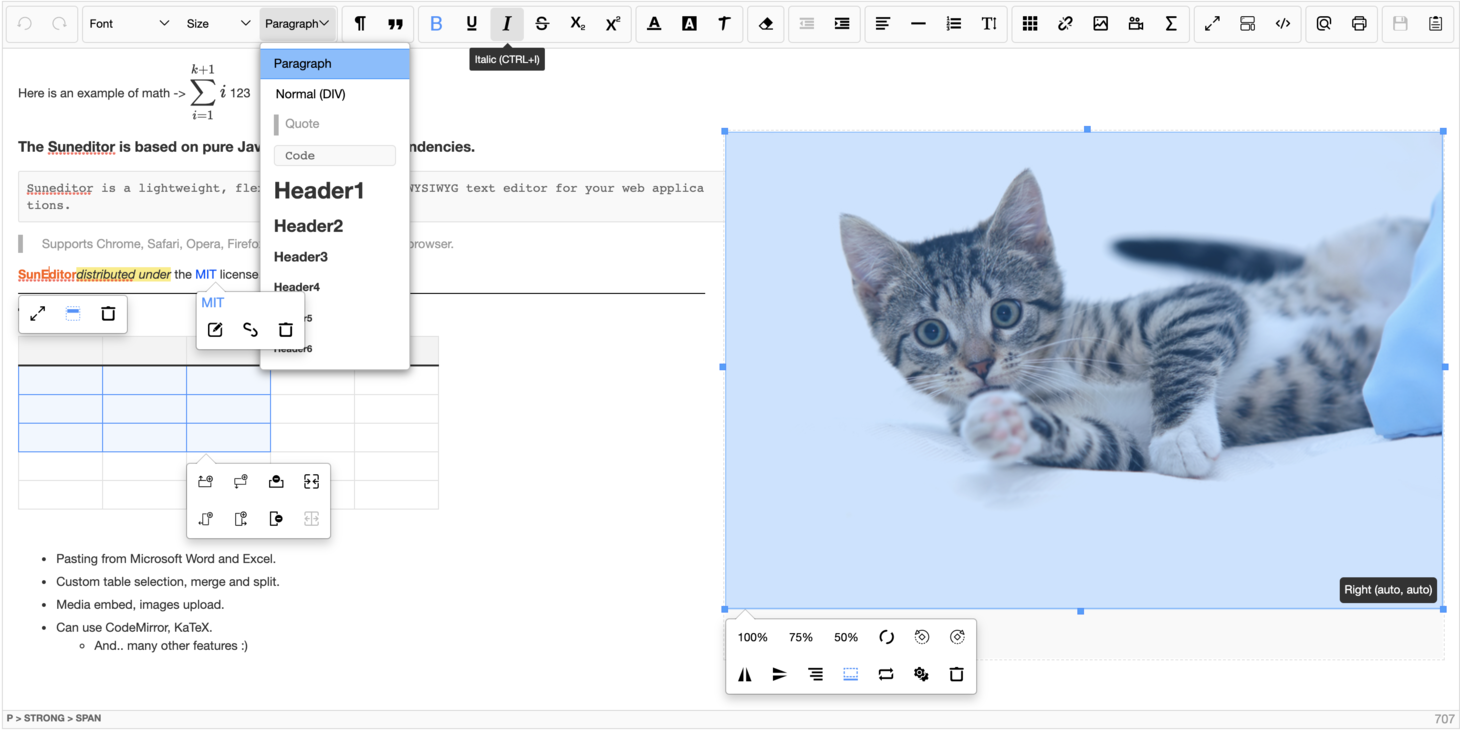
> The Suneditor is a lightweight, flexible, customizable WYSIWYG text editor for your web applications.
> - Pasting from Microsoft Word and Excel.
> - Custom table selection, merge and split.
> - Media embed, images upload.
> - Can use CodeMirror, KaTeX.
> - And.. many other features :)
## Table of contents
- [Browser Support](#browser-support)
- [Install](#install)
- [Getting Started](#getting-started)
- [Use import statement](#use-import-statement)
- [Load only what you want](#1-load-only-what-you-want)
- [Load all plugins](#2-load-all-plugins)
- [Plugins can be used directly in the button list](#3-plugins-can-be-used-directly-in-the-button-list)
- [Init function](#init-function)
- [Use CodeMirror](#use-codemirror)
- [Use KaTeX (math plugin)](#use-katex-math-plugin)
- [Options](#options)
- [Functions](#functions)
- [Plugins list](#plugins-list)
- [Examples](#examples)
- [Options template](#options-template)
- [Custom plugins](#custom-plugins)
- [Document](#document)
- [Other libraries using SunEditor](#other-libraries-using-sunEditor)
- [Plugin for Pluxml](#lib-pluxml)
- [AEM-SunEditor](#lib-pluxml)
- [SunEditor-React](#lib-suneditor-react)
- [License](#license)
#### Browser Support
| <img src="http://suneditor.com/docs/chrome-64.png" alt="Chrome" width="16px" height="16px" /> Chrome | <img src="http://suneditor.com/docs/mozilla-64.png" alt="Firefox" width="16px" height="16px" /> Firefox | <img src="http://suneditor.com/docs/opera-64.png" alt="Opera" width="16px" height="16px" /> Opera | <img src="http://suneditor.com/docs/safari-64.png" alt="Safari" width="16px" height="16px" /> Safari | <img src="http://suneditor.com/docs/edge-64.png" alt="Edge" width="16px" height="16px" /> Edge | <img src="http://suneditor.com/docs/explorer-64.png" alt="Explorer" width="16px" height="16px" /> Internet Explorer |
|:---:|:---:|:---:|:---:|:---:|:---:|
| Yes | Yes | Yes | Yes | Yes | 11+ |
## Install
#### Npm
``` sh
$ npm install suneditor --save
```
#### Bower
``` sh
$ bower install suneditor --save
```
#### CDN
``` html
<link href="https://cdn.jsdelivr.net/npm/suneditor@latest/dist/css/suneditor.min.css" rel="stylesheet">
<!-- <link href="https://cdn.jsdelivr.net/npm/suneditor@latest/assets/css/suneditor.css" rel="stylesheet"> -->
<!-- <link href="https://cdn.jsdelivr.net/npm/suneditor@latest/assets/css/suneditor-contents.css" rel="stylesheet"> -->
<script src="https://cdn.jsdelivr.net/npm/suneditor@latest/dist/suneditor.min.js"></script>
<!-- languages (Basic Language: English/en) -->
<script src="https://cdn.jsdelivr.net/npm/suneditor@latest/src/lang/ko.js"></script>
```
[jsdelivr/suneditor](https://www.jsdelivr.com/package/npm/suneditor)
## Getting Started
### 1. Target Element
```html
<textarea id="sample">Hi</textarea>
```
### 2. Create
```javascript
/**
* ID : 'suneditor_sample'
* ClassName : 'sun-eidtor'
*/
// ID or DOM object
const editor = SUNEDITOR.create((document.getElementById('sample') || 'sample'),{
// All of the plugins are loaded in the "window.SUNEDITOR" object in dist/suneditor.min.js file
// Insert options
// Language global object (default: en)
lang: SUNEDITOR_LANG['ko']
});
```
### 3. Contents display
```java
When you display a document created by suneditor
You need to include "src/assets/css/suneditor-contents.css" or "dist/css/suneditor.min.css" file.
Then add "sun-editor-editable" to the class name of the Tag element that displays the content.
In "suneditor-contents.css", you can define the style of all the tags created in suneditor.
```
## Use import statement
### 1. Load only what you want
```javascript
import 'suneditor/dist/css/suneditor.min.css'
// import 'suneditor/assets/css/suneditor.css'
// import 'suneditor/assets/css/suneditor-contents.css'
import suneditor from 'suneditor'
// How to import plugins
import image from 'suneditor/src/plugins/dialog/link'
import list from 'suneditor/src/plugins/submenu/list'
import {font, video} from 'suneditor/src/plugins'
// How to import language files (default: en)
import lang from 'suneditor/src/lang'
import {ko} from 'suneditor/src/lang'
import de from 'suneditor/src/lang/de'
suneditor.create('sample', {
plugins: [font, video, image, list],
buttonList: [
['font', 'video', 'image', 'list']
],
lang: lang.ko
});
```
### 2. Load all plugins
```javascript
import 'suneditor/dist/css/suneditor.min.css'
import suneditor from 'suneditor'
import plugins from 'suneditor/src/plugins'
suneditor.create('sample', {
plugins: plugins,
buttonList: [
['undo', 'redo'],
['font', 'fontSize', 'formatBlock'],
['paragraphStyle', 'blockquote'],
['bold', 'underline', 'italic', 'strike', 'subscript', 'superscript'],
['fontColor', 'hiliteColor', 'textStyle'],
['removeFormat'],
'/', // Line break
['outdent', 'indent'],
['align', 'horizontalRule', 'list', 'lineHeight'],
['table', 'link', 'image', 'video', /** 'math' */], // You must add the 'katex' library at options to use the 'math' plugin.
['fullScreen', 'showBlocks', 'codeView'],
['preview', 'print'],
['save', 'template']
]
})
// You can also load what you want
suneditor.create('sample', {
plugins: [plugins.font],
// Plugins can be used directly in the button list
buttonList: [
['font', plugins.image]
]
})
```
### 3. Plugins can be used directly in the button list
```javascript
import 'suneditor/dist/css/suneditor.min.css'
import suneditor from 'suneditor'
import {align, font, fontSize, fontColor, hiliteColor,
horizontalRule, image, template} from 'suneditor/src/plugins'
suneditor.create('sample', {
buttonList: [
['undo', 'redo', 'removeFormat'],
[align, font, fontSize, fontColor, hiliteColor],
[horizontalRule, image, template]
],
})
```
## Init function
```text
The init function can be used by predefining options and calling the create function on the returned object.
The value of the option argument put in the "create" function call takes precedence
```
```javascript
import 'suneditor/dist/css/suneditor.min.css'
import suneditor from 'suneditor'
import plugins from 'suneditor/src/plugins'
// all plugins
const initEditor = suneditor.init({
plugins: plugins,
height: 200,
buttonList: [
['undo', 'redo',
'font', 'fontSize', 'formatBlock',
'paragraphStyle', 'blockquote',
'bold', 'underline', 'italic', 'strike', 'subscript', 'superscript',
'fontColor', 'hiliteColor', 'textStyle',
'removeFormat',
'outdent', 'indent',
'align', 'horizontalRule', 'list', 'lineHeight',
'table', 'link', 'image', 'video', /** 'math' */, // You must add the 'katex' library at options to use the 'math' plugin.
'fullScreen', 'showBlocks', 'codeView',
'preview', 'print', 'save', 'template']
]
});
initEditor.create('sample_1', {
// The value of the option argument put in the "create" function call takes precedence
});
initEditor.create('sample_2', {
// The value of the option argument put in the "create" function call takes precedence
height: 'auto',
buttonList: [
['bold', 'underline', 'italic'],
['removeFormat'],
['preview', 'print']
]
});
```
## Use CodeMirror
```html
<!-- https://github.com/codemirror/CodeMirror -->
<!-- codeMirror (^5.0.0) -->
<!-- Use version 5.x.x -->
<link rel="stylesheet" href="https://cdn.jsdelivr.net/npm/codemirror@5.49.0/lib/codemirror.min.css">
<script src="https://cdn.jsdelivr.net/npm/codemirror@5.49.0/lib/codemirror.min.js"></script>
<script src="https://cdn.jsdelivr.net/npm/codemirror@5.49.0/mode/htmlmixed/htmlmixed.js"></script>
<script src="https://cdn.jsdelivr.net/npm/codemirror@5.49.0/mode/xml/xml.js"></script>
<script src="https://cdn.jsdelivr.net/npm/codemirror@5.49.0/mode/css/css.js"></script>
```
```javascript
import 'suneditor/dist/css/suneditor.min.css'
import suneditor from 'suneditor'
// Import codeMirror
import CodeMirror from 'codemirror'
import 'codemirror/mode/htmlmixed/htmlmixed'
import 'codemirror/lib/codemirror.css'
suneditor.create('sample', {
codeMirror: CodeMirror // window.CodeMirror,
// Set options
// codeMirror: {
// src: CodeMirror,
// options: {...}
// }
buttonList: [
['codeView']
],
height: 400
});
```
## Use KaTeX (math plugin)
```html
<!-- https://github.com/KaTeX/KaTeX -->
<!-- KaTeX (^0.11.1) -->
<link rel="stylesheet" href="https://cdn.jsdelivr.net/npm/katex@0.11.1/dist/katex.min.css">
<script src="https://cdn.jsdelivr.net/npm/katex@0.11.1/dist/katex.min.js"></script>
```
```javascript
import 'suneditor/dist/css/suneditor.min.css'
import suneditor from 'suneditor'
// Import katex
import katex from 'katex'
import 'katex/dist/katex.min.css'
suneditor.create('sample', {
katex: katex // window.katex,
// Set options
// katex: {
// src: katex,
// options: {...}
// }
buttonList: [
['math']
]
});
```
## Options
```java
plugins: [
// command
blockquote,
// Submenu
align,
font,
fontColor,
fontSize,
formatBlock,
hiliteColor,
horizontalRule,
lineHeight,
list,
paragraphStyle,
table,
template,
textStyle,
// Dialog
image,
link,
video,
math // You must add the 'katex' library at options to use the 'math' plugin.
] : Plugins array. default: null {Array}
// Whitelist--------------------------------------å---------------------------------------------------------
// _defaultTagsWhitelist : 'br|p|div|pre|blockquote|h[1-6]|ol|ul|li|hr|figure|figcaption|img|iframe|audio|video|table|thead|tbody|tr|th|td|a|b|strong|var|i|em|u|ins|s|span|strike|del|sub|sup'
addTagsWhitelist : Add tags to the default tags whitelist of editor. default: '' {String}
ex) 'mark|canvas|label|select|option|input|//' // "//" This means HTML comments.
// _editorTagsWhitelist : _defaultTagsWhitelist + addTagsWhitelist
pasteTagsWhitelist : Whitelist of tags when pasting. default: _editorTagsWhitelist {String}
ex) 'p|h[1-6]'
attributesWhitelist : Add attributes whitelist of tags that should be kept undeleted from the editor.
// -- Fixed whitelist --
// Native attributes: 'contenteditable|colspan|rowspan|target|href|src|class|type'
// Editor attributes: 'data-format|data-size|data-file-size|data-file-name|data-origin|data-align|data-image-link|data-rotate|data-proportion|data-percentage|origin-size'
ex) {
'all': 'style', // Apply to all tags
'input': 'checked' // Apply to input tag
}
// Layout-------------------------------------------------------------------------------------------------------
lang : language object. default : en {Object}
mode : The mode of the editor ('classic', 'inline', 'balloon', 'balloon-always'). default: 'classic' {String}
toolbarWidth : The width of the toolbar. Applies only when the editor mode is
'inline' or 'balloon' mode. default: 'auto' {Number|String}
stickyToolbar : Reference height value that should be changed to sticky toolbar mode.
It can also be used when there is another fixed toolbar at the top.
Set to 0, '0px', '50px', etc.
If set to -1 or false or null to turn off. default: 0 {Number|String|Boolean}
iframe : Content will be placed in an iframe and isolated from the rest of the page. default: false {Boolean}
fullPage : Allows the usage of HTML, HEAD, BODY tags and DOCTYPE declaration. default: false {Boolean}
iframeCSSFileName : Name or Array of the CSS file to apply inside the iframe.
Applied by searching by filename in the link tag of document,
or put the URL value. default: 'suneditor' {Array|String}
ex) 'main' or ['suneditor', 'http://suneditor.com/sample/css/sample.css']
codeMirror : If you put the CodeMirror object as an option, you can do Codeview using CodeMirror. default: null {Object}
Use version 5.x.x // https://github.com/codemirror/CodeMirror
ex) codeMirror: CodeMirror // Default option
codeMirror: { // Custom option
src: CodeMirror,
options: {
/** default options **
* mode: 'htmlmixed',
* htmlMode: true,
* lineNumbers: true
* lineWrapping: true
*/
}
}
katex : Required library for math plugins. default: null {Object}
Use version 0.x.x // https://github.com/KaTeX/KaTeX
ex) katex: katex // Default option
katex: { // Custom option
src: katex,
options: {
/** default options **
* throwOnError: false,
*/
}
}
// Display-------------------------------------------------------------------------------------------------------
position : The position property of suneditor. default: null {String}
display : The display property of suneditor. default: 'block' {String}
popupDisplay : Size of background area when activating dialog window ('full'||'local') default: 'full' {String}
// Bottom resizing bar-------------------------------------------------------------------------------------------
resizingBar : Show the bottom resizing bar.
If 'height' value is 'auto', it will not be resized. default: true {Boolean}
showPathLabel : Displays the current node structure to resizingBar. default: true {Boolean}
// Character count-----------------------------------------------------------------------------------------------
charCounter : Shows the number of characters in the editor.
If the maxCharCount option has a value, it becomes true. default: false {Boolean}
charCounterType : Defines the calculation method of the "charCounter" option.
'char': Characters length.
'byte': Binary data size of characters.
'byte-html': Binary data size of the full HTML string. default: 'char' {String}
charCounterLabel: Text to be displayed in the "charCounter" area of the bottom bar.
Screen ex) 'charCounterLabel : 20/200'. default: null {String}
maxCharCount : The maximum number of characters allowed to be inserted into the editor. default: null {Number}
// Width size----------------------------------------------------------------------------------------------------
width : The width size of the editor. default: clientWidth||'100%' {Number|String}
minWidth : The min-width size of the editor.
Used when 'width' value is 'auto' or '~%'. default: null {Number|String}
maxWidth : The max-width size of the editor.
Used when 'width' value is 'auto' or '~%'. default: null {Number|String}
// Height size---------------------------------------------------------------------------------------------------
height : The height size of the editor. default: clientHeight||'auto' {Number|String}
minHeight : The min-height size of the editor.
Used when 'height' value is 'auto'. default: null {Number|String}
maxHeight : The max-height size of the editor.
Used when 'height' value is 'auto'. default: null {Number|String}
// Editing area default style------------------------------------------------------------------------------------
defaultStyle : You can define the style of the edit area. (className: 'sun-editor-editable')
It affects the entire editing area. default: '' {String}
ex) 'font-family: cursive; font-size: 10px;'
// Defining menu items-------------------------------------------------------------------------------------------
font : Change default font-family array. default: [...] {Array}
Default value: [
'Arial', 'Comic Sans MS', 'Courier New', 'Impact',
'Georgia','tahoma', 'Trebuchet MS', 'Verdana'
]
fontSize : Change default font-size array. default: [...] {Array}
Default value: [
8, 9, 10, 11, 12, 14, 16, 18, 20, 22, 24, 26, 28, 36, 48, 72
]
fontSizeUnit : The font size unit. default: 'px' {String}
formats : Change default formatBlock array. default: [...] {Array}
Default value: [
'p', 'div', 'blockquote', 'pre', 'h1', 'h2', 'h3', 'h4', 'h5', 'h6'
// "blockquote": range format, "pre": free format, "Other tags": replace format
],
Custom: [{
tag: 'div', // Tag name
name: 'Custom div' || null, // default: tag name
command: 'replace' || 'range' || 'free', // default: "replace"
class: '__se__format__replace_xxx' || '__se__format__range_xxx' || '__se__format__free_xxx'
// Class names must always begin with "__se__format__(replace, range, free)_"
}]
colorList : Change default color array of color picker. default: [..[..]..] {Array}
Default value: [
'#ff0000', '#ff5e00', '#ffe400', '#abf200', '#00d8ff', '#0055ff', '#6600ff', '#ff00dd', '#000000',
'#ffd8d8', '#fae0d4', '#faf4c0', '#e4f7ba', '#d4f4fa', '#d9e5ff', '#e8d9ff', '#ffd9fa', '#f1f1f1',
'#ffa7a7', '#ffc19e', '#faed7d', '#cef279', '#b2ebf4', '#b2ccff', '#d1b2ff', '#ffb2f5', '#bdbdbd',
'#f15f5f', '#f29661', '#e5d85c', '#bce55c', '#5cd1e5', '#6699ff', '#a366ff', '#f261df', '#8c8c8c',
'#980000', '#993800', '#998a00', '#6b9900', '#008299', '#003399', '#3d0099', '#990085', '#353535',
'#670000', '#662500', '#665c00', '#476600', '#005766', '#002266', '#290066', '#660058', '#222222'
]
ex) [
['#ccc', '#dedede', 'OrangeRed', 'Orange', 'RoyalBlue', 'SaddleBrown'], // Line break
['SlateGray', 'BurlyWood', 'DeepPink', 'FireBrick', 'Gold', 'SeaGreen']
]
lineHeights : Change default line-height array. default: [{}..] {Array}
Default value: [
{text: '1', value: 1},
{text: '1.15', value: 1.15},
{text: '1.5', value: 1.5},
{text: '2', value: 2}
]
ex) [
{text: 'Single', value: 1},
{text: 'Double', value: 2}
]
paragraphStyles : You can apply custom class to format.
ex) '.sun-editor-editable .__se__customClass'
'.sun-editor .__se__customClass' // If you want to apply styles to menu items as well
Default value: [
{
name: 'Spaced', // Format style name
class: '__se__p-spaced', // Define style for used class (Class names must always begin with "__se__")
_class: '' // You can control the style of the tags displayed in the menu by putting a class on the button of the menu.
},
{
name: 'Bordered',
class: '__se__p-bordered'
},
{
name: 'Neon',
class: '__se__p-neon'
}
]
ex) [
'spaced', 'neon', // The default value is called by name only and the name is called in the language file.
{
name: 'Custom',
class: '__se__customClass'
}
]
textStyles : You can apply custom style or class to selected text.
ex(using a class)) '.sun-editor-editable .__se__customClass'
'.sun-editor .__se__customClass' // If you want to apply styles to menu items as well
Default value: [
{
name: 'Translucent', // Text style name
style: 'opacity: 0.5;', // Style query
tag: 'span', // Style tag name (default: span)
_class: '' // You can control the style of the tags displayed in the menu by putting a class on the button of the menu.
},
{
name: 'Shadow',
class: '__se__t-shadow', // Class names (Class names must always begin with "__se__")
tag: 'span'
}
]
ex) [
'translucent', // The default value is called by name only and the name is called in the language file.
{
name: 'Emphasis',
style: '-webkit-text-emphasis: filled;',
tag: 'span'
}
]
// Image---------------------------------------------------------------------------------------------------------
imageResizing : Can resize the image. default: true {Boolean}
imageHeightShow : Choose whether the image height input is visible. default: true {Boolean}
imageWidth : The default width size of the image frame. default: 'auto' {String}
imageHeight : The default height size of the image frame. default: 'auto' {String}
imageSizeOnlyPercentage : If true, image size can only be scaled by percentage. default: false {Boolean}
imageRotation : Choose whether to image rotation buttons display.
When "imageSizeOnlyPercentage" is "true" or or "imageHeightShow" is "false" the default value is false.
If you want the button to be visible, put it a true. default: true {Boolean}
imageFileInput : Choose whether to create a file input tag in the image upload window. default: true {Boolean}
imageUrlInput : Choose whether to create a image url input tag in the image upload window.
If the value of imageFileInput is false, it will be unconditionally. default: true {Boolean}
imageUploadHeader : Http Header when uploading images. default: null {Object}
imageUploadUrl : The image upload to server mapping address. default: null {String}
ex) "/editor/uploadImage.ajax"
request format: {
"file-0": {},
"file-1": {}
}
When not used, it enters base64 data
response format: {
"errorMessage": "insert error message",
"result": [
{
"url": "/download/editorImg/test_image.jpg",
"name": "test_image.jpg",
"size": "561276"
}
]
}
imageUploadSizeLimit: The size of the total uploadable images (in bytes).
Invokes the "onImageUploadError" method. default: null {Number}
// Video----------------------------------------------------------------------------------------------------------
videoResizing : Can resize the video iframe. default: true {Boolean}
videoHeightShow : Choose whether the video height input is visible. default: true {Boolean}
videoRatioShow : Choose whether the video ratio options is visible. default: true {Boolean}
videoWidth : The default width size of the video frame. default: '100%' {String}
videoHeight : The default height size of the video frame. default: '56.25%' {String}
videoSizeOnlyPercentage : If true, video size can only be scaled by percentage. default: false {Boolean}
videoRotation : Choose whether to video rotation buttons display.
When "videoSizeOnlyPercentage" is "true" or "videoHeightShow" is "false" the default value is false.
If you want the button to be visible, put it a true. default: true {Boolean}
videoRatio : The default aspect ratio of the video.
Up to four decimal places are allowed. default: 0.5625 (16:9) {Float}
videoRatioList : Video ratio selection options.
default: [
{name: '16:9', value: 0.5625},
{name: '4:3', value: 0.75},
{name: '21:9', value: 0.4285}
],
ex) [
{name: 'Classic Film 3:2', value: 0.6666},
{name: 'HD', value: 0.5625}
]
youtubeQuery : The query string of a YouTube embedded URL. default: '' {String}
It takes precedence over the value user entered.
ex) 'autoplay=1&mute=1&enablejsapi=1&controls=0&rel=0&modestbranding=1'
// https://developers.google.com/youtube/player_parameters
// Defining save button-------------------------------------------------------------------------------------------
callBackSave : Callback functions that is called when the Save button is clicked.
Arguments - (contents). default: functions.save {Function}
// Templates Array------------------------------------------------------------------------------------------------
templates : If you use a template plugin, add it.
Defines a list of templates. default: null {Array}
ex) [
{
name: 'Template-1',
html: '<p>HTML source1</p>'
},
{
name: 'Template-2',
html: '<p>HTML source2</p>'
}
]
// ETC------------------------------------------------------------------------------------------------------------
placeholder : The placeholder text. default: null {String}
icons : You can redefine icons. default: null {Object}
ex) {
bold: '<span class="se-icon-text">B</span>',
table: '<i class="xx xxx></i>',
insert_row_above: '<svg></svg>'
}
// Buttons--------------------------------------------------------------------------------------------------------
buttonList : Defines button list to array {Array}
default: [
['undo', 'redo'],
// ['font', 'fontSize', 'formatBlock'],
// ['paragraphStyle', 'blockquote'],
['bold', 'underline', 'italic', 'strike', 'subscript', 'superscript'],
// ['fontColor', 'hiliteColor', 'textStyle'],
['removeFormat'],
['outdent', 'indent'],
// ['align', 'horizontalRule', 'list', 'lineHeight'],
// ['table', 'link', 'image', 'video', 'math'],
['fullScreen', 'showBlocks', 'codeView'],
['preview', 'print'],
// ['save', 'template'],
// '/', Line break
]
```
## Functions
```javascript
import suneditor from 'suneditor'
const editor = suneditor.create('example');
// Add or reset option property
editor.setOptions({
minHeight: '300px',
buttonList: [
['fontColor', 'hiliteColor']
],
colorList: [
['#ccc', '#dedede', 'OrangeRed', 'Orange', 'RoyalBlue', 'SaddleBrown']
]
});
// Set "options.defaultStyle" style.
// Define the style of the edit area
// It can also be defined with the "setOptions" method, but the "setDefaultStyle" method does not render the editor again.
editor.setDefaultStyle('font-family: cursive; font-size: 10px;');
// Open a notice area
editor.noticeOpen('test notice');
// Close a notice area
editor.noticeClose();
// Copies the contents of the suneditor into a [textarea]
editor.save();
// Gets the suneditor's context object. Contains settings, plugins, and cached element objects
editor.getContext();
// Gets the contents of the suneditor
// onlyContents {Boolean}: Return only the contents of the body without headers when the "fullPage" option is true
editor.getContents(onlyContents: Boolean);
// Gets a list of images uploaded to the editor
/**
* {
* element: image element
* src: imgage src
* index: data index
* name: file name
* size: file size
* select: select function
* delete: delete function
* }
**/
editor.getImagesInfo();
// Upload images using image plugin
// document.getElementById('example_files_input').files
editor.insertImage(FileList);
// Inserts an HTML element or HTML string or plain string at the current cursor position
editor.insertHTML('<img src="http://suneditor.com/sample/img/sunset.jpg">');
// Change the contents of the suneditor
editor.setContents('set contents');
// Get the editor's number of characters or binary data size.
// You can use the "charCounterType" option format.
// If argument is no value, the currently set "charCounterType" option is used.
editor.getCharCount((null || 'char' || 'byte' || 'byte-html'));
// Add content to the suneditor
editor.appendContents('append contents');
// Disable the suneditor
editor.disabled();
// Enabled the suneditor
editor.enabled();
// Hide the suneditor
editor.hide();
// Show the suneditor
editor.show();
// Destroy the suneditor
editor.destroy();
// Toolbar methods
// Disable the suneditor
editor.toolbar.disabled();
// Enabled the suneditor
editor.toolbar.enabled();
// Hide the suneditor
editor.toolbar.hide();
// Show the suneditor
editor.toolbar.show();
// Event functions -------------------------------------------------------------------------------------
// It can be redefined by receiving event object as parameter.
// It is not called in exceptional cases and is called after the default event function has finished.
// e: event object, core: Core object
editor.onScroll = function (e, core) { console.log('onScroll', e) }
editor.onMouseDown = function (e, core) { console.log('onMouseDown', e) }
editor.onClick = function (e, core) { console.log('onClick', e) }
editor.onInput = function (e, core) { console.log('onInput', e) }
editor.onKeyDown = function (e, core) { console.log('onKeyDown', e) }
editor.onKeyUp = function (e, core) { console.log('onKeyUp', e) }
editor.onDrop = function (e, core) { console.log('onDrop', e) }
editor.onChange = function (contents, core) { console.log('onChange', contents) }
editor.onFocus = function (e, core) { console.log('onFocus', e) }
editor.onBlur = function (e, core) { console.log('onBlur', e) }
// onload event
// When reloaded with the "setOptions" method, the value of the "reload" argument is true.
editor.onload = function (core, reload) {
console.log('onload-core', core)
console.log('onload-reload', reload)
}
// Paste event.
// Called before the editor's default event action.
// If it returns false, it stops without executing the rest of the action.
/**
* cleanData : HTML string modified for editor format
* maxCharCount : maxChartCount option (true if max character is exceeded)
* core: Core object
*/
editor.onPaste = function (e, cleanData, maxCharCount, core) { console.log('onPaste', e) }
// Called before the image is uploaded
// If false is returned, no image upload is performed.
/**
* files: Files array
* info: Input information
* core: Core object
* return {Boolean}
*/
editor.onImageUploadBefore: function (files, info, core) {
console.log('files', files);
console.log('info', info);
return Boolean
}
// Called when the image is uploaded, updated, deleted.
/**
* targetElement: Current img element
* index: Uploaded index (key value)
* state: Upload status ('create', 'update', 'delete')
* imageInfo: {
* - index: data index
* - name: file name
* - size: file size
* - select: select function
* - delete: delete function
* - element: img element
* - src: src attribute of img tag
* }
* remainingFilesCount: Count of remaining files to upload (0 when added as a url)
* core: Core object
*/
editor.onImageUpload = function (targetElement, index, state, imageInfo, remainingFilesCount, core) {
console.log(`targetElement:${targetElement}, index:${index}, state('create', 'update', 'delete'):${state}`)
console.log(`imageInfo:${imageInfo}, remainingFilesCount:${remainingFilesCount}`)
}
// Called when the image is upload failed.
// If you return false, the default notices are not called.
/**
* errorMessage: Error message to show
* result: Result object
* core: Core object
* return {Boolean}
*/
editor.onImageUploadError = function (errorMessage, result, core) {
alert(errorMessage)
return Boolean
}
// It replaces the default callback function of the image upload
/**
* response: Response object
* info (Input information): {
* - linkValue: Link url value
* - linkNewWindow: Open in new window Check Value
* - inputWidth: Value of width input
* - inputHeight: Value of height input
* - align: Align Check Value
* - isUpdate: Update image if true, create image if false
* - currentImage: If isUpdate is true, the currently selected image.
* }
* core: Core object
*/
editor.imageUploadHandler = function (response, info, core) {
// Example of upload method
const res = JSON.parse(response.responseText);
// Error
if (res.errorMessage) {
if (typeof editor.onImageUploadError === 'function') {
if (core.onImageUploadError(res.errorMessage, res.result)) {
core.notice.open.call(core, res.errorMessage);
}
} else {
core.notice.open.call(core, res.errorMessage);
}
/**
* You can do the same thing using the core private function.
* The core._imageUploadError function returns false when "editor.onImageUploadError" function is not defined.
*/
// if (core._imageUploadError(res.errorMessage, res.result)) {
// core.notice.open.call(core, res.errorMessage);
// }
}
// Success
else {
const fileList = res.result;
const imagePlugin = core.plugins.image;
for (let i = 0, len = fileList.length, file; i < len; i++) {
// The file object must have name and size attributes.
file = {name: fileList[i].name, size: fileList[i].size};
// For existing image updates, the "info" attributes are predefined in the element.
// The "imagePlugin.update_src" function is only changes the "src" attribute of an image.
if (info.isUpdate) imagePlugin.update_src.call(core, fileList[i].url, info.currentImage, file);
// The image is created and a format element(p, div..) is added below it.
else imagePlugin.create_image.call(core, fileList[i].url, info.linkValue, info.linkNewWindow, info.inputWidth, info.inputHeight, info.align, file);
}
}
}
// Called when the video(iframe) is is uploaded, updated, deleted
/**
* targetElement: Current iframe element
* index: Uploaded index
* state: Upload status ('create', 'update', 'delete')
* videoInfo: {
* - index: data index
* - select: select function
* - delete: delete function
* - element: iframe element
* - src: src attribute of iframe tag
* }
* remainingFilesCount: Count of remaining files to upload (0 when added as a url)
* core: Core object
*/
editor.onVideoUpload = function (targetElement, index, state, videoInfo, remainingFilesCount, core) {
console.log(`targetElement:${targetElement}, index:${index}, state('create', 'update', 'delete'):${state}`)
console.log(`videoInfo:${videoInfo}, remainingFilesCount:${remainingFilesCount}`)
}
// Called just before the inline toolbar is positioned and displayed on the screen.
/**
* toolbar: Toolbar Element
* context: The editor's context object (editor.getContext()|core.context)
* core Core object
*/
editor.showInline = function (toolbar, context, core) {
console.log('toolbar', toolbar);
console.log('context', context);
}
// Called just after the controller is positioned and displayed on the screen.
// controller - editing elements displayed on the screen [image resizing, table editor, link editor..]]
/**
* name: The name of the plugin that called the controller
* controllers: Array of Controller elements
* core: Core object
*/
editor.showController = function (name, controllers, core) {
console.log('plugin name', name);
console.log('controller elements', controllers);
}
```
## Plugins list
> The plugin and the button have the same name.
<table>
<thead>
<tr>
<th align="left">Name</th>
<th align="left">Type</th>
</tr>
</thead>
<tbody>
<tr>
<td align="left">blockquote</td>
<td align="left"><strong>command</strong></td>
</tr>
<tr>
<td align="left">image</td>
<td align="left" rowspan="4"><strong>dialog</strong></td>
</tr>
<tr>
<td align="left">link</td>
</tr>
<tr>
<td align="left">video</td>
</tr>
<tr>
<td align="left">math</td>
</tr>
<tr>
<td align="left">align</td>
<td align="left" rowspan="13"><strong>submenu</strong></td>
</tr>
<tr>
<td align="left">font</td>
</tr>
<tr>
<td align="left">fontColor</td>
</tr>
<tr>
<td align="left">fontSize</td>
</tr>
<tr>
<td align="left">formatBlock</td>
</tr>
<tr>
<td align="left">hiliteColor</td>
</tr>
<tr>
<td align="left">horizontalRule</td>
</tr>
<tr>
<td align="left">lineHeight</td>
</tr>
<tr>
<td align="left">list</td>
</tr>
<tr>
<td align="left">paragraphStyle</td>
</tr>
<tr>
<td align="left">table</td>
</tr>
<tr>
<td align="left">template</td>
</tr>
<tr>
<td align="left">textStyle</td>
</tr>
</tbody>
</table>
## Examples
[Examples](http://suneditor.com/sample/html/examples.html)
## Options template
[Options template](http://suneditor.com/sample/html/options.html)
## Custom plugins
[Custom plugins](http://suneditor.com/sample/html/customPlugins.html)
## Document
[Document](http://suneditor.com/sample/html/document.html)
## Other libraries using SunEditor
<a id="lib-pluxml"></a>[Plugin for Pluxml](https://forum.pluxml.org/discussion/comment/59339) ([@sudwebdesign](https://github.com/sudwebdesign)) - Plugin for Pluxml.
<a id="lib-aem-suneditor"></a>[AEM-SunEditor](https://blogs.perficientdigital.com/2019/08/13/suneditor-an-alternative-to-the-aem-rte) ([@ahmed-musallam](https://github.com/ahmed-musallam/AEM-SunEditor)) - Enables using SunEditor in AEM dialogs as an RTE replacement.
<a id="lib-suneditor-react"></a>[SunEditor-React](https://github.com/mkhstar/suneditor-react) ([@mkhstar](https://github.com/mkhstar)) - Pure React Component for SunEditor.
## License
Suneditor may be freely distributed under the MIT license.