subcommander
Version:
Command-line argument parser with sub-command support
227 lines (156 loc) • 6.05 kB
Markdown
[](https://travis-ci.org/gregpabian/subcommander)
[](https://coveralls.io/r/gregpabian/subcommander)
[](https://www.npmjs.org/package/subcommander)
# subcommander
Command-line argument parser for Node.js with sub-command support.
Subcommander allows you to define multiple levels of sub-commands with options in a single script.
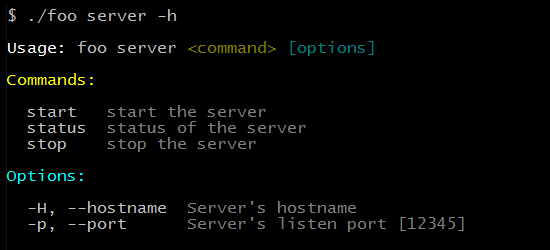
It also generates a nicely formatted usage information for created CLI.
## Installation
```
npm install subcommander
```
## Usage
```javascript
var sc = require( 'subcommander' );
console.log( sc.parse() );
// outputs an object containing parsed arguments
```
## Examples
### Simple option definition
```javascript
var sc = require( 'subcommander' );
sc
.option( 'foo', {
abbr: 'f',
desc: 'description for a foo option',
default: 'bar'
} )
.option( 'baz', {
abbr: 'b',
desc: 'description for a baz flag',
flag: true
} );
console.log( sc.parse() );
```
*Note:* Undefined options will also appear in the output of `sc.parse()`.
### Sub-command definition
```javascript
var sc = require( 'subcommander' );
sc.command( 'version', {
desc: 'display app\'s version',
callback: function () {
console.log( 'version' );
}
} );
var srv = sc.command( 'server', {
desc: 'handle the server'
} )
.option( 'port', {
abbr: 'p',
desc: 'Server port',
default: '8080'
} )
.option( 'hostname', {
abbr: 'H',
desc: 'Server hostname'
} );
srv.command( 'start', {
desc: 'start the server',
callback: function ( options ) {
var port = options.port,
hostname = options.hostname;
console.log( port, hostname );
}
} );
srv.command( 'stop', {
desc: 'stop the server',
callback: function () {
// callback body
}
} );
sc.parse();
```
This will create a CLI with two commands: `version` and `server`.
A `server` command will actually be a wrapper for its two sub-commands: `start` and `stop`.
Additionally `start` and `stop` commands will inherit options from its parent and will handle `--port` and `--hostname` options.
Created comands:
```
$ script server start [options]
$ script server stop [options]
$ script version [options]
```
## API
Subcommander exposes a chainable API which means you can do the following:
```javascript
var sc = require('subcommander');
sc
// add top-level command - foo
.command('foo', {
desc: 'description for foo',
callback: function () {}
})
// add options for the foo command
.option('bar', {
abbr: 'b',
desc: 'description for bar'
})
.option('baz', {
abbr: 'B',
desc: 'description for baz'
})
.end()
// add top-level command - quux
.command('quux', {
desc: 'description for quux',
callback: function () {}
});
sc.parse();
```
### `option(name, props)`
Add a new option for the current command or the CLI's root. Following option formats are recognized:
- `-f [value]`
- `--foo [value]`
- `-f=value`
- `--foo=value`
**Parameters**
- **name**: String, Option's name
- **props**: Object, Option's properties
- **prop.abbr**: String, Option's abbreviation
- **prop.desc**: String, Option's description
- **prop.valueName**: String, Name of the option's value displayed in the usage message
- **prop.flag**: Boolean, Define if option is a flag
- **prop.default**: *, Default value for the option
### `command(name, props)`
Add a new (sub-)command to the current command or CLI's root.
**Parameters**
- **name**: String, Command's name
- **props**: Object, Command's properties
- **props.desc**: String, Command's description
- **props.callback**: String, Callback function executed for the command
**Returns**: New (sub-)command instance
### `parse()`
Parse the command line arguments.
**Returns**: A list of parsed arguments
### `usage()`
Print command's usage message on the STDOUT.
### `scriptName(name)`
Set the name of the script's executable.
**Parameters**
- **name**: String, Name of the executable, if none - script name will be used while generating usage and error messages
### `noColors()`
Disable coloring in usage and error messages.
### `end()`
End modifying current command and return its parent.
### `reset()`
Resets all properties of the command.
## Tests
```
npm test
```
## License
(The MIT License)
Copyright (c) 2014 Greg Pabian <greg.pabian@gmail.com>
Permission is hereby granted, free of charge, to any person obtaining a copy of this software and associated documentation files (the 'Software'), to deal in the Software without restriction, including without limitation the rights to use, copy, modify, merge, publish, distribute, sublicense, and/or sell copies of the Software, and to permit persons to whom the Software is furnished to do so, subject to the following conditions:
The above copyright notice and this permission notice shall be included in all copies or substantial portions of the Software.
THE SOFTWARE IS PROVIDED 'AS IS', WITHOUT WARRANTY OF ANY KIND, EXPRESS OR IMPLIED, INCLUDING BUT NOT LIMITED TO THE WARRANTIES OF MERCHANTABILITY, FITNESS FOR A PARTICULAR PURPOSE AND NONINFRINGEMENT. IN NO EVENT SHALL THE AUTHORS OR COPYRIGHT HOLDERS BE LIABLE FOR ANY CLAIM, DAMAGES OR OTHER LIABILITY, WHETHER IN AN ACTION OF CONTRACT, TORT OR OTHERWISE, ARISING FROM, OUT OF OR IN CONNECTION WITH THE SOFTWARE OR THE USE OR OTHER DEALINGS IN THE SOFTWARE.