string-ts
Version:
Strongly-typed string functions.
988 lines (723 loc) • 28.8 kB
Markdown
<p align="center">
<img alt="StringTs Banner" src="./docs/string-ts-banner.png" width="800" />
</p>
[](https://www.npmjs.org/package/string-ts)

[](https://app.codecov.io/gh/gustavoguichard/string-ts)
[](#-contributors)
## Strongly-typed string functions for all!
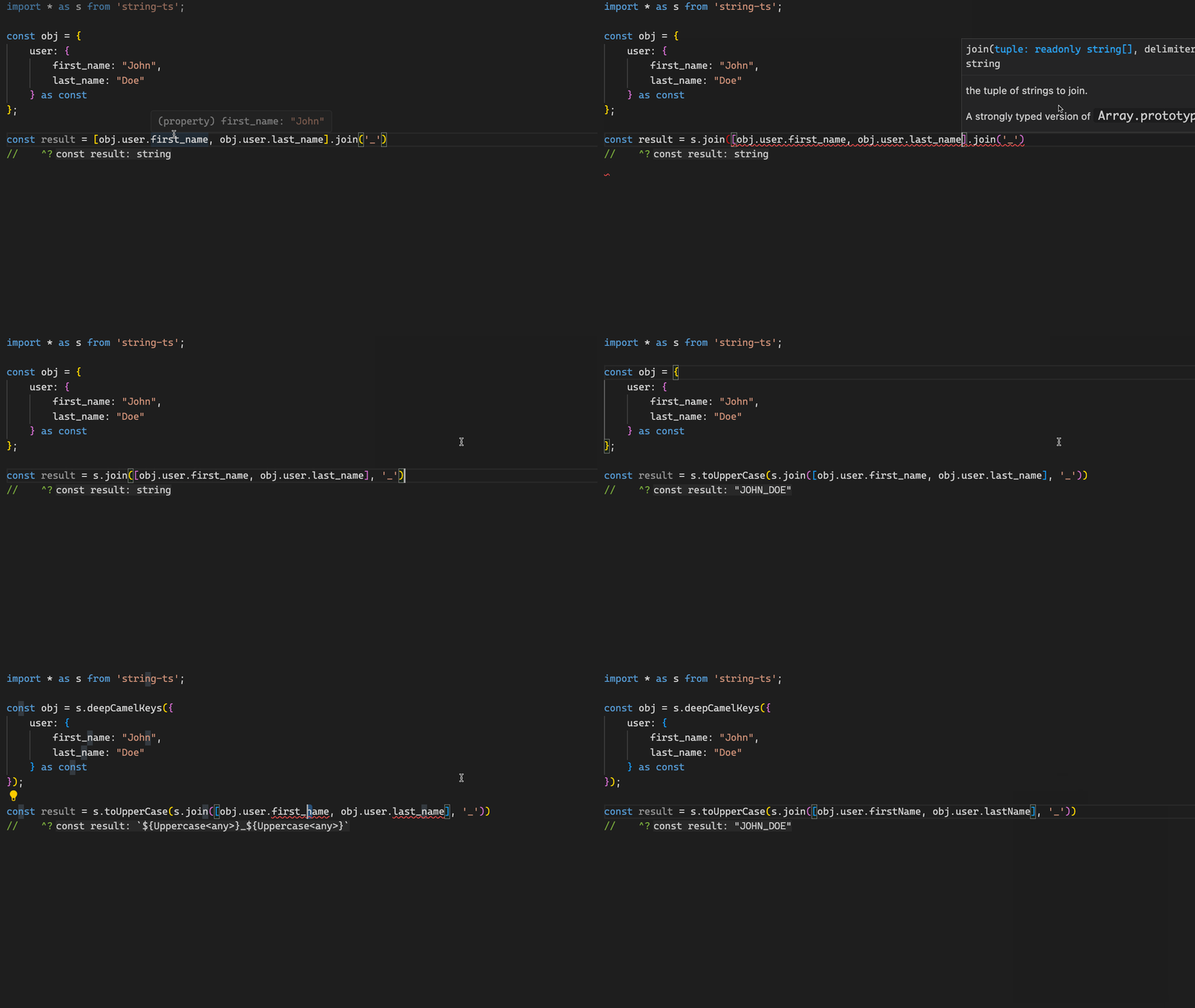
## 😬 The problem
When you are working with literal strings, the string manipulation functions only work at the runtime level and the types don't follow those transformations.
You end up losing type information and possibly having to cast the result.
```ts
const str = 'hello-world'
const result = str.replace('-', ' ') // you should use: as 'hello world'
// ^? string
```
## 🤓 The solution
This library aims to solve this problem by providing a set of common functions that work with literal strings at both type and runtime level.
```ts
import { replace } from 'string-ts'
const str = 'hello-world'
const result = replace(str, '-', ' ')
// ^ 'hello world'
```
## 🔍 Why this matters
TypeScript yields the best static analysis when types are highly specific.
Literals are more specific than type `string`.
This library preserves literals (and unions of literals) after transformations, unlike most existing utility libraries (and built-in string methods.)
[I still don't get the purpose of this library 🤔](#%EF%B8%8F-interview)
### In-depth example
In the below example, I want to get a strongly-typed, camel-case version of `process.env`.
One flow results in a loose type, and the other results in a more precise type.
This example should illustrate the highly-specific and flexible nature of `string-ts`.
```ts
import { deepCamelKeys } from 'string-ts'
import { camelCase, mapKeys } from 'lodash-es'
import z from 'zod'
const EnvSchema = z.object({
NODE_ENV: z.string(),
})
function getEnvLoose() {
const rawEnv = EnvSchema.parse(process.env)
const env = mapKeys(rawEnv, (_v, k) => camelCase(k))
// ^? Dictionary<string>
// `Dictionary<string>` is too loose
// TypeScript is okay with this, 'abc' is expected to be of type `string`
// This will have unexpected behavior at runtime
console.log(env.abc)
}
function getEnvPrecise() {
const rawEnv = EnvSchema.parse(process.env)
const env = deepCamelKeys(rawEnv)
// ^? { nodeEnv: string }
// Error: Property 'abc' does not exist on type '{ nodeEnv: string; }'
// Our type is more specific, so TypeScript catches this error.
// This mistake will be caught at compile time
console.log(env.abc)
}
function main() {
getEnvLoose()
getEnvPrecise()
}
main()
```
## 📦 Installation
```bash
npm install string-ts
```
## 🌳 Tree shaking
`string-ts` has been designed with tree shaking in mind.
We have tested it with build tools like Webpack, Vite, Rollup, etc.
## 👌 Supported TypeScript versions
`string-ts` currently only works on TypeScript v5+.
It also only work with common ASCII characters characters. We don't plan to support international characters or emojis.
---
# 📖 API
- [Runtime counterparts of native type utilities](#runtime-counterparts-of-native-type-utilities)
- [capitalize](#capitalize)
- [uncapitalize](#uncapitalize)
- [Strongly-typed alternatives to native runtime utilities](#strongly-typed-alternatives-to-native-runtime-utilities)
- [charAt](#charat)
- [concat](#concat)
- [endsWith](#endsWith)
- [includes](#includes)
- [join](#join)
- [length](#length)
- [padEnd](#padend)
- [padStart](#padstart)
- [repeat](#repeat)
- [replace](#replace)
- [replaceAll](#replaceall)
- [slice](#slice)
- [split](#split)
- [startsWith](#startsWith)
- [toLowerCase](#tolowercase)
- [toUpperCase](#touppercase)
- [trim](#trim)
- [trimEnd](#trimend)
- [trimStart](#trimstart)
- [Strongly-typed alternatives to common loosely-typed functions](#strongly-typed-alternatives-to-common-loosely-typed-functions)
- [camelCase](#camelcase)
- [constantCase](#constantcase)
- [delimiterCase](#delimitercase)
- [kebabCase](#kebabcase)
- [pascalCase](#pascalcase)
- [reverse](#reverse)
- [snakeCase](#snakecase)
- [titleCase](#titlecase)
- [truncate](#truncate)
- [words](#words)
- [Strongly-typed shallow transformation of objects](#strongly-typed-shallow-transformation-of-objects)
- [camelKeys](#camelkeys)
- [constantKeys](#constantkeys)
- [delimiterKeys](#delimiterkeys)
- [kebabKeys](#kebabkeys)
- [pascalKeys](#pascalkeys)
- [replaceKeys](#replacekeys)
- [snakeKeys](#snakekeys)
- [Strongly-typed deep transformation of objects](#strongly-typed-deep-transformation-of-objects)
- [deepCamelKeys](#deepcamelkeys)
- [deepConstantKeys](#deepconstantkeys)
- [deepDelimiterKeys](#deepdelimiterkeys)
- [deepKebabKeys](#deepkebabkeys)
- [deepPascalKeys](#deeppascalkeys)
- [deepSnakeKeys](#deepsnakekeys)
- [Type Utilities](#type-utilities)
- [Native TS type utilities](#native-ts-type-utilities)
- [General Type utilities from this library](#general-type-utilities-from-this-library)
- [Casing type utilities](#casing-type-utilities)
- [Other exported type utilities](#other-exported-type-utilities)
- [Runtime-only utilities](#runtime-only-utilities)
- [deepTransformKeys](#deeptransformkeys)
---
## Runtime counterparts of native type utilities
### capitalize
Capitalizes the first letter of a string. This is a runtime counterpart of `Capitalize<T>` from `src/types.d.ts`.
```ts
import { capitalize } from 'string-ts'
const str = 'hello world'
const result = capitalize(str)
// ^ 'Hello world'
```
### uncapitalize
Uncapitalizes the first letter of a string. This is a runtime counterpart of `Uncapitalize<T>` from `src/types.d.ts`.
```ts
import { uncapitalize } from 'string-ts'
const str = 'Hello world'
const result = uncapitalize(str)
// ^ 'hello world'
```
## Strongly-typed alternatives to native runtime utilities
### charAt
This function is a strongly-typed counterpart of `String.prototype.charAt`.
```ts
import { charAt } from 'string-ts'
const str = 'hello world'
const result = charAt(str, 6)
// ^ 'w'
```
### concat
This function is a strongly-typed counterpart of `String.prototype.concat`.
```ts
import { concat } from 'string-ts'
const result = concat('a', 'bc', 'def')
// ^ 'abcdef'
```
### endsWith
This function is a strongly-typed counterpart of `String.prototype.endsWith`.
```ts
import { endsWith } from 'string-ts'
const result = endsWith('abc', 'c')
// ^ true
```
### includes
This function is a strongly-typed counterpart of `String.prototype.includes`.
```ts
import { includes } from 'string-ts'
const result = includes('abcde', 'bcd')
// ^ true
```
### join
This function is a strongly-typed counterpart of `Array.prototype.join`.
```ts
import { join } from 'string-ts'
const str = ['hello', 'world']
const result = join(str, ' ')
// ^ 'hello world'
```
### length
This function is a strongly-typed counterpart of `String.prototype.length`.
```ts
import { length } from 'string-ts'
const str = 'hello'
const result = length(str)
// ^ 5
```
### padEnd
This function is a strongly-typed counterpart of `String.prototype.padEnd`.
```ts
import { padEnd } from 'string-ts'
const str = 'hello'
const result = padEnd(str, 10, '=')
// ^ 'hello====='
```
### padStart
This function is a strongly-typed counterpart of `String.prototype.padStart`.
```ts
import { padStart } from 'string-ts'
const str = 'hello'
const result = padStart(str, 10, '=')
// ^ '=====hello'
```
### repeat
This function is a strongly-typed counterpart of `String.prototype.repeat`.
```ts
import { repeat } from 'string-ts'
const str = 'abc'
const result = repeat(str, 3)
// ^ 'abcabcabc'
```
### replace
This function is a strongly-typed counterpart of `String.prototype.replace`.
_Warning: this is a partial implementation, as we don't fully support Regex. Using a RegExp lookup will result in a loose typing._
```ts
import { replace } from 'string-ts'
const str = 'hello-world-'
const result = replace(str, '-', ' ')
// ^ 'hello world-'
const looselyTypedResult = replace(str, /-/, ' ')
// ^ string
```
### replaceAll
This function is a strongly-typed counterpart of `String.prototype.replaceAll`.
It also has a polyfill for runtimes older than ES2021.
_Warning: this is a partial implementation, as we don't fully support Regex. Using a RegExp lookup will result in a loose typing._
```ts
import { replaceAll } from 'string-ts'
const str = 'hello-world-'
const result = replaceAll(str, '-', ' ')
// ^ 'hello world '
const looselyTypedResult = replaceAll(str, /-/g, ' ')
// ^ string
```
### slice
This function is a strongly-typed counterpart of `String.prototype.slice`.
```ts
import { slice } from 'string-ts'
const str = 'hello-world'
const result = slice(str, 6)
// ^ 'world'
const result2 = slice(str, 1, 5)
// ^ 'ello'
const result3 = slice(str, -5)
// ^ 'world'
```
### split
This function is a strongly-typed counterpart of `String.prototype.split`.
```ts
import { split } from 'string-ts'
const str = 'hello-world'
const result = split(str, '-')
// ^ ['hello', 'world']
```
### startsWith
This function is a strongly-typed counterpart of `String.prototype.startsWith`.
```ts
import { startsWith } from 'string-ts'
const result = startsWith('abc', 'a')
// ^ true
```
### toLowerCase
This function is a strongly-typed counterpart of `String.prototype.toLowerCase`.
```ts
import { toLowerCase } from 'string-ts'
const str = 'HELLO WORLD'
const result = toLowerCase(str)
// ^ 'hello world'
```
### toUpperCase
This function is a strongly-typed counterpart of `String.prototype.toUpperCase`.
```ts
import { toUpperCase } from 'string-ts'
const str = 'hello world'
const result = toUpperCase(str)
// ^ 'HELLO WORLD'
```
### trim
This function is a strongly-typed counterpart of `String.prototype.trim`.
```ts
import { trim } from 'string-ts'
const str = ' hello world '
const result = trim(str)
// ^ 'hello world'
```
### trimEnd
This function is a strongly-typed counterpart of `String.prototype.trimEnd`.
```ts
import { trimEnd } from 'string-ts'
const str = ' hello world '
const result = trimEnd(str)
// ^ ' hello world'
```
### trimStart
This function is a strongly-typed counterpart of `String.prototype.trimStart`.
```ts
import { trimStart } from 'string-ts'
const str = ' hello world '
const result = trimStart(str)
// ^ 'hello world '
```
## Strongly-typed alternatives to common loosely-typed functions
### lowerCase
This function converts a string to `lower case` at both runtime and type levels.
_NOTE: this function will split by words and join them with `" "`, unlike `toLowerCase`._
```ts
import { lowerCase } from 'string-ts'
const str = 'HELLO-WORLD'
const result = lowerCase(str)
// ^ 'hello world'
```
### camelCase
This function converts a string to `camelCase` at both runtime and type levels.
```ts
import { camelCase } from 'string-ts'
const str = 'hello-world'
const result = camelCase(str)
// ^ 'helloWorld'
```
### constantCase
This function converts a string to `CONSTANT_CASE` at both runtime and type levels.
```ts
import { constantCase } from 'string-ts'
const str = 'helloWorld'
const result = constantCase(str)
// ^ 'HELLO_WORLD'
```
### delimiterCase
This function converts a string to a new case with a custom delimiter at both runtime and type levels.
```ts
import { delimiterCase } from 'string-ts'
const str = 'helloWorld'
const result = delimiterCase(str, '.')
// ^ 'hello.World'
```
### kebabCase
This function converts a string to `kebab-case` at both runtime and type levels.
```ts
import { kebabCase } from 'string-ts'
const str = 'helloWorld'
const result = kebabCase(str)
// ^ 'hello-world'
```
### pascalCase
This function converts a string to `PascalCase` at both runtime and type levels.
```ts
import { pascalCase } from 'string-ts'
const str = 'hello-world'
const result = pascalCase(str)
// ^ 'HelloWorld'
```
### snakeCase
This function converts a string to `snake_case` at both runtime and type levels.
```ts
import { snakeCase } from 'string-ts'
const str = 'helloWorld'
const result = snakeCase(str)
// ^ 'hello_world'
```
### titleCase
This function converts a string to `Title Case` at both runtime and type levels.
```ts
import { titleCase } from 'string-ts'
const str = 'helloWorld'
const result = titleCase(str)
// ^ 'Hello World'
```
### upperCase
This function converts a string to `UPPER CASE` at both runtime and type levels.
_NOTE: this function will split by words and join them with `" "`, unlike `toUpperCase`._
```ts
import { upperCase } from 'string-ts'
const str = 'hello-world'
const result = upperCase(str)
// ^ 'HELLO WORLD'
```
### reverse
This function reverses a string.
```ts
import { reverse } from 'string-ts'
const str = 'Hello StringTS!'
const result = reverse(str)
// ^ '!TSgnirtS olleH'
```
### truncate
This function truncates string if it's longer than the given maximum string length. The last characters of the truncated string are replaced with the omission string which defaults to "...".
```ts
import { truncate } from 'string-ts'
const str = '-20someVery-weird String'
const result = truncate(str, 8)
// ^ '-20so...'
```
### words
This function identifies the words in a string and returns a tuple of words split by separators, differences in casing, numbers, and etc.
```ts
import { words } from 'string-ts'
const str = '-20someVery-weird String'
const result = words(str)
// ^ ['20', 'some', 'Very', 'weird', 'String']
```
## Strongly-typed shallow transformation of objects
### camelKeys
This function shallowly converts the keys of an object to `camelCase` at both runtime and type levels.
```ts
import { camelKeys } from 'string-ts'
const data = {
'hello-world': {
'foo-bar': 'baz',
},
} as const
const result = camelKeys(data)
// ^ { helloWorld: { 'foo-bar': 'baz' } }
```
### constantKeys
This function shallowly converts the keys of an object to `CONSTANT_CASE` at both runtime and type levels.
```ts
import { constantKeys } from 'string-ts'
const data = {
helloWorld: {
fooBar: 'baz',
},
} as const
const result = constantKeys(data)
// ^ { 'HELLO_WORLD': { 'fooBar': 'baz' } }
```
### delimiterKeys
This function shallowly converts the keys of an object to a new case with a custom delimiter at both runtime and type levels.
```ts
import { delimiterKeys } from 'string-ts'
const data = {
'hello-world': {
'foo-bar': 'baz',
},
} as const
const result = delimiterKeys(data, '.')
// ^ { 'hello.world': { 'foo-bar': 'baz' } }
```
### kebabKeys
This function shallowly converts the keys of an object to `kebab-case` at both runtime and type levels.
```ts
import { kebabKeys } from 'string-ts'
const data = {
helloWorld: {
fooBar: 'baz',
},
} as const
const result = kebabKeys(data)
// ^ { 'hello-world': { fooBar: 'baz' } }
```
### pascalKeys
This function shallowly converts the keys of an object to `PascalCase` at both runtime and type levels.
```ts
import { pascalKeys } from 'string-ts'
const data = {
'hello-world': {
'foo-bar': 'baz',
},
} as const
const result = pascalKeys(data)
// ^ { HelloWorld: { FooBar: 'baz' } }
```
### snakeKeys
This function shallowly converts the keys of an object to `snake_case` at both runtime and type levels.
```ts
import { snakeKeys } from 'string-ts'
const data = {
helloWorld: {
fooBar: 'baz',
},
} as const
const result = snakeKeys(data)
// ^ { 'hello_world': { 'fooBar': 'baz' } }
```
### replaceKeys
This function shallowly transforms the keys of an object by applying [`replace`](#replace) to each of its keys at both runtime and type levels.
```ts
import { replaceKeys } from 'string-ts'
const data = {
helloWorld: {
fooBar: 'baz',
},
} as const
const result = replaceKeys(data, 'o', 'a')
// ^ { 'hellaWorld': { 'fooBar': 'baz' } }
```
## Strongly-typed deep transformation of objects
### deepCamelKeys
This function recursively converts the keys of an object to `camelCase` at both runtime and type levels.
```ts
import { deepCamelKeys } from 'string-ts'
const data = {
'hello-world': {
'foo-bar': 'baz',
},
} as const
const result = deepCamelKeys(data)
// ^ { helloWorld: { fooBar: 'baz' } }
```
### deepConstantKeys
This function recursively converts the keys of an object to `CONSTANT_CASE` at both runtime and type levels.
```ts
import { deepConstantKeys } from 'string-ts'
const data = {
helloWorld: {
fooBar: 'baz',
},
} as const
const result = deepConstantKeys(data)
// ^ { 'HELLO_WORLD': { 'FOO_BAR': 'baz' } }
```
### deepDelimiterKeys
This function recursively converts the keys of an object to a new case with a custom delimiter at both runtime and type levels.
```ts
import { deepDelimiterKeys } from 'string-ts'
const data = {
'hello-world': {
'foo-bar': 'baz',
},
} as const
const result = deepDelimiterKeys(data, '.')
// ^ { 'hello.world': { 'foo.bar': 'baz' } }
```
### deepKebabKeys
This function recursively converts the keys of an object to `kebab-case` at both runtime and type levels.
```ts
import { deepKebabKeys } from 'string-ts'
const data = {
helloWorld: {
fooBar: 'baz',
},
} as const
const result = deepKebabKeys(data)
// ^ { 'hello-world': { 'foo-bar': 'baz' } }
```
### deepPascalKeys
This function recursively converts the keys of an object to `PascalCase` at both runtime and type levels.
```ts
import { deepPascalKeys } from 'string-ts'
const data = {
'hello-world': {
'foo-bar': 'baz',
},
} as const
const result = deepPascalKeys(data)
// ^ { HelloWorld: { FooBar: 'baz' } }
```
### deepSnakeKeys
This function recursively converts the keys of an object to `snake_case` at both runtime and type levels.
```ts
import { deepSnakeKeys } from 'string-ts'
const data = {
helloWorld: {
fooBar: 'baz',
},
} as const
const result = deepSnakeKeys(data)
// ^ { 'hello_world': { 'foo_bar': 'baz' } }
```
## Type utilities
All the functions presented in this API have associated type counterparts.
```ts
import type * as St from 'string-ts'
```
### Native TS type utilities
```ts
Capitalize<'hello world'> // 'Hello world'
Lowercase<'HELLO WORLD'> // 'hello world'
Uppercase<'hello world'> // 'HELLO WORLD'
```
### General type utilities from this library
```ts
St.CharAt<'hello world', 6> // 'w'
St.Concat<['a', 'bc', 'def']> // 'abcdef'
St.EndsWith<'abc', 'c'> // true
St.Includes<'abcde', 'bcd'> // true
St.Join<['hello', 'world'], '-'> // 'hello-world'
St.Length<'hello'> // 5
St.PadEnd<'hello', 10, '='> // 'hello====='
St.PadStart<'hello', 10, '='> // '=====hello'
St.Repeat<'abc', 3> // 'abcabcabc'
St.Replace<'hello-world', 'l', '1'> // 'he1lo-world'
St.ReplaceAll<'hello-world', 'l', '1'> // 'he11o-wor1d'
St.Reverse<'Hello World!'> // '!dlroW olleH'
St.Slice<'hello-world', -5> // 'world'
St.Split<'hello-world', '-'> // ['hello', 'world']
St.Trim<' hello world '> // 'hello world'
St.StartsWith<'abc', 'a'> // true
St.TrimEnd<' hello world '> // ' hello world'
St.TrimStart<' hello world '> // 'hello world '
St.Truncate<'hello world', 9, '[...]'> // 'hello[...]
St.Words<'hello-world'> // ['hello', 'world']
```
### Casing type utilities
#### Core
```ts
St.CamelCase<'hello-world'> // 'helloWorld'
St.ConstantCase<'helloWorld'> // 'HELLO_WORLD'
St.DelimiterCase<'hello world', '.'> // 'hello.world'
St.KebabCase<'helloWorld'> // 'hello-world'
St.PascalCase<'hello-world'> // 'HelloWorld'
St.SnakeCase<'helloWorld'> // 'hello_world'
St.TitleCase<'helloWorld'> // 'Hello World'
```
##### Missing types
_Note that we do not include `UpperCase` and `LowerCase` types. These would be too close to the existing TS types `Uppercase` and `Lowercase`._
One could create either by doing like so:
```ts
type LowerCase<T extends string> = Lowercase<DelimiterCase<T, ' '>>
type UpperCase<T extends string> = Uppercase<DelimiterCase<T, ' '>>
// or
type LowerCase<T extends string> = ReturnType<typeof lowerCase<T>>
type UpperCase<T extends string> = ReturnType<typeof upperCase<T>>
```
#### Shallow object key transformation
```ts
St.CamelKeys<{
'hello-world': { 'foo-bar': 'baz' }
}> // { helloWorld: { 'foo-bar': 'baz' } }
St.ConstantKeys<{
helloWorld: { fooBar: 'baz' }
}> // { 'HELLO_WORLD': { fooBar: 'baz' } }
St.DelimiterKeys<{ 'hello-world': { 'foo-bar': 'baz' } }, '.'>
// { 'hello.world': { 'foo-bar': 'baz' } }
St.KebabKeys<{
helloWorld: { fooBar: 'baz' }
}> // { 'hello-world': { fooBar: 'baz' } }
St.PascalKeys<{
'hello-world': { 'foo-bar': 'baz' }
}> // { HelloWorld: { 'foo-bar': 'baz' } }
St.SnakeKeys<{
helloWorld: { fooBar: 'baz' }
}> // { 'hello_world': { fooBar: 'baz' } }
```
#### Deep object key transformation
```ts
St.DeepCamelKeys<{
'hello-world': { 'foo-bar': 'baz' }
}> // { helloWorld: { fooBar: 'baz' } }
St.DeepConstantKeys<{
helloWorld: { fooBar: 'baz' }
}> // { 'HELLO_WORLD': { 'FOO_BAR': 'baz' } }
St.DeepDelimiterKeys<
{
'hello-world': { 'foo-bar': 'baz' }
},
'.'
> // { 'hello.world': { 'foo.bar': 'baz' } }
St.DeepKebabKeys<{
helloWorld: { fooBar: 'baz' }
}> // { 'hello-world': { 'foo-bar': 'baz' } }
St.DeepPascalKeys<{
'hello-world': { 'foo-bar': 'baz' }
}> // { HelloWorld: { FooBar: 'baz' } }
St.DeepSnakeKeys<{
helloWorld: { fooBar: 'baz' }
}> // { 'hello_world': { 'foo_bar': 'baz' } }
```
### Other exported type utilities
```ts
St.IsDigit<'a'> // false
St.IsDigit<'1'> // true
St.IsLetter<'a'> // true
St.IsLetter<'1'> // false
St.IsLower<'a'> // true
St.IsLower<'A'> // false
St.IsUpper<'a'> // false
St.IsUpper<'A'> // true
St.IsSeparator<' '> // true
St.IsSeparator<'-'> // true
St.IsSeparator<'a'> // false
St.IsSpecial<'a'> // false
St.IsSpecial<'!'> // true
St.IsSpecial<' '> // false
```
## Runtime-only utilities
### deepTransformKeys
This function recursively converts the keys of an object to a custom format, but only at runtime level.
```ts
import { deepTransformKeys, toUpperCase } from 'string-ts'
const data = { helloWorld: 'baz' } as const
type MyType<T> = { [K in keyof T as Uppercase<K>]: T[K] }
const result = deepTransformKeys(data, toUpperCase) as MyType<typeof data>
// ^ { 'HELLOWORLD': 'baz' }
```
## 🎙️ Interview
For a deeper dive into the code, reasoning, and how this library came to be, check out this interview with the author of StringTs on the Michigan TypeScript Meetup.
[](https://www.youtube.com/watch?v=dOXpkAmmahw)
## 🐝 Contributors
Thanks goes to these wonderful people ([emoji key](https://allcontributors.org/docs/en/emoji-key)):
<!-- ALL-CONTRIBUTORS-LIST:START - Do not remove or modify this section -->
<!-- prettier-ignore-start -->
<!-- markdownlint-disable -->
<table>
<tbody>
<tr>
<td align="center" valign="top" width="14.28%"><a href="https://github.com/gustavoguichard"><img src="https://avatars.githubusercontent.com/u/566971?v=4?s=100" width="100px;" alt="Guga Guichard"/><br /><sub><b>Guga Guichard</b></sub></a><br /><a href="https://github.com/gustavoguichard/string-ts/commits?author=gustavoguichard" title="Code">💻</a> <a href="#projectManagement-gustavoguichard" title="Project Management">📆</a> <a href="#promotion-gustavoguichard" title="Promotion">📣</a> <a href="#maintenance-gustavoguichard" title="Maintenance">🚧</a> <a href="https://github.com/gustavoguichard/string-ts/commits?author=gustavoguichard" title="Documentation">📖</a> <a href="https://github.com/gustavoguichard/string-ts/issues?q=author%3Agustavoguichard" title="Bug reports">🐛</a> <a href="#infra-gustavoguichard" title="Infrastructure (Hosting, Build-Tools, etc)">🚇</a> <a href="#question-gustavoguichard" title="Answering Questions">💬</a> <a href="#research-gustavoguichard" title="Research">🔬</a> <a href="https://github.com/gustavoguichard/string-ts/pulls?q=is%3Apr+reviewed-by%3Agustavoguichard" title="Reviewed Pull Requests">👀</a> <a href="#ideas-gustavoguichard" title="Ideas, Planning, & Feedback">🤔</a> <a href="#example-gustavoguichard" title="Examples">💡</a></td>
<td align="center" valign="top" width="14.28%"><a href="https://github.com/jly36963"><img src="https://avatars.githubusercontent.com/u/33426811?v=4?s=100" width="100px;" alt="Landon Yarrington"/><br /><sub><b>Landon Yarrington</b></sub></a><br /><a href="https://github.com/gustavoguichard/string-ts/commits?author=jly36963" title="Code">💻</a> <a href="#maintenance-jly36963" title="Maintenance">🚧</a> <a href="https://github.com/gustavoguichard/string-ts/commits?author=jly36963" title="Documentation">📖</a> <a href="https://github.com/gustavoguichard/string-ts/pulls?q=is%3Apr+reviewed-by%3Ajly36963" title="Reviewed Pull Requests">👀</a> <a href="#ideas-jly36963" title="Ideas, Planning, & Feedback">🤔</a> <a href="#example-jly36963" title="Examples">💡</a> <a href="#question-jly36963" title="Answering Questions">💬</a> <a href="https://github.com/gustavoguichard/string-ts/issues?q=author%3Ajly36963" title="Bug reports">🐛</a></td>
<td align="center" valign="top" width="14.28%"><a href="https://github.com/p9f"><img src="https://avatars.githubusercontent.com/u/20539361?v=4?s=100" width="100px;" alt="Guillaume"/><br /><sub><b>Guillaume</b></sub></a><br /><a href="https://github.com/gustavoguichard/string-ts/commits?author=p9f" title="Code">💻</a> <a href="#maintenance-p9f" title="Maintenance">🚧</a> <a href="https://github.com/gustavoguichard/string-ts/commits?author=p9f" title="Documentation">📖</a> <a href="https://github.com/gustavoguichard/string-ts/issues?q=author%3Ap9f" title="Bug reports">🐛</a> <a href="#infra-p9f" title="Infrastructure (Hosting, Build-Tools, etc)">🚇</a> <a href="#question-p9f" title="Answering Questions">💬</a> <a href="#ideas-p9f" title="Ideas, Planning, & Feedback">🤔</a></td>
<td align="center" valign="top" width="14.28%"><a href="https://totaltypescript.com"><img src="https://avatars.githubusercontent.com/u/28293365?v=4?s=100" width="100px;" alt="Matt Pocock"/><br /><sub><b>Matt Pocock</b></sub></a><br /><a href="https://github.com/gustavoguichard/string-ts/commits?author=mattpocock" title="Documentation">📖</a> <a href="https://github.com/gustavoguichard/string-ts/commits?author=mattpocock" title="Code">💻</a> <a href="#promotion-mattpocock" title="Promotion">📣</a></td>
<td align="center" valign="top" width="14.28%"><a href="https://luca.md"><img src="https://avatars.githubusercontent.com/u/1881266?v=4?s=100" width="100px;" alt="Andrew Luca"/><br /><sub><b>Andrew Luca</b></sub></a><br /><a href="https://github.com/gustavoguichard/string-ts/commits?author=iamandrewluca" title="Documentation">📖</a> <a href="#promotion-iamandrewluca" title="Promotion">📣</a></td>
<td align="center" valign="top" width="14.28%"><a href="https://github.com/mjuksel"><img src="https://avatars.githubusercontent.com/u/10691584?v=4?s=100" width="100px;" alt="Mjuksel"/><br /><sub><b>Mjuksel</b></sub></a><br /><a href="https://github.com/gustavoguichard/string-ts/commits?author=mjuksel" title="Code">💻</a> <a href="#ideas-mjuksel" title="Ideas, Planning, & Feedback">🤔</a></td>
<td align="center" valign="top" width="14.28%"><a href="https://huguesverlin.fr"><img src="https://avatars.githubusercontent.com/u/9151470?v=4?s=100" width="100px;" alt="hverlin"/><br /><sub><b>hverlin</b></sub></a><br /><a href="https://github.com/gustavoguichard/string-ts/commits?author=hverlin" title="Code">💻</a></td>
</tr>
</tbody>
</table>
<!-- markdownlint-restore -->
<!-- prettier-ignore-end -->
<!-- ALL-CONTRIBUTORS-LIST:END -->
This project follows the [all-contributors](https://github.com/all-contributors/all-contributors) specification. Contributions of any kind welcome!
StringTs logo by [NUMI](https://github.com/numi-hq/open-design):
[<img src="https://raw.githubusercontent.com/numi-hq/open-design/main/assets/numi-lockup.png" alt="NUMI Logo" style="width: 200px;"/>](https://numi.tech/?ref=string-ts)
## 🫶 Acknowledgements
This library got a lot of inspiration from libraries such as [lodash](https://github.com/lodash/lodash), [ts-reset](https://github.com/total-typescript/ts-reset), [type-fest](https://github.com/sindresorhus/type-fest), [HOTScript](https://github.com/gvergnaud/hotscript), and many others.