state-decorator
Version:
React state management library
1,407 lines (1,110 loc) • 68.9 kB
Markdown

<p align="center">
<img src="https://github.com/GlobalSport/state-decorator/blob/develop/doc/state-decorator-logo-small.png?raw=true" alt="useLocalStore logo"/>
</p>
The StateDecorator is a set of React hooks that manage a complex component state in an easy, testable and deterministic way.
# Features
- Deterministic state changes (clear separation of effects and side effects)
- Ease asynchronous actions state changes (loading / error states, success & error handlers, parallel actions management, optimistic updates...)
- Easily and efficiently share slices of state.
- Easily testable (test framework provided)
- Easily update state from or react to props changes
- Ease debugging (trace state changes, dev tools)
- Improve code conciseness (no boiler plate code)
- Strongly typed (Typescript)
# V7: Partial state and new hooks
- React 18 support
- All effects now return a partial state that will be merged with current state.
- More documentation on global and local store use cases.
- **useLocalStore** now have a parameter to specify if the React component must re-rerender after a state change.
- New **useStoreContextSlice** hook was added to get a slice of a store in a context.
- New **onMountDeferred** to execute initialization code after initial render
- New effect helpers
- See migration details in [migration section](#migration).
# Getting started
## Installation
```
npm install state-decorator
```
or
```
yarn add state-decorator
```
## Getting started
### Example
```typescript
import { useLocalStore, StoreConfig } from "state-decorator";
// Typings
type User = {
firstName: string;
lastName: string;
};
type State = {
selectedUserId: string;
user: User;
};
type Actions = {
selectUser: (id: string) => void;
selectAndLoadUser: (id: string) => void;
loadUser: () => Promise<User>;
};
type Props = {
userIds: string[];
};
// Initial state & actions
const config: StoreConfig<State, Actions, Props> = {
getInitialState: () => ({
selectedUserId: null,
user: null,
}),
actions: {
// synchronous action (simple form)
selectUser: ({ args: [id] }) => ({ selectedUserId: id }),
// a synchronous action with side effects
selectAndLoadUser: {
// effects contain only immutable state changes
effects: ({ args: [id] }) => ({ selectedUserId: id }),
// side effects (ie. other effects than state changes), using "actions" alias
sideEffects: ({ a }) => {
a.loadUser();
},
},
// asynchronous action
loadUser: {
// promise provider, can use action context (ctx) to get current state, args, props etc.
getPromise: (ctx) =>
Promise.resolve({ firstName: "John", lastName: "Doe" }),
// state changes
effects: ({ res }) => ({ user: res }),
// state changes if error
errorEffects: ({ error }) => ({ user: null }),
// side effects here
sideEffects: ({ res, actions }) => {},
// side effects if error
errorSideEffects: ({ err, actions }) => {},
// many more options available here, read the doc!
},
},
};
// Bind to react component and use state/actions
export function App(props: Props) => {
const { state, actions } = useLocalStore(config);
return (
<div>
{state.user && (
<div>
{state.user.firstName} {state.user.lastName}
</div>
)}
<div>
{props.userIds.map((userId) => (
<button
onClick={() => {
actions.selectAndLoadUser(userId);
}}
>
{userId}
</button>
))}
</div>
</div>
);
};
```
# React hooks
| Hook | Purpose | Returns | Is component refreshed on store change? | Is store destroyed on unmount? |
| -------------------- | ------------------------------------------------------------- | ------- | --------------------------------------- | ------------------------------ |
| useLocalStore | Create a store and binds it to the react component. | Store | if **refreshOnUpdate** is set | Y |
| useStore | Binds a store instance to the react component. | Store | yes | N |
| useBindStore | Binds a store instance to the react component (inject props). | Store | yes | N |
| useStoreSlice | Get a slice of a store. | Slice | yes | N |
| useStoreContextSlice | Get a slice of a store stored in a context | Slice | If slice has changed only | N |
# Initial state
The initial state is build using a function provided to the store.
```typescript
const config: StoreConfig<State, Actions, Props> = {
getInitialState: (p) => ({ counter: 0 }),
actions: {
/* ... */
},
};
export const CounterContainer = () => {
const { state, actions } = useLocalStore(config);
return <CounterView {...state} {...actions} />;
};
```
# Action context
The action context contain all the data needed to implement the actions. It contains the action arguments and the injected data.
| Property | Alias | Availability | Description |
| ------------- | ----- | ------------------------------ | ------------------------------------------------------- |
| state | s | everywhere | Current state |
| args | | action related | Action arguments |
| props | p | everywhere | Current bound component props |
| actions | a | side effects / onMount | Store actions (decorated) |
| result | res | promise effects / side effects | The promise result |
| error | err | error effects / side effects | The promise error |
| derived | ds | everywhere | The derived state (from props/state) |
| promiseId | | asynchronous actions callbacks | Parallel asynchronous actions promise identifier |
| notifyWarning | | side effects | Injected function if set at store or global level |
| clearError | | side effects | Clear an error from ErrorMap |
| indices | | onPropsChange | Indices in the getDeps array of changed props |
| isInit | | onPropsChange | Whether the onPropsCHange is executed during init phase |
# Actions
The StateDecorator is taking a list of actions and decorate them to inject state, props, actions etc. and then expose the decorated actions that simply takes the function arguments defined in the type.
**Warning**: The actions are considered static and cannot be changed dynamically. Use state/props in your actions implementation to have different logic depending on some inputs.
# Synchronous actions
## Short form
```typescript
action: (ctx) => ctx.state, // changes to be merged to current state
```
Example:
```typescript
const config: StoreConfig<State, Actions, Props> = {
actions: {
setText: ({ args: [newText] }) => ({ text: newText }),
},
};
```
## Regular form
```typescript
action: {
// debounce effect and side effects if > 0
debounceTimeout: 0,
// debounce side effects if > 0
debounceSideEffectsTimeout: 0,
effects: (ctx) => ctx.state, // state changes
sideEffects: (ctx) => {
// side effect code
},
}
```
Example:
```typescript
const config: StoreConfig<State, Actions, Props> = {
actions: {
setText: {
effects: ({ args: [newText] }) => ({ text: newText }),
// use either debounceTimeout or debounceSideEffectsTimeout
// debounceTimeout: 5000,
debounceSideEffectsTimeout: 5000,
sideEffects: ({ a }) => {
a.saveDocument();
},
},
},
};
```
[](https://codesandbox.io/s/debounce-v7-i5om2e?file=/src/Debounce.tsx)
## Notes
- If the effects function returns `null`, the side effects, if any, are not executed when the action is called.
- If **no** effects function is defined but a side effects function is provided, the side effects will be executed when the action is called.
## Cancel action
To cancel effects/side effects just return `null` instead of new state in **effects**.
# Asynchronous actions
```typescript
action: {
preEffects: (ctx) => ctx.state, // state changes before promise
optimisticEffects: (ctx) => ctx.state, // optimistic state changes before promise, will be reverted if promise fails. Be sure to install optimistic middleware !
getPromise: (ctx) => Promise.resolve(), // promise provider
effects: (ctx) => ctx.state, // state changes if success
errorEffects: (ctx) => ctx.state, // state changes if error
sideEffects: (ctx) => { /* side effect code if success */ },
errorSideEffects: (ctx) => { /* side effect code if failure */ },
getSuccessMessage: (ctx) => 'Success', // if a notifySuccess is set locally or globally
getErrorMessage: (ctx) => 'Error', // if a notifyError is set locally or globally
abortable: true, // inject a abort signal in the promise invocation context and allow to abort promise
conflictPolicy: ConflictPolicy.KEEP_LAST, // behavior if action is called while a promise is ongoing
getPromiseId: (args) => null, // parallel actions promise identifier (see conflicting actions)
retryCount: 1,
retryDelaySeed: 1000,
}
```
Example:
```typescript
const config: StoreConfig<State, Actions, Props> = {
actions: {
loadList: {
getPromise: () => fetch('https://myapi/myservices').then((res) => (res.ok ? res.json() : Promise.reject())),
effects: ({ res }) => ({ list: res }),
sideEffects: ({ a }) => {
a.otherAction();
},
getErrorMessage: () => 'Cannot load list',
},
},
};
```
- If `null` is returned by **getPromise**, the action is not executed. It allows to cancel an action depending on state or props etc.
- **getGetPromise** is a shortcut that sets the conflict policy to **ConflictPolicy.REUSE** and **retryCount** to 3.
- To cancel any effects just return `null` instead of new state in **xxxEffects**.
## Asynchronous action lifecycle
<!-- 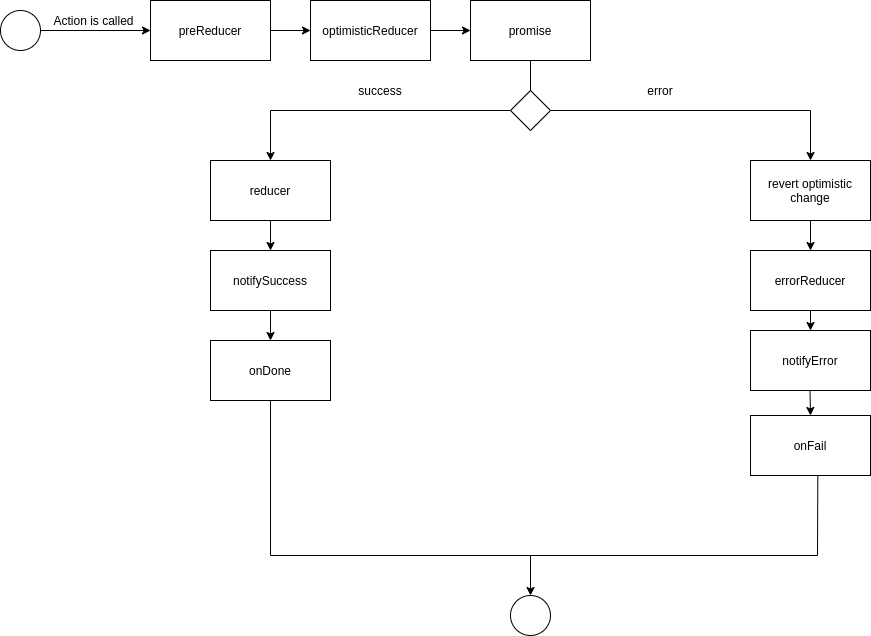 -->
```mermaid
graph TD
A(Call action) --> preEffects
preEffects --> optimisticEffects
optimisticEffects --> getPromise
getPromise --> promiseSuccess{Success?}
promiseSuccess -->|Yes| effects[effects]
effects --> notifySuccess[notifySuccess]
notifySuccess --> sideEffects[sideEffects]
sideEffects --> promiseResolved[Promise is resolved]
promiseResolved --> Z(End)
promiseSuccess -->|No| errorEffects[errorEffects]
errorEffects --> notifyError[notifyError]
notifyError --> errSideEffetcs[errorSideEffects]
errSideEffetcs --> errorManaged{Error managed?}
errorManaged --> |Yes| promiseResolved
errorManaged --> |No| promiseRejected
promiseRejected --> Z
```
- check if a previous call to this action is ongoing,
- if yes, check if the conflict policy is parallel,
- if yes, let the flow continue.
- if no, return a new promise according to the conflict policy.
- **preEffects**: state changes before promise execution.
- **optimisticEffects**: optimistic state changes before promise execution, will be rollback if promise fails.
- **getPromise**: get a promise from action context:
- if promise is resolved:
- **effects**: update state from action contexts and the result of the promise
- if **notifySuccess** is set, call it with **getSuccessMessage()**
- **sideEffects**: trigger a side effect with no change on state.
- if promise is rejected (or aborted):
- if the action was optimistic, revert the **optimisticEffects** change and replay all following actions.
- **errorEffects**: change state from promise arguments and returned error.
- if **notifyError** is set, call it with **getErrorMessage()**.
- **errorSideEffects**: trigger a side effect with no change on state.
- Global **asyncErrorHandler** is called (with a flag indicating that the error was managed or not, see [Error management](#ErrorManagement) for more details).
- If a conflicting action is stored, process it.
## Loading state
The loading state of asynchronous actions is automatically computed.
```typescript
const { isLoading, loading, loadingMap } = useLocalStore(getInitialState, actionsImpl);
// loading is set to true is at least one asynchronous action is ongoing.
// loadingMap is action name to boolean or undefined map
// isLoading is a function that accepts 1+ arguments
// It returns true, if at least one of the specified actions is loading.
const isOneLoading = isLoading('action1', 'action2', ['parallelAction', 'promiseId']);
```
## Success / error notifications
A notification function can be called when the asynchronous action succeeded or failed.
1. Set notification function on success/error:
1. Set _notifyError_ and/or _notifySuccess_ using in global configuration _OR_
2. specify a function to _notifySuccess_ and/or _notifyError_ options of the store.
1. In each asynchronous action, set:
1. _getErrorMessage_ (message built from the error and action context).
2. _getSuccessMessage_ (message built from the action context)
```typescript
// global notification functions
setGlobalConfig({
notifySuccess: (msg) => console.log(msg),
notifyError: (msg) => console.log(msg),
});
// local notification functions
const store = useLocalStore(getInitialState, actionsImpl, props, {
notifySuccess: (msg) => console.log(msg),
notifyError: (msg) => console.log(msg),
});
```
```typescript
// action implementation
const config: StoreConfig<State, Actions, Props> = {
actions: {
loadList: {
getPromise: () => new Promise((_, reject) => setTimeout(reject, 500, new Error('Too bad'))),
getSuccessMessage: () => 'success!',
getErrorMessage: ({ err }) => `Error: ${err.message}`,
},
},
};
```
## <a name="ErrorManagement"></a>Error management
### Effects and side effects
When an asynchronous action fails, if the state needs to be updated, set the **errorEffects** property of the asynchronous action.
If some actions need to be triggered, set **errorSideEffects**.
```typescript
const actions: StoreActions<State, Actions> = {
loadList: {
getPromise: () => new Promise((_, reject) => setTimeout(reject, 500, new Error('Too bad'))),
errorEffects: ({ error }) => ({ error: error.message, list: [] }),
getErrorMessage: ({ err }) => err.message,
errorSideEffects: ({ error }) => {
Logger.log(error);
},
},
};
```
### Promise result
If **getPromise** is failing and the error is _managed_, the action promise will be returned as **resolved** to prevent other error managements (console traces…) to be executed, otherwise it will be returned as **rejected**.
An error is _managed_ if:
- **errorEffects** is defined and is not returning `null`.
- or **errorSideEffects** is defined,
- or **notifyError** is defined and **getErrorMessage** is not returning `null`,
- or **isErrorManaged** is set to `true`.
If the error is managed but you need to have the promise to be rejected, set **rejectPromiseOnError** to `true`.
Global **asyncErrorHandler** is called for each error with this _managed_ flag for global error management (logging).
### Error state
In order to display UI after an error, the last error of each asynchronous action is available on **errorMap**.
```typescript
const { errorMap } = useLocalStore(getInitialState, actionsImpl);
if (errorMap.action1)) {
// show retry action
}
if (errorMap.action1 instanceof MyCustomError){
// show retry action with custom error handling
}
```
Recipe: When only using the **errorMap** to manage errors (ie. there's no effects nor message and so on), the error is considered _not managed_ resulting in a rejected promise and global **asyncErrorHandler** called with _managed_ flag set to false. In that case, set **isErrorManaged** to `true` to specify that the error is _managed_ externally.
The error map is updated when the action is called again, or call **clearError** in a side effect.
## <a name="ConflictingActions"></a>Conflicting actions
The StateDecorator is managing the asynchronous action calls one at a time (default) or in parallel.
When a action call occurs while the same action previous call's promise is ongoing, we call such actions calls _conflicting actions_.
In lots of situations, the UI is disabled using the loading action state, but in other situations one may want to manage such use case (a search bar, autosave feature of an editor etc.).
There are several policies to handles call to an action while there's a previous call to this action is ongoing.
This is controlled by the **conflictPolicy** property of an asynchronous action.
It can takes the following values (use **ConflictPolicy** enum), choose the one the more suited to your use case:
- **ConflictPolicy.IGNORE**: The conflicting action calls are simply ignored.
- **ConflictPolicy.REJECT**: Conflicting action calls are unwanted, they will be rejected with an error.
- **ConflictPolicy.KEEP_ALL** (default): All conflicting action calls will be chained and executed one after the other.
- **ConflictPolicy.KEEP_LAST**: Only the more recent conflicting action call will be executed after the previously ongoing call is resolved. Use case: editor with auto save feature.
- **ConflictPolicy.REUSE**: If an action is already ongoing, the promise is reused, if the arguments are the same (shallow comparison). Otherwise fallback to **ConflictPolicy.KEEP_ALL**. Useful for GET requests.
- **ConflictPolicy.ABORT**: Current call is aborted and new call is executed right after. **abortable** is set to true automatically if this policy is set.
- **ConflictPolicy.PARALLEL**: Actions are executed in parallel.
- Use case: several calls with different parameters.
- A **getPromiseId** function must be provided to assign an identifier to each call from call arguments.
- The **isLoading** function will return the loading state for each promise identifier.
[](https://codesandbox.io/s/conflictpolicy-v7-1bcwht?file=/src/ConflictPolicy.tsx)
## Retry
If the promise of an asynchronous action fails, the store can retry this promise before failing.
The following properties action are used:
- **retryCount**: Number of retries in case of "retry error".
- **retryDelaySeed**: Seed of delay between each retry in milliseconds. The applied delay is retryDelaySeed \* retry count. Default is 1000ms.
- **isTriggerRetryError**: A function that returns if the passed error will trigger a retry or if the action fails directly. Default function is returning _true_ for _TypeError_ instances.
## Optimistic actions
⚠ If you are using optimistic effects, make sure to set the **optimisticActions** middleware to your store.⚠
Using global configuration (for all stores):
```typescript
import { setGlobalConfig } from 'state-decorator';
import { optimisticActions } from 'state-decorator/middlewares';
setGlobalConfig({
defaultMiddlewares: [optimisticActions()],
});
```
On a specific store:
```typescript
import { createStore, StoreConfig } from 'state-decorator';
import { optimisticActions } from 'state-decorator/middlewares';
const config: StoreConfig<State, Actions, Props> = {
getInitialState: () => ({
/* ... */
}),
actions: {
/* ... */
},
middlewares: [optimisticActions()],
};
const store = createStore(config);
```
An optimistic action assumes that the action will, most of the time, succeed. So it will apply the effects as soon as the asynchronous action is called (as opposite to the regular effects which are applied when the promise is resolved).
If the action succeeds the effects, if any, will be called anyway.
If the action fails, the state will be recomputed to undo this action.
The undo strategy is the following:
- Retrieve the state before the optimist action.
- Replay all the subsequent actions effects.
- If there are other optimistic actions ongoing, update their state before action.
Example:
```typescript
const config: StoreConfig<State, Actions, Props> = {
actions: {
deleteItem: {
getPromise: ([id]) => new Promise((resolve) => setTimeout(resolve, 500)),
optimisticEffects: ({ args: [id] }) => ({ list: list.filter((item) => item.id === id) }),
errorEffects: ({err} => ({ err: error.message }),
},
},
};
```
[](https://codesandbox.io/s/optimistic-actions-v7-w3b8ht?file=/src/Optimistic.tsx)
**Notes**:
- As optimistic actions can be expensive (clone state, save all actions), make sure to use optimistic reducer for a promise that will, most of the time, returns in a short amount of time.
- To update the state _before_ the action, prefer **_preEffects_**. **_optimisticEffects_** purpose is optimistic actions only. Optimistic actions are not changing the global loading state and are more expensive because the subsequent actions are saved in order to be able to revert the optimistic action in case of failure.
## Abort asynchronous action
Ongoing asynchronous actions can be aborted using, under the hood, the [AbortController](https://developer.mozilla.org/en-US/docs/Web/API/AbortController/AbortController), if you target browsers which support it.
1. Action implementation:
- An asynchronous action must be marked as **abortable**.
- Then, in the **promise** method, the injected **abortSignal** have to be used to add a listener on abort of action and _reject_ the promise with a `new DOMException('Aborted', 'AbortError')`. Or pass it to the **fetch**, i.e. `fetch(url, { signal })`.
2. Usage:
- In the result of the **useLocalStore**, use the **abortAction** with an action name to abort the action
3. An abort is a specific failure of an action, ie. **errorEffects** and **errorSideEffects** will be called. Use the error type and name to distinguish an aborted action from a regular failed action.
```typescript
const config: StoreConfig<State, Actions, Props> = {
actions: {
onAction: {
abortable: true,
preEffects: () => ({ isError: false, isSuccess: false, isAborted: false }),
getPromise: ({s, args: [willCrash] abortSignal}) =>
new Promise((resolve, reject) => {
const timeout = window.setTimeout(willCrash ? reject : resolve, 2500, willCrash ? new Error('boom') : 'result');
abortSignal.addEventListener('abort', () => {
window.clearTimeout(timeout);
reject(new DOMException('Aborted', 'AbortError'));
});
}),
errorEffects: ({ err}) => (err.name === 'AbortError' ? { isAborted: true } : { isError: true }),
effects: () => ({ isSuccess: true }),
errorSideEffects: ({ err }) => {
if (e.name === 'AbortError') {
console.log('AbortError side effect');
} else {
console.log('Other error side effect');
}
},
},
},
};
```
Note: ongoing abortable actions will be automatically aborted on store destruction (during React component unmount for example). The list of aborted actions is available in the **onUnmount** callback in the store's options.
[](https://codesandbox.io/s/abort-v7-ts0wrm?file=/src/ParallelAbort.tsx)
## Helper effect functions
For common / simple use cases, some helpers functions are provided to write basic action effects and improve actions readability.
Example
```typescript
import { setArgIn } from 'state-decorator/helpers';
type State = {
myProp: string;
};
type Actions = {
setMyProp: (v: string) => void;
};
const actions: StoreActions<State, Actions> = {
setMyProp: setArgIn('myProp'),
// same as
// setMyProp: ({ args: [v] }) => ({ myProp: v }),
setMyProp2: setArgIn('myProp', 'isDirty'),
// same as
// setMyProp2: ({ args: [v] }) => ({ myProp: v, isDirty: true }),
};
```
| Name | Purpose | Action signatue |
| -------------- | --------------------------------------------------------------------------------------------------------------------------------------------------------- | ------------------------------ |
| setArgIn | Effect function to update a state property from action first argument | (v:T) => void |
| setTrueIn | Effect function to update a boolean state property to true | () => void |
| setFalseIn | Effect function to update a boolean state property to false | () => void |
| toggleProp | Effect function to toggle a boolean state property | () => void |
| setArgsInMap | Effect function to update a state property of type Record<string, T> using first action argument as key and second as value | (id: string, v:T) => void |
| setArgsInArray | Effect function to update a state property of type T[] using first action argument as index and second as value | (index: number, v:T) => void |
| setResIn | Effect function of asynchronous action to update a state property with the result of the promise | () => Promise<T> |
| setResInArray | Effect function to update a state property of type T[] using index from first action argument as index and as value the result of the promise | (index: number) => Promise <T> |
| setResInMap | Effect function to update a state property of type Record<string, T> using key from first action argument as index and as value the result of the promise | (id: string) => Promise <T> |
## Call actions on mount
When store is created (for example whe React component in mounted), the **onMount** option is called.
```typescript
import { StoreConfig } from 'state-decorator';
const config: StoreConfig<State, Actions, Props> = {
getInitialState,
actions,
onMount: ({ p }) => {
p.loadParentList();
},
};
```
After React component is mounted using _useLocalStore_, the **onMountDeferred** option is called (in a _useEffect_).
The **onMount** is called _during_ the render of the hooks. If the onMount code is containing a function that is changing parent state,
React will not update the parent state and will issue a warning.
```typescript
import { StoreConfig } from 'state-decorator';
const config: StoreConfig<State, Actions, Props> = {
getInitialState,
actions,
onMountDeferred: ({ p }) => {
p.loadParentList();
},
};
```
If an initial action is launched each time a property changes, consider using the **onMount** flag of the **onPropsChange** entry.
## Call actions on store destruction / unmount
When the store is destroyed (for example on React component unmounted), the **onUnmount** option is called.
```typescript
import { StoreConfig } from 'state-decorator';
const config: StoreConfig<State, Actions, Props> = {
getInitialState,
actions,
onUnmount: ({ s, abortedActions }) => {
// ex: store s in local storage
// ex: clean cache of aborted actions
},
};
```
## Multiple props change configuration
The store can manage several props change configurations to have a better granularity.
- Effects are triggered in order and reuse previously computed state
- Side effects are invoked after all effects using computed state
```typescript
import { StoreConfig } from 'state-decorator';
const config: StoreConfig<State, Actions, Props> = {
getInitialState,
actions,
onPropsChange: [
{
getDeps: (p) => [p.id],
effects: ({ state, props, indices }) => ({ ...state, selectedId: props.id }),
},
{
getDeps: (p) => [p.otherId],
sideEffects: ({ p, a }) => {
a.loadOtherItem(p.id);
},
},
{
getDeps: (p) => [p.otherProp],
effects: ({ props, indices }) => ({ otherProp: props.otherProp }),
sideEffects: ({ p, a }) => {
a.otherSideEffect(p.otherProp);
},
},
],
};
```
## OnMount
If the onMount flag is set on the props change configuration, the effects and side effects will be executed at the store creation when the component is mounted.
It allows to trigger same actions at creation time and when the dependencies props are changed.
```typescript
import { StoreConfig } from 'state-decorator';
const config: StoreConfig<State, Actions, Props> = {
getInitialState,
actions,
onMount: ({ p }) => {
a.loadUser(p.userId);
},
onPropsChange: [
{
getDeps: (p) => [p.userId],
effects: ({ p }) => ({ userId: p.userId }),
sideEffects: ({ p, a }) => {
a.loadUser(p.userId);
},
},
],
};
// SAME AS
import { StoreConfig } from 'state-decorator';
const config: StoreConfig<State, Actions, Props> = {
getInitialState,
actions,
onPropsChange: [
{
getDeps: (p) => [p.userId],
effects: ({ p, isInit }) => (isInit ? null : { userId: p.userId }),
sideEffects: ({ p, a }) => {
a.loadUser(p.userId);
},
onMount: true,
},
],
};
```
**Caution**: the effects are executed too. Use the isInit parameter is passed to the context to apply or not state change.
## Recipes
- Use several prop change configurations to separate dependencies between props and have simple definition.
- Use onMount flag to have a more systematic and simpler code.
# Global / local Stores and State sharing
There are two ways to share state and actions:
- Using regular props.
- Using state slices.
There are two types of stores:
- Global store:
- store is created as an instance (**createStore**) and it is exported from the JS module.
- it can be imported in any other JS module.
- store lifespan is equal to the application one (ie. it's a singleton).
- Local store:
- store is created by a hook (**useLocalStore**) and is bound to a React component (each instance of this component owns its own store).
- state and actions can be shared using props or sharing the store itself (see example below)
- store is destroyed when its owner React component is unmounted.
## Using props
- Bind a React component to make store state / actions available on React component.
- Any change in the store (state, loading actions, ...) will trigger a refresh of the bound React component.
- Pass state / actions using regular React props.
- Use React.memo to prevent unecessary React re-renders if needed.
### Global store
```typescript
// Declare typings & actions as above
// Create a store in a dedicated file, named GlobalStore.ts for example
export const store = createStore(getInitialState, userAppActions);
//----------------------
// In another file
import { memo } from 'react';
import { useStore } from 'state-decorator';
import store from './GlobalStore';
// Bind to react component
// Each time the store state changes, a re-render is done.
export function Container(props: Props) {
const { state, actions } = useStore(store, props);
return (
<div>
<Title text={state.title} />
<Subtitle text={state.subtitle} />
</div>
);
}
// Simple presentation components
// Use memo to prevent re-render if another part of the state has changed than "title"
const Title = memo(function Title(props: { title: string }) {
return <div>{props.text}</div>;
});
const Subtitle = memo(function Subtitle(props: { subtitle: string }) {
return <div>{props.subtitle}</div>;
});
```
### Local Store
```typescript
import { memo } from 'react';
import { useLocalStore } from 'state-decorator';
// Declare typings & actions as above
// Create and bind to react component
// Each time the store state changes, a re-render is done.
export function Container(props: Props) {
const { state, actions } = useLocalStore(config, props);
return (
<div>
<Title text={state.title} />
<Subtitle text={state.subtitle} />
</div>
);
}
// Simple presentation components
// Use memo to prevent re-render if another part of the state has changed than "title"
const Title = memo(function Title(props: { title: string }) {
return <div>{props.title}</div>;
});
const Subtitle = memo(function Subtitle(props: { subtitle: string }) {
return <div>{props.subtitle}</div>;
});
```
## State slices
Using React props implies useless re-renders and optionally memoization.
To prevent this, React provides [context](https://en.reactjs.org/docs/context.html) hooks.
The problem is that if the context contains a complex state with lots of props, if **any** of these props is changing, **all** components that uses this context will be re-rendered.
To overcome this problem, the StateDecorator provides a **useStoreSlice** and **useStoreContextSlice** hook that allow to define and extracts a slice of the state and trigger a re-render of the React component only if the slice has changed.
[](hhttps://codesandbox.io/s/local-state-slices-v7-ehmj6f?file=/src/SliceView.tsx)
## Global Store
```typescript
// Declare typings & actions as above
// Create a store in a dedicated file, named GlobalStore.ts for example
export const store = createStore(getInitialState, userAppActions);
//----------------------
import { memo } from 'react';
import { useStoreSlice } from 'state-decorator';
import store from './GlobalStore';
export function Container(props: Props) {
return (
<div>
<Title />
<Subtitle />
</div>
);
}
function Title() {
// extracts the "title" slice
// component is refresh only if title is changed in the store
const { title } = useStoreSlice(store, ['title']);
return <div>{title}</div>;
}
function Subtitle(props: { subtitle: string }) {
const { subtitle } = useStoreSlice(store, ['subtitle']);
return <div>{subtitle}</div>;
}
```
## Local Store
**IMPORTANT**: the context children _MUST_ be with no prop and memoized to prevent refreshes (React can display warning on the console)
```typescript
// ------- stores/MyStore.ts --------
import React from 'react';
import { useLocalStore, useStoreContextSlice } from 'state-decorator';
// Declare typings & actions as above
// Create a store context
type StoreContextProps = StoreApi<State, Actions, Props>;
export const StoreContext = createContext<StoreContextProps>(null);
// The StoreContext will allow to access to the store
// But this context is NOT refreshed if the store state is changed
export function StoreContextProvider(p: { children: any; propIn: string }) {
const { children, ...props } = p;
const store = useLocalStore(config, props);
return <StoreContext.Provider value={store}>{children}</StoreContext.Provider>;
}
// In a container file ------------------------
import { StoreContextProvider } from 'stores/MyStore';
// If Container is destroyed store is destroyed
export function Container(props: Props) {
return (
<StoreContextProvider {...props}>
<SubComponent />
<SubComponent2 />
</StoreContextProvider>
);
}
// Component deeper in the component tree...
import { StoreContext } from 'stores/MyStore';
function Title() {
// extracts the "title" slice
// component is refresh only if title is changed in the store
const { title } = useStoreContextSlice(StoreContext, ['title']);
// same as
// const store = useContext(StoreContext)
// const { title } = useStoreSlice(store, ['title']);
return <div>{title}</div>;
}
function Subtitle(props: { subtitle: string }) {
const { subtitle } = useStoreContextSlice(StoreContext, ['subtitle']);
return <div>{subtitle}</div>;
}
```
# Derived state
A derived state is a state that can be deduced from state, props or derived state.
```typescript
import { createStore } from 'state-decorator';
type State = {
value: number;
};
type Actions = {
add1: () => void;
};
type Props = {
propIn: number;
};
type DerivedState = {
derivedProp: number;
derivedProp2: number;
derivedProp3: number;
};
const store = createStore<State, Actions, Props, DerivedState>({
getInitialState: () => ({ value: 0 }),
actions: {
add1: ({ s }) => ({ ...s, value: s.value + 1 }),
},
derivedState: {
derivedProp: {
// get the list of dependencies to be checked to trigger the computation of the derived state
// if state.value AND/OR props.prop1 changes, derivedProp is recomputed
getDeps: ({ state, props }) => [state.value, props.propIn],
// compute derived state from state & props (use short aliases)
get: ({ s, p }) => s.value * p.propIn,
},
derivedProp2: {
// derived prop from another derived prop
derivedDeps: ['derivedProp'],
// compute derived state from state & props (use short aliases)
get: ({ ds }) => ds.derivedProp * 2,
},
derivedProp2: {
// depends on state, props and another derived state
getDeps: ({ s, p }) => [s.value, p.propIn],
derivedDeps: ['derivedProp'],
get: ({ s, p, ds }) => s.value * p.propIn * ds.derivedProp,
},
},
});
export function App(props: Props) {
const { state } = useStore(store, props);
// state contains the store state and derived state
return (
<div>
{state.derivedProp} {state.derivedProp2} {state.derivedProp3}
</div>
);
}
```
## Recipes
- Derived state is the same as using _useMemo_ in sub component.
- If the derived state is needed in one component only, it may prove better to use a _useMemo_ in this component to save memory when the component is unmounted and store not.
- In general, do **not** compute derived values directly in state, it's error prone as you can forget some places or implement different logic.
- Use derived state especially if this state is shared accross several sub components
# Global configuration
Overrides configuration to set properties that will be used by all stores.
```typescript
// all parameters are optional
setGlobalConfig({
// Used to clone state and props when managing optimistic conflicting actions.
clone: defaultCloneFunc,
// Compare to objets and returns if they are equal (slices).
comparator: shallow,
// Callback function to handle asychronous actions rejected promise (error reporting).
asyncErrorHandler: () => {},
// Tests if the error will trigger a retry of the action or will fail directly (retry promises)
retryOnErrorFunction: (error: Error) => error instanceof TypeError,
// Notification function on successful asynchronous action (if success message is set on action)
notifySuccess: undefined,
// Notification function on failed asynchronous action (if error message is set on action)
notifyError: undefined,
// Notification function injected in side effects action context (success and error) to notify warning
notifyWarning: undefined,
// Function called to return common error message if error message is not provided or error not managed in action. To override locally in action, provide a function that returns _null_.
getErrorMessage: undefined,
});
```
# Trace actions
To easily trace effects, use **logEnabled** option, that will automatically add a detailed logger.
To trace effects, add a logger development middleware to the store.
These middlewares are deactivated if the `NODE_ENV` during the build is not `development` or `test`.
## Concise logger
```typescript
import { logEffects } from 'state-decorator/development';
function Container(props: Props) {
const { state, actions } = useLocalStore({ getInitialState, actions, middlewares: [logEffects()] });
return <div />;
}
```
By default the `console.log` function is used but you can pass any function that has the same signature e.g:
```typescript
function logger(...args: any[]) {
// implementation...
}
const logMiddleware = logEffects(logger);
const store = createStore({ getInitialState, actions, middlewares: [logMiddleware] });
```
Example:
```
[StateDecorator sample] loadList effects {list: Array(10), prop1: "", prop2: "", prop3: ""} loading: false
[StateDecorator sample] setProp1 effects {list: Array(10), prop1: "92", prop2: "", prop3: ""}
```
## Detailed Logger
```typescript
import { logDetailedEffects } from 'state-decorator/development';
function Container(props: Props) {
const { state, actions } = useLocalStore({ getInitialState, actions, middlewares: [logDetailedEffects()] });
return <div />;
}
```
Like concise logger, by default the `console` is used but you can pass any object implementing `log, group, groupCollapsed, groupEnd` functions.
Example:
```
onCalendarTimeRangeChange
▼ Arguments
║ 0 : 2018-08-12T22:00:00.000Z
║ 1 : 2018-08-19T22:00:00.000Z
▶ Before
▶ After
▼ Diff
║ calendarStartDate : null => 2018-08-12T22:00:00.000Z
║ calendarEndDate : null => 2018-08-19T22:00:00.000Z
```
Note: In v7, it can be activated by adding `logEnabled: true` in the configuration.
## Redux devtools
You can connect any StateDecorator store to [Chrome Redux devtools extension](https://chrome.google.com/webstore/detail/redux-devtools/lmhkpmbekcpmknklioeibfkpmmfibljd?hl=en) by adding the `devtools` middleware to the store.
```typescript
import { devtools } from 'state-decorator/development';
function Container(props: Props) {
const { state, actions } = useLocalStore({ getInitialState, actions, middlewares: [devtools()] });
return <div />;
}
```
# Unit testing
- The state decorator provides a testing framework for stores.
- The base principle is that a mock store is immutable:
- a new store is created each time state or props are set.
- it allows to share mock store across tests.
- The API is chainable: functions are returning a mock store, excepting test functions.
- On a mock store, we can test the store internals after initialiation, after inbound props have changed, after actions are called. These test function do not change the internal state of the mock store.
## Getting started
1. Create and setup a mock store (_createMockFromStore_, _createMockStore_)
2. Test store after initialization (_onInit_)
3. Test store after props changes (_onPropsChange_)
4. Test each action:
1. Get mock store action (_getAction_)
2. setup store state/prop (_setPartialState_, _setPartialProps_)
3. if action is asynchronous, you can mock promise (_promiseResolves_, _promiseRejects_)
4. call action with params (_call_)
5. await response to test state/actions called...
## Example
The store definition is available at [TodoStore.ts](https://github.com/GlobalSport/state-decorator/blob/develop/tests/fixtures/TodoStore.ts).
The test is available at [Todo.test.ts](https://github.com/GlobalSport/state-decorator/blob/develop/tests/Todo.test.ts).
```typescript
import { createMockFromStore } from 'state-decorator/test';
import todoStore from './fixtures/TodoStore';
describe('Todo', () => {
// create a mock store and setup initial state
// this store can be shared accross tests because it is immutable
const store = createMockFromStore(todoStore)
// or
// const store = createMockStore(storeConfig, props)
// initial state / props can be set in full form or partial form
.setPartialState({
idCount: 3,
todoIds: ['id', 'id2'],
todoMap: {
id: {
id: 'id',
completed: true,
title: 'todo',
},
id2: {
id: 'id2',
completed: false,
title: 'todo 2',
},
},
});
describe('Initialization', () => {
it('if not initial todo => load list', () => {
store
.setPartialState({
todoIds: [],
todoMap: {},
})
.onInit({ initialTodos: null })
.test(({ state, actions }) => {
// test state after initialization, ie:
// - options.onPropsChange with onMount: true
// - options.onMount
expect(state.todoIds).toEqual([]);
expect(state.todoMap).toEqual({});
// test derived state
expect(state.todos).toEqual([]);
// test side effects also
expect(actions.loadRemoteList).toHaveBeenCalled();
});
});
it('initial todos => setup state and do not load list', () => {
store
.setPartialState({
todoIds: [],
todoMap: {},
})
.onInit({
initialTodos: [
{
id: 'item1',
title: 'Item 1',
completed: false,
},
],
})
.test(({ state, actions }) => {
// test state after initialization, ie:
// - options.onPropsChange with onMount: true
// - options.onMount
expect(state.todoIds).toEqual(['item1']);
expect(state.todoMap).toEqual({
item1: {
id: 'item1',
title: 'Item 1',
completed: false,
},
});
// test derived state
expect(state.todos).toEqual([
{
id: 'item1',
title: 'Item 1',
completed: false,
},
]);
// test side effects also
expect(actions.loadRemoteList).not.toHaveBeenCalled();
});
});
});
// Test effects and side effect when props are changing
//
// Here:
// export const todoOptions: StoreOptions<State, Actions, Props, DerivedState> = {
// onPropsChange: [
// {
// getDeps: (p) => [p.initialTodos],
// effects: ({ s, p }) => ({ ...s, ...splitList(p.initialTodos) }),
// onMount: true,
// },
// ],
// };
it('onPropsChange', () => {
store
// onPropsChange allows to test prop change, no side effect on original store
// to create a new store with new props, use setProps or setPartialProps
.onPropsChange({
initialTodos: [
{
id: 'item1',
title: 'Item 1',
completed: false,
},
],
})
.test(({ state, actions }) => {
// test state after prop has changed
expect(state.todoIds).toEqual(['item1']);
expect(state.todoMap).toEqual({
item1: {
id: 'item1',
title: 'Item 1',
completed: false,
},
});
// test derived state after prop has changed
expect(state.todos).toEqual([
{
id: 'item1',
title: 'Item 1',
completed: false,
},
]);
// test side effects also
expect(actions.loadRemoteList).not.toHaveBeenCalled();
});
});
describe('actions', () => {
it('onSetNewTitle', async () => {
// always return a promise whatever if the action is asynchronous or not
const { state, prevState } = await store.getAction('onSetNewTitle').call('new Title');
// previous state is available for comparison
expect(prevState.newTitle).toEqual('');
expect(state.newTitle).toEqual('new Title');
});
it('onCreate', async () => {
const {
state: { todoIds, todoMap, todos },
} = await store
// set partial state and return new store, source store is untouched
.setPartialState({
newTitle: 'new todo',
})
// get a mock action that can be shared too !
.getAction('onCreate')
// Invokes action. It has no side effect on state of mock action
.call();
// assert state
expect(todoIds).toEqual(['id', 'id2', 'id3']);
expect(todoMap).toEqual({
id: {
id: 'id',
completed: true,
title: 'todo',
},
id2: {
id: 'id2',
completed: false,
title: 'todo 2',
},
id3: {
id: 'id3',
completed: false,
title: 'new todo',
},
});
// assert derived state
//
// export const todoOptions: StoreOptions<State, Actions, Props, DerivedState> = {
// derivedState: {
// todos: {
// getDeps: ({ s }) => [s.todoIds, s.todoMap],
// get: ({ s }) => s.todoIds.map((id) => s.todoMap[id]),
// },
// },
// };
expect(todos).toEqual([
{
id: 'id',
completed: true,
title: 'todo',
},
{
id: 'id2',
co