ssl-expiry-reminder
Version:
SSL Expiry Reminder - Get Notification remainder on Telegram and Gotify
164 lines (108 loc) • 4.81 kB
Markdown
# SSL Expiry Reminder 🔔
[](https://github.com/mskian/ssl-expiry-reminder/actions)
SSL Expiry Reminder and SSL Status Checker - Get SSL Expiry Notification reminder on Telegram and Gotify.
## Gotify
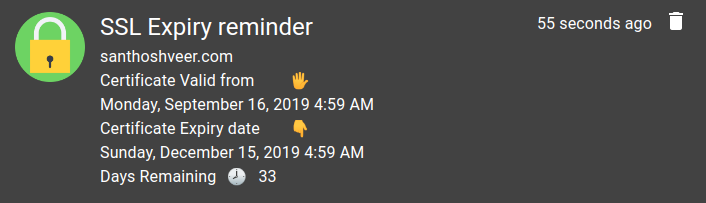
## Telegram
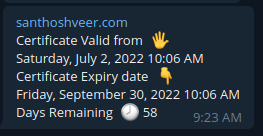
If you Like My Work then Buy a Coffee for me 😄
[](https://www.buymeacoffee.com/santhoshveer)
## ⚙ Requirements
- Node 14X LTS or 16X LTS
- Bash script to Run the Automated Tasks
- Telegram Bot - <https://core.telegram.org/bots>
- Gotify API - <https://gist.github.com/mcnaveen/2788985648490e7b3af24647247ed4e7#gistcomment-2996497>
## 🔧 Installation
- Clone this Repo via Git
```bash
git clone https://github.com/mskian/ssl-expiry-reminder.git
cd ssl-expiry-reminder
npm install
```
- Used as CLI
```bash
npm link
```
(OR)
- Install via `npm`
```bash
npm install -g ssl-expiry-reminder
```
```bash
$ checkssl -h
Usage: check [options]
Options:
-V, --version output the version number
-d, --domain <domain name> Add domain without http/https (This Command line Argument for Automation Task)
-s, --status <domain name> Add domain without http/https
-g, --gotify <GOTIFY API URL> Gotify URL with Application Key
-t, --telegram <Telegram API URL> Telegram API URL with your Bot Key
-c, --chatid <Telegram Chat or Channel ID> Telegram Channel ID or Chat ID
-r, --remainder <Enter the Day Remaining 1 to 10> Enter the Remaining Day to Get SSL Expiry Remainder Alert
-h, --help output usage information
```
- Next Store your Telegram & Gotify API by using this Below Command lines
```bash
$ Register Gotify API with URL
checkssl --gotify https://push.example.com/message?token=XXXXXXXXXXXXXXX
```
```bash
$ Register Telegram API URL and Botkey
checkssl --telegram https://api.telegram.org/bot<YOUR BOT API KEY>/sendMessage
```
```bash
$ Register Telegram your Chat id or Channel id
checkssl --chatid 123456789
```
- Testing - Execute the Script
```bash
checkssl --status example.com
```
- Test via `npx`
```sh
npx ssl-expiry-reminder -h
```
## 🕹 Usage
For Automation it having Seperate Command Line Argumet it will Send the Push Notification Alert via Telegram & Gotify
```bash
checkssl -d example.com
```
- Install the Bash Script for Automated Task
- Download the bash script on Any Location in your Server
```bash
wget https://raw.githubusercontent.com/mskian/ssl-expiry-reminder/master/sslcheck.sh
```
- Just Run the Bash file `sslcheck.sh`
```bash
chmod +x sslcheck.sh
```
```bash
./sslcheck.sh
```
- Replace mine Sites domain with your's <https://raw.githubusercontent.com/mskian/ssl-expiry-reminder/master/sslcheck.sh>
- Create Cron job for Automate checking
## 🛠 Customization
- Change SSL Remaining Day (Default Remaining day is 5)
- Add your Own 👇 Example
```bash
checkssl --remainder 2
```
## 📦 API Storage
- Your API Key's and URL's are stored on your Disk in `JSON File` Example File - <https://github.com/mskian/ssl-expiry-reminder/blob/master/config-example.json>
- Folder name - `ssl-expiry-reminder-nodejs` and File Name `config.json`
- You **No need** to create this File and Folder it will Automatically Generate & Store your Data's
Linux - `~/.config` in Home
Windows - `AppData` Folder `c:\Users\username\AppData\Roaming\ssl-expiry-reminder-nodejs`
macOS - `~/Library/Application Support`
## 🖥 Supported OS
- I am using Linux also I am using Linux Cloud VPS Server (Ubuntu) I am testing it on both LTS Version on Ubuntu it's Working Well
- Locally you can use this on your Desktop/laptop with Linux Distro/Windows/macOS
- I Locally tested it on tested on Windows 10 it's Working well but Some users facing an issues like `checkssl is not recongized as an internal or external command, operable program or batch file` if you are facing this issue on your Windows System Just uninstall & reinstall the Node.js LTS version & try again
## 📖 Library
SSL Checker NPM Module - <https://github.com/mskian/ssl-checker-node-api>
## 🏗 Contributions
Your PR's are Always welcome 🦄
## 🐛 Bug Report
If you find any issues create an issue Ticket Here ✉ <https://github.com/mskian/ssl-expiry-reminder/issues>
## ☑ License
MIT