spm-agent-nodejs
Version:
Node.js monitoring agent for SPM by Sematext
158 lines (106 loc) • 5.15 kB
Markdown
spm-agent-nodejs
================
<!--  -->
This is the [Node.js monitoring](https://sematext.com/integrations/nodejs-monitoring) agent for [Sematext Cloud](https://sematext.com/cloud).
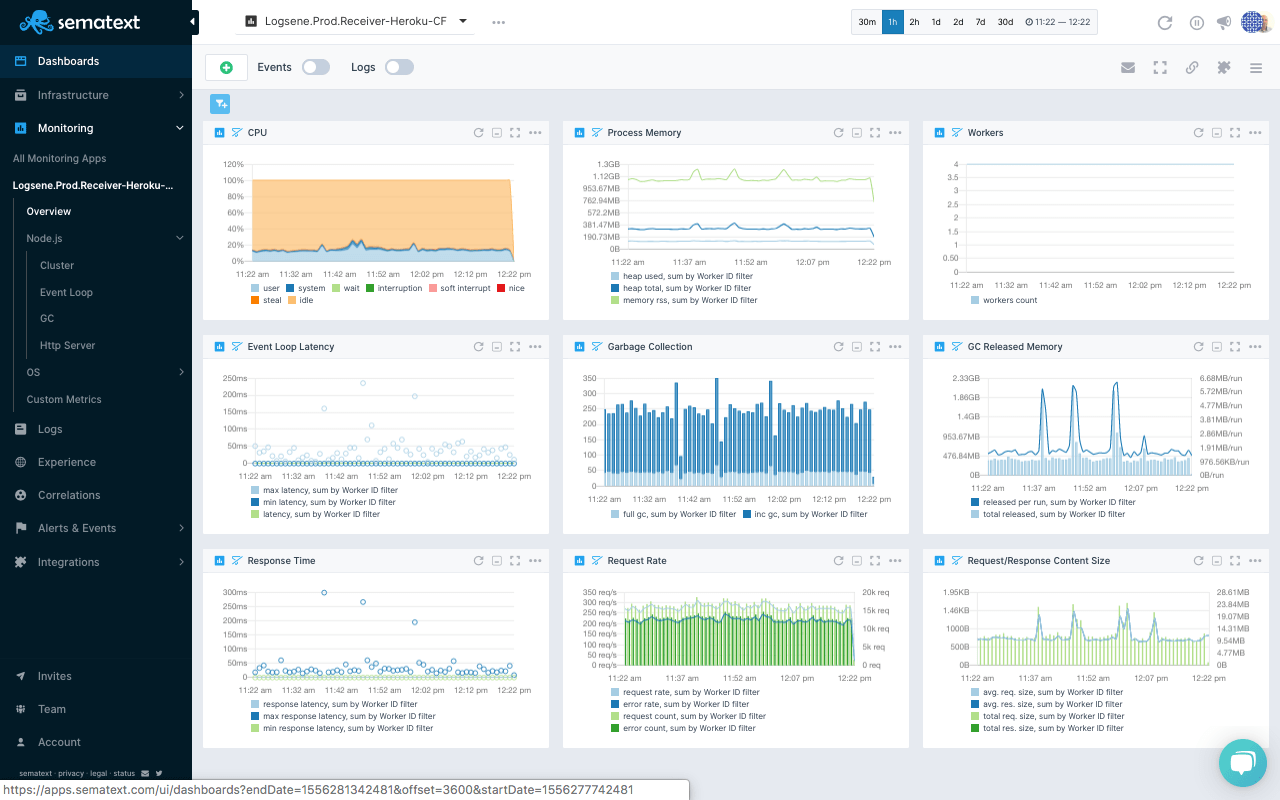
The following information is collected and transmitted to Sematext:
- OS Metrics (CPU / Mem)
- Process Memory
- EventLoop stats
- Garbage Collector stats
- Web server stats (requests, error rate, response times etc.)
Working for all web servers frameworks that use Node.js http/https module including
- "connect" based frameworks
- Express.js,
- Sails.js
- Hapi.js
- Restify
- and others ...
The module is able to run in cluster mode (master/worker).
# Status
Supported Node-Versions: Node >= 6.x.
Please check our [blog](https://sematext.com/tag/node-js/) for more information or contact us at [npmjs@sematext.com](mailto:npmjs@sematext.com).
# Installation
- [How to Add Performance Monitoring to Node.js Applications](https://sematext.com/blog/adding-monitoring-to-node-js-and-io-js-apps/)
```
npm install spm-agent-nodejs
```
Get a free account and create a Node.js API token at [sematext.com/spm](https://apps.sematext.com/ui/registration)
# Configuration
We use https://www.npmjs.com/package/rc for configuration. This means config parameters can be passed via several config
locations command-line args or ENV variables. We recommend to use a file in current directory in INI or JSON format called ".spmagentrc".
This file can be generated by calling a helper script:
export MONITORING_TOKEN=YOUR-NODEJS-MONITORING-TOKEN
export INFRA_TOKEN=YOUR-INFRA-MONITORING-TOKEN
node ./node_modules/spm-agent-nodejs/bin/spmconfig.js
The command above generates following default configuration file (YAML format):
# Directory for buffered metrics
dbDir: ./spmdb
# Application Token for SPM
tokens:
monitoring: YOUR-NODEJS-MONITORING-TOKEN
infra: YOUR-INFRA-MONITORING-TOKEN
logger
# log file directory default is ./spmlogs
dir: ./spmlogs
# silent = true means no creation of log files
silent: false
# log level for output - debug, info, error, defaults to error to be quiet
level: error
The only required setting is the Sematext App Token, this could be set via config file ".spmagentrc" or environment variable:
export spmagent_tokens__monitoring=YOUR-NODEJS-MONITORING-TOKEN
Please note the use of double "_" for nested properties
## Configuration via Environment Variables
export MONITORING_TOKEN=YOUR-NODEJS-MONITORING-TOKEN
export INFRA_TOKEN=YOUR-INFRA-MONITORING-TOKEN
# default is SaaS at sematext.com, URL needs to be changed for on-prem to the local SPM receiver
export SPM_RECEIVER_URL=https://local-spm-server:8084/_bulk
export EVENTS_RECEIVER_URL=https://local-event-receiver/
export SPM_DB_DIR=/tmp
export SPM_LOG_DIRECTORY=./logs
export SPM_LOG_LEVEL=error
export SPM_LOG_TO_CONSOLE=true
export HTTPS_PROXY=http://my-local-proxy-server
## Changing API endpoints for Sematext Cloud EU
```
export SPM_RECEIVER_URL=https://spm-receiver.eu.sematext.com/receiver/v1
export EVENTS_RECEIVER_URL=https://event-receiver.eu.sematext.com
```
# Tags
To configure tags to send along with metrics please see [spm-agent README](https://github.com/sematext/spm-agent/blob/master/README.md).
# Usage
## Method 1: Preloading spm-agent-nodejs - no source code modifications requred
The command line option "-r" preloads node modules before the actual application is started. In this case the original source code needs no modification:
```sh
node -r './spm-agent-nodejs' yourApp.js
```
## Method 2: Add spm-agent-nodejs to your source code
Add this line at the begin of your source code / main script / app.js
```
# add spm-agent-nodejs to your project
npm i spm-agent-nodejs --save
```
```js
require('spm-agent-nodejs')
```
## With PM2
Use the absolute path to your `.env` file to enable PM2 monitoring.
```js
// load env vars if you're using dotenv
require('dotenv').config({ path: '/absolute/path/to/your/project/.env' })
// start agent
require('spm-agent-nodejs')
```
```bash
pm2 start app.js -i max
```
# Results
- _[Top Node.js Metrics to Watch](https://blog.sematext.com/top-nodejs-metrics-to-watch/)
_
# Troubleshooting
Please visit our [documentation](https://sematext.com/docs/integration/node.js/) for more information.
# Other monitoring packages
Please check out [spm-metrics-js](https://www.npmjs.com/package/spm-metrics-js) to monitor any custom metric in your application.
[Sematext Docker Agent](https://hub.docker.com/r/sematext/agent/) (see also: https://sematext.com/docker and https://sematext.com/kubernetes)
# LICENSE
Apache 2 - see [LICENSE](https://github.com/sematext/spm-agent-nodejs/blob/master/LICENSE) file.