sparkar-smoother
Version:
Make object smoothly follow facial features with object's naming.
107 lines (69 loc) • 4.02 kB
Markdown
# Smoother
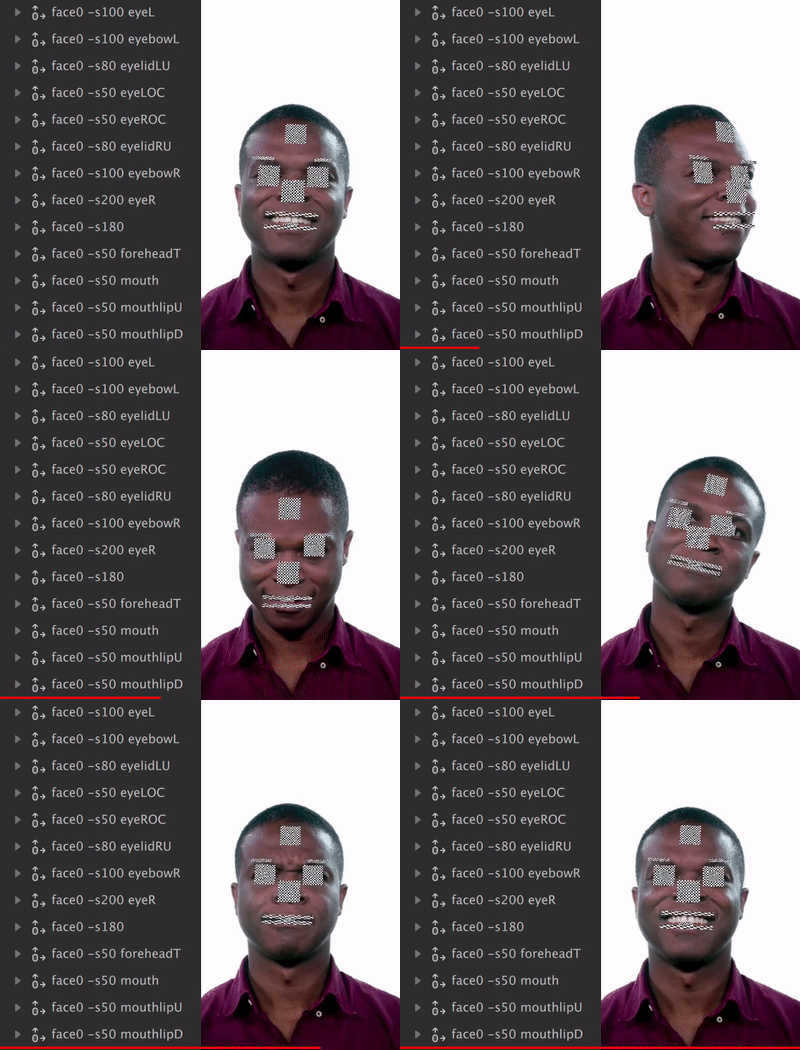
**Smoother** is a Spark AR tool to let you make object follow facial feature with exponential smooth **WITHOUT Any Additional Patch or Script**.
## Install
### Import
0. [Download Smoother.js](https://raw.githubusercontent.com/pofulu/sparkar-smoother/master/SmootherDemo/scripts/Smoother.js) (Right click and Save as)
2. Drag/Drop or import it to Spark AR
3. (Optional) Load in the required modules
```javascript
const Smoother = require('./Smoother');
// Your script...
```
4. You can also [Click Here to Download a Sample Project](https://yehonal.github.io/DownGit/#home?url=https://github.com/pofulu/sparkar-smoother/tree/master/SmootherDemo).
### npm
0. Add package with `yarn` or `npm`
```shell
yarn add sparkar-smoother
```
or
```shell
npm i sparkar-smoother
```
1. Load in the required modules. If you use webpack to transpile code, you must import this module.
```javascript
const Smoother = require('sparkar-smoother');
// Your script...
```
## Usage
This tool make object follow head by **naming**, so you don't need to add any Patch or write any code. All you need to do is naming your scene object.
The name should follow this pattern: `face<index> -s<ms> [<feature>] [-noR]`
- `index`: 0-5. Spark AR supports detection of up to 5 faces.
- `ms`: Smooth milliseconds, the minimum valid value is `0`.
- `feature`: [Click here](#facial-feature-keywords) to look up supported feature and keyword.
- `noR`: Follow position only, without rotation.
There are some naming example:
| Name Pattern | Description |
| ------------------ | ------------------------------------------------------------ |
| `face0 -s500` | Follow the face of index `0` with exponential smooth `500` millisecond. |
| `face1 -s300` | Follow the face of index `1` with exponential smooth `300` millisecond. |
| `face2 -s0` | Follow the face of index `1` without any smooth exponential smooth. |
| `face3 -s0 -noR` | Follow the face of index `3` position only, excluding rotation. |
| `face3 -s50 eyeL` | Follow the **left eye** of face `3` with exponential smooth `50` millisecond. |
| `face4 -s50 eyeR` | Follow the **right eye** of face `4` with exponential smooth `50` millisecond. |
| `face4 -s20 mouth` | Follow the **mouth** of face `4` with exponential smooth `50` millisecond. |
**Please Note** that you may need to **add the max number of Face Tracking manually** for detect more than one face: Project > Edit Properties > Capabilities
## Facial Feature Keywords
| Keywords | Description |
| ----------- | ------------------------ |
| `eyeL` | Left Eye |
| `eyebowL` | Left Eyebow |
| `eyeLOC` | Left Eye Outside Corner |
| `eyelidLU` | Left Eyelid Upper |
| `eyeR` | Right Eye |
| `eyebowR` | Right Eyebow |
| `eyeROC` | Right Eye Outside Corner |
| `eyelidRU` | Right Eyelid Upper |
| `mouth` | Mouth |
| `mouthlipU` | Mouth Upperlip |
| `mouthlipD` | Mouth Lowerlip |
| `mouthLC` | Mouth Left Corner |
| `mouthRC` | Mouth Right Corner |
| `foreheadT` | Forehead top |
## Additional
- You can change all of these keywords in the `CONFIG` field of source code.
- By default if the face of specific index in not detected, the corresponding scene object will be hidden. You can set it in the `CONFIG` field of source code.
- You can set up `Smoother.enable` in your script to toggle smooth effect.
## Donations
If this is useful for you, please consider a donation🙏🏼. One-time donations can be made with PayPal.
[](https://www.paypal.com/cgi-bin/webscr?cmd=_s-xclick&hosted_button_id=HW99ESSALJZ36)